Dark Mode for Quicken for Windows (6 Merged Votes)
Comments
-
@Chris_QPW - here's his original post, because I needed a reminder too. I'm tempted to try this.
"https://community.quicken.com/discussion/7856333/dark-mode-for-quicken-for-windows-6-merged-votes/p12"
Ok, the URL didn't work as expected, copy/paste the one above - it's a few posts down on that page.
1 -
Come on Quicken - step up and get this done. Dark mode is needed for more then just a cool look. There are many, including me, who have health conditions that would benefit from dark mode.
0 -
As Isomeme suggested in a previous post you can change the color filters in Windows:
In Windows 11, Go to "Settings > Accessibility > Color filters",
Toggle on color filters
Select Inverted.
Below that turn on: Keyboard shortcut for color filters.
My shortcut is windows+ctrl+C
The shortcut will make it easy to turn off/on the color change but it affects all of your windows not just Quicken. Which can be a good thing where ever dark mode is not supported and white backgrounds hurt your eyes.
It reminds me of early versions of windows having a color option called Hot Dog Stand. Not my preferred color choices but I must admit, the dark background is easy on the eyes especially if you like working a computer in low lighting like I do. Or if you get Aura Migraines. I sure wish there was a way to only affect my Quicken window and not my other windows. Maybe the Quicken developers and Microsoft could join forces to build a similar feature that only affects Quicken. And maybe with better colors.
The green color below gets converted to pink and other places brown. Blue text gets converted to yellow. The red dollar amount gets converted to light blue.
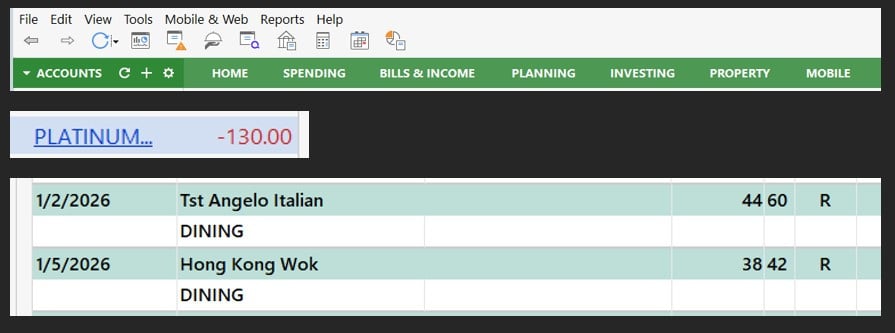 1
1 -
There are a few assumptions here that I don't think you are taking into account. The first seems to be an assumption that the developers are "highly skilled" (for a decades old, nitch market product and wouldn't look that good on a resume), and the second is that "they have as much time as needed to change what they want". For the Quicken Windows developers I doubt either of these are true. What's more I doubt it has even occurred to them to try do this in a "hacked fashion", not to mention I'm sure whoever wrote AutoHotKey had to discover many low-level quirks of Windows to get this done which a Quicken Windows developer doesn't have time to do.
I think the best approach anyone in this thread can take would be to take you up on your offer to give them the AutoHotKey script. Or use one of the other options recommended in this thread.
And with that I will leave it at that.
0 -
I would be happy to provide the AutoHotkey script I use to anyone that wants it. There is a bit of front end work to do first, i.e., install AutoHotkey, etc. But after that, this script is virtually 'invisible' (as much as a dark mode method can be invisible :-) ).
1 -
@J.A. Clark do you have any screen shots you can share showing the result? Or is it essentially equivalent to the invert method but only applies when Quicken is run? Reading up on NegativeScreen, it sounds like more control over the inversion is possible compared to that available via Windows Magnifier. Provided one can figure out the "formula" 😁
0 -
Providing a screenshot of Quicken probably would not be a good idea - security/privacy wise :-)
The Dark Mode AutoHotkey is setup to define any executable file and place that app in dark mode. One could use it just for Quicken or use it as I do, put into dark mode a number of various apps that I use that don't have their own native dark theme.
The formula is not difficult to find the correct color you are looking for. For example, finding the opposite color of blue can be determined with a quick Google search - orange is the opposite of blue. There are various websites that you can define an RGB or Hex color and it will provide you the opposite color. The script is very versatile and I have updated it to use with Windows 11 as Microsoft (in its infinite wisdom) changed some of the 'hooks' used to color various components.
Hope this explains this script a bit more for those who have not worked with AutoHotkey scripts :-)
0 -
That's obvious - but blur works well in those cases.
HOWEVER, I just discovered a solution for ME. Turning off HDR. Doing that, the normal Windows inversion method many are using looks MUCH better.
Now that I've discovered that, I'll look into your AHK script to automate it so I don't have to keep toggling it on/off when jumping between Quicken and the browser.
HDR did brighten/liven up the display when I discovered my updated monitor supported it. Things just looked better/sharper. But, for lack of a better term, it over saturates some of Quicken when the inversion is on. The fonts are not as clear. But with HDR off, heck, I can live with this.
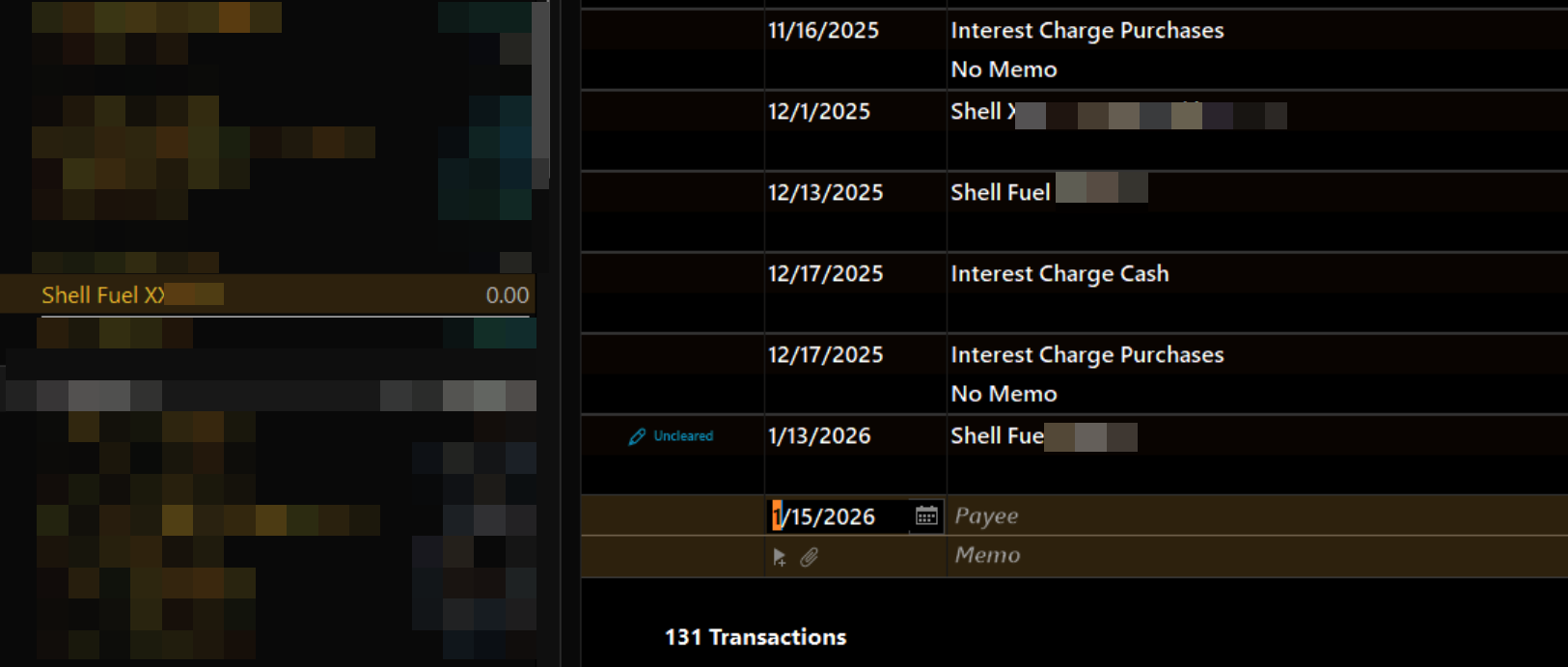
Presumably your colors are similar to this…
 0
0 -
Copy that. Your screenshot is similar to what the AutoHotkey script does and how it implements a 'dark theme' or 'dark mode'.
1 -
To J.A. Clark,
Will you please post or attach your .ahk script on here? I feel more comfortable seeing the code before I run free software on my computer. Is your script written in v1 or v2 of autohotkey? I believe they have different syntax rules and my installed version will probably need to match it. I appreciate your effort to help us dark mode lovers.
0 -
I upgraded the script to run v2 of AutoHotKey. You will also see the various applications that I have added to the sections for going into dark mode and sections for excluding apps from dark mode.
In addition, please note, I had to rename the script with a '.pdf' file extension because this forum doesn't allow .ahk, .txt extensions - so I cheated a bit so I could get it uploaded. Before running the script, ensure the extension is changed back to .ahk file name extension.
Hope this helps others with the same health issues I have (diabetic and 'allergic' to bright light :-)
——————4 -
Thank you J.A. My weakness is aura migraines. If I don't wear a hat in grocery stores the bright overhead lights will often trigger the migraine. No pain but man does my vision get screwed up. Pulsating small checkerboards of irregular shapes that make it impossible to read anything. Total darkness gets rid of it in about 15 minutes. Bright white computer screens will also trigger a migraine if I don't turn on lights on the sides of my office…away from the screen. At least I get no pain with it.
0 -
Hope this helps many others with or without health issues :-)
——————0 -
@Quicken Anja @Quicken Kristina I'm wondering that given that Quicken Inc isn't going to be able to do this, if the best workarounds can't be marked as answer or something so that they are pinned at the start of the thread for anyone that is coming to this new and would have trouble picking them out of this long discussion.
Or maybe a FAQ.
0 -
Don'
Don't really see a way of doing what you mention other than clicking on the 'Helpful' icon on each of the posts in this thread. Not sure if Quicken has some type of algorithm that forces the 'helpful' to the top of the thread.
0 -
Just a note regarding the Dark Mode autohotkey script for use with Quicken; I'm working on a 'tweak' that allows the switching from an app (like Quicken) to another app using the taskbar icons. I really don't like the 'lag' time it takes to display whatever app is being switched to using the taskbar when coming from an app using the Dark Mode.ahk script. Temporary work around is using the 'Alt + Tab' to switch between apps as this does not appear to affect the Dark Mode.ahk script.
Stay tuned…..
——————2 -
New version of the Quicken Dark Mode Autohotkey script. Much faster then past version but still may need some tweaking.
Remember when downloading to remove the '.pdf' extension and just have the '.ahk' extension (need to do this because this forum doesn't allow many file types - .pdf being one of them so I had to 'trick' the uploader a bit).
Would recommend backing up all previous versions in case something doesn't quite work with this .ahk on your system.
Will continue to tweak and post any updates to this forum.
——————[Edited - Removed Attachment]
0 -
I noticed that my latest Autohotkey script for Quicken Dark Mode was removed. I'll try again. If a Quicken employee is removing this - how about a reason why you removed it? I'm trying to assist other Quicken users in providing them with a dark mode method for Quicken.
Remember when downloading to change the '.pdf' extension to the '.ahk' extension (need to do this because this forum doesn't allow many file types (can't even upload a simple text file 🤨).
0 -
I honestly think that, like other corporation to care about its user base, the only way they would take this seriously is if they lost users because of it. I always say, the only language corporations understand is dollars.
0 -
Agreed. If it were not due to the fact I have several decades of using Quicken, I would have been long gone:-) I find the script I have posted to really help in making Quicken 'dark mode'. In light of that, I'll keep using Quicken as it stands - for now 🙄
0


