Tax Planner Errors

Windows User for 2026 subscription. Been using Quicken since 1994.
Whats going on with Quicken lately?
Today I saw incredible errors in the tax planner.
- Scheduled estimated tax payments is messed up the scheduled amount is $28,000 and the Planner shows $112,000
- Taxable SS Income is scheduled monthly for a total of $50,817.6 and the Planner shows $57,248
- This is nuts…
Anyone else using Tax Planner with this crazy stuff going on?
Best Answer
-
Regarding the SS split category issue: Sometimes a Reminder can get corrupted and there really is not fix when that happens other than to try doing the following:
- Try editing the splits to get them set up correctly, again. This will often resolve such issues.
- If #1 doesn't resolve it: Try deleting the Reminder (the entire series) and then set up a new Reminder to replace it.
I had a similar issue with my SS Reminder splits starting with January, as well….a little different in that it replaced the gross SS benefit amount with the net deposit amount and then removed the splits for the various deductions. This happened in 3 out of 4 SS income Reminders in 3 different data files. I tried to fix the splits but they could not be fixed. So, I ended up deleting the bad Reminders and setting up new ones to replace them. So far, it looks like they are OK and stable now.
If one of these 2 things fixes the category splits issue, it should also fix the Tax Planner issues.
Quicken Classic Premier (US) Subscription: R66.23 on Windows 11 Home
0

Answers
-
Hello @petermartin1950,
Thank you for letting us know you're encountering this problem. To help troubleshoot, please provide more information:
- Did you first notice this issue today?
- When you encountered this problem, were you setting up the Tax Planner in Quicken for the first time?
- If not, when was the last time it was showing correct information?
- Are you able to see any obvious indication of what is throwing it off, such as duplicate or missing transactions?
I look forward to your reply!
Quicken Kristina
Make sure to sign up for the email digest to see a round up of your top posts.
0 -
My recent experience with TaxPlanner for 2026 was similar however now it's corrected itself.
When my 2026 pension, social security and 401k income was planned as an Income Reminder, TaxPlanner appeared to be looking back at 2025 data and the calculations were incorrect.
Once actual transactions for each income category downloaded this month (and I accepted them) everything looked normal.
Hope this helps!
You Don't Have to Have a Point, To Have A Point
1 -
As I said, Ive been a Quicken user since 1994. This issue occurred the day I asked the question…Jan. 27, 2026.
There is no obvious reason for the error. I've edited the scheduled transactions to no avail. The error is also occurring with the State Income tax scheduled transaction.
There are other errors in Quicken. Too many to write up for a programmer to trouble shoot. Very frustrating. The program seems to be losing reliability. I am more than glad to discuss with someone over the phone and allow Quicken to enter my computer to see the issues in real time.
-1 -
I've noticed that sometimes Tax Planner (TP) sometimes randomly changes the option I selected to one of the other options. That, can cause some significant errors in TP's projections. It does not happen a lot but every few days I will find that the TP projection of tax refund or tax owed was changed from the last Quicken session. That prompts me to review every section of TP and it's always been found that this issue occurred in just 1 or 2 sections. I fix those and everything if fine, again, for a few days and then the same thing happens in a different 1 or 2 sections. So, yeah, there does seem to be some reliability/instability issues with the 2026 TP.
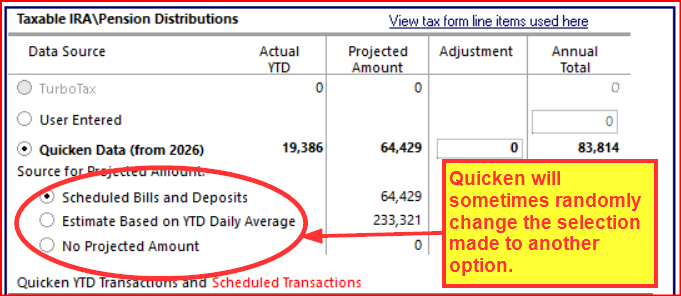
Other than this it seems to me that TP is functioning normally.
I should also state that for the first 1-2 months of just about every year I usually experience at least one TP stability/reliability issue. I usually just ride it out for the 1st couple of months and then everything seems to be self-resolved.
Quicken Classic Premier (US) Subscription: R66.23 on Windows 11 Home
4 -
I've suffered through this same glitch in the TP. Frustrating and renders the program unreliable for the intended purpose. Further, the TP does not work until I cancel the multiple requests to insert a program disk I don't have as the 2026 purchase is a download
-1 -
You should not be getting any requests to insert a program disk. When that request comes up it indicates there is a good chance the last version update was not correctly or completely installed. If this is the case, then using Windows to uninstall Quicken, then downloading/installing a fresh copy of the installation file from either your online Quicken.com account or from will usually resolve that issue. (This will not affect your data file, your Preference settings, your online services nor your saved customized reports.)
And maybe, just maybe, it might also resolve the issue you are seeing with TP.
Quicken Classic Premier (US) Subscription: R66.23 on Windows 11 Home
4 -
I reinstalled Quicken as suggested. Program does not request to install missing components anymore. However, the program errors in Scheduled Federal Tax Pmts continue. Four Scheduled amounts of $7,000 for Federal Est. Tax Pmts post as $112,000 in the Tax Planner Summary page while appearing correctly in the Estimated detail at the bottom of the page. The State Tax Est Pmts now appear correctly in the Summary page.
-1 -
Glad to hear that my prior post resolved the one issue that it was intended to address: The "install missing components" error message.
As mentioned, it was a stretch of a wish that reinstalling Quicken might also fix the TP issues. So if the State Tax Est Pmts is fixed that is a partial win.
As far as the Fed Est Tax Pmts goes: I set up 4 scheduled amts of $7K each in a test file and it correctly showed $28K for the year on both the detail view and on the summary view. I'll play around with it some more to see if there is something that I'm missing.
Quicken Classic Premier (US) Subscription: R66.23 on Windows 11 Home
0 -
I am also seeing changed settings in the Tax Planner as described by @Boatnmaniac above. After entering month-end dividends, several of my settings were changed from "Scheduled bills and Deposits" to one of the other settings.
I run the Tax Planner periodically to look for any significant changes in the tax or refund due. When there is a change, I must go through all the settings and correct whatever has changed. Very annoying!
I have not installed any updates since I carefully set up these settings a couple of weeks ago, but I did open a backup file and then returned to my current working file.
After correcting the settings, I ran a Validate and Repair and it did did not find any problems or affect the Planner settings.
QWin Premier subscription2 -
On Friday Jan 31, 2026 I called Quicken Help Desk and spoke for about an Hour +. Bottom line, I was asked to detail specifically with screen shots the issues with the TP as well as initiating additional Topics about all the other issues with this program. The associate was very helpful and cordial. But no bananas in the end.
-1 -
Thanks for the update @petermartin1950.
Because this issue happens randomly, it will be really hard for us to catch and document. If I had to guess, I would say it happens after I have accepted Reminders that affect the Tax Planner data, but that is just a guess.
I suppose we could keep periodic PDF copies of the Tax Planner report and screen shots of the correct settings. We would then watch for changes in the refund or tax due amount. If it changes significantly, indicating that a setting has changed, we would make a PDF of the incorrect report, then dig in and find what has changed, capture screen shots, restore the correct settings, and capture the report again.
Presumably they will only take action if they see reports from several users, but even then it would be very difficult for them to find the problem.
If anyone has a better idea I am all ears.
QWin Premier subscription0 -
Correction: Friday January 30, 2026
-1 -
January SS entry to checking account using a scheduled transaction
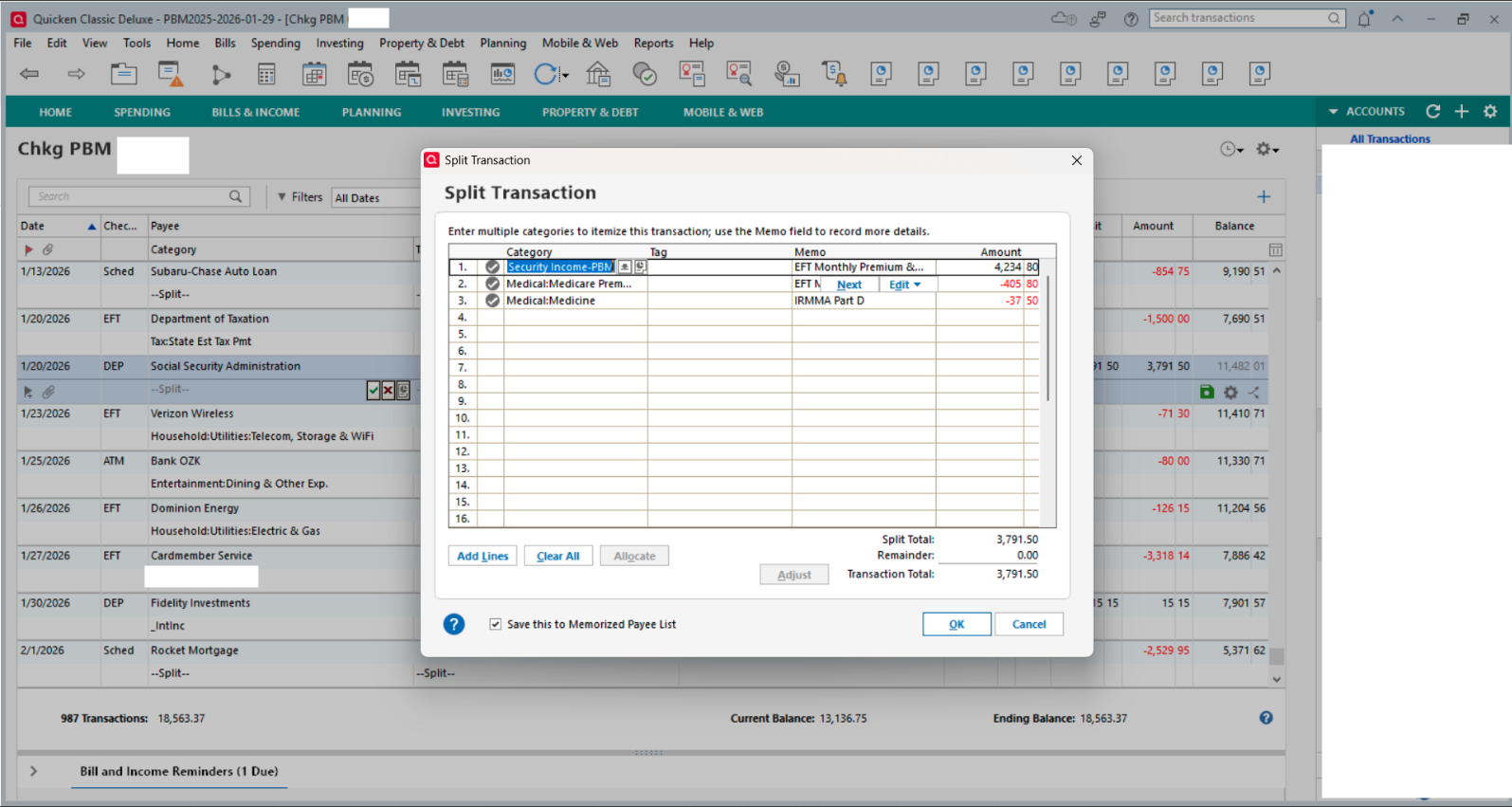
February scheduled transaction for SS income for 2/25/2026
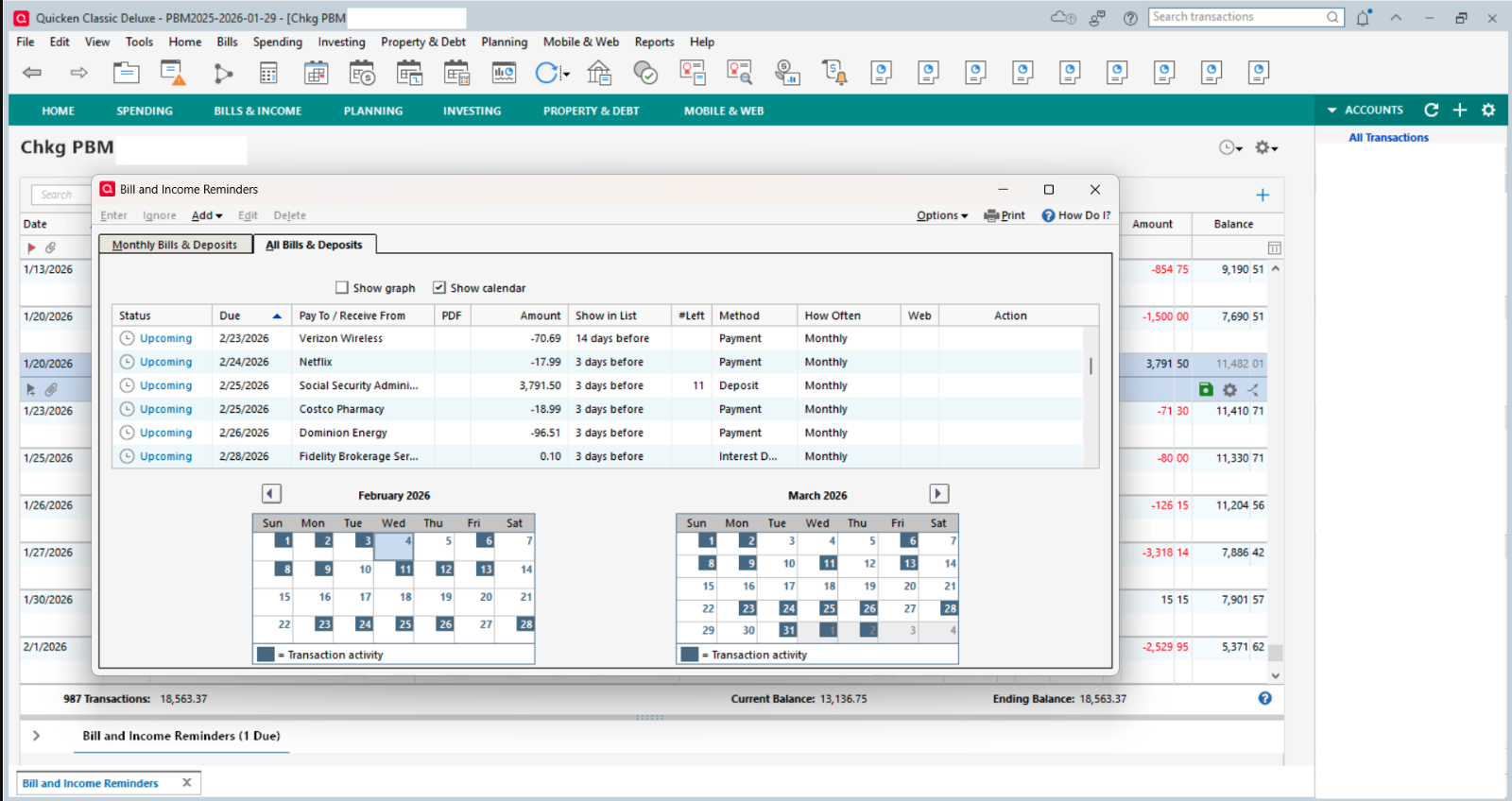
Details of split for 2/26/2026 Deposit incorrectly jumbled split from the scheduled transaction
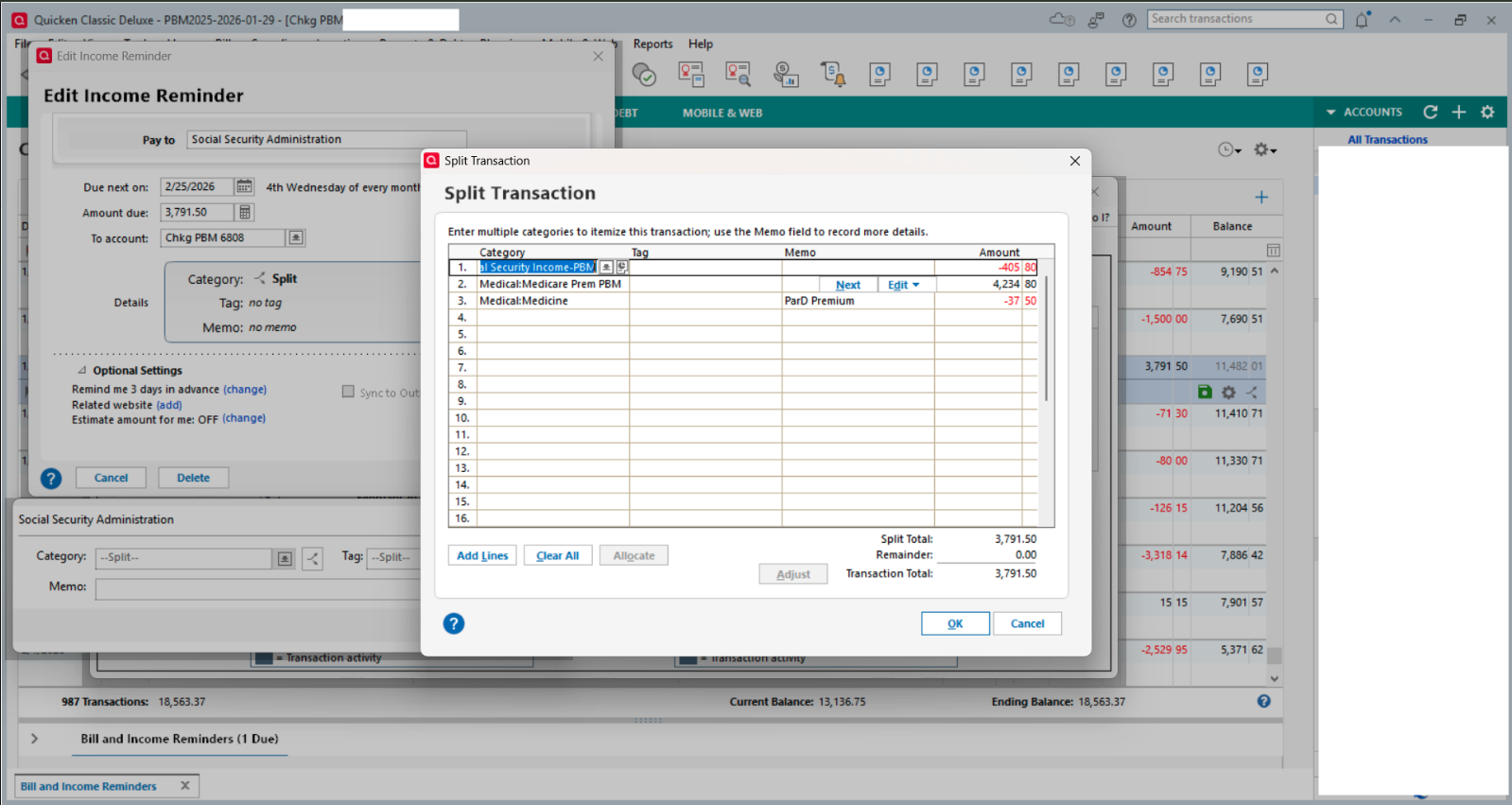
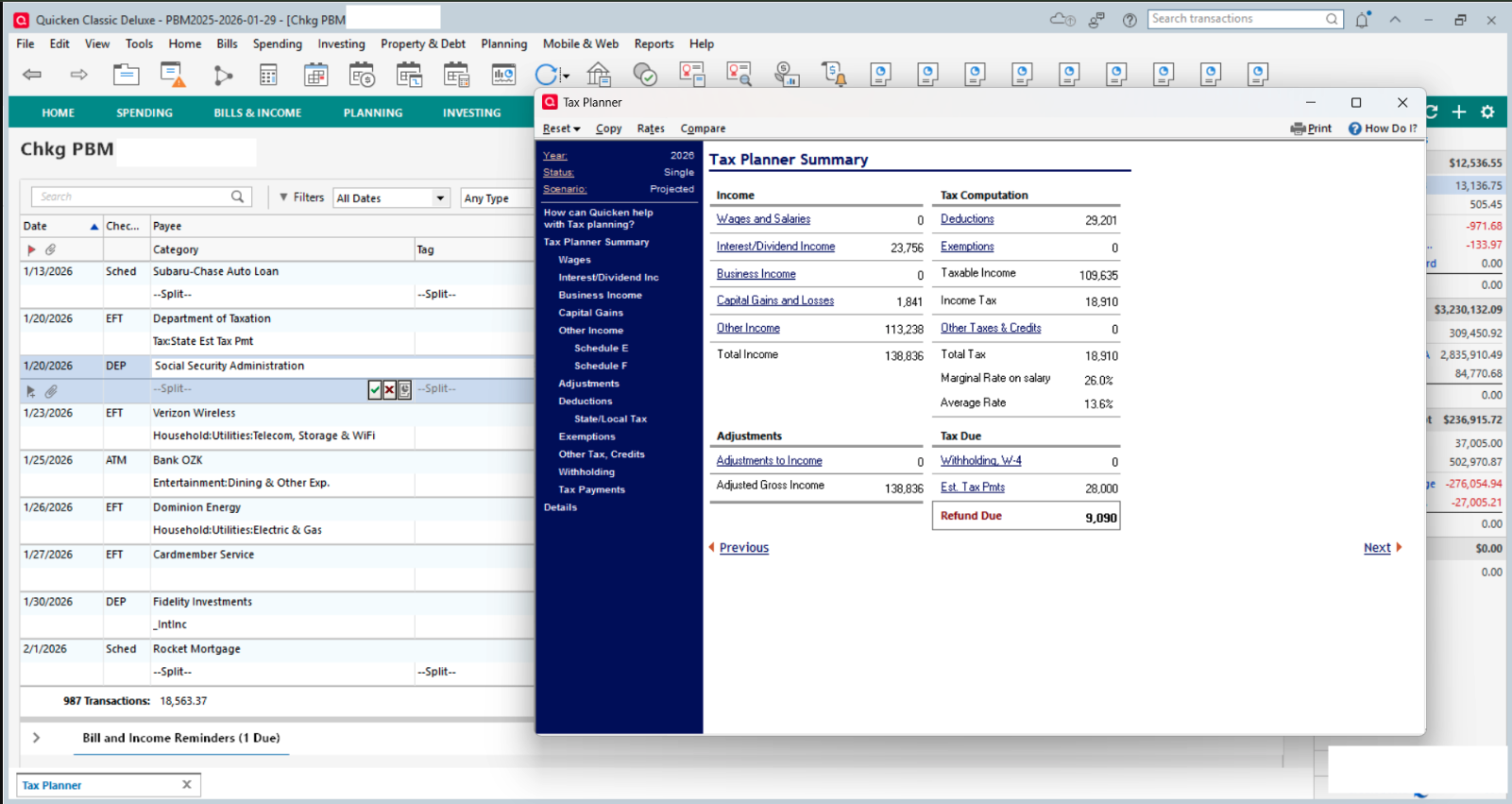
Tax Planner (TP) showing incorrect Other Income of $113,238
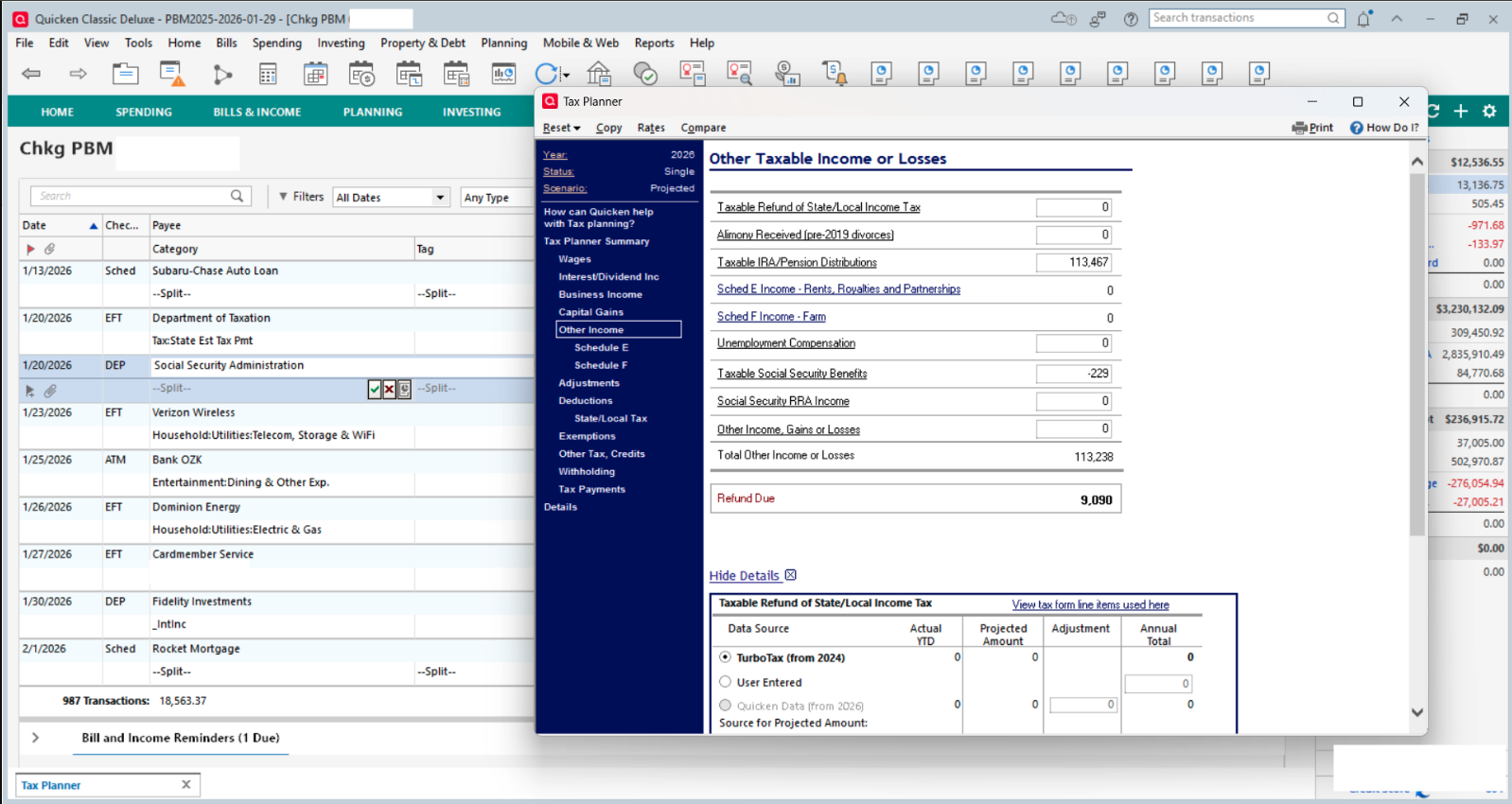
Detail of incorrect Other Income Taxable SS Income of -$220
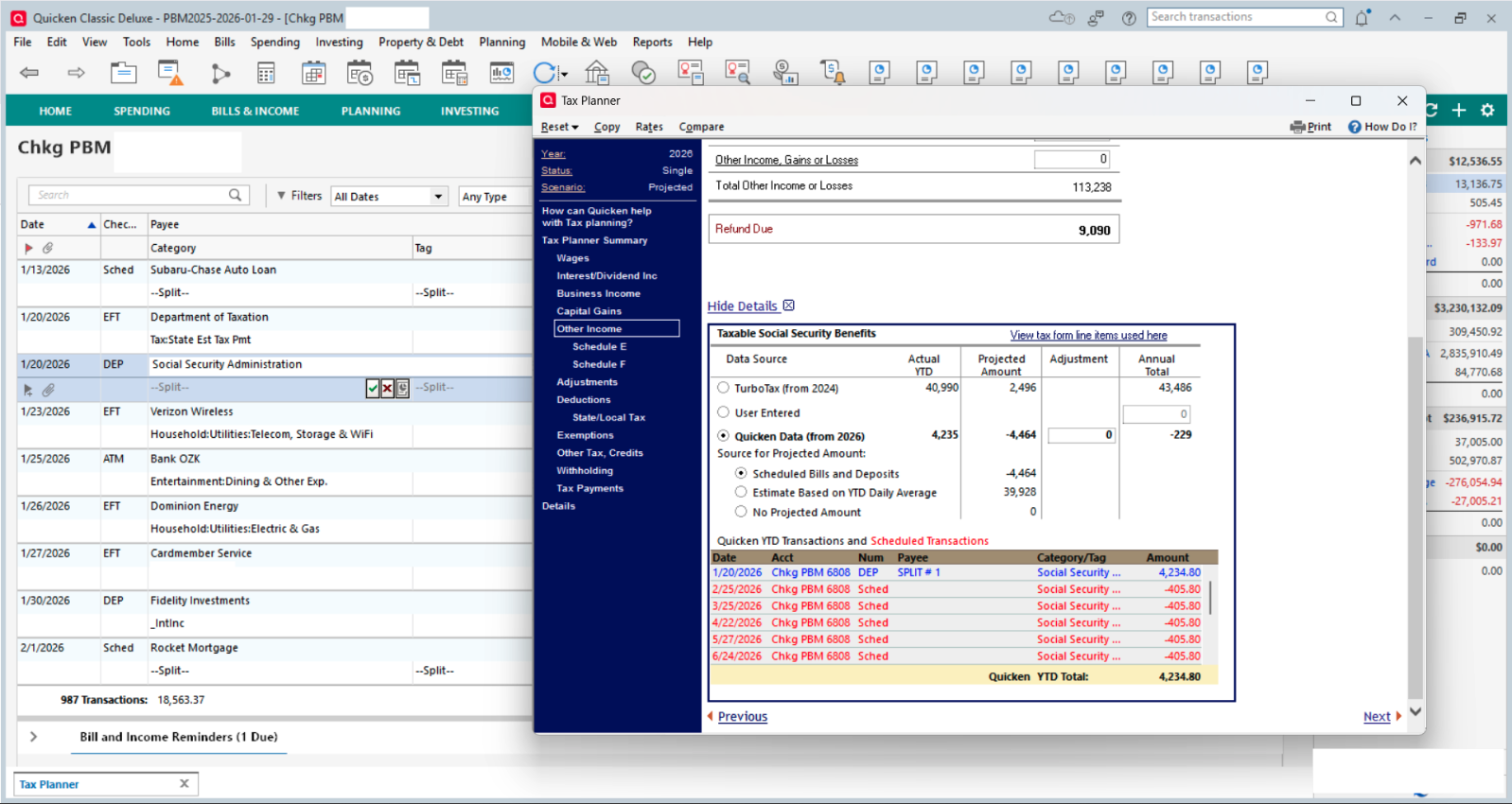
Incorrect detail of 2026 remaining scheduled transactions, as well as missing all other scheduled transaction splits
Can anyone help get this issue with Quicken remedied?
[Edited - Removed Personal Information]
-1 -
Regarding the SS split category issue: Sometimes a Reminder can get corrupted and there really is not fix when that happens other than to try doing the following:
- Try editing the splits to get them set up correctly, again. This will often resolve such issues.
- If #1 doesn't resolve it: Try deleting the Reminder (the entire series) and then set up a new Reminder to replace it.
I had a similar issue with my SS Reminder splits starting with January, as well….a little different in that it replaced the gross SS benefit amount with the net deposit amount and then removed the splits for the various deductions. This happened in 3 out of 4 SS income Reminders in 3 different data files. I tried to fix the splits but they could not be fixed. So, I ended up deleting the bad Reminders and setting up new ones to replace them. So far, it looks like they are OK and stable now.
If one of these 2 things fixes the category splits issue, it should also fix the Tax Planner issues.
Quicken Classic Premier (US) Subscription: R66.23 on Windows 11 Home
0 -
TP Summary showing incorrect information based on scheduled transactions which splits have been jumbled. This is as of Feb 2026. And the Feb SS Income has not yet been processed.
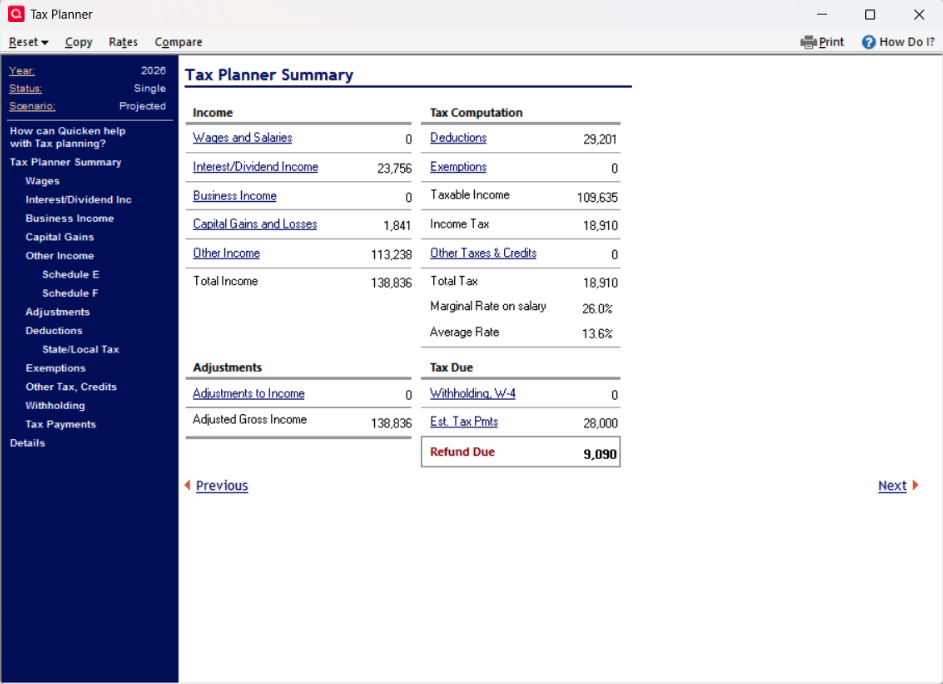
[Edited - Removed Personal Information]
-1 -
Did you do what I had suggested? As mentioned in my previous post, if you do that then TP Summary and Details should be fixed.
Quicken Classic Premier (US) Subscription: R66.23 on Windows 11 Home
0 -
Hey Moderators! Anyone interested in fixing this Tax Planner?
-2 -
Hey Petermartin1950, you interested in answering questions directed to you that could help address the issue?
Q user since February, 1990. DOS Version 4
Now running Quicken Windows Subscription, Business & Personal
Retired "Certified Information Systems Auditor" & Bank Audit VP0 -
Thank you for your response. I had tried all the same steps you took. It corrected the TP issue. However, the errors recurred again and again. Then I validated the file. The error came back. Then I deleted the scheduled SS payment transaction and reentered with the correct splits again. It's been a day since this step, and TP is showing incorrect Taxable SS Benefits.
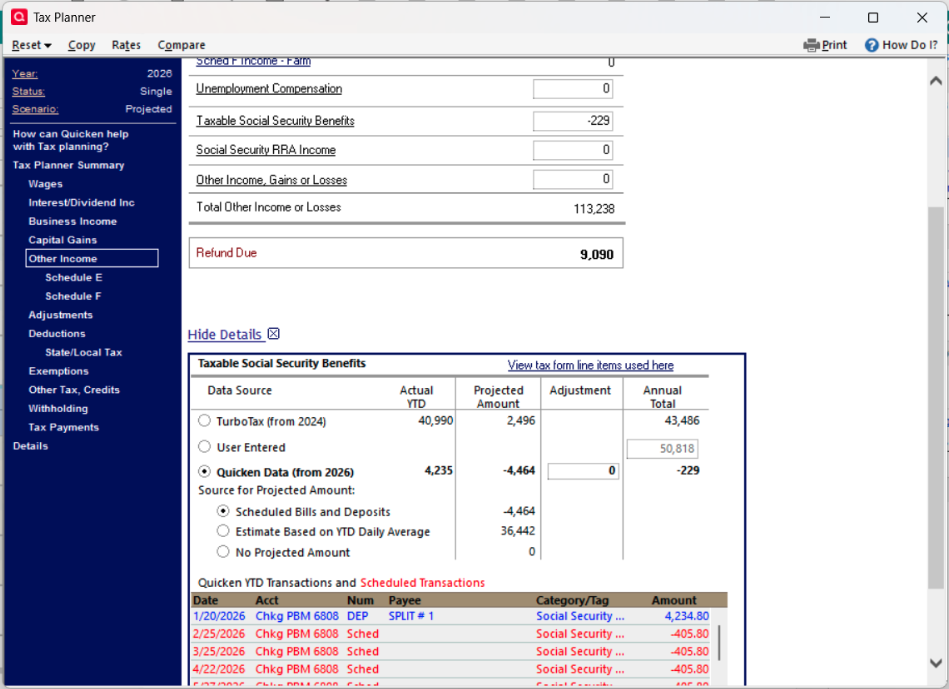
[Edited - Removed Personal Information]
0 -
If you go to Edit > Preferences > Mobile and Web, is the Sync setting On (slider to the right)? That often causes splits to be scrambled. The problem appears after syncing, often after doing a One Step Update. If you don't use Quicken on the Web or the mobile apps, there is no harm and much stability to be gained by turning it off.
If you do use Quicken on the Web and/or the mobile apps, you might consider turning Sync off for a while to see if that prevents corruption of your splits.
QWin Premier subscription0 -
You said:
Then I deleted the scheduled SS payment transaction and reentered with the correct splits again. It's been a day since this step, and TP is showing incorrect Taxable SS Benefits.
Please clarify. Did you delete just the scheduled SS payment transaction that is the issue or did you do as I'd suggested and deleted the entire Reminder series? If the Reminder series has been corrupted (which sometimes does happen), then deleting just the one scheduled transaction will not fix the issue. The entire Reminder series will need to be deleted and then re-added.
Quicken Classic Premier (US) Subscription: R66.23 on Windows 11 Home
0 -
This is not a Tax Planner issue. Tax Planner is just displaying the results of corrupted and jumbled scheduled reminders with splits.
The link shows the steps I took a couple of months ago to finally keep cloud sync from scrambling my split reminders. Even with Sync Off, Quicken is still syncing certain items to the cloud so turning it off is not a total solution. Deleting the reminder series might work because in theory a new reminder series will be sent to the cloud file, but if not try the steps in the link. The number of complaints about this has dropped so I was kind of hoping they did something to help. Apparently not in your case. Knock on wood but I have not had a scrambled split since then whereas before applying the measures in the link, it happened frequently. Changes in tax planner values were a reliable indicator that it happened again.
3 -
I've deleted the scheduled transaction. Created a new scheduled transaction. Backed up the file. closed the program. Restarted Quicken. TP showed the correct entry for January and all looked good.
A day later all is fowled up again.
1 -
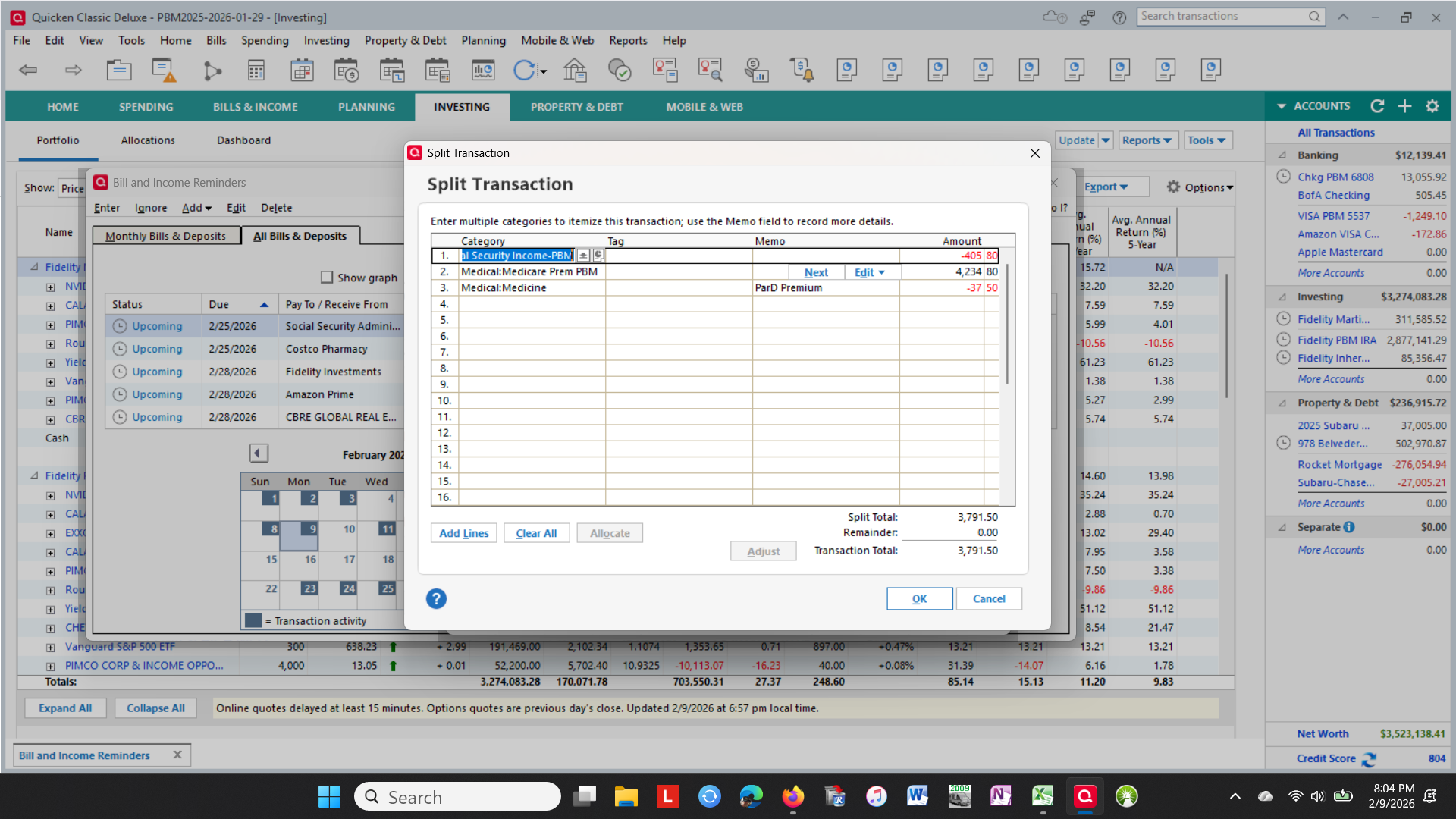
After entering the new scheduled transaction, the Income and SS Premium deduction are switched by the program
0 -
@petermartin1950 You have not answered m question about your Sync setting, which I think may be what is causing the problem you are seeing. To repeat:
If you go to Edit > Preferences > Mobile and Web, is the Sync setting On (slider to the right)? That often causes splits to be scrambled. The problem appears after syncing, often after doing a One Step Update. If you don't use Quicken on the Web or the mobile apps, there is no harm and much stability to be gained by turning it off.
@markus1957 posted a detailed link on how he recovered from sync-related issues causing scrambled reminders. I suggest that you try that.
QWin Premier subscription1 -
I believe I've documented this specific issue with the Tax Planner in Quicken as directed by the tech team associate I spoke to for over an hour. He assured me that a moderator would pick this up and escalate the issue to get a fix for a later Release update.
0 -
I've been seeing the problem with changes in the tax planner for at least a couple of months now, mostly with projected income and taxes. I've never used Q mobile or split transactions for income. I use paychecks for SS and pension income. The numbers listed in the tax planner are correct. What changes is the "Quicken Data (from 2025) Source for Scheduled Amount" in the Tax planner. I now have the click the "User Entered" radio button, enter the numbers manually and hope it doesn't revert back (which has happened several times for reasons unbeknownst).
0 -
I have taken your suggestion to stop sync'ing to Quicken web. What good is the program if the features advertised do not work?
-1 -
Good point, but I learned just turning off sync does not stop scrambled splits from occurring after OSU because some syncing still takes place whether it is on or off. After not seeing the issue in my data file for over 2 months, I just might turn sync back on to see if the steps I took were permanent or temporary. I'll report back with the outcome after a few days.
Update- Well that was disappointing. I turned on Sync and Reset the cloud file to in theory make sure the cloud file matched my desktop file. It completed successfully but I noticed after looking at Tax Planner, the values had changed. The 3 reminders with splits had been corrupted but the splits themselves had not been scrambled by the cloud reset. I performed a super-validate which showed the 3 reminders being repaired. The Tax Planner looked correct again, so I tried an OSU.
The OSU sync revealed my Chase account connection had been corrupted/disconnected and that took a while to correct by having to go into the hidden Shift+Ctrl+F3 Contact Info window in Online Center to delete the Chase FI connection in the file.
Most disappointing was that the 3 reminders with splits were all scrambled again with categories, amounts and descriptions in the splits getting mixed up. This of course created trash input to the tax planner.
So, I'm back to trying to get the file stable again with sync off and wishing I had left well enough alone.
1 -
I deleted the entire Reminder Series and reenterd the scheduled transaction.
0




