Income Reminders Change

Has anyone else noticed the split income reminder amounts changing when you log out of classic and log back in. I have used income reminders to book federal payments that have income lines and expense lines. In 2026, the system has started moving the amounts between the lines. I have deleted reminders, set up again, use different names, etc. and still have an issue. Once entered in the register they work fine and when I make changes everything looks good and works through the budgets until I log out and back in. Any help resolving this would be appreciated.
[Edited-Readaility]
Answers
-
@TLH there have been quite a few posts on this issue. The cause seems to be corrupted reminders from the Quicken cloud getting synced to your data file, which corrupts the reminders in your file. The current best known solution is to reset your Quicken cloud account. If that doesn’t fix the issue, there are other steps to try.
Here is a post about the issue from one of the super users who has done extensive troubleshooting on this issue. It is posted under a Quicken on the web category, but covers the Quicken desktop issue as well.Quicken user since Q1999. Currently using QW2017.
Questions? Check out the Quicken Windows FAQ list0 -
I'm having the same issue. I use bills and income to enter my paycheck, and my split categories were being put in a different order when I sync. I reset my cloud and synced, and it not only reordered my categories again, but it also changed category values. This is a bug in one of the last two software updates. If you split categories in scheduled bills and income, do not sync; it will mess up your data.
[Edited - Language/Readability]
0 -
Same here. I've done the following so far
Reset cloud per Mshiggins - same issue
Tried to edit info in cloud, saves, and even without syncing it gives same issue.
Tried rolling back software as well, no change.
Is someone looking into this? I'm ok with reorganizing but not ok with categories changing on me. New to these boards, do admins review?
0 -
I have it on good authority that Quicken is working on the issue. The R66 release implemented a fix that prevents the issue when Sync is turned Off. I also recommend before turning sync off, deselect cloud sync from One Step Update settings. Then after validating your file and restoring any jumbled reminder splits, wait for a full fix to be implemented. It's frustrating that the full value of the product cannot be utilized but that is where the issue stands.
0 -
Hello All,
Thank you for reporting the issues you are seeing with splits.
I have some follow-up questions. For all of you:
- Approximately how long has this issue been happening?
- Does this impact only income reminders, or are bill reminders being affected as well?
@TLH, you said the amounts are being reordered.
- Does this mean that the amounts you entered are there, but not on the category you originally put them on?
- You said the issue occurs after you log out and log back in. Does that mean after you close and reopen Quicken? Or are you signing out and signing back in?
@rskurato, you mentioned your category values changing and reordering.
- To clarify, you mean that not only does the order change, but sometimes a category that was not originally used in the reminder is now present?
@zetavu, thank you for sharing the troubleshooting steps you tried. When you said categories changing, are you referring to amounts no longer being assigned to the correct categories, or random categories you didn't use now being present in the split?
Screenshots of what you all are seeing may be helpful. If needed, please refer to this Community FAQ for instructions on how to attach a screenshot. Alternatively, you can also drag and drop screenshots to your response if you are not given the option to add attachments.
I will be forwarding this issue along internally, so the more information you can provide and the more specific you can be, the better. Please go to Help>Report a problem>Send to Quicken and submit your log files.
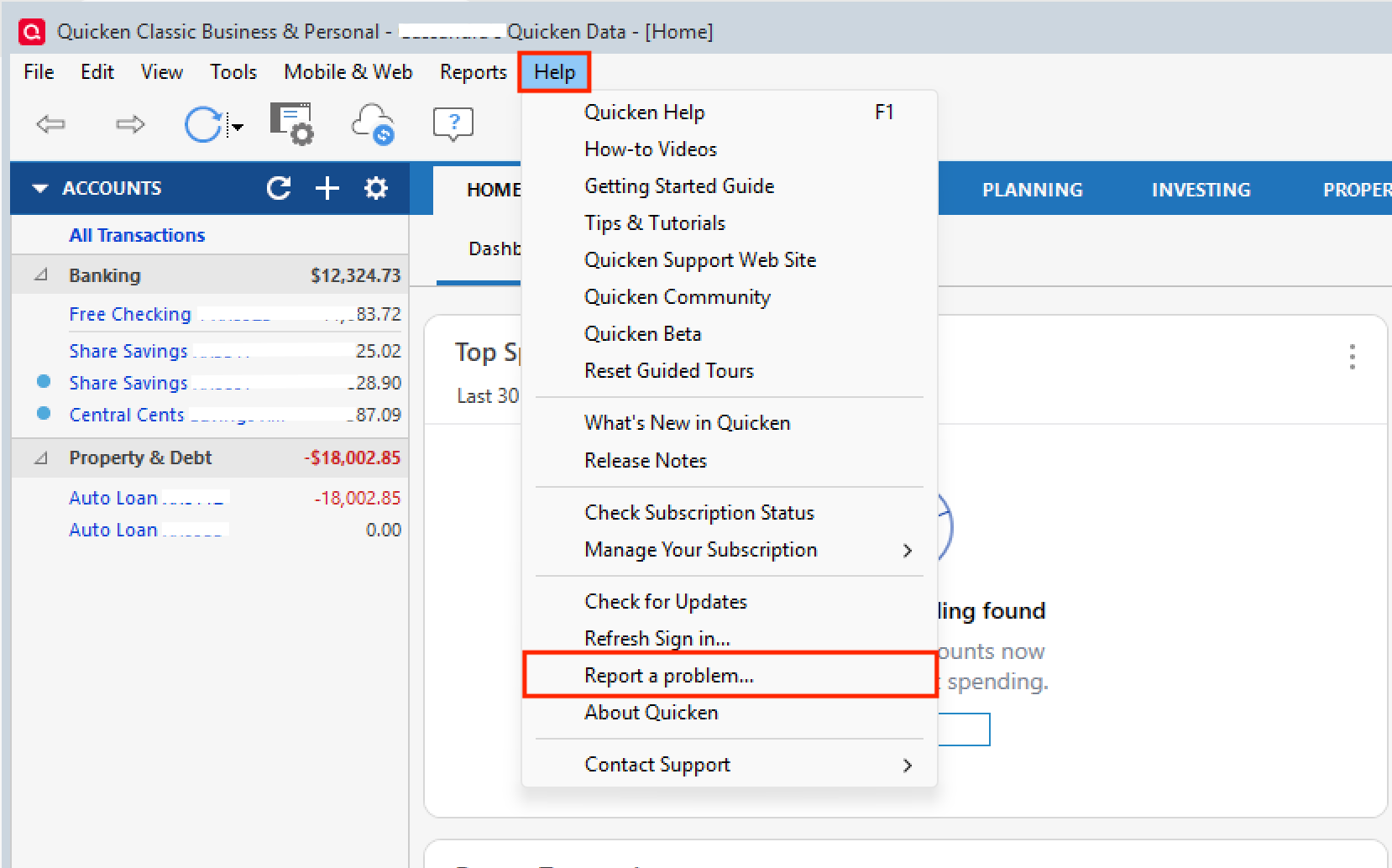
Including a sanitized version of your data file can be helpful as well, but is not required. Let us know when you have done a submission so we can add it to the ticket.
Thank you!
[CBT-1068]
Quicken Alyssa
Make sure to sign up for the email digest to see a round up of your top posts.
0 -
- Approximately how long has this issue been happening?
- I have only seen the issue in 2026.
- Does this impact only income reminders, or are bill reminders being affected as well?
- I have not had issues with bill reminders.
@TLH, you said the amounts are being reordered.
- Does this mean that the amounts you entered are there, but not on the category you originally put them on?
- That is correct. Amounts move between categories creating budget issues.
- You said the issue occurs after you log out and log back in. Does that mean after you close and reopen Quicken? Or are you signing out and signing back in?
- Yes, I had sync on and when I logged back in the income reminders changed. I have deleted the income reminders, turned off the sync option, created a copy, and without syncing my desktop works fine. It is a shame to lose the mobile application portion of Quicken.
0 -
@Quicken Alyssa This appears to be the same issue that is being tracked as CBT-746. That issue focuses on the impact that the scrambled Reminders have on the Tax Planner, but the underlying cause appears to be related to syncing to the cloud scrambling splits in Reminders.
Also CTP-13929, which has an active Alert, appears to be the same problem.
Sometimes after syncing to the cloud the split items are reordered but the amounts for each split remain the same, and sometimes the amounts get assigned to different split lines.
I sent a problem report on 2/14 referencing CBT-746, including a sanitized test file and screen shots that clearly demonstrate the issue. Do you need me to send that again?
Please see this discussion for more info.
QWin Premier subscription2 -
Hello @Jim_Harman,
This issue is very similar, but enough details were different that we created a separate ticket to track this issue.
Thank you for your reply @TLH,
Yes, I had sync on and when I logged back in the income reminders changed. I have deleted the income reminders, turned off the sync option, created a copy, and without syncing my desktop works fine. It is a shame to lose the mobile application portion of Quicken.
To clarify, when you say you logged back in, do you mean you opened Quicken, or do you mean you were prompted to login with your Quicken ID & password?
Thank you!
Quicken Kristina
Make sure to sign up for the email digest to see a round up of your top posts.
0 -
As of March 21, this is still an issue that I discovered only today.
What is most disappointing is that for a significant bug as this, there has been NO notification to users of the problem or the recommended solution.
Shameful.
1 -
Hello All,
Thank you for adding to this discussion.
An escalation ticket has been created. In order to submit this, I will need at least one set of log files from someone experiencing this issue. If you would like to aid in the investigation and escalation of this issue, please go to Help>Report a problem>Send to Quicken and submit your log files.
Including a sanitized version of your data file can be helpful as well, but is not required. Let us know when you have done a submission so we can add it to the ticket.
Thank you!
[CBT-1068]
Quicken Alyssa
Make sure to sign up for the email digest to see a round up of your top posts.
0 -
Alyssa, I hope you got your data file for this issue. I will not turn sync on my application and mess up my Quicken reminders again. I do hope this gets resolved aa the Quicken phone app is useless.
1 -
@TLH,
Thank you for following up.
We have not yet received the log files for this ticket, but it's totally understandable if you're not inclined to provide them. Either way, we appreciate you reporting the issue.
Thanks again!
Quicken Alyssa
Make sure to sign up for the email digest to see a round up of your top posts.
0