Unable to Link Existing Quicken Invest. Accounts to Fidelity Accounts after Fidelity Reauthorization

I was asked to "reauthorize" my Fidelity Investment accounts for downloading from Fidelity to Quicken, which I was able to do. However, when it gets to the screen that asks if you want to "add the account" or "link to an existing account", I select link to existing account. When the list of Quicken Investment accounts comes up to link to, none of the Fidelity Accounts are included in the Quicken list of Investment Accounts. So I cannot make the existing Quicken Account link to the Fidelity Account. I tried numerous times and it would not work. I closed Quicken and tried again, but no luck. I am running Windows Quicken Classic Premier version R66.18 (just updated today). Anyone else experienced this problem????
PGAVON
Quicken Premier - Windows Subscription
Comments
-
Hello @pgavon,
Thank you for reporting this issue, though we apologize that you are experiencing this.
We have received reports of multiple Fidelity issues this morning, and we are working to identify the cause. We will be forwarding this issue to the proper channels to have this further investigated. However, we request that you please navigate to Help > Report a problem within your Quicken program and submit a problem report with log files and screenshots attached in order to contribute to the investigation.
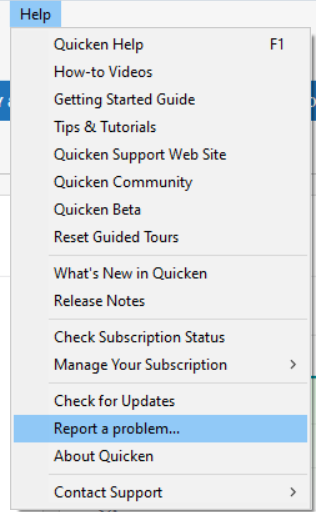
It would also aid the investigation to include a sanitized file when submitting the problem report. A sanitized file is a data file that removes personally identifiable information so you can comfortably share this file with the Quicken team.
While you will not receive a response through this submission, these reports will help our teams in further investigating the issue. The more problem reports we receive, the better.
Please let us know once you have sent them so we can add them to the ticket.
Thank you.
[CBT-1053]
Quicken Alyssa
Make sure to sign up for the email digest to see a round up of your top posts.
0 -
Thank you again for taking the time to report this!
We have forwarded these Fidelity issues along to the proper channels, and our teams are actively investigating.
While we do not have an ETA available on resolution, in the meantime, please refer to this Community Alert for any and all available updates and information.
Thank you!
Quicken Alyssa
Make sure to sign up for the email digest to see a round up of your top posts.
0 -
I have sent you a direct message. Please navigate to the inbox in the top right-hand corner of the Community page and check your inbox.

Thank you!
Quicken Alyssa
Make sure to sign up for the email digest to see a round up of your top posts.
0 -
Similar Problem. I got the CC-800 error. I have multiple Fidelity accounts. I was able to reconnect to non-retirement account, because they came up "Link to existing." Some of these accounts, I could open the drop down and see the check was on the right account. However, with other accounts showing "Link to existing," I was unable to see the accounts in the drop down list, but I assumed that Quicken had associated the correct account. The drop down list has entries that go beyond what I can see and does not allow me to scroll down to see the other listed entries. The drop down list shows old hidden accounts and pushes the new accounts out off sight in the drop down. I have been using Quicken for 30+ years and have a lot of hidden accounts.
It appears that the non-retirement accounts have all been connected, because they were shown as "link to existing." The retirement (NetBenefits) accounts came up showing "add new account." Because the hidden accounts push these account out of sight, I cannot see the account and I am unable to check the existing account to link them.
Hoping some know a solution.
[Edited-Readability]
0 -
I just had the same exact problem
0 -
I have submitted the problem to Quicken on the 25th. Hopefully this will get addressed shortly, but I fear they have too many other things they are working on to address in a quick new release. I guess we have to update manually until this gets addressed. Thanks!
PGAVON
Quicken Premier - Windows Subscription
0 -
Having a similar problem. In my case, after OSU, Quicken tries to reconnect all of my 12 Fidelity accounts. No big deal.
But when I try to "link to existing", the list of accounts includes ALL of my scores of hidden, deactivated accounts in a non-scrollable window. The list takes up the entire screen, but it does not include the currently active Fidelity accounts, so I cannot link to them.
Is there some way to limit the "link to…" list to include only the non-hidden accounts? I have never seen this behavior before.
0 -
I also did the "Report a problem…" thing.
0 -
Hello All,
Thank you for adding to this discussion.
We do still have an Open Alert for Fidelity. The alert asks that, if you are experiencing issues with Fidelity, you contact Quicken Support directly so that they can be investigated.
Thanks again!
Quicken Alyssa
Make sure to sign up for the email digest to see a round up of your top posts.
1 -
I have also posted at -
On the issue of not being able to scroll to see all account. If that is your problem, you may want to look at the other thread.
0 -
same…started after cs asked me to reauthorize
0 -
Hello All,
Thank you for continuing to update this discussion.
As stated above, we have an Open Alert for Fidelity.
The alert asks that, if you are experiencing issues with Fidelity, you contact Quicken Support directly so that they can be investigated.
Thanks again!
Quicken Alyssa
Make sure to sign up for the email digest to see a round up of your top posts.
0 -
The open alert that you direct people to does not address the problem being discussed in this thread. My comments and the initial comment made by @pgavon are related to a Quicken issue that does not allow the user to see all account in order to link an existing account.
0 -
Thank you for pointing this out.
While you are correct, it does not explicitly point out this issue; it states, "We’ve received reports from some users that transactions are missing, while others are seeing incorrect balances or a $0 balance. There have also been reports of missing securities, along with other issues."
Basically, we received reports of many different issues, so we are asking users to contact Quicken Support so these can be addressed on a case-by-case basis.
Hope this clears up any confusion!
Quicken Alyssa
Make sure to sign up for the email digest to see a round up of your top posts.
0 -
Your comment implies that the issue where the user cannot see all accounts in order to link an existing account is a problem associated with Fidelity. And, therefore is covered by the comment "along with other issues." This issue is not unique to Fidelity, I experienced the same problem with Bank of America. That is why I posted here on March 6, sharing that the problem was more than just a Fidelity issue.
0 -
Let me take a minute and update you on what the status of the issue I posted at the beginning of this Discussion. I called Quicken Support and eventually wound up at the "Escalations Desk" and after 30 minutes of trying different things (like changing the font presentation controlled by Windows), I was informed that Quicken's conclusion was that my issue was "my computer" (ticket # 12270643). Mind you that my computer is an HP ENVY x360 Laptop purchased one year ago. Apparently, Quicken has concluded that it is impossible for Quicken to use a smaller font, and impossible for Quicken to only show non-hidden investment accounts when trying to link accounts, or impossible for Quicken to present the investment accounts in multiple columns to allow more accounts on the screen. So it must be "my computer". So I can no longer download the activity in my 4 Fidelity accounts unless I go back to some other type of computer and hopefully it works using that model. So, fair warning to anyone using an HP computer, you may not be able to connect accounts from Fidelity (and other Investment Companies) to your Quicken Accounts. Its situations like this that make it so hard to like and recommend Quicken after my 30 years of my loyal subscription.
PGAVON
Quicken Premier - Windows Subscription
0 -
@pgavon
Thank you for updating us on your experience. I also contacted Quicken support, but got a different answer. I was told the problem had been escalated so that a software fix will be done sometime in the future. My chat and follow-on phone conversation took place on the morning of March 6.
Hope the reply I got was the correct one. It is hard to believe that Quicken would not want to solve this problem.
If you have read my posts here and on the thread titled "Bank of America Reauthorization - Linking to existing account," I would be interested in knowing if your problem is the same as mine. I believe we have the same issue.
I solved my problem at BofA by changing the name on the account in Quicken to match the name used on the BofA site. When I tried checking again, the drop down had changed from add account to link existing. Although, I could not scroll down the list and verify a check mark next to the right account, I went ahead and proceeded to add to existing. It worked.
My non-retirement accounts at Fidelity came up as link existing, with two accounts showing with check marks and two that I could not verify. I still have two retirement account (NetBenefits) that I could not see to connect and the fix I used at BofA did not work with these two accounts.
Hoping this issue gets resolved.
0 -
Below are some additional threads where the problem is being discussed. Seeing these discussions makes it hard to believe Quicken will ignore the problem.
0 -
Hello All,
Thank you for reporting this issue.
This has been escalated internally and is now being investigated. If you would like to contribute to the investigation, you can go to Help>Report a Problem>Send to Quicken and submit your log files.
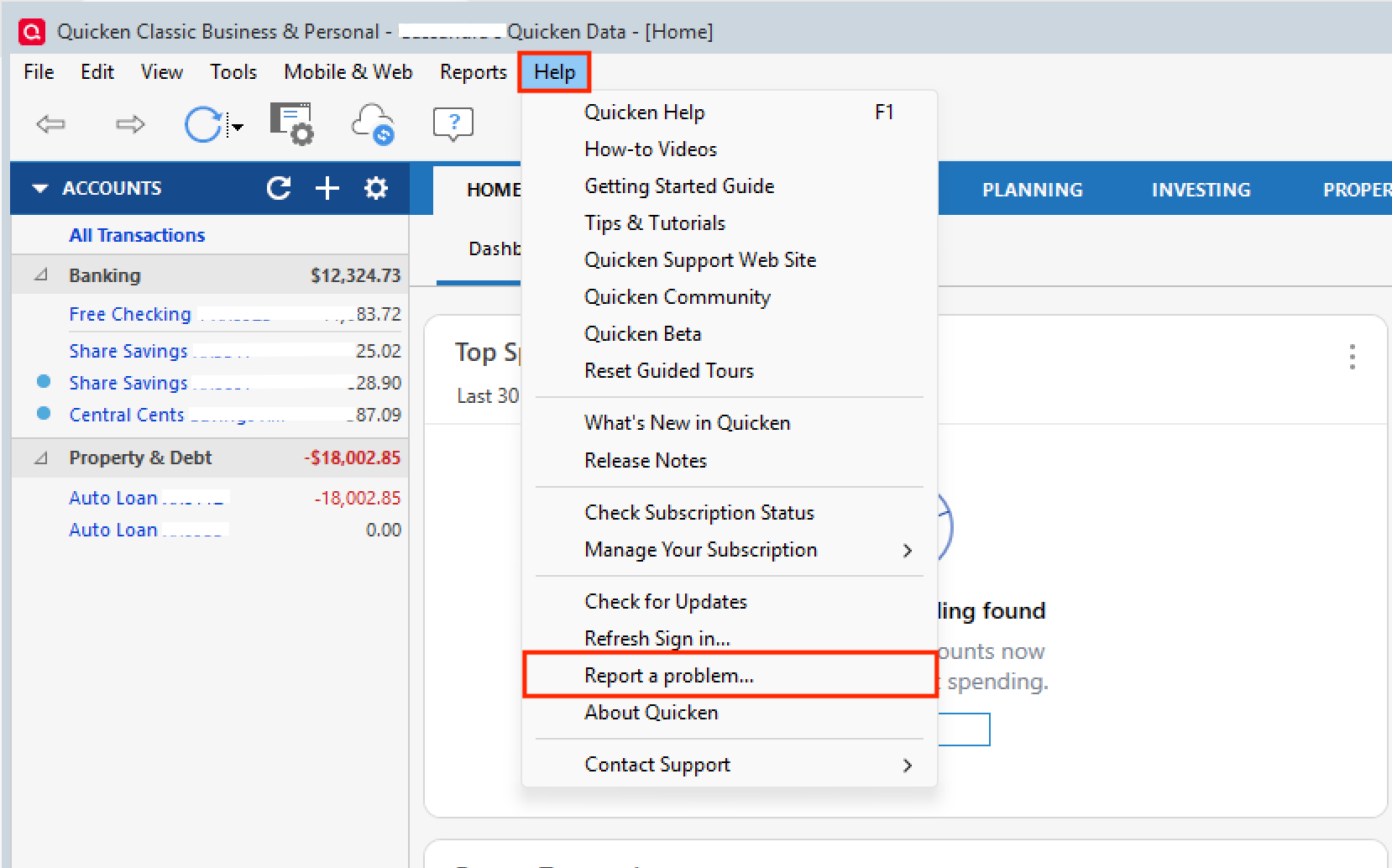
If you decide to send them over, let us know so we can add them to the ticket.
Thank you!
[CTP-16544]
Quicken Alyssa
Make sure to sign up for the email digest to see a round up of your top posts.
0 -
I’ve experienced pretty much the same problems as others when trying to reauthorize about ten deactivated Fidelity Investment accounts. Well, except Q correctly showed “link to existing” Fid Brokerage Acct that I authorized on Fidelity site and let me choose the corresponding right Q account, like the system is supposed to do.
PROBLEMS - But Q defaults to “Add Account” for several other similarly authorized, non-brokerage and mostly retirement or prof managed Fid accts. Like others faced trying to “link to existing,” my drop-down menu gives a long, non-scrollable, non-searchable, non-sortable list of hidden, closed accounts that excludes active accounts. So Quicken prevents Users’ “link to existing.” Also, accts defined as IRA and 401k in Fidelity and Quicken default to ‘Brokerage’ for me in the Add, Don’t Add, Link to Existing screen. I’m not sure if this has any bearing on lack of connection between Fid and Q. I’d also like to know if IRA and 401k or Brokerage are even relevant on this screen any more.
SUGGESTIONS for Q PROGRAMMERS - As quick fix, restore active, non-hidden accts in scrollable menu for ‘link to existing’ selection. Downloading of transactions would also be a nice feature. (Tongue in cheek.) Longer term, enable searchable menu for User to find appropriate account to link between Fidelity and Quicken or put likely matches at top of list. Also remove 401k, IRA, Brokerage selection if those are not useful criteria or show a pop-up if User needs to specify one.
Experience and logs will be sent to "Report a Problem."
I’m in the 25-30 yr Quicken User club, too. Unfortunately, I join hundreds of others who spent more time in past 18-months reporting or trying to resolve Q problems than in those combined yrs using product. Count me frustrated by the wave of downloading and connectivity problems. Still, Q Community insights and feedback help and I thank contributors for sharing experiences so I know it’s not a one-up problem here. It's a good forum to learn and find solutions to challenges on reports, etc as well.
2 -
@Quicken Alyssa I submitted the requisite info to Report a Problem for the "Can't activate online services" mentioned above. Just FYI… I tried renaming the account that I'm trying to link to a new name that should have fallen within the range of names that shows up on the drop-down list of accounts. It didn't work. The list of account names appears to be static and unchangeable as well as unscrollable.
1 -
Thank you for your reply,
Thank you for sending the problem report and for providing this additional information. It will help our teams investigate the issue.
Thank you!
Quicken Kristina
Make sure to sign up for the email digest to see a round up of your top posts.
0