PNC Bank not downloading since February 23, 2026
Answers
-
Same as everyone else. PNC. Looks like connection working but no transactions in this same timeframe. R66.23 is the latest it says.
0 -
Hello @jpatton1979, @dladams, and @zadie2026,
Thank you for letting us know you're encountering this issue. I added all of you to the ticket.
Thank you!
Quicken Kristina
Make sure to sign up for the email digest to see a round up of your top posts.
0 -
Please add me to this issue. If you read my comments and several others, I spent almost an hour on the phone with PNC and we went through all the same things the Quicken Customer service peeps did when I finally got to them.
0 -
Quicken Kristina
Make sure to sign up for the email digest to see a round up of your top posts.
0 -
I am also having this problem — no OSU errors, but no new transactions since 2/24. The similar problems that occurred several months ago when they "enhanced" their web site were caused by PNC, not Quicken, and I am betting the cause of the current issue is on PNC as well. It is important to call PNC (as I and several others here have) when problems such as these arise. If they get very few calls, it is easy for them to assume it is impacting just a few customers and not address the issue with the priority it deserves. Quicken may have an inside contact to whom they can communicate that many of their users are being impacted, but IMO, hearing directly from their frustrated customers would likely have more impact on PNC.
Greg
Quicken Classic Deluxe - Windows
Quicken User Since 2004
0 -
Hello @Swift,
Thank you for letting me know you're affected by this issue! I added you to the ticket.
Thank you!
Quicken Kristina
Make sure to sign up for the email digest to see a round up of your top posts.
0 -
@Quicken Kristina I just wanted to let you know I have three PNC accounts (1 biz checking, one personal checking, 1 savings) where I use Quicken and 1 PNC account (biz checking) where I use Quickbooks. Quickbooks has NO problem connecting to my PNC account.
Also, another update, I still am unable to get any transactions on those three accounts since 2/23 EXCEPT one transaction from 3/6 was able to download today - it was a transfer I did in the PNC app from my PNC checking to a PNC Visa - no other transactions came through. Not sure if that helps you at all, but it's definitely an issue with PNC and Quicken, not PNC across the board. PNC is pointing to it being an issue with Quicken, and Quicken is pointing to PNC. We desperately need your help on this. Also, you mentioned you are tagging us in some ticket, but I'm new to these forums and don't know how to get to the ticket you are tagging us in so I can keep up. Thanks in advance for any help.
1 -
I'd like to be added to the ticket as well. Have same symptoms as above… no Direct Connect transactions coming down, even though it looks like it runs correctly with no issues. I was also in the same mess Oct-Dec last year, like many others, and it seems to be the same issue. I'm pleased with the way Quicken is working with PNC even though it appears to be on the PNC servers side. I'm also frustrated with the way you have to spend 15 minutes or more EVERY TIME you call PNC, getting to right person. There's no way to contact Tier III directly. Each time you need an update, you have to go call in and go through Tier I and Tier II, each time explaining the same story, just so they can transfer you to the next level. That process needs fixed for "existing tickets" customers. It's also disappointing is that PNC.com shows absolutely no current issues. It'd be nice to see some sort of "We are experiencing issues with our PNC Quicken Direct Connect Users" or some ownership that there's an issue going on. I'm open to help troubleshoot in any way (logs, error messages, etc) so we can all get through this together. In the meantime, I will log into PNC.com every 2 days and manually update my Quicken register. Not fun.
0 -
Ditto others,
I'd like to be added to the ticket as well. Have same symptoms as above… no Direct Connect transactions coming down, even though it looks like it runs correctly with no issues. I was also in the same mess Oct-Dec last year, like many others, and it seems to be the same issue.
0 -
I have the same issue. I worked with PNC support to try to fix it and had no success. However, PNC support had me create a new account and then had me link my PNC account to that new account with direct connect. I then did an update on that new account and the transactions DID download from PNC. It would appear this is a Quicken problem and not a PNC problem.
0 -
Thank you for the additional information @aprilsamuels,
I forwarded it to our teams.
Hello @Shawn Indy, @timermanbennett, & @kcaj,
Thank you for letting me know you're also seeing this issue. I added you to the ticket.
Thank you!
(CTP-16554)
Quicken Kristina
Make sure to sign up for the email digest to see a round up of your top posts.
0 -
@Quicken Kristina were are we at with a resolution to this issue???? The number is growing on here of who is having issues. At least tell us whose issue it is. I am a long term Quicken user and this is unacceptable that we are not getting any answers from anyone….Quicken or PNC. Please advise!~
0 -
Wow call Quicken give them the ticket number Quicken Kristina supplied us and was told that they can not tell me anything about that ticket as it is not public. Really.
0 -
Has anyone gotten any Updates from PNC????? I can't get any.
0 -
Please add me to the ticket as I've been having the same issue starting late February. I did walk through the issue with PNC and they had me set my account up with a new file and the same account and all transactions were downloaded to that file. I also attempted to disable download from my current account and setup a new temporary account with my existing file. When I did that some of the transactions downloaded but not all. So, the problem does appear to be on the Quicken end.
Kevin
0 -
I have the same issue with my PNC account. No updates since Feb 23, 2026. Please contact me when the issue is resolved.
Thank you.
0 -
Hello @Kevinjf,
Thank you for letting us know you're also seeing this issue. I added you to the ticket.
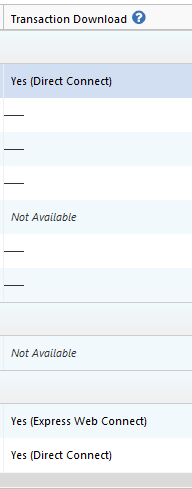
When you were troubleshooting with PNC and created the test file, did you confirm that you connected using the Direct Connect connection type? When I check our internal tools, it looks like the account is connected using Express Web Connect. You can check that in the test file by navigating to Tools>Account List and looking in the Transaction Download column next to the account.
Hello @magallagher,
Thank you for letting us know you're encountering this issue. I added you to the ticket.
Thank you for your replies. We do not have any updates yet. Since this is an issue with Direct Connect, it is most likely caused by a problem on PNC's servers.
Thank you!
Quicken Kristina
Make sure to sign up for the email digest to see a round up of your top posts.
0 -
As noted earlier, I am having this same problem. What I did not mention is that I also created a new Quicken file and tried adding and downloading my primary account from that. The result was that I got just one of several transactions that had not downloaded, but it was a pending transaction (per PNC's web site), and the preferences in the test file were set not to download pending transactions.
Greg
Quicken Classic Deluxe - Windows
Quicken User Since 2004
1 -
Thank you for sharing,
Was the one transaction that downloaded for you also a pending transaction?
Thank you!
Quicken Kristina
Make sure to sign up for the email digest to see a round up of your top posts.
0 -
Hello All,
We now have a Community Alert that you can bookmark to be notified of any updates and to know when the issue is resolved:
Thank you!
(Ticket #12281409/ CTP-16554)
Quicken Kristina
Make sure to sign up for the email digest to see a round up of your top posts.
0 -
>Hello @Kevinjf,
>Thank you for letting us know you're also seeing this issue. I added you to the ticket.
>
>When you were troubleshooting with PNC and created the test file, did you confirm that you connected using >the Direct Connect connection type? When I check our internal tools, it looks like the account is connected >using Express Web Connect. You can check that in the test file by navigating to Tools>Account List and >looking in the Transaction Download column next to the account.
Hmm, I had thought that was the case but I looked back in the test file and you are correct. PNC confuses the issue by having two different institutions with the name differing by the connection type. However, they allow the Express Web Connect type under the one named 'PNC Bank - Direct Connect'. So, my test with them was done under 'Express Web Connect' but my main file is connected using Direct Connect.
Is there value in me setting up the test again and ensuring Direct Connect and contacting PNC? Or if someone from PNC is already working on it I will just wait.
Thanks, Kevin.
0 -
Thank you for your reply,
There currently is no value in switching the connection in that test file to Direct Connect. Test files are typically used to check for file-specific problems, and considering how many other customers are reporting the same issue, it's highly unlikely to be a file-specific problem.
I hope this helps!
Quicken Kristina
Make sure to sign up for the email digest to see a round up of your top posts.
0 -
Yes PNC wants you to do a test file, they want you to do everthing else to fix your file error, it is not a file error and so many are doing this and basically wasting their time. In my case I have an account within the Quicken file that is from another bank and I download via Direct Connect for it and it is working just fine! So it is a PNC or PNC/Quicken issue. I get reactivating an account, I have done it this time and last time, however, that didn't resolve the issue.
0 -
I checked my Test file and yes, it was set for Direct Connect. It still works but that doesn't help me get anything into my main PNC File.
0 -
Thank you for your reply,
Based on the other discussion you started about the issues you're having with PNC, it's possible that you're encountering more than just the issue being discussed here.
Thank you!
Quicken Kristina
Make sure to sign up for the email digest to see a round up of your top posts.
0 -
Add me to the ticket. No posted transaction downloads from PNC Bank in same timeframe, One Step Update/Direct Connect, Quicken Classic Deluxe vR66.23
1 -
Hello @Stuie,
Thank you for letting me know you're also affected by this. I added you to the ticket.
Thank you!
Quicken Kristina
Make sure to sign up for the email digest to see a round up of your top posts.
0 -
Please add me to this ticket. PNC and Quicken have had several issues over the last two years. Thanks in advance.
Tony
0 -
Hello @Tony1014,
Thank you for letting us know you're seeing this issue. I added you to the ticket.
Thank you!
Quicken Kristina
Make sure to sign up for the email digest to see a round up of your top posts.
0 -
You can add me to the list as well. Long time Quicken member and very frustrated that this is the 2nd time we've had this happen and it takes over a week to get rectified.
0

