Fidelity not downloading transactions

Quicken is yet again having download connection issues. This time with Fidelity which will not download any transactions. I have tried deactivating and activating and even deleting and readding the accounts. Nothing works. Quicken is getting less and less useful and the helpdesk is fairly useless.
Answers
-
There is a ticket on this issue initiated 3/2/26. No ETA from Quicken. Here is the header if you want to search it up and read the threads that reference it. Several posts I've seen reporting problems since 2/27.
NEW! 3/2/26 Fidelity Investment- FDP-101/CC-601 CP_SCRIPT_ERRORQuicken KristinaQuicken Windows Subscription Moderator modMarch 2We are receiving reports that customers trying to connect accounts from Fidelity Investments in Quicken Classic are encountering an FDP-101/CC-601 error.Our teams are actively investigating the cause and working toward a resolution. We will share updates as more information becomes available.To be notified of updates as they become available, please click the bookmark ribbon located in the upper right. If you do not see the bookmark ribbon, please make sure that you are signed into the Quicken Community.Thank you!(Ticket #12266898/ CTP-16491)Quicken Laura responded to my post on 3/3
[Edited-Removed Screenshot]
1 -
Thank you for reporting the issues you are experiencing!
As @berryjt pointed out, we do have an Open Alert for the error you are seeing. You can bookmark the linked alert to stay updated on progress/changes as they occur.
We apologize for the inconvenience.
Quicken Alyssa
Make sure to sign up for the email digest to see a round up of your top posts.
0 -
Just in case this helps those who are investigating the problem. I was doing fine with Fidelity updates until i needed to restore my Quicken file from Fidelity. After i restored my file, i got this error (FDP-101). Which i assume is to do with the fact that Quicken Classic (on the mac) is having a problem with Fidelity.
Quicken Deluxe for Mac (8.5.1)(Quicken User since 1988)
2 -
I haven't been able to download from Quicken since they moved over, it just does not work no matter what I do. I stopped investing with Fidelity because I am not manually entering in transactions. My plan for now is just to once a year go in and manually enter in dividend transactions etc, which will take a ton of time by itself. I assume at this point it will never be corrected. I have debated transferring out all of my Fidelity investments to Schwab or Vanguard but I figure I will wait for 2026 and see if it is ever resolved and if not just plan to do it in 2027.
May be worth looking into, it is to difficult to track manually when I am doing weekly investments into multiple Fidelity accounts, so all I could do was stop doing that and move the money to another broker.
0 -
Interesting. I also copied my file in order to rename it and that coincided with the dates of loss of download ability. I was able to download month-end activity from Fidelity on Saturday morning 2-28, then later that day decided to copy to a new file with an update name since there is no "rename" function in quicken and I was concerned that doing it in MS Windows file mgmt might cause referencing difficulty for Quicken. I copied the file and began using the newly renamed file that weekend. No more downloads since I had already done that. On Monday, all of my download passwords were missing, but that has never worked on a file rename, which is why I hadn't renamed in so long. I figured that was some sort of security consideration. I reestablished all my account download passwords for both investments and banking. That was when the download issues started.
BTW, contrary to an "official" post I saw recently from Quicken [Insert name here] Fidelity no longer offers a native Quicken file download, only a CSV to excel. Some other Fin Insts do offer manual download; Synchrony Financial, which sponsors lots of store-branded credit cards like Sam's and Lowe's Hardware does, for example, and maybe Fidelity did at one time, I don't know. They don't now, at least not on the consumer investment platform I'm using.
Thanks, hope this may help.
-Jim
1 -
Quicken Laura and Quicken Alyssa,,
OK just for grins I went back to my pre-restore version which was in a drive/directory I didn't want to continue to use. I opened the file that was not named as I wanted, but which hadn't been restored for several years and still had all the download passwords and authorizations intact. I pressed "Update" and it worked perfectly, although it did bring in a bunch of duplicated transactions for the last 60-90 days, apparently, probably bc this was the first "working" download since I re-authorized account access in the new copied file. As noted above, Quicken has not been able or willing to maintain saved passwords in a file copy for many years.
Quicken folks, please investigate this as a possible root cause. It cannot be a good solution that download capability is lost whenever files are moved, renamed, copied or restored. Something is wrong, not merely inconvenient.
Thanks,
-Jim Berry
Longtime QforWin "Classic" User
v 66.23 build 27.1.66.23
0 -
My Fidelity account stopped downloading months ago. Updates come and go and it still hasn't been fixed.
1 -
On Sunday, i sent in a "Report a problem to the Quicken development team.
Just updated to the latest Quicken for Mac and sent in another report.
Quicken Deluxe for Mac (8.5.1)(Quicken User since 1988)
0 -
Looks like Quicken is trying to solve this problem. This is good news!
Quicken Deluxe for Mac (8.5.1)(Quicken User since 1988)
1 -
This morning, my Quicken linked to Fidelity and I got some data from some of my Fidellity accounts. No error messages. On the face of it, everything looks normal except that not all the data from Fidelity came through. I am tempted to Disonnect the Fidelity accounts that did not download any data and reconnect. But last time i did this, I got the error 101 message.
Quicken, please could you provide some information/ update on this issue. Thanks.
Quicken Deluxe for Mac (8.5.1)(Quicken User since 1988)
1 -
Hello All,
Thank you for updating this discussion.
The Alert for FDP-101/CC-601 is open and ongoing. Our teams are still working on a resolution. We do not have an ETA as to when it will be resolved.
We apologize for the inconvenience.
Quicken Alyssa
Make sure to sign up for the email digest to see a round up of your top posts.
0 -
Good news is that the Fidelity accounts linked through okay. Hope everyone else with this issue is now connected.
But the bad news is that Fidelity has messed up with the core account again. It now looks like Fidelity/Netbenefits are treating the core account as Cash??? Last time i connected this was not the case.
Is there a way to override Fidelity's messing around with its interpretation of the core account?
Quicken Deluxe for Mac (8.5.1)(Quicken User since 1988)
0 -
Thank you for adding to this discussion. I apologize for the delayed response.
We do have an Open Alert for the issue you have described. We do not have an ETA as to when it will be fully resolved. Please bookmark the linked alert to be notified of progress/changes as they occur.
Thanks again!
Quicken Alyssa
Make sure to sign up for the email digest to see a round up of your top posts.
0 -
Since Quicken broke the working download, how about coming up with a fix in an update?
This has been going on for months.
1 -
Thank you for chiming in on this discussion.
We do have an Open Alert for this issue, and our teams are working toward a resolution, as you have suggested. We do not have an ETA as to when it will be fully resolved.
We apologize for any inconvenience and appreciate your patience as we work through this issue.
Thanks again!
Quicken Alyssa
Make sure to sign up for the email digest to see a round up of your top posts.
1 -
Dear Quicken team - this issue is not isolated to just this fund symbol as suggested by the alert. I do hope the alert is updated and a solution sought for all impacted securities, being downloaded from Fidelity 401k and other Fidelity types of accounts. This remains an unresolved issue.
0 -
Thank you for adding to this discussion.
Please provide more information.
- Which funds other than FZDXX are you seeing this issue with?
- How long have you been experiencing this?
- This is happening in your 401k account. What other account types are affected?
Additionally, screenshots of what you are seeing could be helpful. If needed, please refer to this Community FAQ for instructions on attaching a screenshot. Alternatively, you can also drag and drop screenshots to your response if you are not given the option to add attachments.
The more information you can provide, the better.
Thanks again!
Quicken Alyssa
Make sure to sign up for the email digest to see a round up of your top posts.
0 -
Hello. This is happening in 401k accounts, Roth IRA accounts, 403b accounts etc. I suspect it happens on all Fidelity related retirement type accounts, but most likely on brokerage accounts as well. FCNTX and FZCXX are two additional funds which have this issue. Personally it is most likely all of Fidelity Mutual funds. I don't want to list out all of them, but I offer you these two for further investigation. This has been going on since at least the beginning of this year January 2026. My screen shots are identical as to the ones listed above in this chain. When the transaction data is downloaded, you get the miss-match appearing in the download summary screen. Quicken also adds this "unrecognized" security into the security list be default each time a download takes place. You have to manually delete this security from the security list each time.
1 -
Thank you for sharing that additional information.
I have reached out internally for more information to determine whether a new escalation is needed here.
I noticed you use both Quicken on Windows and Mac. To clarify, you are seeing this when using Quicken for Mac, correct?
Looking forward to your response!
Quicken Alyssa
Make sure to sign up for the email digest to see a round up of your top posts.
0 -
Hello this specific issue is on a Windows PC. It may also be present on MACs as well, but I have not verified this.
0 -
Hello @dp_go_blue,
Is the issue you're posting about here the same as the one you posted about in the discussion linked below?
I look forward to your response!
Quicken Kristina
Make sure to sign up for the email digest to see a round up of your top posts.
0 -
Hi Kristina. I did not submit the post you linked here, it appears cjim did. However the issue is essentially the exact same issue I am posting about. As noted in his post, every single time the erroneous security info is downloaded as "unrecognized security", it is important to note that quicken simulatneously marks it as a BOND, and not a mutual fund. This is an important part of the issue which needs to be resolved.
Separately be aware that I have no concerns with list the funds which have issues, but there are too many too list. I continue to suggest that it is all mutual funds from Fidelity plans at minimum.
0 -
Thank you for confirming,
Since it is the same issue, please navigate to Help > Report a Problem and submit a report with the log files attached to help our teams investigate.
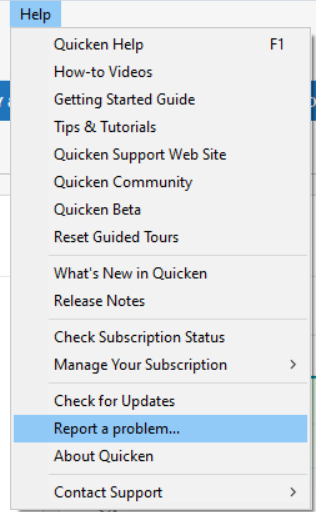
While you will not receive a response to this submission, these reports will help our teams further investigate the issue. The more problem reports we receive, the better.
Thank you!
Quicken Kristina
Make sure to sign up for the email digest to see a round up of your top posts.
0 -
"I continue to suggest that it is all mutual funds from Fidelity plans at minimum. "
Beg to differ. I hold 17 different Fidelity funds, in 7 different accounts (some funds held in more than 1 account) and I'm having this trouble with NONE of them.
3 of those accounts are taxable, 3 retirement and 1 corporate. BUT, I don't hold any of the funds that have been described as problematic … just lucky.
Q user since February, 1990. DOS Version 4
Now running Quicken Windows Subscription, Business & Personal
Retired "Certified Information Systems Auditor" & Bank Audit VP0 -
Kristina - I have filed the error report per your request.
1 -
Quicken Alyssa
Make sure to sign up for the email digest to see a round up of your top posts.
0 -
@cjim Nope, no 401k accounts. When I retired I moved that money to a Rollover IRA.
Q user since February, 1990. DOS Version 4
Now running Quicken Windows Subscription, Business & Personal
Retired "Certified Information Systems Auditor" & Bank Audit VP1 -
Just downloaded my account data into Quicken for the Mac. Fidelity still broken. With interest reinvested into Fidelity Government Cash Resrve. In (401) and in brokerage account.
Will this issue actually be fixed?
Thanks for keeping us up to date as to what is going on behind the scenes between Quicken and Fidelity. Or, what we can do to fix this problem.
Quicken Deluxe for Mac (8.5.1)(Quicken User since 1988)
1 -
Hello @Sammy,
Thanks for sharing the update and the details of what you’re seeing.
The Fidelity download issue is still actively being worked on, and there is no ETA available at this time. The most up-to-date information will continue to be posted in this Community Alert as progress is made.
We appreciate everyone’s continued patience while this is being investigated! Thank you.
-Quicken Anja
Make sure to sign up for the email digest to see a round up of your top posts.0



