Update R66.28 crashes

Running Windows 11 desktop and Quicken Premier Classic.
Quicken was working fine until it installed update R66.28 today.
Now it keeps crashing. I have downloaded the update and reinstalled it as admin with antivirus and firewall shutdown.
Can someone please help?
Thank you,
CCPJR
Comments
-
I've experienced the exact same thing.
The only way I have been refresh my accounts is to update each account individually. Quicken doesn't crash following this pathway but is very time consuming and thus very frustrating.
Sure hope that the Quicken Support Team jumps on this user request right away.
0 -
See this:
Q user since February, 1990. DOS Version 4
Now running Quicken Windows Subscription, Business & Personal
Retired "Certified Information Systems Auditor" & Bank Audit VP0 -
I have been a long time Quicken user and Quicken has always been a quality program with quality support.
I have been very pleased until this last update, R66.28.
I have done all the things that Quicken recommended on their website and in the community posts and it still crashes.
From what I see there are a lot of people with the same issue.
I have re-downloaded the R66.28 patch.
Uninstalled Quicken, deleted the installation folder, restarted the computer, closed the firewall and anti-virus and reinstalled as admin and Quicken still crashes.
I have tried different data files and Quicken still crashes.
I have sent them a log file and did not hear back.
I have tried using chat but that is nothing but AI which does not help.
Quicken used to have phone and live person support on weekend, but no longer.
Where is the quality support that Quicken used to have?
It would be nice if Quicken acknowledged the problem and that they were working on it.
Can someone please help with this issue?
0 -
I have also run validate and repair and it found nothing wrong.
0 -
What happens when you create a new test file and try to load that?
0 -
Do you mean data file, no imported data?
0 -
I submitted an error report with files yesterday regarding a crashing issue as well.
Just curious, what are your systems doing when they crash?
Mine happens at various points within the program. Everything will be running fine, then the screen goes black and the computer becomes unresponsive. I have to force a shutdown with the power button on the CPU and restart it. If it crashes while accessing anything online it kills all of my O.S.U. settings and I have to reauthorize with all of my financial institutions as if starting anew.
Since my monitor was ancient (one of the early 22" flat screens) and had been acting up whenever I restarted/rebooted the computer I assumed it was the problem. But a new monitor did not help. And my wife mentioned that it only happens to me then I noticed it was only in Quicken.
In addition to this being a fairly new computer(~1 year old) and now a new monitor, I have tried; validating the file, restoring from backup, uninstalling/reinstalling the program…. None of this has worked.
FYI: This update has also caused issues with O.S.U. posting duplicate entries for reminder transactions during download. I have been posting on a thread here about this, if anyone else is having this problem here is the link for that thread:
1 -
Hello @brian7815,
Thank you for letting us know you're encountering issues. To help troubleshoot, please provide more information:
- Does the computer go blank/unresponsive only when you're using Quicken?
- How often does this happen (every time you use the program, sometimes when you use the program, rarely, etc.)?
- You mentioned this happens at various points when using the program. Are there specific functions that reliably trigger this behavior?
- You mentioned you've validated the file. Were there any problems listed in the report after the validation was completed?
I look forward to your reply!
Quicken Kristina
Make sure to sign up for the email digest to see a round up of your top posts.
0 -
Hello Kristina,
I will answer your questions one at a time:
- Does the computer go blank/unresponsive only when you're using Quicken?
- Yes, this has been happening only while using Quicken. And, as near as I can remember, it started shortly after the update to Version 66.28.
- How often does this happen (every time you use the program, sometimes when you use the program, rarely, etc.)?
- To answer this more fully, I should give you an idea of how I usually use the program:
- First, in case I forget to mention it, I use OSU at least once every time I am in Q.
- During the work week, I use Q before going to work using OSU to check for downloads and to verify that I didn't forget to setup outgoing payments at my bank's online site (I do not use Q's bill pay). I then use Q after work to enter any transactions up to that point in the day (OSU). If I do anything after work that would require entering a transaction, I enter that when I get back.
- On the weekend, I may only use Q once or twice the whole weekend. But I do enter post several bill reminders for the upcoming week on Sunday (Payroll, auto payments, monthly utility payments, etc….)
- Now the answer. There have been times when it has happened every time I used Q, and there have been times where it doesn't happen for a day or two.
- You mentioned this happens at various points when using the program. Are there specific functions that reliably trigger this behavior?
- Not that I have been able to figure out. The first couple of times, it happened when I attempted to use OSU. But it has also happened when I tried to post a reminder, when I was viewing my investments, and when I was trying to close the program.
- You mentioned you've validated the file. Were there any problems listed in the report after the validation was completed?
It showed that there were a couple of stock splits that may or may not have been entered properly. But all of my share counts and balances match.
It also mentioned a couple of accounts that it had to repair, but did not go into details. But it did say no further action needed on these accounts.
I hope this helps somehow.
0 -
Thank you for your reply,
You mentioned that you restored a backup. How far back was that backup from?
Since uninstalling and reinstalling Quicken didn't resolve the issue, and the problem started shortly after updating to R66.28, please backup your Quicken file and revert the program to a recent version that predates the problem (such as R66.23).
To do that, please use the article linked below to download an appropriate patch:
Once the patch is downloaded, go to your Downloads folder and double-click the Quicken patch file you just downloaded. Once it is installed, verify if the issue persists.
Please let me know how it goes!
Quicken Kristina
Make sure to sign up for the email digest to see a round up of your top posts.
0 -
Hi, since 2-3 weeks ago, I've started to experience crashes on launch.
This is what I get, and reported almost all crashes.
This happens immediately after launch (the window starts to open, the menu includes File and something else, and then it crashes. Every single time.
I followed all instructions I could find as can be seen in my comments in the attached crash report screen shot.
Installing the patches (as suggested for those who had crashes after subscription expiration) don't help either.
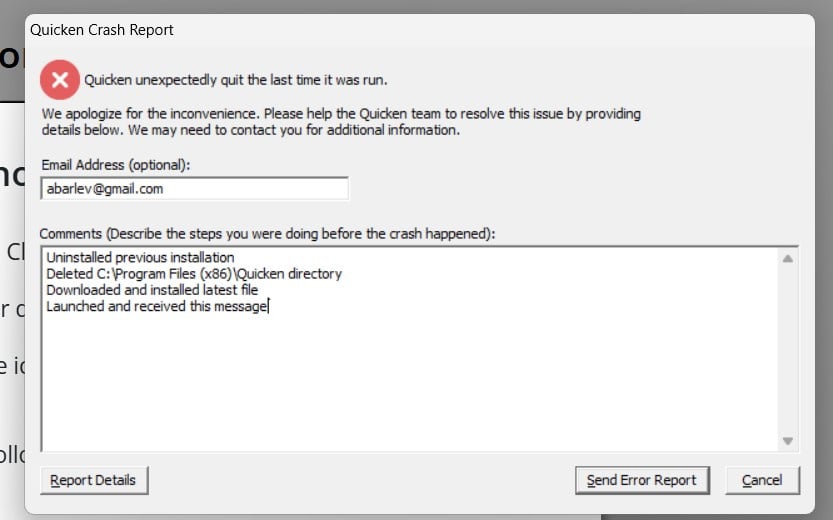
If this doesn't get fixed, I will obviously stop my subscription as I am getting no service.
0 -
Hi @AsafB,
Thank you for joining the thread and for sharing the issue you’re experiencing. There is a new release available that you can try installing to see if it helps resolve the behavior. Before proceeding, I’d appreciate it if you could try a few additional steps:
Please first check whether there are any pending Windows updates. If so, install them and then restart your computer.
Next, try running Quicken as an administrator:
- Right-click the Quicken icon
- Select Run as administrator
If the issue persists, please install the latest release by uninstalling and reinstalling Quicken.
Additionally, if you are using any VPN, firewall, or antivirus software, these may sometimes impact performance. If possible, temporarily disable them and then check whether Quicken opens and runs as expected.
Please let me know how it goes!
Quicken Laura
Make sure to sign up for the email digest to see a round up of your top posts.
0 -
Still crashing. With or without VPN, anti virus, running as admin. Always crashing
0 -
Hi @AsafB,
Thank you for trying all the steps provided. I’m sorry to hear that the issue is still occurring.
At this point, I recommend contacting Quicken Support directly for further assistance. They can guide you through additional troubleshooting steps in real time and escalate the issue if needed.
You can find the Quicken Support phone number here: Support Home | Quicken. Phone support is available Monday through Friday, from 5:00 AM PT to 5:00 PM PT.
I apologize that I could not provide a more direct solution, but please don’t hesitate to reach out again if you have any other questions.
Quicken Laura
Make sure to sign up for the email digest to see a round up of your top posts.
0



