Subscription Value Concern: SSFCU Connectivity Unresolved for Months

Subject: Subscription Value Concern: SSFCU Connectivity Unresolved for Months
Body:
I’m hoping to get clarity on a long‑running issue with Security Service Federal Credit Union (SSFCU) connectivity in Quicken Classic.
For most of this calendar year, Quicken has been unable to connect to SSFCU using the standard online services. I’ve followed all recommended steps (password resets, account relinking, cloud dataset resets, etc.), and SSFCU confirms that my credentials and account access are functioning normally. Manual QFX downloads import correctly, which suggests the issue is not on my end.
SSFCU has stated that they block certain third‑party aggregators for security reasons. If Quicken’s connection method is one of the blocked aggregators, that would explain the persistent CC‑503/CC‑929 errors many users have reported.
My concern is about the value of the subscription. The subscription fee explicitly covers:
- Online banking connectivity
- Aggregation services
- Cloud sync
- Mobile app functionality
When connectivity to a primary institution is unavailable for months at a time, the core value of the subscription becomes difficult to justify — especially when manual downloads continue to work reliably.
I’m not looking for workarounds; I’m looking for clarity:
- Is SSFCU currently a known issue for Quicken’s aggregation provider?
- Is Quicken actively working with SSFCU to restore connectivity?
- If SSFCU blocks Quicken’s aggregator by policy, is there a long‑term plan or alternative connection method?
- What should subscribers expect when a supported institution remains disconnected for extended periods?
I rely heavily on mobile sync and shared access, so understanding whether this is a temporary outage or a structural incompatibility is important for deciding how to move forward.
Thank you for any concrete information you can provide.
Comments
-
Hello @RGTharp,
Thank you for letting us know you're encountering an issue connecting with Security Service FCU. There aren't any open alerts for SSFCU currently. To help troubleshoot, I checked our internal tools, and I can see you have been getting CC-502 errors.
To troubleshoot, please follow these steps from our article on CC-502 errors:
Refresh your account information
- Open the transaction register for the account with the error message.
- Click the Gear Icon in the upper right of the register and select Update Now.
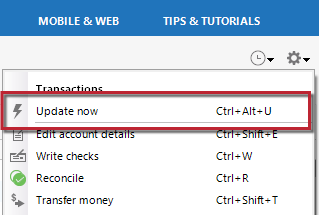
- Follow the on-screen instructions to complete the update.
- Repeat these steps for each account with this error.
If refreshing your accounts does not resolve the issue
Try waiting one business day. This error message is typically caused by maintenance on your bank's website. You can try updating again in a few hours or the next business day. If the issue still occurs after one business day, try the steps above again.
If the issue persists
Please Contact Us so we can help you fix this issue.
To answer your questions:
Is SSFCU currently a known issue for Quicken’s aggregation provider? & Is Quicken actively working with SSFCU to restore connectivity?
I do not see any open tickets regarding SSFCU. That doesn't mean there aren't any; it just means that of the tickets I can access, none are open for SSFCU. The ticket for CC-503/CC-929 errors was marked resolved in 2024.
If SSFCU blocks Quicken’s aggregator by policy, is there a long‑term plan or alternative connection method?
The financial institution decides whether to support Quicken. If they choose to support Quicken, but are blocking the connection, then they should be willing to work with us to resolve whatever is causing the block.
What should subscribers expect when a supported institution remains disconnected for extended periods?
If an issue isn't resolved through troubleshooting, it will typically be escalated, and you will receive a ticket number to track its status. If an issue is widespread enough, there may also be a Community Alert for it.
I hope this helps!
Quicken Kristina
Make sure to sign up for the email digest to see a round up of your top posts.
0 -
Hello @RGTharp,
We haven't heard back from you in a while. Do you still need assistance?
Check back and let us know! Thank you.
Quicken Kristina
Make sure to sign up for the email digest to see a round up of your top posts.
0 -
Hello again,
Checking in once more before this thread is closed.
Let us know if you still need assistance.Thank you!
Quicken Kristina
Make sure to sign up for the email digest to see a round up of your top posts.
0 -
Problem is unresolved
0 -
Hello @luthien,
Thank you for letting us know you're seeing an issue with SSFCU. To help troubleshoot, I checked our internal tools, and I can see you're getting a CC-502 (timeout) error. If you haven't already done so, please follow the troubleshooting I shared in my earlier post:
If you followed those steps and the issue persists, please contact Quicken Support directly, as the issue will likely need to be escalated for resolution. The Quicken Support phone number can be found through this link here. Phone support is available from 5:00 am PT to 5:00 pm PT, Monday through Friday.
Thank you!
Quicken Kristina
Make sure to sign up for the email digest to see a round up of your top posts.
0 -
Your claim that there aren't any open alerts is a bunch of baloney! I have submitted many reports to Quicken technical support about issues connecting to SSFCU over the last several months. I am having exactly the same issue as RGTharp reported. After getting absolutely NO response from Quicken, I finally posted a message on these forums and immediately got a reply back that someone would contact me. Nobody contacted me, but I did call Quicken and get nowhere with the support agent. She then consulted with another level of support and they asked me to create a separate test file and add SSFCU. I did so and the brand new file had the same issue, proving that my data file didn't cause the problem. She then "escalated" the issue, and I have hear NOTHING for 1 solid month. I finally reached out to support again today and was given the same line of baloney "we suspect damage to your data file. Have you tried adding the account a new file?" Really! Was this not entered in the notes of my "escalation" case? I was then told to "call support for help". Give me a break?! Was my "escalation" case closed without a resolution? Why do I need to call again and start all over? [Removed-Rant]
0 -
ZChefDan is correct in his post. This is an on going problem and has been for months. Reports have been sent, files refreshed, uninstall - reinstall, yada-yada-yada. A real answer with a real outcome would be greatly appreciated, to say the least.
0 -
-
Not saying it is or it isn't SSFCU's mess.
0 -
How can Q, where you're posting, provide a "real answer with a real outcome" to an SSFCU screw-up …. which the CC-502 (timeout) that you're getting certainly is?
Get real.
Q user since February, 1990. DOS Version 4
Now running Quicken Windows Subscription, Business & Personal
Retired "Certified Information Systems Auditor" & Bank Audit VP-2 -
I have no wish to place blame, but I am wanting to know what the status of the problem is that they said they are working on.
-1 -
Which means they're trying to get SSFCU to fix it. Q cannot fix a timeout, which exists entirely on SSFCU's servers.
GO bug SSFCU
Q user since February, 1990. DOS Version 4
Now running Quicken Windows Subscription, Business & Personal
Retired "Certified Information Systems Auditor" & Bank Audit VP-2 -
Wow... just Wow.
-1 -
Have you called or sent a complaint to the Office of the President of SSFCU?
Normally, that should get a response.
If not, consider changing banks and taking your business elsewhere.0 -
@NotACPA wrote
Which means they're trying to get SSFCU to fix it. Q cannot fix a timeout, which exists entirely on SSFCU's servers.
GO bug SSFCU
And exactly how do you know that this is a SSFCU screw up? I have two logins at SSFCU. One of them works fine and one of them is completely hosed. At the suggestion of Quicken support I deactivated all of my accounts at SSFCU and now I get CC501 when I try to activate them. Clearly SSFCU isn't blocking Quicken because one of my logins continues to work fine. The problem I have is there's no indication that anyone at Quicken is actively working to resolve this issue. If they were, it wouldn't be ongoing for several months with multiple users complaining, and support posting baloney that there's no documented issue with SSFCU. Nor would support tell me to create a test file when the notes in my "escalation" case should show that I already did that at the direction of Quicken support. And even if the issue is on SSFCU's end, Quicken should work with the credit union to resolve it because I am paying Quicken for this service, not SSFCU! The ONLY reason that I pay Quicken is for the right to download my accounts. Otherwise I would cancel my subscription and continue to use Quicken but manually update my accounts. Oh wait, I have to manually update my SSFCU account. So exactly what am I paying for ??
0 -
"And exactly how do you know that this is a SSFCU screw up?"
Because it's a CC-502 (Timeout) which happens on SSFCU's servers and can only be caused by SSFCU.
Q cannot fix a timeout on SSFCU's servers.
Q user since February, 1990. DOS Version 4
Now running Quicken Windows Subscription, Business & Personal
Retired "Certified Information Systems Auditor" & Bank Audit VP-3 -
Sir, I write software for a living and what you are purporting simply isn't true or is intended to shift any blame from Quicken. A timeout simply means that the server didn't respond before the software expected. If the software isn't waiting long enough, the problem would be in the software, not the server. I don't know the details of how these transactions are processed, but I do know that if Quicken (the software) waits 5 seconds for example before it declares a timeout, and it takes the server 6 seconds to respond, the problem could be that the software didn't wait long enough. Software such as Quicken can also cause a timeout on a server by sending incorrect information. I'm not saying that happened here, but it is another example how software can cause a server to timeout. Something isn't right when one login is fine and another one times out. It isn't obvious that the issue is on the server rather than the software. I am not going to continue paying Quicken for a service that I'm not getting.
0 -
Here's another data point that I just found. I went to ssfcu.org, logged into my account, and manually downloaded transactions to a .qfx file. I clicked on the file and told Quicken which account to use. Quicken set up a Web Connect method on my account. I then clicked Update Now from the gear, and guess what? Quicken opened a browser and tried to go to https://mybranch.ssfcu.org/. That URL doesn't exist anymore and I got "This site can’t be reached". This is yet another example of how software (Quicken) can cause a timeout. I'm not saying that's the cause of the CC-501 or CC-502 but until someone at Quicken spends time looking into the issue there's no way to know for sure what the root cause is. It could be SSFCU. It could be Quicken. It could be a combination. No matter what the root cause, Quicken has to be part of the solution because that's who I am paying!
0 -
You said it yourself "the server didn't respond".
Now, unless you're trying to claim that Q/Intuit has a shorter "response expected time" for SSFCU than it has for thousands of other FIs … you've also identified SSFCU as being the problem.
re: URL, here's the entry in FIDIR.TXT for what Q uses to connect to SSFCU. "mybranch …" is nowhere to be found
Security Service FCU https://www.ssfcu.org/ 1-800-527-7328 https://www.ssfcu.org/login ACTIVE BANKING&WEB-CONNECT BANKING,CREDIT,ACCOUNTINFO&EXP-WEB-CONNECT
Which raises the question of why the info in YOUR Q is outdated. When you click HELP, About Quicken … what shows as the Release and the "Subscription valid thru" info?
Q user since February, 1990. DOS Version 4
Now running Quicken Windows Subscription, Business & Personal
Retired "Certified Information Systems Auditor" & Bank Audit VP-2 -
Quicken Kristina
What would be the next best step to get Quicken or Security Service Federal Credit Union (SSFCU), or both, moving in the direction of fixing a connection problem that is beyond normal trouble shooting steps - i.e., deactivating, reactivating accounts? I could be very wrong, but it seems to me that Quicken needs to take ownership of this issue and reach out to SSFCU with the goal of isolating the root cause. After all, Quicken is collecting an annual subscription from what appears to be at least two advanced users.
1 -
Hi @gtgerbo,
Thanks for following up. Since the error has been occurring for more than 24 hours,I recommend contacting Quicken Support for further assistance. They can guide you through additional troubleshooting steps in real time or escalate the case if necessary.
Phone support is available Monday through Friday, from 5:00 AM PT to 5:00 PM PT.
I hope this helps!
Quicken Carlos
Make sure to sign up for the email digest to see a round up of your top posts.
-1 -
@Quicken Carlos If you read up in this thread, users indicate they have talked with Quicken Support multiple times and despite promised escalation, have gotten nowhere. See this post above:
So is calling Quicken Support again, and going down the same hole again, really advised in this case? I think there users above were posting here hoping someone on the moderation team could look into this to see if this is a known/acknowledged issue.
Quicken Mac Subscription • Quicken user since 19931 -
@NotACPA I am using Version R67.7 Build 27.1.67.7 and my subscription was just paid on 4/23/26. mybranch hasn't been a valid URL since early 2021. We are now going on 5+ years of an outdated URL being incorporated in Quicken's software. Perhaps someone at Quicken can reproduce the issue as I explained the steps or look at the source where this URL is pulled from and fix it. I have paid for my Quicken subscription every year since they changed to a subscription model, and I bought many versions of Quicken before that dating back to 1998.
As @jacobs articulated very well, Quicken needs to take ownership of the issue. Quicken cannot expect every financial institution to know how to fix an issue that affects their customer's ability to connect and download transactions. If the problem is on SSFCU, Quicken should have the expertise to help the credit union expedite a fix. Or are you saying, it's SSFCU's problem and leave them out to fend for themselves to figure out how to resolve an issue with 3rd party software? Just fix the problem already. It has been ongoing for months and obviously from a quick search on these forums, it is affecting multiple users and likely many more who didn't take the time to report it.
-1 -
Here's a thought. Is the timeout adjusted for the number of accounts that are associated with a single login? I have 7 accounts at SSFCU under the same login. My other login only has 2 accounts. The one with 2 accounts is fine. The one with 7 accounts started having CC errors a few months ago. Now I can't even activate the login - I get CC 501 when I try. Maybe someone from Quicken who knows how their software works or has the ability to debug the source can look into whether the number of accounts is causing or contributing to the issue? Also, is Quicken having an issue with the security question that pops up sometimes? Around the time this problem started several months ago, I would get a popup in Quicken that asked me to answer my security question. The problem is the question was "null" and I have 3 questions. I had to guess which one it was asking. I no longer see "null" but that is a problem in itself and might be related to the current issue where I can't even activate my account.
0 -
"We are now going on 5+ years of an outdated URL being incorporated in Quicken's software."
HOGWash!. I've posted the entry from FIDIR.TXT that Q uses as it's "directory" to connect to your bank.
The verbiage "mybranch" is nowhere to be found in it.
And even if one does "Add Account" from within Q, that "mybranch" isn't shown … only www.ssfcu.org
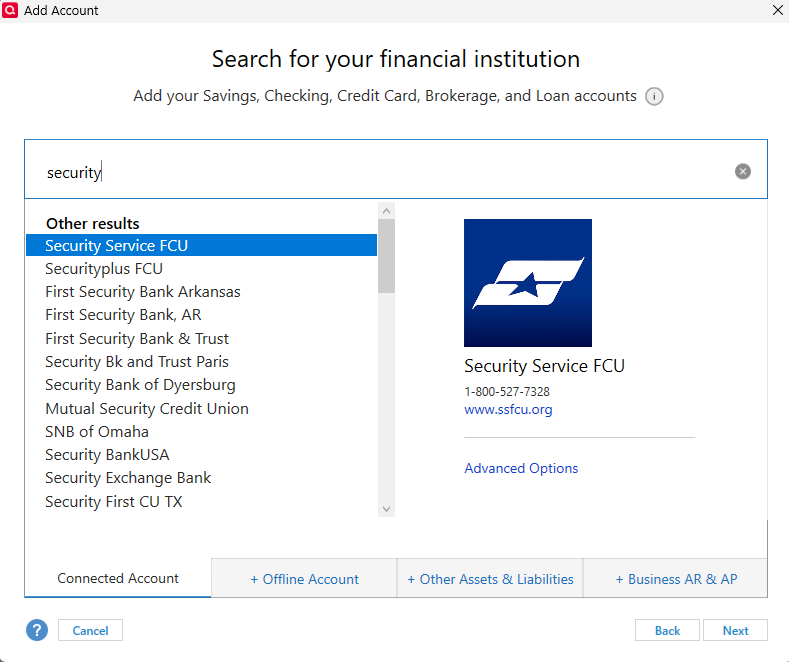
Q user since February, 1990. DOS Version 4
Now running Quicken Windows Subscription, Business & Personal
Retired "Certified Information Systems Auditor" & Bank Audit VP-1 -
@gtgerbo My case ID is 12333611 and I believe it was assigned on 4/3/26. I had a case before that one but it appears as if Quicken closed it with no resolution. I don't know if my escalation case is still open because when I contacted Quicken to ask for an update a few days ago, I was instructed to call Quicken again. I am not doing that because it doesn't value my time. I am not going in circles with technical support and have already spent many hours trying to troubleshoot this by Validating, deactivating/activating several times, creating a test file, clearing the online sync, etc. It was rude of Quicken to ask me to call support again. Why? Did they close my case and want me to open a new one?
@NotACPA I provided the steps to reproduce the issue and will do so again here.
- I went to ssfcu.org through a web browser outside of Quicken and logged into my account.
- I downloaded transactions for one of my accounts into a .qfx file.
- I clicked the .qfx file in File Explorer and went to Quicken. It opened a window "Import Downloaded Transactions".
- I selected the radio dial option "Link to an existing account", selected the correct account, and clicked the Import button.
- Quicken imported the transactions and the flag was raised next to the account.
- I clicked the Gear in that account and selected Edit account details.
- Select the Online Services tab. I found that Quicken had automatically set up a "Web Connect" Connection Method.
- Click the Gear and select "Update now". Quicken opens a web browser and tries to go to https://mybranch.ssfcu.org/.
- I just went through the steps listed above again and it is repeatable every time. I know you can't try it if you don't have an account at SSFCU to log into but I can assure you that this is what happens. I have no idea where Quicken pulls the mybranch URL from, but it happens when I click "Update now" in Quicken so obviously the software is responsible!
0 -
As @jacobs articulated very well, Quicken needs to take ownership of the issue… Just fix the problem already.
Hang on… that's definitely not what I said. 😉 Quicken can acknowledge the issue (which is what I asked the moderator if he could confirm). Quicken can report the issue to Intuit, their connectivity service provider. But Quicken cannot "take ownership of the issue" if the issue is something on the financial institution's end.
Quicken cannot expect every financial institution to know how to fix an issue that affects their customer's ability to connect and download transactions.
Yes, Quicken can expect each financial institution to make their connection work according to protocols. The financial institution signed an agreement with Intuit to do just that.
If the problem is on SSFCU, Quicken should have the expertise to help the credit union expedite a fix.
If the problem is on SSFCU, they have to want to fix it. Fixing a connectivity issue with Quicken is not always a high priority for the IT team at a financial institution. I know of issues where Quicken has identified a problem and the financial institution has told them they have scheduled a fix for three months later due to other priorities. I don't know anything about SSFCU, but many small financial institutions outsource their connectivity IT to an outside provider, meaning there can be four different parties involved.
Or are you saying, it's SSFCU's problem and leave them out to fend for themselves to figure out how to resolve an issue with 3rd party software?
Fend for themselves? Quicken is not some big bully beating up on poor little SSFCU. (Quicken is actually the little guy here: SSFCU has about 2,000 employees to Quicken's roughly 200.) If it's SSFCU's problem, then yes, they have to fix their problem. Of course they can communicate with Quicken — but more likely Intuit — if they need help in testing that their respective servers are communicating correctly.
Quicken Mac Subscription • Quicken user since 19931 -
@ZChefDan You've mentioned twice about seeing the mybranch.ssfcu.org URL. Since that's not the URL in the fidir.txt file, as @NotACPA has mentioned, I wonder if it is something in the .qfx file coming from SSFCU. Could you try opening the .qfx file in Notepad or any other text editor, and do a search to see if "my branch" is found in the file.
Quicken Mac Subscription • Quicken user since 19930 -
@jacobs I searched the QFX file and it does not contain the defunct mybranch URL. I found a folder on my hard drive C:\ProgramData\Quicken\14107 and renamed it thinking that it might contain cached data with the old URL. I imported another QFX file and Quicken recreated the 14107 folder, but "Update now" still points to the defunct URL. I don't know where Quicken is getting that defunct URL from. I searched the fidir.txt file on my computer and it contains the correct URL for SSFCU. I also looked in Tools —> Online Center and the contact info for SSFCU is correct. I tried to use AI to determine where the defunct URL might be coming from and it opines that Quicken might need to update the Master FIDIR record for FID 14107. I don't know what that is or whether that makes sense. I also don't know if the defunct URL is a totally different issue or somehow related to the CC50X errors, which is my main concern. I only tried to use the WC - Update now as a workaround because EWC isn't working. I think there might be something to my login with 2 accounts working and the one with 7 accounts failing but it's only a guess because it would make sense that it takes longer to aggregate 7 accounts than 2. I don't understand the details that cause CC50X errors and it seems like three entities are involved: Quicken, Intuit, and SSFCU. All the stakeholders need to work together to resolve this issue. Finger pointing won't resolve it.
0




