Split Transfer Transactions Are Not Showing Splits on the Receiving Account

I browsed the community and didn't find the same problem. I am on Quicken Classic Deluxe, Ver R67.7, Build 27.1.67.7, Windows 11 Enterprise.
When I enter a Transfer transaction with splits in the register of the "originating" account, the receiving account register shows the new transaction in its register with the correct total amount, but the transaction does not include the splits. I tried reversing the transaction entry sequence by entering it in the account that was the receiving account and sending it to the account that was the originating account. Same thing happened (or didn't happen). The transfer is not complex, the categories (account names) and tags are the same for each of three splits. I identify the difference between the split lines with notes in the memo space. I tried to edit the transaction in the receiving account to add the splits manually. Quicken allowed me to enter the split transaction details in the pop-up Split Transaction window. Quicken accepted the completed split transaction window when I selected “OK”, but when I selected the save icon for the transaction (bottom right), an error message popped up telling me I had to go to the source transaction and make the edits there, where, of course, the splits already exist. The edits were automatically discarded. As a result, I am having to recreate a Quicken report manually on Excel to show the information as I want it presented.
I recently purchased a new laptop with Windows 11 and transferred my Quicken activity to the new laptop. I don't recall having this problem on my Windows 10 laptop.
Comments
-
Splits can only be on one side of a transaction. Any transfer in a split to another account will be a single transfer transaction in that account. If you have more than one split line with a transfer to the same account those amounts will be combined into a single transfer transaction in the other account.
0 -
Thanks for the reply. Do you know why? Programming limitations? Std accounting practices? Just the way it is?
Sounds like the better thing to do is not enter split transfer transactions if the split detail is needed at both ends. Instead enter multiple separate transactions. This would also extend to the actual transactions at your banking, investment, etc institutions to ease the reconciliation process.
0 -
@dkdavis1 - Generally, the split category details are only needed on one side (in the originating account) because that is where the splits actually have occurred. The exception to this is only with regard to transfers where the transfer need to be present in the originating account (in the split category) and in the receiving account as a single category (because the other category splits never occurred in that receiving account). If all of the splits in the sending account transaction were to be included in the receiving account transaction it would cause the following issues:
- It would duplicate the category splits in Quicken reports with one being a negative number and the other being a positive number. They would then cancel each other out in the various Quicken reports.
- Since the sum of the splits must equal the total amount of the transaction a split can only work with the original sending account transaction. In the receiving account transaction it should show just the transfer amount, not the other category splits added to it. For instance, if you have a $100 transaction entered into the sending account with $50 being transferred to the receiving account and $50 being assigned to some other category but that other category is also included in the receiving account split then the receiving account would have a $100 total transaction dollar amount instead of the correct $50 total transaction amount. That, of course, would throw the receiving account out of balance.
What you describe about how Quicken is handling split categories is the correct way Quicken should be handling it. It has worked that way for as long as I can remember (going back to QWin 2010 when I migrated from MS Money).
Would it be possible for you to take a picture of your category split in the original sending account and then post it here? It would be helpful to us in understanding what you are trying to accomplish so we can provide you less generic replies.
If you don't know how to post a picture you can review this FAQ:
Quicken Classic Premier (US) Subscription: R67.7 on Windows 11 Home
0 -
Thanks for your reply. Whether you have the splits or not at the receiving end the transfers will always result in a positive and negative entry among the accounts involved. That's the nature of the beast. Your other point comes closer to the problems I am experiencing. I'm sorry, but I can't reply immediately, but I will try to get back to you as soon as I can. I tried to craft a quick answer, but I realized it wasn't making sense.
0 -
By using Tags (what comes after the / in the transfer to my Escrow account) I get 2 lines created in that account.
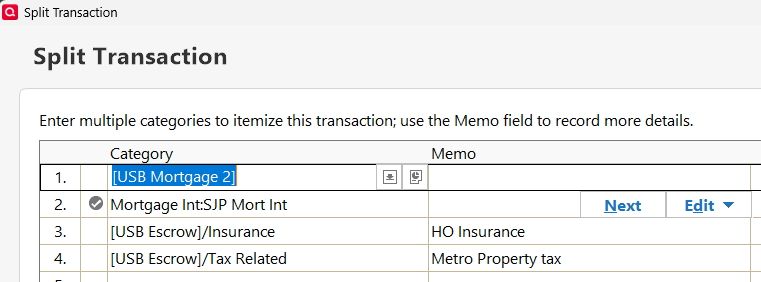
Q user since February, 1990. DOS Version 4
Now running Quicken Windows Subscription, Business & Personal
Retired "Certified Information Systems Auditor" & Bank Audit VP2 -
I appreciate all of your feedback and I understand that the way the splits are handled between two accounts is intentional and not a glitch. This will likely be my last post as I need to move on. For your understanding as to why this is an issue for me, if you're interested, I am giving the following explanation:
I am spending a lot of time in Reports as I take a deep dive back a few years to create a picture of my finances over this time. I am using this information for future budgeting. It's been a turbulent time for me many reasons, which isn't necessary to get into further here. I'm not in any kind of financial distress, but I have been involved in a lot of uncommon financial scenarios all at the same time. And I just haven't been able to be as structured and consistent in my recording transactions. I'm taking time now to look back to see where I may need to make some corrections/adjustments.
Part of my process is to reconcile transfers and that is where I have run into the problem with splits. I run reports then export to excell to "sort & spin" the data (Tags, Categories, Dates, Accounts …). For the sending account, I can make the reports show the split detail but it does not show the transaction total amount. On the receiving account the report shows only the total amount and not the split detail. Through a long list of transactions this becomes a challenge to research and match up the corresponding transfer transactions. It just takes more time.
For me, within Quicken, I would prefer to see the splits at both ends.
Best wishes for you all, and again, thank you for your comments and input.
0


