R67.7 Reports & Graphs Center issues

Since the last upgrade, my reports and graphs functionality has stopped working well, especially when trying to run "how much did I spend on" or "how much did I pay to". The drop box which I used to be able to quickly type in to find a category or vendor name does not work anymore and then Quicken stops working. So frustrating. I hate updating the software these days as I know something else will break. This is functionality I use all the time and now it doesn't work. Help!
Answers
-
While you await a fix for the Easy Answer reports, I suggest you try the All Transactions register. You can find the link for All Accounts at the top of the Account Bar. Once you have the All Accounts register open, use its search box to enter some or all of the payee or category you want the report for.
Quicken user since Q1999. Currently using QW2017.
Questions? Check out the Quicken Windows FAQ list1 -
I am having the same problem. I find the Easy Answer reports unusable at present. Trying to enter a payee name no longer works and the things just hangs.
0 -
The Easy Answer dropdowns for both "pay" and "spend" are still working for me with R67.7
Q user since February, 1990. DOS Version 4
Now running Quicken Windows Subscription, Business & Personal
Retired "Certified Information Systems Auditor" & Bank Audit VP0 -
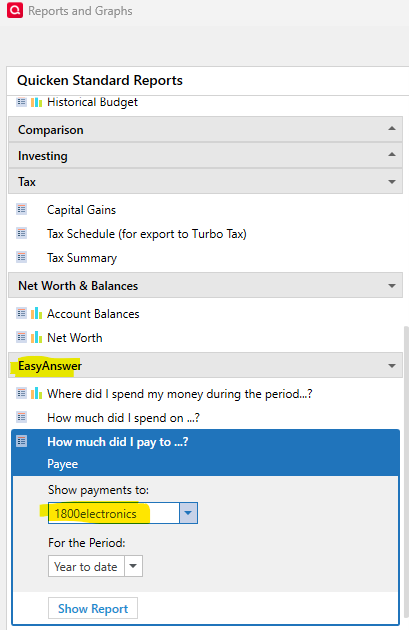
What I am seeing is that in the Reports and Graphs Center, the EasyAnswer reports "Show Payments to" box is a dropdown only, you can't type a name. When it is working, it only searches for the first letter of what you type. If you are looking for "Fred" and type F, it shows the first entry that starts with F, as expected. But when you type R, It shows the entries that start with R, not FR.
Also if I switch to another open Windows application while the dropdown selections are displayed, the selections sometimes remain on top of the new application, or I must click twice to switch to the new app. After making a couple of selections from the Reports and Graphs Center, Quicken sometimes hangs, I think until you close the Reports and Graphs center.
Some of these issues were first reported in 2024, but were apparently never resolved
In previous versions, we could work around issues with the new Reports and Graphs Center by reverting to the old version in Preferences > Early access, but that option has been removed in R67.7.
I edited the title to clarify the issue
QWin Premier subscription1 -
When I try to use the "How much did I pay to" report, nothing hangs. I can make it work.
However, the payee name selection is primitive, to say the least and only allows a single payee to be selected. I can type the first letter of the payee name to position the list to payee beginning with "S", for example. Next I use the mouse's scroll wheel to scroll down to the actual name. Click to select one payee name, then click "Show Report" and you have your report.Multiple selection by typing several letters, e.g., "San" for "San Francisco" does not work.
Selection of more than one Payee Name, e.g., all Payees beginning with "San Fran", does not work.If your Payee Name list is "dirty", containing dozens or hundreds of similarly named, yet different Payee Names all referring to one payee, e.g., "POS TRANS 070124 STARBU", "POSTRANS 070224 STARBU", "POS TRANS 070324 STARBU" all the result of going to Starbucks for a cup of coffee … some cleanup would be helpful, both for existing register entries and, using Renaming Rules, for new transactions.
1 -
The text in the Reports & Graphs Center & the Easy access menus is now so small as to be almost unreadable.
0 -
Piling on with another issue associated with custom reports in the new interface. Under the old interface when a custom report was run and either a new security or new category was added since the report was last saved, a pop-up window asking if you wanted to update the report appeared. If you clicked Okay, the customize report window would pop-up with filter check boxes to show only the new categories or new securities.
The customize window still pops up with the filter check boxes, but they no longer work and show all categories and securities rather than just the newly added ones.
2 -
Exactly. I made a mention of it in this post that I created, second comment, mid paragraph, where I wrote:
Another issue I discovered was running a saved report after adding a new category where the checkbox to show the new category does not work as well as it did.
- Q Win Deluxe user since 2010, US Subscription
- I don't use Cloud Sync, Mobile & Web, Bill Pay1 -
Quicken version R67.7 on PC Windows 11.
In Easy Answer reports, the drop-down menus in "How much did I spend on…" and "How much did I pay to…" are exceedingly slow to respond, and sometimes not at all. This happened with the latest release. Will this be fixed with next release?
0 -
Hello @MDW,
Thanks for reaching out to tell us about this issue!
To better assist you, could you please provide the following details?
- Where is your Quicken data file stored? Is it on your local hard drive (C: Drive) or a cloud-based/external drive (e.g.: OneDrive, DropBox, USB, etc.)?
- Please provide the exact file path as shown in the example below.

- Please provide the exact file path as shown in the example below.
- Have you attempted any troubleshooting steps so far? If so, what were they?
- When did this issue first start occurring?
- Were there any significant changes to your system or software before the issue began (updates, new installations, etc.)?
Your answers will help us diagnose the issue more effectively.
Looking forward to your response!
-Quicken Anja
Make sure to sign up for the email digest to see a round up of your top posts.0 - Where is your Quicken data file stored? Is it on your local hard drive (C: Drive) or a cloud-based/external drive (e.g.: OneDrive, DropBox, USB, etc.)?
-
Hello, in answer to the above questions from the moderator…we ALL seem to experiencing the same issue with
R67.7 on PC Windows 11.
I have been a user of Quicken for 20 plus years and use the feature of the Easy Answer Reports constantly. The Easy Answer reports are no longer working. They bring up the first vendor and then either stops all together or if you can type, it only allows you to type the first letter of the vendor. I have thousands of vendors over the years. This used to be a report I could pull up in seconds before the update.
I don't see a way to troubleshoot. The issues started happening after the last update to Quicken.
The path:

Thank you for any help.
0






