OSU Issues/Error CC-501
Answers
-
Hello All,
Our teams are aware of the issue with One Step Update hanging, and CC-501 errors, and are working to resolve this, though we do not have an ETA available at this time!
Please refer to these Community Alerts for any and all available updates:
- Reopened 11/1/25 One Step Update Slowness / Error CC-501/FDP-101
- NEW 10/31/25 QWIN - CC-501 - Multiple financial institutions
If you are still experiencing the issue, we recommend trying the steps outlined in the alert or waiting 1–2 hours while we continue working on a resolution.
We appreciate your patience while our teams work to resolve this!
-Quicken Anja
Make sure to sign up for the email digest to see a round up of your top posts.0 -
Just an FYI. My Fidelity credit card updates just fine while the investments accounts have the same CC-501 error they've had for the past 2 days. I did the "fix" yesterday - which seems to have a shelf life of less than 24 hours. I'm beginning to wonder why I still pay for service that provides very little. I can manually enter my transactions faster than this.
1 -
Got this just now trying to reset account:
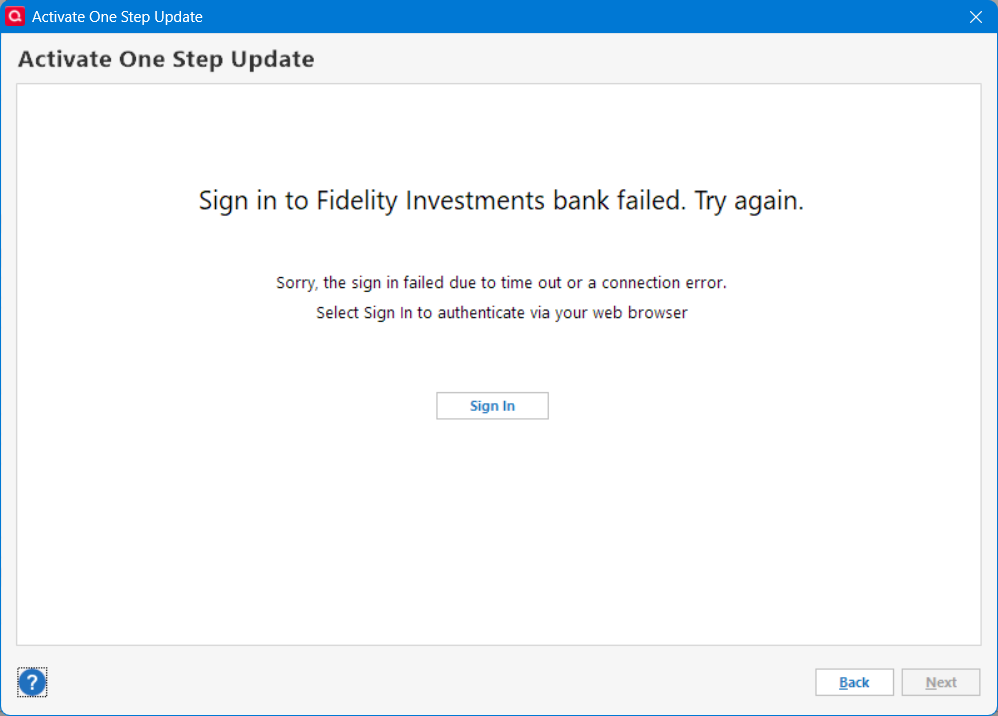
Maybe a step in working out the issue. Hopefully.
I got through the Sign In after 3 attempts.
Deluxe R65.29, Windows 11 Pro
1 -
Have been having the same issue for a couple days. Today the OSU has not only Fidelity and Schwab issues, but now including several credit card accounts as well with the 501 error.
1 -
I'm suddenly (2025-11-01) getting a CC-501 error on Charles Schwab for all my accounts. "We are unable to update this account due to an unknown error". Any help????
Quicken Classic Windows (Premier) Version R64.35; Build 27.1.64.35
I can log in to Schwab just fine on my browser, and see multiple transactions that have not been downloaded.
John
1 -
I continue to see the above described CC-501 error today, 11/1/2025, with my Fidelity accounts in Quicken Classic Deluxe, for the third day running. Other accounts function normally.
0 -
I am having the same problem (CC-501) using the One Step Update with Merrill Lynch. This began several days ago. I have 3 files each with multiple brokerage accounts and each file when trying to use One Step Update takes 3-5 minutes to run and then fails with a CC-501 error. Additionally, I have tried deactivating the accounts and re-connecting them, but the failure continues. Even the reconnecting process has been taking 3-5 minutes with Quicken when it normally is 10-20 seconds.
Prior to this problem, I have been receiving a CC-506 error, which I understand has been escalated to the California team. It has been months since my On Step Update has cleanly run and this is extremely frustrating and time consuming.
0 -
This started out last week as a Fidelity and Merrill Lynch issue. The list has expanded to include other FIs. It makes me think this is not a Fidelity and Merrill Lynch issue as much as it is an Intuit and/or Quicken issue.
Quicken Classic Premier (US) Subscription: R65.29 on Windows 11 Home
0 -
Assuming that someone from Quicken actually reads this….
I am getting the CC-501 error from Schwab when I do a OSU. However, my Schwab Bank checking account is getting transactions while brokerage accounts are not. They are all under the same login. Thought that might a clue to someone.
1 -
This content has been removed.
-
I'm having the same CC-501 issues. Started a few days ago. Schwab and Fidelity.
1 -
I have also experienced slow OSUs around 9 AM EDT this morning. I have 2 Fidelity logins and the delay is apparently 5 minutes for each, followed by CC-501 errors.
I tried a Download transactions for one of the accounts at 11:40 EDT and received another CC-501. Following the instructions in the latest Alert, I tried resetting that account. This led to a Fidelity login to reauthorize, followed by the Add/Link accounts screen. Promisingly, this included an opportunity to link a new Fidelity account that was just created yesterday.
I linked the new account and the one I had reset and following a delay of several minutes "Updating your accounts," the process completed with no errors, but no new transactions were downloaded and the accounts do not have a Last Download timestamp.
In one of the accounts, an HSA, I was expecting a dividend reinvestment for FDRXX but it did not download. However when I do a Reconcile Shares, it reports a mismatch for FDRXX for the reinvested shares, so the new share balances have downloaded correctly. I will wait to see if the expected reinvestment downloads on Monday.
QWin Premier subscription0 -
Receiving a CC-501 on Fidelity for 5 accounts on OSU and when using Update Transactions on individual accounts. However, transactions seem to have downloaded to the accounts and the balances are in line with Fidelity Web Site. On first attempt this morning seems the Fidelity download with CC-501 delayed the whole process. Sent a problem report.
 Windows 11 Home / Quicken Premier Subscription - Quicken user since the last century0
 -
No downloads happening under One-Step Update. Getting this message for both the logins we have with Schwab covering over a dozen accounts in total: "We are unable to update this account due to an unknown error. For more information, see this FAQ…."
Updates stopped coming in sometime yesterday but I think this message started showing up only this morning Pacific time
Windows 11, Quicken Classic Premier, R64.35, Build 27.1.64.35
0 -
I am seeing the same CC-501 errors on Fidelity and Merrill Lynch accounts. First noticed it 2 days ago.
0 -
Here is different result: I ran OSU this morning (01Nov) and had the same symptoms - long completion times on all EWC+ accounts and CC-501 error on Fidelity Investments. However, 5 of 7 accounts Fidelity downloaded transactions. In one account, an interest payment was recorded as a dividend for an unidentified security. Also, I manually added a dividend payment and an interest payment in a smart cash account (one of the 2 that did not update). This should have flagged a difference between the online center holdings and Quicken - it did not.
I reset the smart cash account and ran OSU. I download the transactions that I had manually entered, but is did not recognize the matches.
0 -
Hello @Double-A,
Thank you for letting us know you're seeing this issue. It is a known issue, and I merged your post with the existing discussion. If you haven't already done so, please bookmark this Community Alert to track the status of the issue and know when it's resolved:
Thank you!
Quicken Kristina
Make sure to sign up for the email digest to see a round up of your top posts.
0 -
I don't know why, but I tried "Update Transactions" from different Fidelity accounts and each time, Quicken downloaded some more transactions. In total, I downloaded 3 times for 6 Fidelity accounts. I restored a backup datafile and tried to download and got the CC-501 and all attempts of individual "Update Transactions" for different accounts downloaded nothing. So I went back to the copy that has the latest downloads. Very unpredictable behavior. Too bad it's month end when this happens.
Deluxe R65.29, Windows 11 Pro
1 -
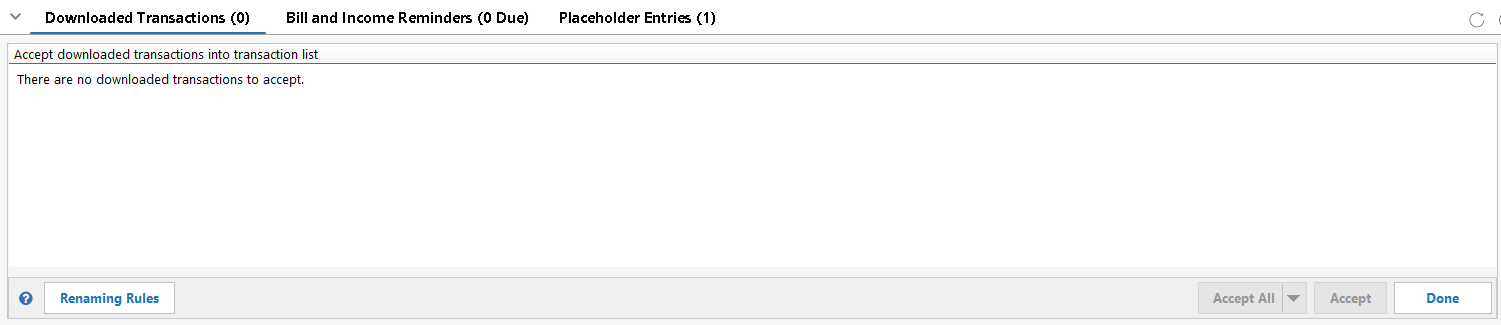
OSU finally completed without errors for me, and it said there were new transactions for my Fidelity and other accounts, but there were no flags or downloaded transactions for Fidelity. So it looks like they went into the bit bucket.
What was interesting was that the accounts I expected to have transactions did have the Downloaded Transactions window expanded at the screen bottom, but there were no transactions there, and the Done button was showing. The window collapsed after closing & reopening Quicken. Problem reported.
0 -
I noticed this for the accounts I was expecting downloads for:

And this for accounts I got downloads and accepted them:
 0
0 -
I reset all 5 of my Charles Schwab accounts per Quicken Kathryn's instructions and only 1 of the 5 accounts updated. I tried closing and reopening Quicken to see if that would help, performed an update and that didn't work. The remaining 4 will not update.
0 -
As of 5:20PM Eastern, both Fidelity & Merrill downloaded in normal time. All expected transactions were received correctly.
1 -
Despite saying it's resolved, it's not. just a little different. I tried downloading fidelity. Took a while, but then it downloaded past transactions. so I tried resetting the account in the online services tab. Got an error message about closed dataset. None of the accounts were closed.
1 -
Based on MrZookie's report at 5:32 pm (above, Nov 1), I ran Quicken and the update. While I can report that I did not receive the usual CC-501 error, none of my Fidelity investment accounts updated with transactions that occurred over the 3 days. Close, but no cigar….
UPDATE to my comment…. I just re-ran the update, and it finally downloaded the last 3 days of transactions discussed above.
0 -
I tried updating again and got a CC-800 error. Quicken disconnected 2 of my Fidelity accounts. I reset one of the disconnected accounts and was able to relink the 2 disconnected accounts. Such unstable behavior.
Deluxe R65.29, Windows 11 Pro
0 -
No errors now but Fidelity transaction update still lacking transactions. Manual entry it shall be (bad day to receive my renewal notice too)!
0 -
I thought I had posted this somewhere, but can't find it. I am not getting the 501 error. Just getting many old transactions, as I did when it converted to the new interface. I'll wait until tomorrow, but I guess I'll have to delete the duplicate ones. AGAIN!!
1 -
I just ran OSU and Fidelity correctly updated all but one of my accounts (except for the FDRXX MMF issue with my retirement accounts).
The other account had been deactivated earlier today when I tried to do Reset Account for it. I then did Add Account for Fidelity Investments and was able to reactivate that one account when my end-of-month transactions were all correctly downloaded (except for the FDRXX MMF issue).
So, now I am waiting for R65 to be released to see if that will actually fix the FDRXX MMF issue.
Quicken Classic Premier (US) Subscription: R65.29 on Windows 11 Home
1 -
For me, downloads have eventually worked in the evening and broken again in the mornings.
Deluxe R65.29, Windows 11 Pro
1






Categories
- All Categories
- 64 Product Ideas
- 36 Announcements
- 222 Alerts, Online Banking & Known Product Issues
- 21 Product Alerts
- 704 Welcome to the Community!
- 673 Before you Buy
- 1.2K Product Ideas
- 54K Quicken Classic for Windows
- 16.4K Quicken Classic for Mac
- 1K Quicken Mobile
- 812 Quicken on the Web
- 115 Quicken LifeHub