Feature Request: Child Windows and Dialogs Center on App, Not on Screen (7 Legacy Votes)

I have a wide monitor and like to run the program on half the screen (Win+Left or Win+Right, for those unaware) so I can have my web browser and email client open at the same time (e.g. when reconciling from an online statement). Currently, any dialogs (e.g. paycheck details form) pop-up center-screen, straddling Quicken and my other open program(s). I would like to see these windows and dialogs open over the main application instead.
Some more examples of the dialogs I am referring to: enter transaction dialog, print checks dialog, add account dialog, recategorize dialog, etc.
Thank you for your consideration.
Comments
-
Yes, please. This would be most helpful.
Quicken user since Q1999. Currently using QW2017.
Questions? Check out the Quicken Windows FAQ list1 -
Hello All,
This Idea seems to have fallen stagnant and due to the age of the request and lack of User Votes/Comments, it will be archived within the next 7 business days.
If you would like to see this Idea kept alive and considered for possible future implementation in Quicken, be sure to add your vote and a comment explaining how this Idea would be beneficial for you.
More information, including steps to vote and how to submit your own Ideas for future product features/improvements, is also available here.
Thank you,
Quicken Community Support Team
0 -
I think the OP made the case well.0
-
I'd like to see this implemented too. I often have multiple windows open when working with Quicken - a web browser and Excel are probably the most common, and I frequently have to move a Quicken pop-up window out of the way when it appears in the centre of the display.US Quicken Deluxe for Windows Subscription R28.16 on Windows 10 Pro v20040
-
Hello All,
The Community Support team regularly reviews long-standing posts and Ideas for relevancy and current interest. This Idea seems to have stalled and we would like to gauge the current interest in this request.
If you would like to see this idea implemented, please add your vote and a comment explaining how this idea would be beneficial for you. More information, including steps to vote and how to submit your own Ideas for future product features/improvements, is also available here.
Thank you,
Quicken Community Support Team
-Quicken Anja
Make sure to sign up for the email digest to see a round up of your top posts.0 -
I created a new post and was pointed by Quicken to this old post. Fixing this is easy for any decent programmer. The only excuse Quicken has is that screens were all small when they started.
Looked at present day, the best I can say is sloppy programming. Bad on all and very bad on larger screens. Pop up windows such as update accounts (but all others) appear randomly placed (though maybe as indicated above they are in the center of the screen). They should default to the center of the Quicken window. If moved by the user, the last position should be remembered.
To explain the problem, I use a large screen and keep Quicken on the right side. When I log in, the password window is on the left. Worse, it often starts hidden underneath another program such as outlook. Same for the account vault password. Then the update progress window appears over my other work on the left, forcing me to drag it back over Quicken (which is unusable during updates) so it does not interfere with my other work. And every time I update, I have to drag it over again and again.
This means every start up, I get three similar annoyances. As I said, this is sloppy.
1 -
seems like an easy fix to make Quicken work like other Windows programs (i.e., normal) My OSU dialog window first opens in the center of my 27" iMac and I typically have Quicken open on LH side of the screen. should open in center of Quickens window area or at last location, instead always back to center of the screen and under other windows. sad really.
1 -
My solution is using a second 33" monitor alongside my 17" main laptop monitor. Since I spend the vast majority of my computer time with several documents and multiple applications open, this works well for me. Also, I use a couple older desktop computers for other applications, one of which has a 27" monitor. We use a NAS device with four large disks for our data that is shared to all machines.
One additional thing I would appreciate would be having Q given the ability to open wider fields in the display so the data is not always truncated making me manually spread the fields. It has been decades since I did any front-end development of applications, but I think there must be a way to automatically widen the fields in the displays such as the registers and reports. It's much easier to drag the window wider than to manually adjust each field. The management studio for my database software does this automatically.
Ó¿Õ¬
Faithful Q user since 1986, with historical data beginning in 1943, programmer, database designer and developer for 42 years, general troublemaker on Community.Quicken.Com0 -
Mbinday, I have to agree that "Looked at present day, the best I can say is sloppy programming."
I know you all get tired of my constant comments on issues with Q, "the software we love to hate".
Quicken does really need a complete do-over from scratch, including both user interface, FI interface, and database design.
One of the totally mind-blowing things I constantly marvel at is the massive number of reported failures for connecting and downloading data. Now stop and think about that for a minute. Is it logical that so many financial institutions would have so many failures in all their various systems that would cause so many constant failures with a single application?
[Removed - Speculation]
Ó¿Õ¬
Faithful Q user since 1986, with historical data beginning in 1943, programmer, database designer and developer for 42 years, general troublemaker on Community.Quicken.Com0 -
I also created a new post and was pointed by @Quicken Kristina to this old post, which is generally the same request. I agree with the @mbinday post above and others who have essentially said that it should not be the way it is, and should be readily fixable with better programming practices. As @mbinday says above, he gets 3 annoyances just in starting up the program, and I can say I get annoyed repeatedly through a session with numerous actions that bring up Child Windows and Dialogs. Below is the essence of my newer Post, and also a LINK to it.
My preference would be for: 1) All Child and Dialog windows to open fully Inside the Quicken main window, 2) Preferably sized to their minimum size without requiring scroll bars, and biased toward the right side, so I can still see Account Bar on the left, and 3) For subsequent or next level dialogs, have those open biased toward the right as well, and perhaps offset somewhat lower, without extending beyond the confines of the main window. Even just centered within the Quicken main window would be better than nothing, if biasing it to the right side is too challenging.
I have voted in favor of this change … but with just 13 votes in 9 years, I'm not sure I'll be around to see it implemented. The whole process of getting the simplest and most obvious things done here is just painfully slow, inefficient, and with the odds stacked against it. I'll concede this is window dressing compared to mission critical functions like maintaining robust connectivity with our financial institutions, but it does affect the day-to-day feeling of quality around using the product.
0 -
Voted.
- Q Win Deluxe user since 2010, US Subscription
- I don't use Cloud Sync, Mobile & Web, Bill Pay1 -
Never voted before, but hope this post counts. I too have been inconvenienced by Dialogs coming up mid-screen vs mid-application window.
1 -
Just copying over some comments from other people that commented to my more recent Post, which is essentially the same as this, and from which I was referred to this post to Vote for, and seek others comments and support. Thanks to all !
From @Chris_QPW: I already voted for it long ago.
From @BarryGraham: I voted in favor. Thanks for your confidence in me!
From @Boatnmaniac: This is not something that affects me but I can understand how it would be a good improvement for others, especially since I've seen several posts over the years about this. I had not seen this idea before so I had not voted for it previously. I just now did vote for it.
From @BK: I too just voted for this. There are several issues with Quicken not playing well with the graphics - all minor. I have participated in various posts and added my own experience to them as well.
0 -
I want to add something to this. As a matter of standard good GUI practices not only shouldn't a program use the "system dialog" (which is the one centered on the main screen instead of the application) any window or dialog that is more than "simple message" should be saving its size and position.
There is nothing more frustrating than having to resize/reposition dialogs/windows over and over because the default isn't in a good place for the user.
This should be a standard practice that doesn't need people to point out each dialog that is wrong. It is bad enough that happens with the old dialog/windows, but new dialogs and windows are being created with the same bad policies. Like this:
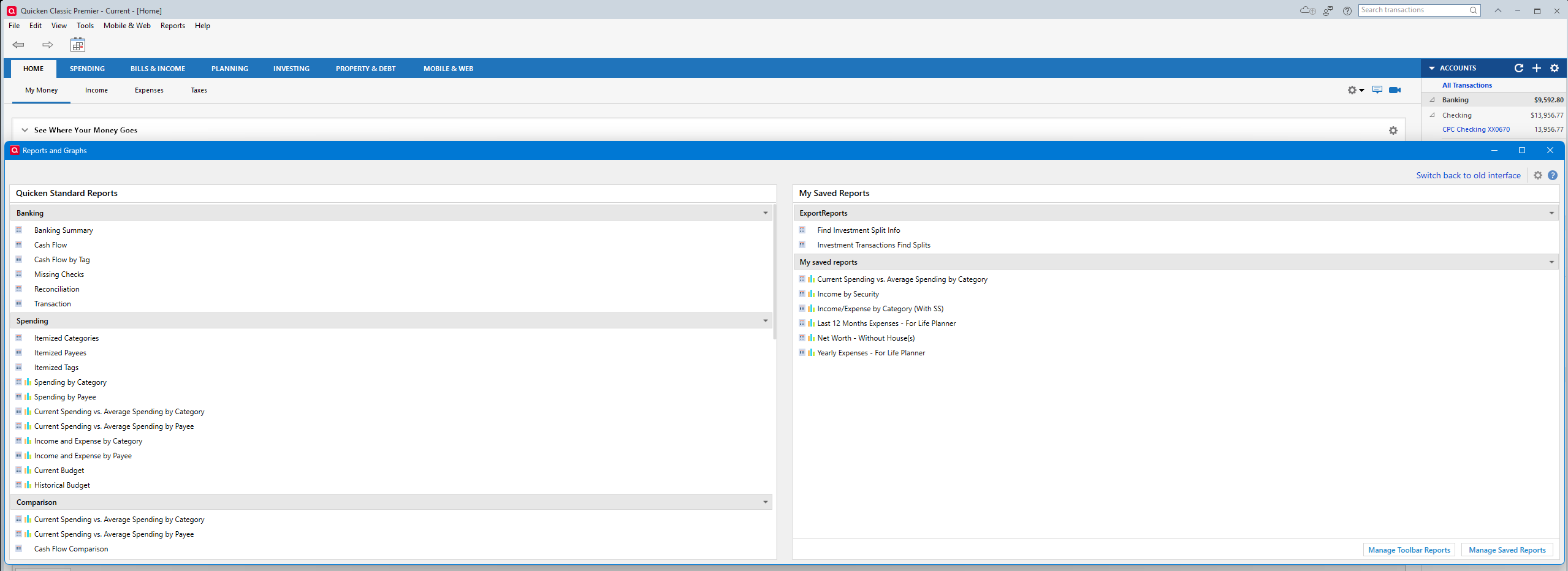
And I will point out that the "vote count" should MUCH higher. As in this problem has been brought up many times, and over the years each of those threads have been ignored/archived. Just as this one has a history of trying to be silenced.
2 -
And I'm going to add something else. The Quicken Windows developers have taken on themselves to make a lot of these "dialogs" windows that they control the size and position, and they are doing a terrible job of this whenever multiple displays are used.
This shows up all over the place, from graphs that have graphics in the wrong place to little pop ups on the wrong screen to windows on the wrong screen.
At the fundamental level Quicken isn't calculating the position of Quicken's main window correctly, at least not in all cases.
3 -
I'd like to see the improvements proposed here implemented asap.
1








