What’s Going On Between Fidelity and Quicken?

I’ve been a long-time user of Quicken Deluxe for Windows and, until recently, had very few issues downloading transactions from Fidelity.
Following a recent computer failure in which I lost key files, I had to reinstall Quicken from scratch. When I re-added my Fidelity accounts, I was surprised to find that only “Simple” investment tracking was available.
This limitation did not apply to my Schwab accounts, where complete tracking was available and transactions downloaded without issue.
I initially assumed I could switch to “Complete” tracking later, as it’s critical to how I manage my investments. However, even “Simple” tracking didn’t work—my Fidelity accounts displayed zero balances and no transaction history. Worse still, when I tried to edit the accounts, both tracking options were grayed out and unavailable.
I later learned that Quicken has changed the way it connects to Fidelity, apparently discontinuing Direct Connect. What’s baffling is that I had been using Direct Connect without problems just days earlier and was never notified that such a significant change was coming.
When I contacted Quicken support, the representative eventually gave up and told me to call Fidelity. But this isn’t a Fidelity issue—it’s Quicken’s responsibility to ensure its software functions with supported institutions. Customers are paying for both a product and a service, and when key features are limited—or, as in my case, completely removed—the value of what we’ve paid for is significantly diminished.
Fidelity represents a large portion of my investment portfolio. While I could have worked with Simple tracking if necessary, having no access to account data is unacceptable. After years of relying on Quicken, I’m now forced to abandon it altogether.
This situation is incredibly frustrating. Quicken must be more transparent about changes like this and take ownership of resolving them.
Comments
-
@Desiree what financial institution are you using to connect with Fidelity? Open your Account List (Ctrl-A) and look in the "Financial Institution" column.
0 -
Make sure you are connecting to the correct Fidelity financial institution. Just recently the Add Account financial institutions got changed so if you set up with Fidelity Investments (the traditional one for Direct Connect and Complete Tracking) it will now be set up with Express Web Connect+ and Simple Tracking.
To set up your accounts, again, with Direct Connect and Complete Tracking you now need to do the downloading set up via Fidelity Investments DC.
This change was announced recently in this Announcement post: Fidelity Account Name Changes.
So, if your accounts are currently set up via Fidelity Investments:
- Back up your data file before proceeding.
- Deactivate your Fidelity accounts (all of them) on the Online Services tab of Account Details.
- Change the Tracking method (for each account) from Simple to Complete on the General tab of Account Details.
- Do Add Account and type in and select Fidelity Investments DC.
- When prompted, make sure the downloads get properly Linked to the accounts you have in Quicken.
Please confirm whether or not this resolved the issue for you.
Quicken Classic Premier (US) Subscription: R66.23 on Windows 11 Home
0 -
Boatnmaniac, thank you for your suggestions. Unfortunately, the issue remains unresolved.
I tried connecting using Fidelity Investments, Fidelity Investments DC, and Fidelity NetBenefits (which is necessary for accessing my 401(k)).
None of these options worked. I removed the connections, re-added them numerous times, and ultimately contacted the Quicken help desk.
The support representative attempted a few steps but was puzzled when both the “Simple” and “Complete” tracking options were grayed out and unavailable. Seemingly, this was an issue he hadn’t seen before. That’s when I was told to contact Fidelity directly.
Considering that the majority of my accounts are with Fidelity and no data is being shared I've opted to cancel my subscription for now. Perhaps this issue will be resolved at a later date.
0 -
@Desiree I know you have tried a lot of troubleshooting to get your connection to work, but there are two other things to try if you haven't already -
- Uninstall and reinstall Quicken.
- Set up a new Fidelity account in a test file to see if you can connect with Fidelity DC and change your Tracking Method to "Complete".
This will at least narrow down what the issue might be.
0 -
@Desiree said:
None of these options worked. I removed the connections, re-added them numerous times, and ultimately contacted the Quicken help desk.
The support representative attempted a few steps but was puzzled when both the “Simple” and “Complete” tracking options were grayed out and unavailable. Seemingly, this was an issue he hadn’t seen before. That’s when I was told to contact Fidelity directly.
If both Simple and Complete tracking options are grayed out it means that the account is still connected to Fidelity Investments. This financial institution supports only Simple so the Tracking method cannot be changed and both options to do so will be grayed out.
Please clarify: After you deactivated the accounts, did you immediately try to set up the connections, again? Or did you first go to the General tab of Account Details for each account and try changing the Tracking method from Simple to Complete before you tried to set up the connections, again?
It is important to deactivate all of your Fidelity accounts first and then change the Tracking method for each of those accounts. Only after the Tracking method is changed to Complete should the new connection setups be attempted.
Also, make sure you do not try to set up the new non-401K connections with Fidelity Investments, again. If you do, you will likely be changing the Tracking method for those accounts back to Simple and will then need to repeat the steps above, again.
Quicken Classic Premier (US) Subscription: R66.23 on Windows 11 Home
1 -
Desiree,
I had same issue with my Fidelity NetBenefits not downloading since end of April. Tried resetting, deactivating and re-adding the account. On a fidelity webpage about 3rd party data sharing, they mentioned working on security protocols moving away from Direct Connect which exposes your login credentials to Web Connect+ uses more secure tokens. I called Fidelity and they didn't seem to know anything about this, had to show them the webpage. And when I called Quicken, they didn't know anything about the Fidelity security upgrade. There seems to be a lack of coordination between Quicken and Fidelity (also other institutions) — encountered same problem of no downloads with Schwab. It is up to us to report issues (test the product).
I am using complete tracking in Fidelity and Schwab, don't have problem with it being grayed, always used complete.
1 -
Fidelity 403B started downloading transactions end of June/July, let's see if it continues working. Wish Quicken would be more upfront and informative on when issues occur.
0 -
I received the following email from Quicken on 6/30/25. When is the new connection method going to be ready so I can access Fidelity via Quicken again? It has been about 4 months since I have been able to download from Fidelity.
We’re improving your connection to Fidelity.
Quicken has partnered with Fidelity to update your connection to a modern, more secure protocol. This enhancement will continue to deliver the data you’re accustomed to receiving, with improved security.
We’re in the final stages of preparing this update. Once it’s ready, you’ll experience a more secure connection.
No action is needed right now.
We’ll notify you within the next 30 days when it’s time to make the switch.0 -
That email you received said we would be notified within the next 30 days of when it's time to make the switch. It is not yet 30 days since that email was received. We should be getting an update soon provided that the implementation is still on schedule.
But the bigger question is why haven't you been able to download anything from Fidelity for 4 months? Please provide some additional information:
- Which "Fidelity" have you been trying to set up for downloads? Using the wrong one for your account(s) will fail to set up and download.
- Have you seen this Announcement regarding Fidelity financial institution name changes and have you tried setting up your download connections per this Announcement?: Fidelity Account Name Changes
- What type of Fidelity account(s) do you have?
- When you try to set up the download connection or try downloading with OSU, are you getting any error messages or error codes? If so, what are they?
- On the Account Register(s) for your Fidelity account(s): Directly beneath the Account Name above the transactions register what do you see for the last download date and time as well as for the connection method? If your account(s) are connected, you should see something like what is highlighted in yellow in this picture:
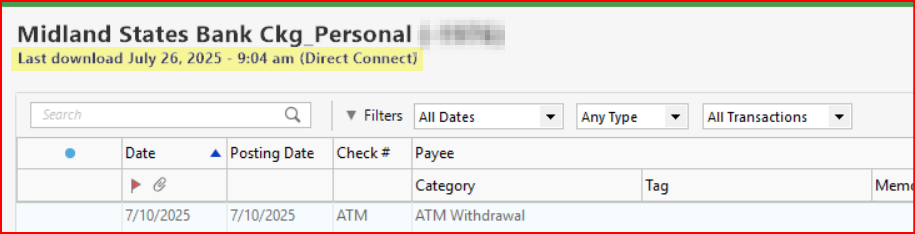
Of course, instead of answering these questions and trying to get your downloads set up now you could just wait a while longer and see if the new EWC+ connection method resolves the issue for you.
Quicken Classic Premier (US) Subscription: R66.23 on Windows 11 Home
0 -
I can confirm this is a problem. I'm a 25+ year user of Quicken. I've been with Fidelity for at least 20 of those years. I noticed that the financial institution for Fidelity during One Step Update was changed to "ZZZ-Fidelity Investments - DC" which is always indicative that the bank is changing their connector between Quicken and the bank. I disabled the updating, changed to the new Fidelity Investments and it changed my account from Complete - Positions and Transactions tracking method to Simple - Positions Only which is totally a non starter for someone like me who tracks every transaction in Quicken.
I played games with this for 30 minutes disabling the Online services, switching it back to Complete Tracking method then re-authenticating both using the current "Fidelity Investments" and the legacy "zzz-Fidelity Investments - DC" for the financial institution. In both cases, it 100% forces you to "Simple - Positions only" type tracking.
This is not the first time Fidelity has totally miscalculated their customer base who uses and relies on Quicken. I'm going to open a support call with them, but I think the only way we will get them to fix this and allow us to use the Complete tracking method is if we get enough people on this Quicken forum raising holy hell with them and opening dozens of tickets to see the backlash of our anger.
So now, as difficult as this is going to be, I'm deactivating the Online Services and will have to manually see if Fidelity has a Import using Web Connect .qfx option or worse case I'll be creating all my transactions manually until we can get this reversed.
If you are reading this, please make comments, and do not hesitate to open a ticket with Fidelity and make sure you explains EXACTLY what we are saying. It does not matter how you configure this, Fidelity is forcing us to use "Simple - Positions Only" now.
0 -
I too noticed this morning that Fidelity's "financial institution" is now listed as "zzz-Fidelity Investments-DC". There were no transactions to download and I didn't fiddle with any settings. So, seemingly no issues yet but I await further fellow user comments.
0 -
Most curious, because I downloaded from "Fidelity Investments - DC" just 10 minutes ago without issue.
And when I look in FIDIR.TXT (which records all of the FIs that Q has connections with) there is NO "zzz-Fidelity Investments-DC", but there is "zzz-Fidelity NetBenefits" and "zzz-Fidelity Rewards".
I'd suggest that anyone experiencing this try one more time to download from Fidelity Investments … and if it doesn't work contact Q Support via the link at the top of this page.
I'm running Version R63.21
Q user since February, 1990. DOS Version 4
Now running Quicken Windows Subscription, Business & Personal
Retired "Certified Information Systems Auditor" & Bank Audit VP0 -
In my main data files I have Fidelity set up with DC which just in the last couple of days appears to have been changed from Fidelity Investments - DC to ZZZ-Fidelity Investments - DC. As you mention the ZZZ- is a sign that DC is about to be deactivated but provided that the accounts are not deactivated they are still updating via DC. But as mentioned by @NotACPA this ZZZ-Fidelity Investments - DC financial institution does not appear in the FIDIR List which is certainly very odd.
In a test file I was able to Reset Account for one of the DC connected Fidelity accounts. The DC connection and Complete Tracking remained intact.
However, once the DC connection is deactivated it can only be set up, again, with Fidelity Investments which is now EWC+ since neither Fidelity Investments - DC nor ZZZ-Fidelity Investments - DC appear as options in Add Account. This also applies to adding new Fidelity accounts in Quicken. There is no way, that I found to be able to establish a DC connection, again.
Very disturbing to me is what you found regarding the EWC+ connection: Complete Tracking is no longer available and only Simple Tracking is available with no ability to switch back to Complete Tracking. It was my understanding that Complete Tracking is to still be available with EWC+ so either that information was inaccurate, Fidelity needs to make a correction on their end or Fidelity has changed their plan regarding this.
Quicken Classic Premier (US) Subscription: R66.23 on Windows 11 Home
2 -
I created a new test file and set up a Fidelity as a new brokerage account for downloading. In Add Account I was only given the Fidelity Investments option which, as expected, did set up the account with EWC+.
However, there were some significant issues with what is shown in the Dashboard for this account:
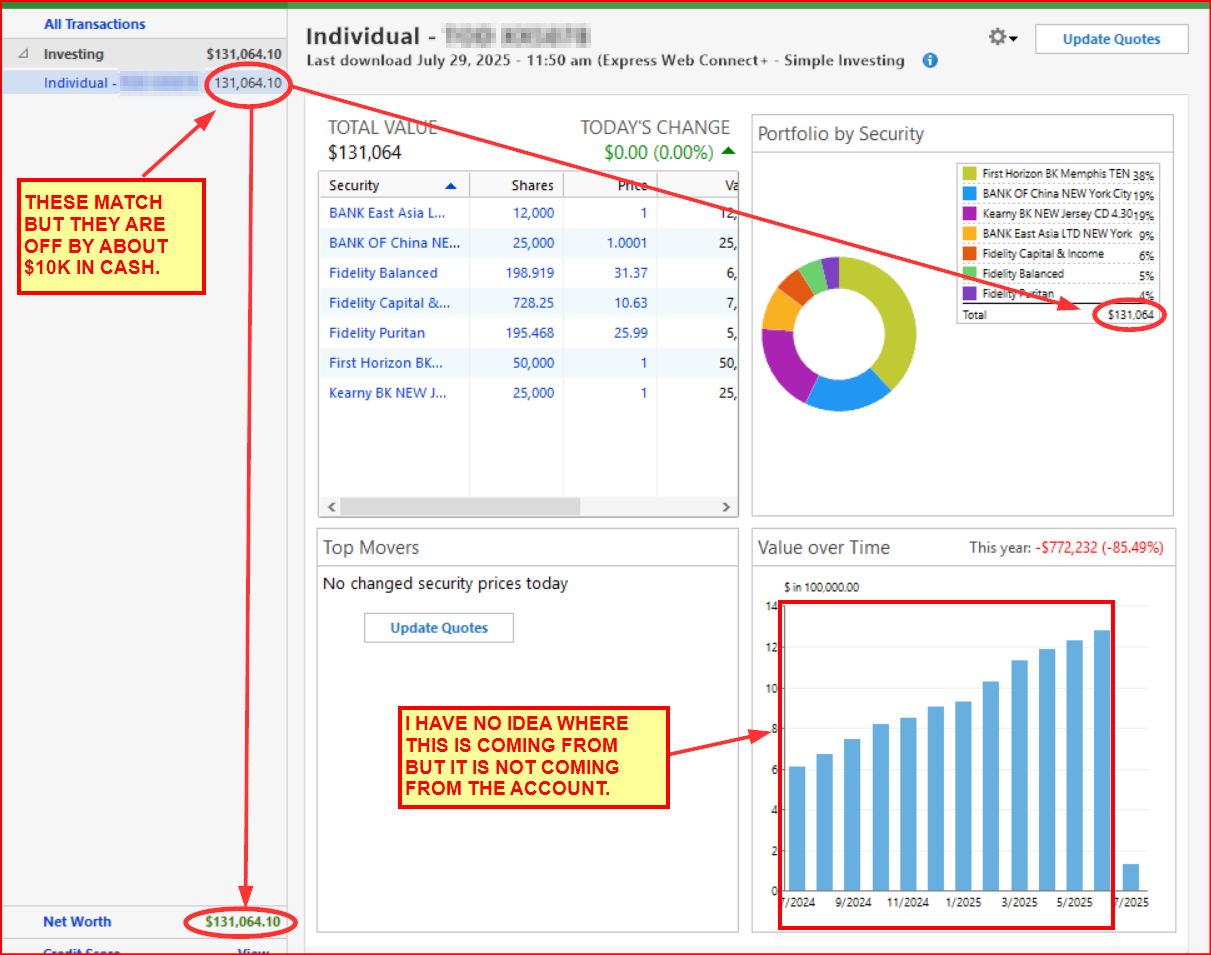
I will run OSU, again, this evening and tomorrow morning to see if these issues self-resolve.
Quicken Classic Premier (US) Subscription: R66.23 on Windows 11 Home
0 -
Unavailability of complete tracking for Fidelity EWC+ seems like a bug and should be reported. IMO
Just curious, does this preference setting need to be set in order to switch between Simple and Complete tracking?
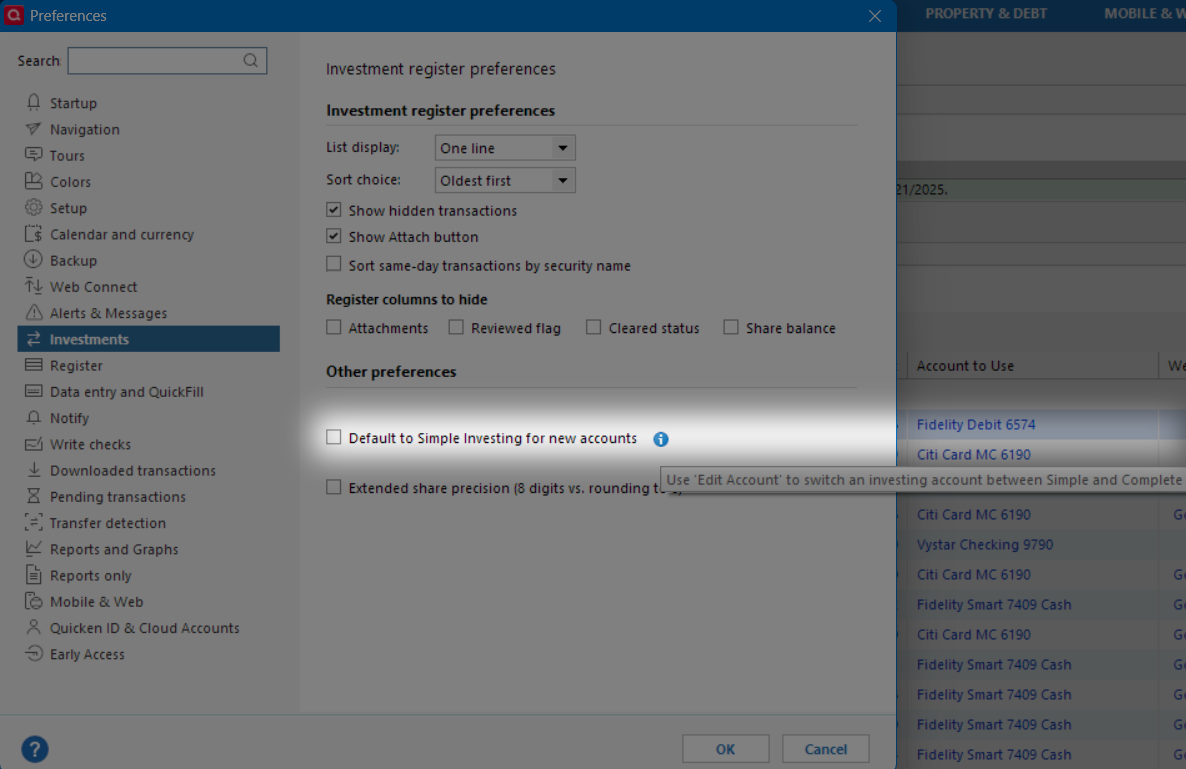
Deluxe R66.23, Windows 11 Pro
0 -
It appears that @Quicken Kristina confirmed the Fidelity EWC+ connection will support Complete Tracking.
Deluxe R66.23, Windows 11 Pro
0 -
Hello All,
We are aware of this issue with Complete not showing as an option for Fidelity accounts connected via Express Web Connect + (EWC+). The issue has been forwarded to the proper channels for further investigation.
Thank you!
Quicken Kristina
Make sure to sign up for the email digest to see a round up of your top posts.
4 -
I'm a Fidelity customer, since the early 1980's, and in their "Private Client Group".
About 10 minutes ago I informed my Account Exec of this issue … and of my intention to leave Fidelity if
Complete Investing is no longer supported.I urge other Fidelity clients to also "vote with their feet" if Complete Investing isn't continued.
Q user since February, 1990. DOS Version 4
Now running Quicken Windows Subscription, Business & Personal
Retired "Certified Information Systems Auditor" & Bank Audit VP0 -
Whether or not Complete Tracking is available for a FI is not a bug. It is the FI that decides what they will support. There are a few investment companies that support only Simple Tracking. The first one to do this was Schwab (I believe they were the very first FI to implement EWC+) but after much uproar from their clients they soon added support for Complete Tracking, again.
That Simple Investing (Tracking) Preference setting applies to new investment accounts. There are some users who really do not want or feel they need to see Complete Tracking. All they are interested in is the high level Dashboard data. Checking that box ensures that when they add new investment accounts they will automatically be set up with Simple Tracking by default.
BTW, I seem to recall when that Preference setting was added to QWin it was thought by some Quicken folks that Simple Tracking is what most QWin users wanted to see (based upon posts here in Community and other feedback to Quicken) so it was initially checked by default. It was soon apparent that most QWin users are rather detailed folks who want Complete Tracking so that default was removed but it was kept as an optional setting.
Quicken Classic Premier (US) Subscription: R66.23 on Windows 11 Home
1 -
I just did the same with my Account Exec.
Quicken Classic Premier (US) Subscription: R66.23 on Windows 11 Home
0 -
Hopefully, Quicken support will also provide feedback to Fidelity that many clients want the Complete Tracking feature.
Deluxe R66.23, Windows 11 Pro
0 -
I'm on Quicken Mac and was asked to migrate away from Direct Connect today, and complete tracking is available there, so I do believe this is a bug. I did run into some other differences which are annoying, but unsure if they're also present in Windows (purchased money market funds are showing as balance rather than an investment, share and price rounding amounts in transactions are slightly different, etc).
1 -
I am on Windows Classic. I am trying to One Step Update, and it starts with Reauthorizing Fidelity Accounts. When I do this I am brought to Fidelity's site to sign in. Once I do this, I am just prompted with a HTTP Status 400 – Bad Request. Am I missing something?
UPDATE - So a flaw in the process….. When I open Quicken and click ONE STEP, the Fidelity Reauthorize comes up before I have entered my Vault PW. I canceled out of the Fidelity Reauthorize screen and entered my Vault PW. It then worked.
0 -
WWindows Classic?
thecreator-bTesting Quicken Subscription Beta B63.19 (Nov. 2023) Installed 24/7.
in Windows 10 Pro 64-Bit Build 19045.3693 Quicken Classic Business & Personal0 -
Something changed this morning and I now had to do an elaborate re-authentication for Fidelity every time I connect. Also, new accounts have been added out of nowhere and all the totals are screwed up.
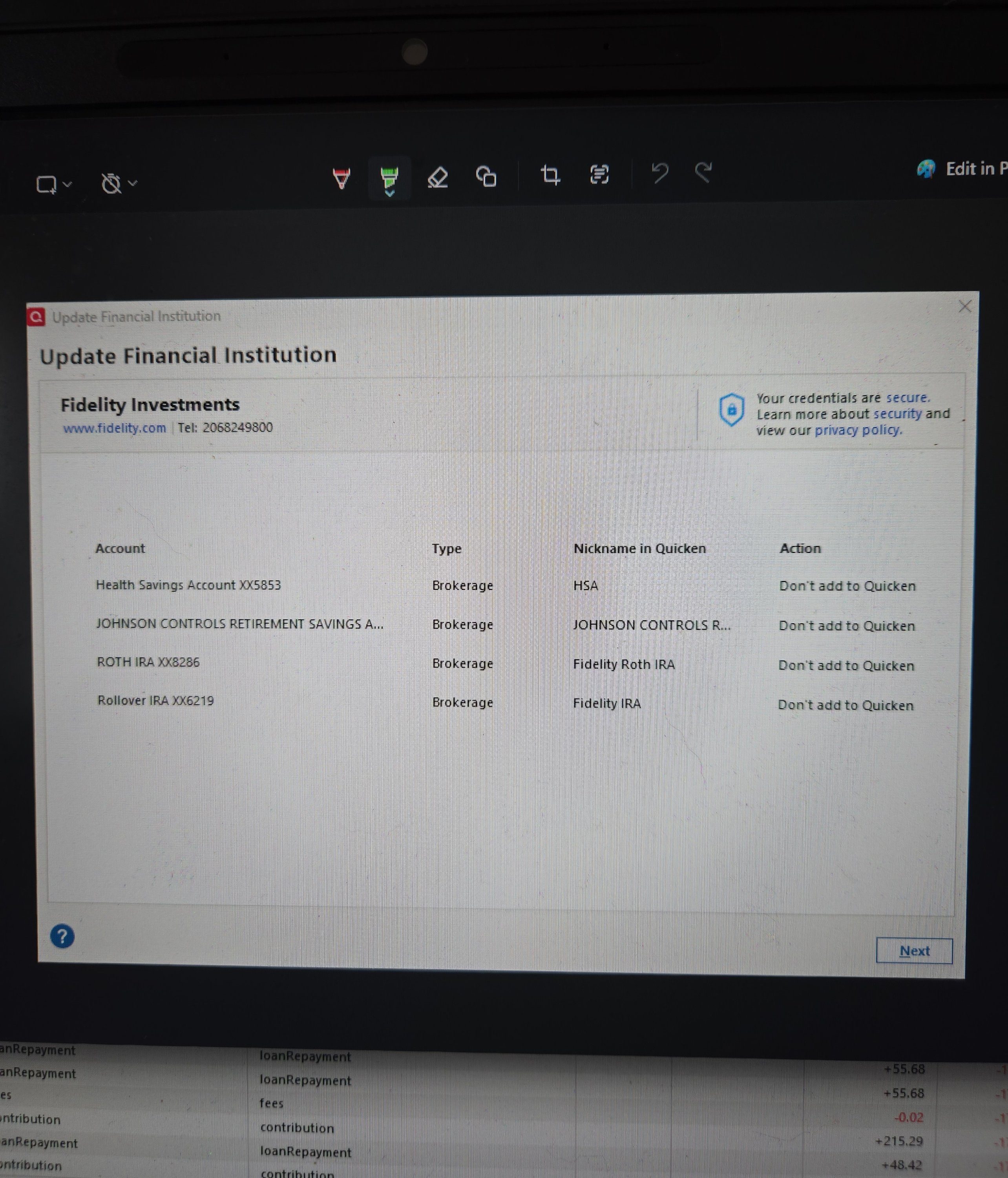 1
1 -
I am hearing from other QMac users that Fidelity's new Quicken Connect (similar to QWin's EWC+) does support Complete Tracking, too, so that is encouraging. But this is Fidelity's 2nd attempt at implementing the new connection method (the first started in Dec 2023). It never worked properly then (except for the Fidelity Rewards Visa Card but not until about 10 months later) but at least we all still had the DC option available to us.
One of the issues with Simple Tracking is that switching back to Complete Tracking at a later date is not so simple a task. Since Simple Tracking downloads do not include any securities transactions there is no recorded history of those missing transactions created in Quicken. If we later switch to Complete Tracking, none of that missing transactions history will be present and none of it will download. So there will be gaps in the transactions history that will need to be filled in by either manually entering the missing transactions or by manually entering some Add or Remove Shares transaction which will not provide the most accurate data for reports and tax planning.
The other option is to restore a backup file that has DC Complete Tracking data in it. But we need to keep in mind that generally Fidelity downloads data for only the last 30 days. So, if the backup file is from more than 30 days ago there will still need to be some manual entry done to fill the gaps in the transactions history. And the other downside to this option is that all the other non-Fidelity accounts will also be out of date and will need to be updated which could be an even bigger issue for many people.
Regarding your MMF being downloaded as Cash: Is that MMF your Core Position that Fidelity uses for holding cash in your investment account? If so, you should know that it is a common practice for Fidelty to download the value of the shares you hold in the MMF as your Cash Balance, not as shares. There are some exceptions to this, mostly with regard to Buy and Sell orders that you initiated and with ReinvDiv transactions. In this case, Fidelity does download the shares transactions but they also download the value of those shares as Cash so it creates a mess in Quicken that can be somewhat time consuming to resolve. So, if this MMF is your Core Position it is best to not place Buy and Sell orders for it in your online account and to change your preference for how Fidelity is to manage the dividends so they are paid into the account's cash balance instead of being reinvested. Instead, Fidelity will do that by default and then the shares generally will not get downloaded. You can read more about this at Downloads from Fidelity do not included activity into the settlement fund.
Quicken Classic Premier (US) Subscription: R66.23 on Windows 11 Home
0 -
Did the new Fidelity re-authorization this morning. Now my two Fidelity accounts (IRA and brokerage) show "0" balance. Using the "Simple - Positions Only" tracking method. Finanical Institution is "Fidelity Investments". I cannot find a DC option when choosing a financial institution.
Changing tracking method to "Complete - Positions and Transactions" does not help.
I've deleted the accounts and also reset them to no avail…
0 -
FYI
Updated my Fidelity investment connection to the EWC+ today. I already had a Fidelity credit card connected to the Fidelity Investments option as well as the zzz-Fidelty Investments - DC for investments. When authorizing the credit card account always had the option to connect the others but opted not to till today out of curiosity.
Deactivated all the investment accounts and closed/reopened Quicken then selected one of the investment accounts to activate downloads. It found the accounts and I selected link to existing. All investments accounts downloaded leaving my tracking method as selected which is complete.
The only issue I had is several previously downloaded transactions were downloaded (back to end of May). Some were noted as "Matched", "Near Match (shares carried out 8 plcs)" or "New" although all were previously downloaded and accepted. Deleted all of these.
Cash balances and share balances remained correct after the conversion
The Fidelity credit card account did request reauthorization once a month or so and suspect will continue to do so but so do Chase and Capital One so not concerned about doing reauthorizations occasionally for security purposes.
“Never stop dreaming,never stop believing,never give up,never stop trying, andnever stop learning.”
Quicken user since 19931 -
When I connected to Fidelity this morning to reactivate my accounts, my credit card account would not "Link" to the proper account. Rather it offered to "Link" to improper accounts. I experienced the same problem recently with Well Fargo not being able to "Link" to the proper accounts.
0 -
Same problems for me. Reauthorizing, etc. Now my balances are off by tens of thousands of dollars.
1




Categories
- All Categories
- 20 Product Ideas
- 34 Announcements
- 247 Alerts, Online Banking & Known Product Issues
- 19 Product Alerts
- 518 Welcome to the Community!
- 682 Before you Buy
- 1.5K Product Ideas
- 55.7K Quicken Classic for Windows
- 16.8K Quicken Classic for Mac
- 1K Quicken Mobile
- 834 Quicken on the Web
- 128 Quicken LifeHub