Mis-ordered splits in Scheduled Transactions

If I create a scheduled transaction with splits (like a paycheck but also happens with expenditures), it appears to save correctly. However, when the transaction shows up in the register, the splits are re-ordered in a nonsensical and apparently random order. If I go back to the scheduled transactions and check the transaction in question, its splits are also mis-ordered. No matter how many times I correct the scheduled transaction and save it again, Quicken again messes up the order of the splits. Anyone else seeing this problem?
Comments
-
I don't have complex splits, but for me the order appears to be preserved. However this appears to have been reported elsewhere, for example here
QWin Premier subscription0 -
I have the same issue. Frustrating when I take the time to organize the details for analysis later and faster bill detail entry.
A similar post suggested turning off Sync to the Web as a possible solution.
A better solution would be to have a solution that doesn't sacrifice a Quicken feature.0 -
@Paul Schubert and others: I agree they should fix this, but first they need to understand what is causing it.
To help the developers get to the root cause of this problem, do you have the Sync setting at Edit > Preferences > Mobile and Web turned on? If you turn Sync off for a few days, and enter some split transactions, does the problem go away for new transactions, then return if you turn Sync back on?
Note that this Sync setting only needs to be turned on if you are using the mobile apps or Quicken on the Web.
QWin Premier subscription0 -
I have seen users reporting this problem going back to 2017 and Quicken has STILL not bothered to fix the problem.
I manually entered in split categories to reflect a paycheck. The order of the split items needs to remain the same.
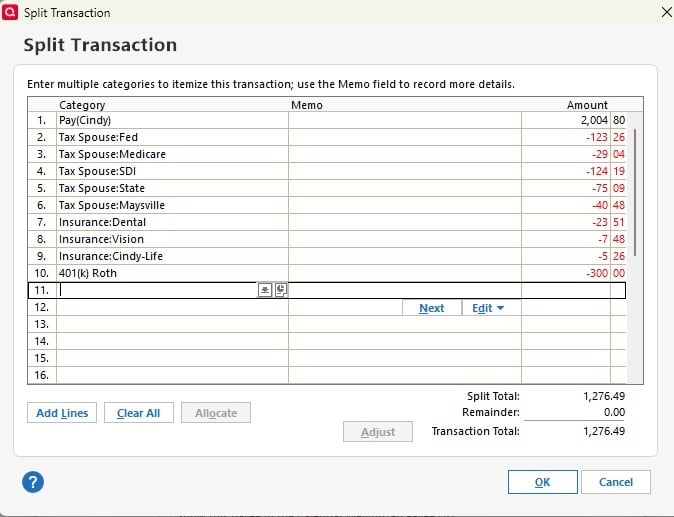
However, when I call up the memorized transaction two weeks later, it looks like this:
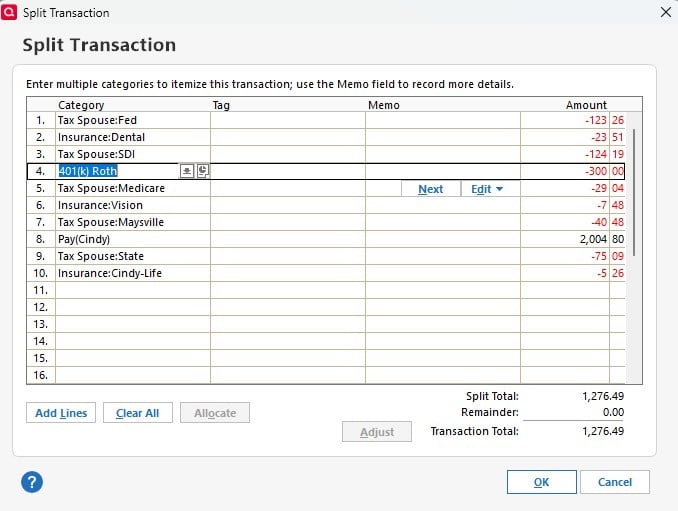
I believe the problem is caused by Syncing with the cloud. I have sent this via "Report a Problem" at least 5 times, with no resolution. I haven't been able to duplicate this by syncing, shutting down Quicken, restarting, and using the memorized transaction, but when I try to use the memorized transaction two weeks later, it happens every time - to every memorized split transaction.
I have turned of Sync - meaning I can no longer use the mobile app - to see if it fixes the problem.
I just spoke to Customer Support. The representative finally elevated my concern to a supervisor who said, "Yeah, Quicken does that. There's nothing you do to prevent it."
But there is: Quit using Quicken.
NOTE: I have been using Quicken since I bought an Apple //e back in 1987 - nearly 40 years as a customer. Quicken didn't use to have a problem with this.
1 -
I have turned off Sync and the problem has not repeated. Apparently, when memorized/scheduled transactions are copied to the server, the categories get re-sorted, and when they are then copied back, they overwrite what is saved locally.
Now that the problem has been identified, it should be a relatively easy fix, Quicken Programmers!
0 -
Jim,
I travel frequently, and using the mobile app allows me to enter purchases as they occur. I shouldn't have to sacrifice this feature because there is a problem with Sync.
Yes, I have verified that the shuffling only occurs when Sync is turned on. Memorized/Schedule transactions get automatically re-ordered when they are copied (synched) to the cloud server, and then overwrite the locally stored memorized/scheduled transactions when they are synched again - the reason it is rarely seen the same day - it takes two sync's to screw things up locally.
But I still haven't been able to get the Quicken programmers/developers to rectify the problem. I keep getting the response, "Yeah, we know Quicken does this. There's nothing you can do to prevent it."
I realize your comments were meant to be helpful, but seriously, telling us we only need the sync feature if we're using the mobile app… that's not really the solution, is it?
The problem is, I have reported this both through "Report a problem" and by calling the customer service number - both multiple times over the past four years. I have been able to recreate the problem by turning sync back on. It is a known issue, but apparently not a big enough issue to the developers to put in the effort to repair it.
1 -
@Mom Scalf - Messaged to @Jim_Harman :
I realize your comments were meant to be helpful, but seriously, telling us we only need the sync feature if we're using the mobile app… that's not really the solution, is it?
I think you misread what he said in his post. He was not providing a solution to the issue. He was asking a question that the answer to which might be helpful to the programmers in resolving the issue.
He was also not saying to only turn on Sync when we are using the Mobile (or Web) app. Turn it on only if (not when) we use the Mobile or Web features. If we don't ever use Mobile or Web, we should make sure Sync is turned off and stays off because Sync's only function is to support Mobile and Web.
Quicken Classic Premier (US) Subscription: R66.23 on Windows 11 Home
0 -
Hello All,
Thank you for taking the time to report this issue, though we apologize that you are experiencing this.
We will be forwarding this issue to the proper channels to have this further investigated. However, we request that you please navigate to Help > Report a problem within your Quicken program and submit a problem report with log files and screenshots attached in order to contribute to the investigation.
It would also aid the investigation to include a sanitized file when submitting the problem report. A sanitized file is a data file that removes personally identifiable information so you can comfortably share this file with the Quicken team.
While you will not receive a response through this submission, these reports will help our teams in further investigating the issue. The more problem reports we receive, the better.
We apologize for any inconvenience in the meantime! Thank you.
(CBT-746)-Quicken Anja
Make sure to sign up for the email digest to see a round up of your top posts.3 -
Boatmaniac - Thank you, but there is no need to interpret Jim's meaning for Jim. Allow me to point out that even turning on sync temporarily to sync with the Mobile and Web - even one time - will scramble the categories in the memorized/scheduled transactions. The first sync will scramble the transactions in the cloud server, the second sync will overwrite the local version. Turning sync on and off will NOT fix the problem.
As Paul Schubert said in his post, "A similar post suggested turning off Sync to the Web as a possible solution. A better solution would be to have a solution that doesn't sacrifice a Quicken feature."
0 -
Quicken Anja,
I have submitted this to "Report a problem" with screen shots multiple times.
However, I have a question: when I submit a sanitized copy with the log files, do you want me to send the current version with the memorized/scheduled transactions saved correctly, or do I need to turn on sync, allow it to scramble my transactions again (creating a significant amount of work on my end - yet again) and then submit the "Report a problem" after the corruption of the transactions occurs?
Thank you for forwarding this to the proper channels!!! I've been trying to get that done for four years!
0 -
And yet you continue to refer to @Jim_Harman's suggestion as a solution to the issue. I was simply trying to clarify that he never suggested that.
Quicken Classic Premier (US) Subscription: R66.23 on Windows 11 Home
0 -
@Mom Scalf I am sorry if my post was unclear.
As @Boatnmaniac says, I did not mean to imply that stopping using Quicken's Mobile and Web features is a solution to this issue. I was asking people who are experiencing the issue if they have Sync turned on, and if so to temporarily turn off Sync to see if that stops the scrambling of the splits.
I also pointed out that if you don't use the Mobile or Web features, then there is no reason to have the sync turned on.
Apparently turning off the sync does stop the reordering of the splits, and the splits get reordered again when you turn Sync back on. That information should be helpful to the developers when they investigate this.
@Quicken Anja do you now have enough information to create a ticket for this and initiate some follow-up by the developers? Thanks.
QWin Premier subscription0 -
@Jim_Harman - I understand your intent.
Your recommendation to others to turn off sync for a few days to see if it stopped was sound advice; however explaining that the sync feature isn't really necessary for all users detracted from your advice. In the case of @Boatnmaniac jumping in and trying to explain what you meant -[Removed - Disruptive]. I don't mean to take offense when none was intended, but I wasn't the only person who felt "if you don't use the Mobile or Web features, then there is no reason to have the sync turned on" is kind of condescending. Either we use the Mobile/Web features (because we use the mobile app or we want to use web backup - both of which require syncing) or we already know we don't need the feature and have it turned off. With that said, I really do appreciate other experienced users sharing their knowledge when questions are asked.
@Quicken Anja had already responded to my update on July 26 and forwarded it to proper channels to have the problem addressed. She also provided additional instructions to those experiencing the problem about what information needed to be added to "Report a problem" and having us re submitting it. I sincerely appreciate you adding your support, but @Quicken Anja had already addressed the situation and forwarded it to the developers before you added your request on the 28th for her to exactly that.
-1 -
Hello @Jim_Harman,
@Quicken Anja do you now have enough information to create a ticket for this and initiate some follow-up by the developers? Thanks.
Yes, we now have enough information, and a ticket has been created for our development team to investigate further. At this time, there is no estimated timeframe for resolution, but we’ll keep you updated with any significant progress.
Thank you!
-Quicken Anja
Make sure to sign up for the email digest to see a round up of your top posts.1 -
@Quicken Anja - Please fix this issue as soon as possible. It has been going on for years now and is so, so frustrating! It has resulted in errors in my entries, resulting in miscommunications with family members over how much they owe for things I pay and they reimburse. It wastes so much time every month. It really is over the top frustrating. I would love to participate in a test of the bug fix…
0 -
@BatesWV @Jim_Harman @Mom Scalf @DaveWhite71 We have been asked to gather a few more details regarding this issue. If you could please provide the following details, this would help us further in our investigation.
- What type of reminder it is? (Paycheck reminder?)
- If you have not already, please provide a sanitized copy of your file which indicates the problem(along with screenshot of reminder total amount). Let me know when you have done so.
- Also confirm if this is happening only with a specific type of reminders or with all the types(Bill, Income, Rental, Loan, income, etc.)?
To provide a sanitized copy of your file, please navigate to Help> Report A Problem within your Quicken program and select Sanitized Data File and then hit send. A sanitized file is a data file that removes personally identifiable information so you can comfortably share this file with the Quicken team.
Thank you!
Quicken Janean
Make sure to sign up for the email digest to see a round up of your top posts.
0 -
@Quicken Janean Sorry, but I have not experienced this problem myself, because I don't use the mobile apps and thus I always leave Sync turned off.
From what others have reported, it appears that the order of the split lines gets scrambled with multiple types of split transactions entered either via a Reminder or a Memorized Payee when Sync is turned on.
Hopefully others who are experiencing this issue will be able to answer your questions directly.
QWin Premier subscription1 -
@Quicken Janean - This happens on both income reminders and bill reminders. I tried to send a sanitized file.
My problem is that the splits get re-ordered and the tags get reassigned to different lines
0 -
Thanks for the feedback @BatesWV. I do not see a sanitized data file attached. Were you not able to add it?
Thank you @Jim_Harman for clarifying.
Quicken Janean
Make sure to sign up for the email digest to see a round up of your top posts.
0 -
@BatesWV I am seeing this scramble on my income reminder. The splits get re-ordered and memo fields get reassigned. The amounts are also scrambled, but not in the same re-ordering as the categories (so the amounts no longer match the correct categories).
@Quicken Janean I will try to report the problem.
0 -
Any reminder with a split will get scrambled if Sync is turned On.
0 -
Concur with markus 1957. Turning off Sync corrected the split scramble.
0 -
I think initially I had only unchecked the Sync checkbox in One Step Update. Once I turned Sync off under Preferences > Mobile & Web, I have had better luck with the splits not scrambling. Thanks!
0 -
I cannot break reminders with splits as of yesterday. I waited until this morning after a new day's OSU to see if the reminders remained uncorrupted and they did.
I cannot pin down exactly what happened but have a couple of candidates. I went from reliably being able to break the reminder after OSU as verified by seeing changed values and anomalous behavior in tax planner and also "corrected scheduled reminders" in super-validate reports to not being able to break it.
Three things I did but really cannot pin down if any one of them are responsible.
First, I deleted QW.rmd, a legacy file from BillMinder that is still used somehow in Quicken and which has been implicated in the past for bad behavior in reminders. I had not looked at it in a while and it was rather large. It's now only about 40 kb.
Second, I reset the cloud file after a super-validate and then made no accounts selected for mobile sync.
Third, after a super-validate, I would always go back to the problem reminder(s) and check them to see if anything changed. I would then resave them. The next OSU would result in corruption, sometimes even before the next OSU, I'd notice Tax Planner shift from using scheduled reminders to YTD use to date. After the last 2x super-validate, to verify a clean file, I performed OSU immediately and Tax Planner values remain as expected.
Some form of corruption was being spawned using Quicken and being perpetuated by the OSU process. It seems for now, one of the steps I took (or a back-end change in the OSU process) corrected the corruption and the file is now behaving as expected. Several others are reporting this type of issue with reminders containing splits. Hopefully, thru trial and error, a specific set of steps that can be taken to restore the file will be identified.
1 -
Hi Everyone, if you are still experiencing this, can you please provide the following information?
- What type of reminder it is(I am assuming its a paycheck reminder)
- Share sanitized copy of their file which indicates the problem(along with screenshot of reminder total amount).
- Also confirm if this is happening only with a specific type of reminders or with all the types(Bill, Income, Rental, Loan, income, etc.)?
Thanks!
Quicken Janean
Make sure to sign up for the email digest to see a round up of your top posts.
0 -
I have been experiencing this issue for YEARS! It is so frustrating. Just found this thread and have turned off Auto-Sync. I don't use the Web version or the Mobile version. I specifically use this feature for my paycheck entries. I have a feeling this may be the cause to several other issues I am experiencing when I try to reconcile.
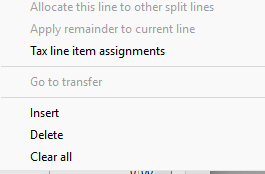
@quicken janean - Please fix this issue. There may be a day when I will want to use the mobile features. I can log a report, but I think you have probably already received enough information. Also, a future request, please activate "click and drag" in the split transactions and other areas of Quicken. Every time my transactions get re-arranged, I have to start all over! Why can't I just have a click and drag option or a "move up" or "Move down" option? Currently, it's "Insert", "Delete" or "Clear All". That doesn't help at all.
I am on version R64.35; Build 27.1.674.35; Windows Home 11
0 -
FWIW, I can reproduce this behavior in a newly created test file with only manual accounts. Activating the manual account associated with the multi-split reminder for mobile sync and cloud syncing will cause the splits to be re-ordered and, in some cases, it will delete a category in the split.
The re-ordered split can be seen in the web app as well as the desktop file after a manual cloud sync.
I used an income reminder simulating a recurring social security payment to a manual checking account with splits for taxable social security income, non-taxable social security income, Medicare Part B premium, Medicare Part B IRMAA, Medicare Part D IRMAA.
I can correct the order in the desktop file but after syncing the splits are again reordered. At first glance, after syncing the web app shows the split order by amount with the lowest value as split #1. The desktop split order is not necessarily in the same order as in the wen app.
Still testing but odd behavior is reproducible, but so far not consistently odd such that I can tell if a sort order between the 2 apps is to blame.
1





Categories
- All Categories
- 23 Product Ideas
- 34 Announcements
- 247 Alerts, Online Banking & Known Product Issues
- 19 Product Alerts
- 265 Welcome to the Community!
- 300 Before you Buy
- 1.5K Product Ideas
- 55.8K Quicken Classic for Windows
- 16.9K Quicken Classic for Mac
- 1K Quicken Mobile
- 834 Quicken on the Web
- 128 Quicken LifeHub