Crashes after installing R64.23

This morning I installed R64.23 update and after the installation I can't do much in the system. When I try to do any meaningful action such as One Step Update, I would get a dialog to enter my Quicken ID Password. After I click Continue I get Please check internet connection and try again (needless to say I'm connected all this time). Clicking Retry does nothing and then when I try to close this dialog the system crashes (I did sent the Quicken Crash Report to the Quicken team). What can I do to make this work?
Answers
-
You could revert to an earlier release. Download R64.19 from this link:
https://assistant.quicken.com/patch/QW27.1.64.19MPatch.EXE
and install it. Do not have Quicken running when you do this.
-splasher using Q continuously since 1996
- Subscription Quicken - Win11 and QW2013 - Win11
-Questions? Check out the Quicken Windows FAQ list0 -
I just tried that, I see that the current version went back to R64.19 in About window. Unfortuinately I still have the same problem - so this did not help
0 -
I have the same problem after the R64.23 update. A dialogue titled "Enter Quicken ID Password", that is blank for about 20 seconds and then gets "Please check internet connection and try again". Everything else on my computer is working fine on the internet.
Sure wish Quicken would test their software before dumping it on me. Had a somewhat similar problem a year or two ago that took me over 100 hours to track down what cached data to remove in order to fix the issue. Back then it was in the WebView2 browser used by Quicken.
The one thing I learned from that is that calling Quicken support was the least effective thing to do. Maybe some kind of answer will be forthcoming here.
2 -
Hello @divoloper & @captiveuser,
Thanks for sharing the details about the issues you’re experiencing after the R64.23 update.
To help us better understand what’s happening, could you please provide screenshots of both the “Enter Quicken ID Password” dialog and the “Please check internet connection and try again” error? This will help our team investigate the problem more effectively.
If needed, please refer to this Community FAQ for instructions on how to attach a screenshot. Alternatively, you can also drag and drop screenshots to your response if you are not given the option to add attachments.
Thank you!
-Quicken Anja
Make sure to sign up for the email digest to see a round up of your top posts.0 -
I did not experience the issue. After updating, the software requested my credentials and accepted them without issue. One Step Update, as well as all other functions, operated as expected. I'd verify your that your credentials are correct before back-revving. No doubt, Quicken Support could help you with that task.
0 -
I'm having the same issue.
0 -
I managed to fix the issue by closing the pop-up window asking for login password and then going to edit preference - login - and entering my password there. It seems like the popup window asking for login/password has a bug, but the regular menu works.
1 -
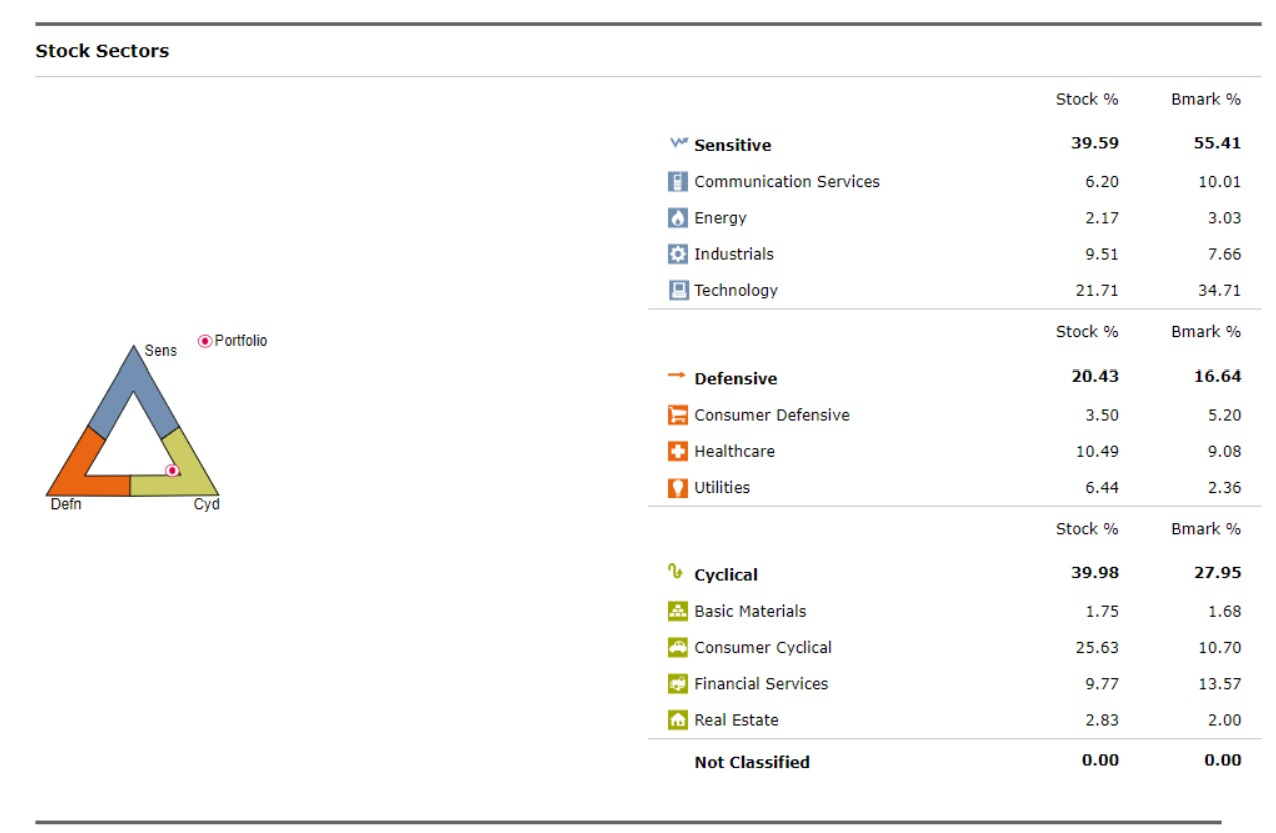
I installed 64.23 this morning and the bug I noticed is in the graph display in the X-Ray interpreter. The dot point is stuck in the edge of the triangle, where it should not be. It was always more centered based on the same numbers.
 -1
-1 -
Hi @Glamis,
Thanks so much for sharing what worked for you! I’m glad to hear that entering your password through the Preferences menu resolved the issue.
For anyone else experiencing the same problem after the R64.23 update, you can find a more detailed walkthrough of these steps in this support article.
Hope this helps others encountering the same issue!
-Quicken Anja
Make sure to sign up for the email digest to see a round up of your top posts.0 -
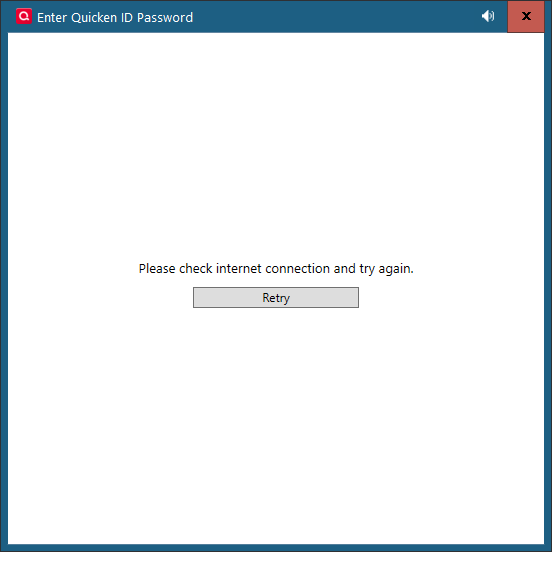
Below is the dialog with the error. Also, contrary to what someone else said, I got the same error when going to preferences and attempting to change my quicken id.
 0
0 -
Thanks for sharing the screenshot, @captiveuser.
Does this pop-up allow you to close it? If so, it may keep appearing repeatedly during the sign out/sign in process. In that case, you’ll need to continue closing it each time it pops up until you reach the full sign-in screen. I know it’s a bit annoying, but once you complete the sign-in, this pop-up should stop appearing.
-Quicken Anja
Make sure to sign up for the email digest to see a round up of your top posts.0 -
This is the same one I'm getting
0 -
I can close it, but the problem for me is that after I do that Quicken crashes and shows the standard dialog asking to send report to Quicken
0 -
I can also close the Enter Quicken ID dialog multiple times, get to the sign in dialog, and open my Quicken file, but as soon as I try to do anything, the same dialog comes back. Also, trying to create a new Quicken file or going through Preferences to enter a Quicken ID get the same dialog/error.
Completely dead in the water.
0 -
I had a similar problem with 51.12 - here's a link to my issue and solution (update Edge browser). I don't use the Microsoft Edge browser, so I had disabled the constant updates. Eventually, the part Quicken uses was too far behind to work anymore, so I faced the same problems you're having. It may not be this, but your problems sound remarkably similar.
If it is this, Quicken needs to update their System Requirements to include the Edge browser and find a way to let the user know what the real problem is - Quicken relying on a Microsoft product without first confirming that it's updated to a usable level.
1 -
Ducksoup_SD,
Thanks for that suggestion. It got me on the right track, and the issue was indeed due to Edge. Hooray for that!
Not that my opinion of Quicken support could get much lower, but their conspicuous dropping out of this thread is disheartening. For the money they are collecting, I would expect a company to figure out why the new version caused the product to break.
But I guess that's what you get when you are a captive user.
0 -
Thank you for the follow-up,
I'm glad to hear that @Ducksoup_SD's post was able to help you track down the problem.
Please be aware that the Community forum is primarily user-to-user based with only a couple of us mods. Therefore, responses are not immediate and can take up to 24 to 48 hours. If you need faster support, we recommend contacting Quicken Support directly via phone or chat.
Thank you!
Quicken Kristina
Make sure to sign up for the email digest to see a round up of your top posts.
0 -
If I play around in Billers tab, I get frequent crashes.
Sent several crash and problem reports
1 -
Hello @miklk,
Thank you for letting us know you're getting frequent crashes on the Billers tab. Have you noticed anything specific triggering the crashes? If not, is there any pattern to when it crashes?
I look forward to your reply!
Quicken Kristina
Make sure to sign up for the email digest to see a round up of your top posts.
0 -
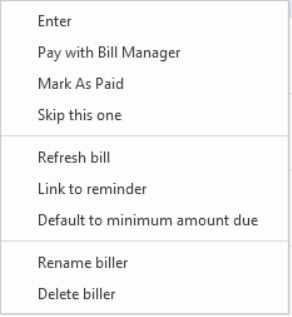
Of course, I tried to reproduce now in several datafiles and it did not crash with multiple menu items clicked.. Earlier, I was working in my files trying to get rid of erroneous Bill dates and amounts on Billers that showed the next due date with the prior months amounts. I was only using the menu where it usually starts under the Quickpay mostly unlinking to reminders, default to Total and then skip a bill. (Maybe not crashing now because all bills now just awaiting next bill due to the work I did earlier.)
PS: MANY, MANY other problems with Billers which I reported most BUT of course the crashes are most important. Just sent another detailed report.
1 -
I do not have any blockers to update Edge
0 -
Thank you for your reply @miklk,
I'm glad to hear that it's no longer crashing. I can see that you've reported quite a few issues that you have encountered in R64. Since those issues are off topic for this discussion, I sent you a DM to ask for more information.
Thank you!
Quicken Kristina
Make sure to sign up for the email digest to see a round up of your top posts.
0 -
@divoloper because I didn't get the everyday updates and only got the required ones to bring my system up to date, maybe I missed one that causes a hiccup with Quicken. You might consider an uninstall and reinstall of Edge to see if that can fix the issue.
0 -
Someone's suggestion to do a "Validate and Repair File" and that fixed it for me. Eliminated the bug but how did this get released in the first place?
Cost me 30 minutes to get to the bottom of it but I did not need that interference today.
1 -
This is the second time in about 2 years that I have had issues with Quicken and Edge WebView2 that completely stopped Quicken from working.
I think the first one was due to the WebView cache being corrupted, this latest one was due to an installation issue with Edge.
In neither case did Quicken even suggest that WebView2 might be the problem. From what I can tell, Quicken support doesn't even have WebView2 on its list of possible problem causes. Instead, they wasted my hours of my time with all kinds of validates, re-installs, and resetting online services. The only thing that really needed to be done was to reinstall WebView2.
Another way to deal with this would be for the Quicken installer/updater to validate that its connection through WebView2 is working correctly, and either reinstall it, or report the problem with some possible remedies.
Anything would be better than keeping their head in the sand.
0 -
Thank you for the follow-up @captiveuser,
Thank you for sharing that you were able to narrow the issue down to WebView2. I'm glad to hear that reinstalling WebView2 got everything working properly again.
I forwarded your feedback to our teams!
Quicken Kristina
Make sure to sign up for the email digest to see a round up of your top posts.
0