Latest update broke all future paycheck reminders - somehow web synch messed things up

Long-time user and current beta tester posting here for the Quicken team and anyone else seeing similar issues.
I applied the latest update earlier this week during a limited market account-only update. Today, when I went in, everything looked fine in my check register, including all of my future paychecks for the next several weeks. After doing a One Step Update, all of my unentered paycheck reminders switched from being deposits to payments with very screwy numbers.
I restored from a backup more than once, did a file validation and a super validation, and every time I ran One Step Update, I would get the same thing for all future paychecks. Finally, I noticed that the dialog for web syncing was coming up during the update. I found that odd as I have that turned off.
So, I restored from the backup again, enabled sync on the Quicken Mobile & Web page (it was ticked off), and the Accounts section told me there were like 11 accounts set up for sync with the web. I disabled all of those and the sync dialog came up and after about 10 minutes, I let it sit for over half an hour while I did some house cleaning while it worked. I came back to see it still trying to sync, so I finally had to kill the application, restart it, at which point Quicken said all the accounts were turned off. I reset all my cloud data for good measure and then turned off sync again, and this time, after running One Step Update, everything in my register stayed as expected.
Seems like Quicken may not be completely respecting the global Mobile & Web sync setting, causing files and other information to get out of whack with one another and overwriting future reminders in the active Quicken file.
Comments
-
Hello @Michael Jones,
Thank you for sharing your experience. That is unusual behavior. Do you keep your Quicken file directly on your local hard drive? Is it synced with any cloud service, such as OneDrive, iCloud, or Dropbox? Was Sync with the Quicken Cloud turned on at some point in the past? Were any issues found when you ran the Validate?
I look forward to your response!
Quicken Kristina
Make sure to sign up for the email digest to see a round up of your top posts.
1 -
Hi Kristina.
I do keep it on my local hard drive, and it is in a folder that is synced to OneDrive. However I've never experienced any issue with this like that and I've been doing that now for several years over several releases.
I will be honest, I can't tell you if I've had synch on in this particular file or not. Certainly, there were files on the synch end that I deleted after I turned it back on. But I've been using this same file for quite some time.
Validate and Super Validate both turned up no major issues other than some future-dated transactions which I will tend to do at the start of a month when I post all my set bills for the month and usually all my paychecks. Also something I do regularly with no issue.
Totally possible it's a one-time thing. Though I have the old file with the messed up stuff still as I have now switched to the restored backup.
1 -
Latest update has zeroed out all future paychecks here. It hasn't changed anything prior that was already cleared in registers.
0 -
Hello @QuiltLadyNC21,
Thank you for letting us know you're seeing a similar issue. Since this happened after the latest update, please try restoring a backup from before that update was installed, and check to see if the issue is resolved in the newly restored file.
Please let me know how it goes!
Quicken Kristina
Make sure to sign up for the email digest to see a round up of your top posts.
0 -
I just fixed it manually. I commented to be certain the prior comment on it wasn't brushed off as a one-off.
I've been using Quicken for a VERY long time, back when you could buy a cd and have it work for years without additional costs. Moving to the subscription model was painful, and the continual updates that add no value for me but often cause glitches are frustrating. I'm sure there will come a day when the costs far outweigh my ease of familiar use and I'll move to another product.
2 -
I'm also having this issue. I'm a new user of the Quicken subscription model as I finally upgraded from my Quicken 2012. I have to say I'm missing the old software… sync is incredibly slow and causes a number of issues. I've been trying to delete a recurring reminder and every time I use the "one step sync" the reminder is added back in. I've tried to delete it 10 times now and it comes back every time.
1 -
Try what I did. Take a backup and work from that. Enable online synch and make sure there are not accounts set for web/mobile synch and delete all your online files. Then disable synch again.
Do that before running a one step update or any other online activity first thing.
1 -
I reported this same issue earlier today. I have been using Quicken since MS-Money was deprecated. I don't use OneDrive or any other cloud service, I do not use Quicken Mobile, just the old-fashioned PC-based app. When I do a One Step Update the splits in my recurring paycheck transaction disappear.
1 -
Like you, I use the PC based version only but, on checking, I found that the cloud syncing was on. To be safe, check three places
- Mobile & Web Tab\Add/remove accounts and unselect any accounts that are selected. It may take a while to update.
- On the One Step Update dialog, make sure cloud sync is not selected.
- Mobile & Web Tab\Go to Mobile & Web and turn off sync at the top
If Mobile & Web is already off you won't see the options for steps 1 & 2. That should completely kill the Mobile & Web stuff. After I did that the funny business with reminders seems to be fixed (an account closed in 2020 also appeared with an erroneous balance for me). I think the PC app may be pulling bad data from the cloud and overwriting your paycheck transaction reminder.
2 -
I having the same issue. Once I run the One Step Update, my paycheck reminders lose all the splits, set to salary category, and no longer included in the projected balances chart. This has been going on since this past weekend. I have restored from backup. I have tried reinstalling a prior version. After installing the prior version, I still encountered the same issue.
I do not have mobile & web turned on. I am only using the PC program.
1 -
Thanks MajorEvent - that worked! My paycheck reminder is working correctly now. I really appreciate your taking the time to share that. Now . . . do you have a way to make my paycheck a little bigger? 😁
1 -
Hello @Tungue,
When did you first notice this issue? Do you keep your Quicken file directly on your local hard drive? Is it synced with any cloud services, such as OneDrive, iCloud, or Dropbox?
If you haven't already done so, please try restoring a backup from before the issue started, and test to see if that resolves the issue.
I look forward to your reply!
Quicken Kristina
Make sure to sign up for the email digest to see a round up of your top posts.
0 -
Confirming I'm seeing the same problem. Future paychecks change their values to random nonsensical values after doing One Step update, since the R64.23 update.
My file is stored locally, not on cloud, not backed up or synced.
I think it has to do with the Online Billing update feature. When I disconnected online bills, I can run the one step update and my paychecks stay.
1 -
Hello @Voytek,
Thank you for sharing your experience. The behavior you're describing may be caused by the update patch not installing correctly or by file-specific problems. To troubleshoot, please start by making a backup of your Quicken file and manually reinstalling the most current update patch. For the link to download the current update patch and instructions on installing it, please use this article:
Please let me know how it goes!
Quicken Kristina
Make sure to sign up for the email digest to see a round up of your top posts.
0 -
The latest update not only corrupts paycheck reminders if Sync is ON, but any scheduled reminder with splits will also be corrupted by cloud sync. The only way to avoid it until a fix is released is to turn Sync OFF.
This behavior was identified and reported during testing.
1 -
I also have issues with Paycheck reminders and One Step Update. Quicken Classic for Windows. Quicken Version R64.25 Build 27.1.64.25
Mobile & Web Sync is turned off. I turned it off a few years ago due to constant sync update problems with it. (Similar to what is happening now)
Anytime I do a One Step Sync now, my paycheck deposit amount gets set to zero. Opening the reminder the Paycheck amounts and deductions are all intact, but the deposit amount is zero. Hitting done restores the deposit amount without changing anything in the reminder itself.
As a note, One Step Update was affecting many of my other online bill reminders by adding a website to the reminder or adding a memo to the reminder. Editing the reminder and removing the false entries only worked until the next One Step Update when all of the false information returned to the reminders again. I went through each reminder deleted it and recreated it which has fixed my issues with the One Step Update on those reminders. I thought this would work with the paycheck reminder also, so I deleted the Paycheck and recreated it, but the issue still remains after a One Step Update, the deposit amount for the reminder gets set to zero until I go in and open the reminder and save it.
2 -
I started experiencing the problem on Sept 6th. I had performed a restore from back up. I had also tried re-installing a previous version. My file is stored locally on my machine. I experienced the issue all last week. As of this past weekend, I am no longer experiencing the issue. Whatever it was seems to have been resolved.
1 -
As an update, it is not specifically related to the One Step Update. Today, I had a credit card reminder that had a zero balance, so I clicked Skip This One and immediately, my Paycheck reminder deposit amount switched to zero. Once again opening the paycheck reminder and hitting done restored the deposit amount.
0 -
@Quicken Kristina , I have followed those directions and still experiencing the same issues. Paychecks still get set to $0 after One Step Update. This is the same as other users are seeing.
0 -
Thank you for your reply @Voytek,
The next step to troubleshoot this issue is to restore a backup from before the problem started, and test to see if the issue persists in the newly restored file.
I hope this helps!
Quicken Kristina
Make sure to sign up for the email digest to see a round up of your top posts.
0 -
The issue has returned. Starting on the 20th, all the information in my paycheck reminder is deleted when I run the one-step update. I've tried restoring a backup. I have tried repairing the file. The issue continues to happen.
0 -
Thank you for the follow-up @Tungue,
To clarify, the paycheck reminder itself is still there, but all the lines are blank? Is it still displaying like a paycheck reminder, or is it behaving more like a regular split transaction? If you're willing, please provide a screenshot of what you're seeing (with any personal information redacted). If needed, please refer to this Community FAQ for instructions on how to attach a screenshot. Alternatively, you can also drag and drop screenshots to your response if you are not given the option to add attachments.
Thank you!
Quicken Kristina
Make sure to sign up for the email digest to see a round up of your top posts.
0 -
The reminder no longer displays like a paycheck. All the split information is removed. The split information is replaced with Salary. The Projected Balance graph no longer includes the reminder.
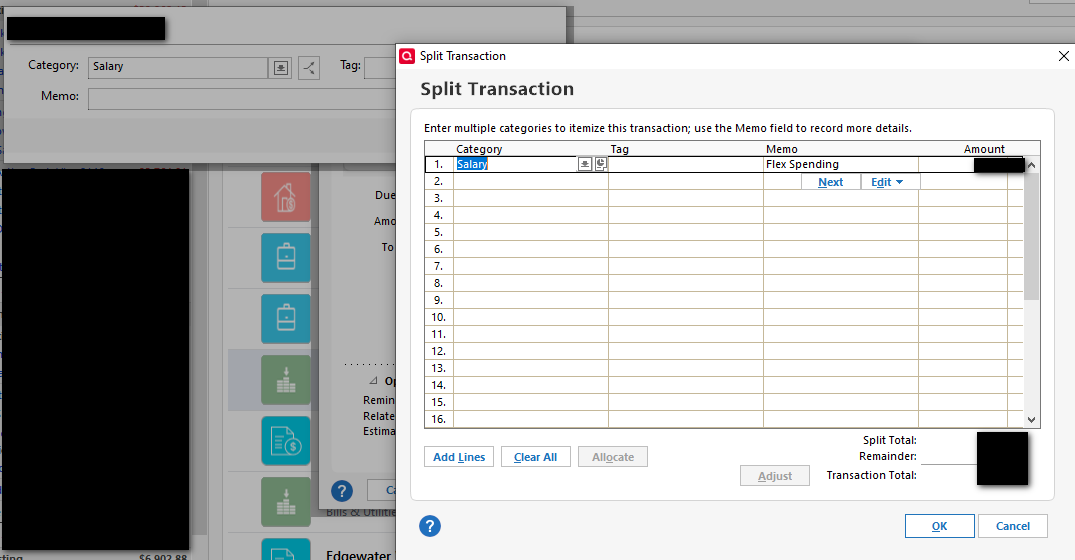 1
1 -
@Tungue Was it ever a real Paycheck reminder? You screenshot looks like you created a regular income reminder and added your splits manually. A Paycheck reminder looks like the screenshot below.
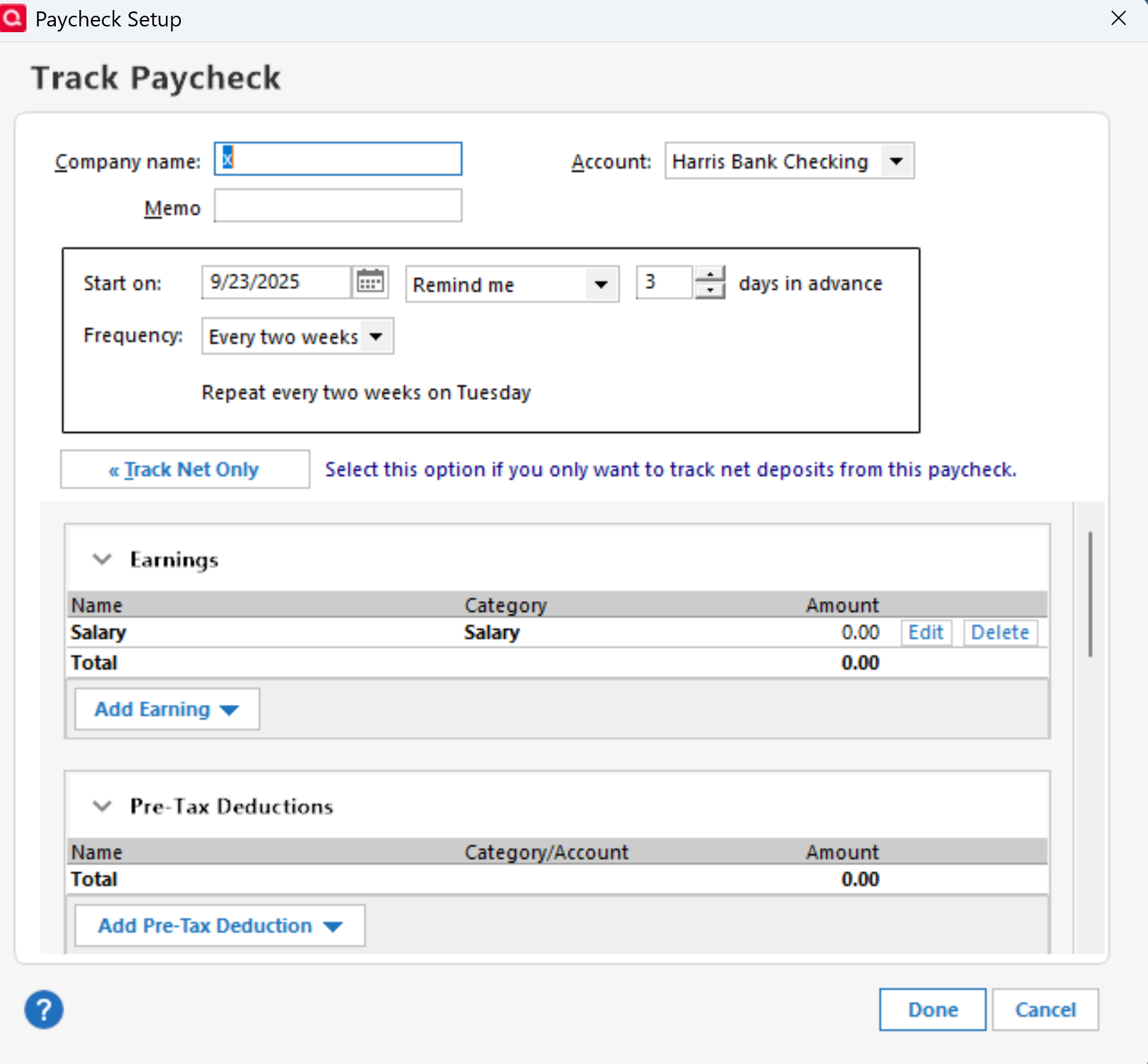 1
1 -
@markus1957 It was a paycheck reminder. After I run the One Step update, the paycheck reminder is wiped out. The screenshot what happened to my paycheck reminder.
2 -
@Tungue Thanks for clarifying. I could be wrong, but your issue could be part of the broader issue with corrupted reminders being perpetuated by the OSU process even after they have been corrected in the data file. Your paycheck reminder reverting to a common reminder confirms paycheck reminders are a special form of the common reminder. My experience with corrupted reminders follows.
I cannot break reminders with splits as of yesterday. I waited until this morning after a new day's OSU to see if the reminders remained uncorrupted and they did.
I cannot pin down exactly what happened but have a couple of candidates. I went from reliably being able to break the reminder after OSU as verified by seeing changed values and anomalous behavior in tax planner and also "corrected scheduled reminders" in super-validate reports to not being able to break it.
Three things I did but really cannot pin down if any one of them are responsible.
First, I deleted QW.rmd, a legacy file from BillMinder that is still used somehow in Quicken and which has been implicated in the past for bad behavior in reminders. I had not looked at it in a while and it was rather large. It's now only about 40 kb. The file is found under C:\Users\UserName\AppData\Roaming\Quicken\Data
Second, I reset the cloud file after a super-validate and then made no accounts selected for mobile sync.
Third, after a super-validate (holding Ctrl+Shift while clicking File Validation), I would always go back to the problem reminder(s) and check them to see if anything changed. I would then resave them. The next OSU would result in corruption, sometimes even before the next OSU, I'd notice Tax Planner shift from using scheduled reminders to YTD use to date. After the last 2x super-validate, to verify a clean file, I performed OSU immediately and Tax Planner values remain as expected.
Some form of corruption was being spawned using Quicken and being perpetuated by the OSU process. It seems for now, one of the steps I took (or a back-end change in the OSU process) corrected the corruption and the file is now behaving as expected. Several others are reporting this type of issue with reminders containing splits. Hopefully, thru trial and error, a specific set of steps that can be taken to restore the file will be identified.
0 -
Thank you for your reply @Tungue,
The issue you describe is similar to paycheck reminder issues that have been reported, but is also different enough that it may have a separate root cause. I think it's unlikely to be a file specific issue. For further assistance, I recommend reaching out to Quicken Support directly. They have access to tools we can't access on the Community, and they're able to escalate the issue as needed. The Quicken Support phone number can be found through this link here. Phone support is available from 5:00 am PT to 5:00 pm PT, Monday through Friday.
Please let me know how it goes!
Quicken Kristina
Make sure to sign up for the email digest to see a round up of your top posts.
0 -
I'm going to respectfully disagree with @Quicken Kristina that this is not a file specific issue. If it were not file specific, this community would be flooded with ongoing posts regarding the issue. I would offer that a subset of users' bill reminder table was corrupted during one of the recent updates introducing the new online billers platform and that OSU is perpetuating the problem by reintroducing the corrupted reminders.
Some have stumbled on a repair that works like I did and others may just be adapting by deleting and readding the reminders. Once repaired and the cloud is forced to honor the repair, all seems normal.
1 -
Exactly the same issue here, and it started the moment I applied an update a few weeks ago.
0 -
The trick I found, and I have seen others use here, is to start with an uncorrupted file. That may mean you have to go back a bit to find a backup if you have one.
In that file, BEFORE you do an OSU:
- Go to the Mobile & Web tab
- Even if you've never used it, turn SYNC to ON. In my case, it's off, and I don't use it with my production file, but I have used it for beta testing.
- If you aren't using this feature, ensure that all your accounts are unselected for sync and consider resetting your cloud data. For me, this caused a hang where Quicken just kept trying to sync the web, so I killed the application and restarted it. Hopefully, that doesn't happen for you.
- Go back to the Mobile & Web tab and turn sync OFF.
- Validate your reminders are correct in your register or wherever you see them
- Assuming so, now perform an OSU and see if they stay corrected.
I had like 7 accounts marked for cloud sync even though I had the master toggle turned off. The website hasn't been updated in almost a year, according to the online release notes, and for a file with 20 years of data in it, in my case, it has NEVER synced correctly and has ALWAYS failed other than in the most simple of situations. So I quit trying.
0


