What’s Going On Between Fidelity and Quicken?
Comments
-
If R64.25 is supposed to correct some of these issue, why are there no notes in the release notes that are referencing this problem with the Fidelity connection change? It seems that Quicken would benefit from including release notes about any potential issues that have been corrected. @Quicken Anja , can you confirm if there is a hard date to change from Direct Connet to EWC+? There still seems to be some problems and confusion, given that this post is now 12 pages long. Thank you.
0 -
Tonight I was told to reauthorize my accounts with Fidelity. I have many. That seemed to go well until I saw the downloaded transactions. Quicken shows them as new but they are not. I've already downloaded these transactions. All are duplicates but they all show as New. I cannot Match them to the existing transactions and I haven't figured out how to delete the newly downloaded transactions in mass. We are talking about hundreds of transactions over a dozen or more accounts.
1 -
I too have often been disappointed that there was not some way to delete multiple transactions before accepting them without all the effort (3 actions each) when there are a LOT of duplicate downloads. What I have been doing recently is the following:
- First, RECONCILE the account so that all recorded transactions are shown with the "R" label on the CLR column.
- Next, ACCEPT ALL the downloaded transactions (I understand this will put the duplicates in your register, but we will get rid of them soon)
- Then under the Gear Icon on the top right, select EDIT MULTIPLE TRANACTIONS
- This will bring up a list of all your transactions in your register and you can SORT this list by CLR
- All the newly accepted transactions will have a CLR value of "c" so they can easily be identified
- This list supports the CTRL-click or SHIFT-click method of selecting multiple entries
- Select all the duplicates and then select DELETE (bottom right) and all the selected entries will be removedOf course, make a backup before you try this in case you make some mistake and also be careful that you only select the duplicates. This allowed me to get rid of all my duplicates in a few keystrokes when I converted to EWC+ a few weeks back.
Good Luck!
3 -
Thanks for your reply. I understood it. :-)
My cash is in FDRRX, a money market fund - this is my 'core' MMF. In my account Fidelity refers to this simply as "Cash" or Fidelity Cash Reserves and not as FDRRX. They show that at the top of my investment list, not alphabetized as are the other investments. It's been that way for a long time and I prefer it that way. So … I think what I did was enough.
0 -
Today I upgraded to Version R64.29. Fwiw, the list of changes did not show anything related to the change to EWC+ covered in this thread.
Doing the OSU I was again asked to reauthorize with Fidelity, something I thought I'd done already to switch to EWC+. Although sceptical I went ahead with this second reauth. Best I can tell there were no snafus and no additional back-dated transactions were put upon my Quicken, which happened the first time I reauthorized. I stopped then started Quicken and did another OSU — this time I was not prompted to reauthorize. Hopefully things between Quicken and Fidelity are now sorted out in my case.
0 -
I tried the migration yesterday after being prompted by R64.29. Of my 5 accounts, ONLY the retirement accounts work. The two non-qualified investment accounts won't migrate.
0 -
@Yarga Do you use a different Fidelity login for the accounts that did not migrate? If so, you should be prompted to reauthorize them the next time you do a One Step Update.
QWin Premier subscription0 -
The problem is definitely not fixed.
On Sept 14, I guess they temporarily rolled back the conversion because I was able to download Fidelity without problems (no reauthorization required). But today, reauthorization was required and the same problems - it downloaded past transactions again. I don't bother downloading the transactions, since I know the situation isn't OK. I restored from a previous backup. I agree with @Mark Wagner that the conversion should be postponed. Perhaps even until they fix the problem??
0 -
@kmagnush Was reauthorization really required, or was there a "Remind me later" button at the bottom of the reauthorization notice box?
QWin Premier subscription0 -
@Jim_Harman Thank you - that seems to have worked! Last week when I tried that, it didn't work. Looks like I can breathe easy for a little bit longer!!
0 -
@Quicken Anja is there a hard date to change from Direct Connect to EWC+? If so, where is the announcement? Why are none of the fixes that you say were addressed in the release notes?
1 -
I have been experiencing this for months and despite lengthy support calls to Quicken, downloads from Fidelity keep going 'wrong'. I've had to do so many manual corrections [Removed - Rant] Is there a consolidated 'how to' or do I have to do lengthy calls again? My current situation is that in the online center I see a transaction, but it doesn't appear in my register. I can't do an account reset because that transaction is there - but also not 'there'. Also, my last Fidelity 401k download only has about half of the transactions present.
1 -
Upgraded Quicken to 64.29. De-activated and re-activated Fidelity accounts. Still NO transaction downloads from any account!!!!
1 -
On Monday mornings, there are usually no weekend transactions to download for any of my accounts. I usually have to wait until Tuesday or Monday night for transactions to be available. Downloaded transactions on Sunday thru Monday are usually not available for me.
Deluxe R66.23, Windows 11 Pro
0 -
Agree….same for me.
Quicken Classic Premier (US) Subscription: R66.23 on Windows 11 Home
0 -
Thanks. I'll try again tomorrow
0 -
New issue for me today (Tue Sept 23). Due to all the issues with the DC to EWC+ conversion I have 2 Quicken files which should have identical transactions; the only difference is one uses the new EWC+and the other with the old DC online method. I finally got them to remain in Sync last Wed-Monday (no Fidelity updates downloaded Sunday & Monday morning). This morning (Tue) the DC connection worked properly on our split checking & investment account properly recording checks being paid and a sale of a non-core Money Market (FZDXX) to cover the cash shortage. However, the EWC+ file did NOT download the sale of a non-core Money Market (FZDXX) to cover the cash shortage (and I selected this FZDXX account to remain as a security during the reauthorization process).
Note: I backup everyday prior to online updates (only recently because of issues with this Reauthorization update) and the same thing happens whether I update the DC file before or after the EWC+ file is updated. The very first attempt the EWC+ file was updated before the DC update.
Split Checking & Investment Config:
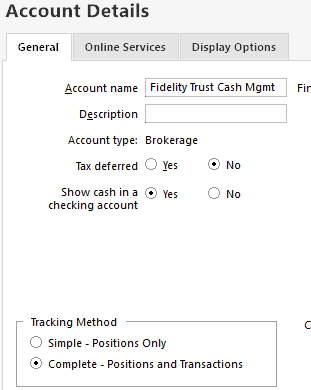
Transaction that was downloaded using DC but NOT downloaded with EWC+

Quicken Classic Deluxe; Ver R64.29, Build 27.1.64.29; Windows 11 Home
0 -
There seems to be many issues that are yet to be resolved. @Quicken Anja or @Quicken Kathryn, has a new deadline been released for a forced migration to EWC+, given all of these issues that have not been resolved. Thank you.
0 -
It's now nearly the end of September and all of my unresolved transactions are coming to roost! I don't care so much about the history back a decade or more (when I was still learning how to operate Quicken -what a mess). How do I stop the re-authorization process from downloading all of the history? I'd sure like to start over with just the last 3 or 4 years but make the accounts (including Fidelity and banks, etc.), keep aligned with the current account balances.
If not, then suggest a alternative accounting software to Quicken Classic please. I've searched for one unsuccessfully. I just need to keep daily accounting life simple!
0 -
I don't know if you saw this post (there are so many that it is hard to locate) regarding clearing a large amount of downloaded investment transactions.
For cash accounts, multiple downloaded transactions can be selected and deleted with a few clicks. Just sort the transactions by date so you can tell new transactions for older.
If you have a large number of duplicate downloaded investment transactions, @bmbass has posted the following method for identifying and bulk deleting the duplicates.
I too have often been disappointed that there was not some way to delete multiple transactions before accepting them without all the effort (3 actions each) when there are a LOT of duplicate downloads. What I have been doing recently is the following:
- First, RECONCILE the account so that all recorded transactions are shown with the "R" label on the CLR column.
- Next, ACCEPT ALL the downloaded transactions (I understand this will put the duplicates in your register, but we will get rid of them soon)
- Then under the Gear Icon on the top right, select EDIT MULTIPLE TRANSACTIONS
- This will bring up a list of all your transactions in your register and you can SORT this list by CLR
- All the newly accepted transactions will have a CLR value of "c" so they can easily be identified
- This list supports the CTRL-click or SHIFT-click method of selecting multiple entries
- Select all the duplicates and then select DELETE (bottom right) and all the selected entries will be removedOf course, make a backup before you try this in case you make some mistake and also be careful that you only select the duplicates. This allowed me to get rid of all my duplicates in a few keystrokes when I converted to EWC+ a few weeks back.
Deluxe R66.23, Windows 11 Pro
0 -
Having yet another problem connecting accurately to Fidelity after converting to the new connection method. All balances and transactions were accurate before the conversion. Now many securities are not showing up in two Fidelity brokerage accounts. One account has 7 securities in it, Quicken only shows 3 (balances and transactions for those 3 securities and cash are accurate, but the total account balance is way off because of the missing securities); another account has 12 securities in it, Quicken only shows 9 (with the same accuracies and inaccuracies). What's weird is that the transactions purchasing those securities are intact in "Transactions" view, but the securities are nowhere to be found in "Portfolio" view. Anyone found a solution to this problem?
Also, despite my going through the update process for all 4 of my Fidelity accounts, every time I update transactions I get prompted to update the connection to one IRA account (that I already updated multiple times). Any clue how to stop that? Thanks.
Quicken Classic Deluxe Mac V. 8.3.1 Build 803.58866.100, MacOS 15.6.1
0 -
This morning (7:20 AM), Quicken failed to update any account at Fidelity. I tried three times, and still, there is no change - the stocks sold and bought on Monday (9/22/25) still do not appear in my Fidelity accounts.
Quicken Classic Deluxe Version:R64.29 Build:27.1.64.29, Windows 11 Pro
0 -
In Portfolio view under Options → Customize Current View, if you select the Securities tab, are those missing securities shown and are they selected?
Example:
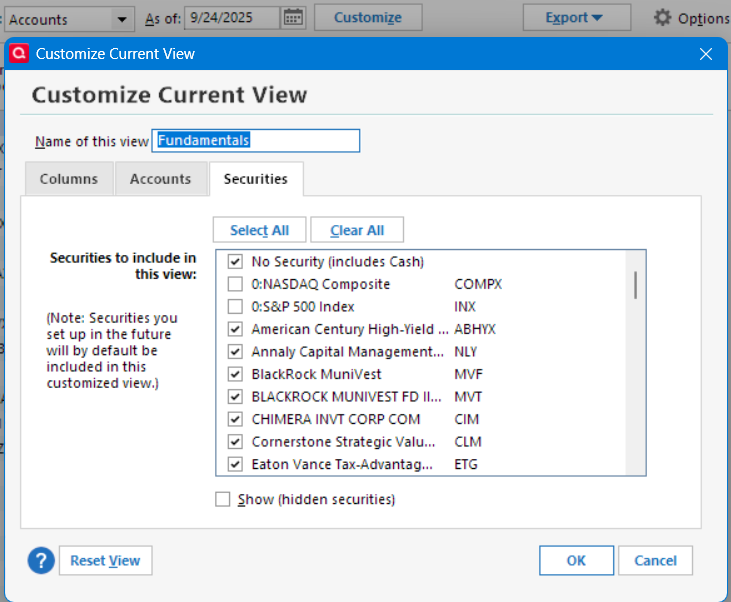
Also, in the Securities list, do they show and if not, select Show hidden securities and now do they show with the Hide switch selected? If they are hidden, unhide them and see if that changes the visibility in the registers and Portfolio view.
Suggestions
Deluxe R66.23, Windows 11 Pro
0 -
No new stocks/securities were added; funds were transferred by selling an existing stock and buying more of another existing stock in the portfolio.
Update (10:10 AM ET USA): Ran One Step Update (OSU) again, and all information was updated correctly.0 -
when will we get a straight answer on when we can update fidelity without keeping our fingers crossed it will work to our satisfaction. will we be receiving a patch update? what is the correct web connection with fidelity investments going to be?
0 -
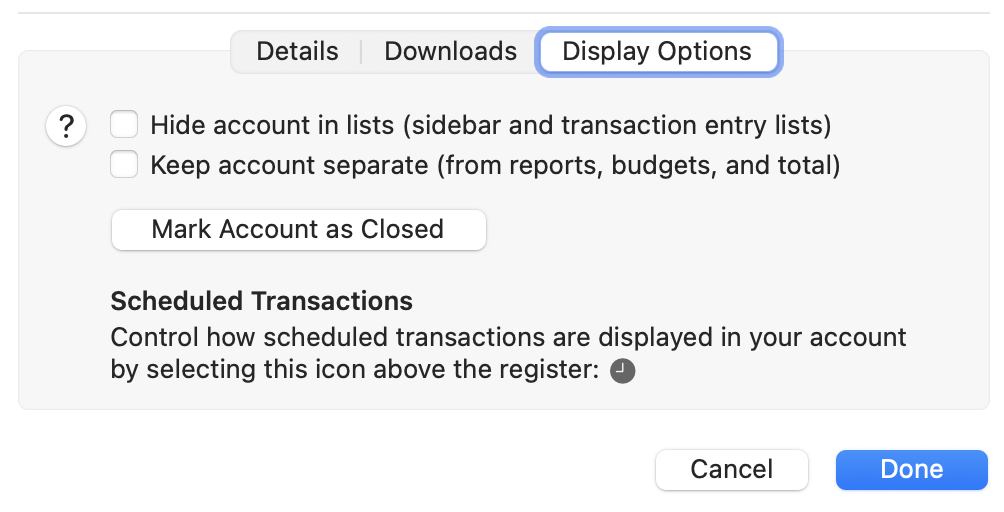
Thanks for your suggestions. Quicken for Mac (quite the orphan compared with the Windows version) has a different display layout. As far as I can see, there is no "Options" choice in Portfolio view and no "Customize Current View." You can choose which columns to display, and under "Settings" → "Display Options" your only choices are to hide the account or keep the account separate. That's it. If anyone can point me to something I'm missing in Quicken/Mac, that would be great.
In the Securities window, all of the missing securities are present and listed as "Currently Held." So the absence in Portfolio view is bizarre.
Not sure what to do except wait a few more months until Quicken straightens this out. Thanks again.
0 -
Quicken for Mac, Not downloading any Fidelity transactions, in ANY accounts (brokerage, cash management, IRA, Roth, HSA). Anyone else having that problem??
0 -
Same here. When I do get anything to download it duplicates all my positions and therefore doubles the total account value. Transactions such as buy, sell, dividends, etc. do not download. This is all Fidelity accounts.
0 -
I just went thru the transition, and it automatically selected all the incorrect accounts. I had to manually unselect and reselect all the correct accounts, manually, with very little info to go on. There was not sufficient info displayed to correctly select the correct accounts to match to. I had to "guess", and when it was wrong, I had to redo it. It's all good now, but way more of a pain than it should have been. Please fix the flow.
0 -
Ever since I updated to the new Fidelity Connection, my 401(k) balances are not updating. I have had to go in and update the security prices daily.
I deactivated the online connection and tried to reactivate it. There is no longer an option for Fidelity NetBenefits as the institution. The only option is Fidelity Investments. When I select Investments and authorize the accounts (which I have done numerous times), there is no option for 401(k).
There are also issues with my HSA through Fidelity. I continue to get transactions that the action is CvrShrt. These were never there before. I can delete them and it doesn't affect the balance, but there are several mismatches.
I am getting very frustrated with all of the issues that are arising. I have used Quicken for DECADES and never had these issues, and I am seriously looking in using other software.
Any insight would be helpful.
(on another note, with the latest update, I got hung up trying to do my daily update and had to revert back to the last version R64.25)
0


