zzz-Fidelity Updates
Comments
-
Good Moring …
I have 2 Fidelity Investment Accounts which are used strictly for checking and recurring payments. I keep my deposits in the Spartan Money Market (SPRXX). When check or automatic payment is received, the transactions are properly processed in the checking account . However the sale of the SPRXX to cover the transaction is not recorded in the investment account. This only started to happen when I converted to EWWC+. I have tried deactivating the account and that has not worked. Does anyone have any suggestions.
Thank You.
0 -
I am not getting prompted anymore to switch my Fidelity NetBenefits 401K over to EWC from DC? I am for my non-401K accounts? What is the new deadline?
 0
0 -
Hello @Scooterlam,
Thank you for sharing your experience!
Conversion of the FDRXX in my IRAs and HSA not so much.
See first illustrated imagefor an explanation and fix.Thank you for sharing what you did to correct this!
I noticed in "Account details" there is a "Reset Money Market securities/cash options" control.Is this new? How is it to be used? Nothing in the window help screen.See second illustrated image.If the financial institution supports it, some accounts give you the option how you want to track money market funds/cash in the account. If you accidentally choose the wrong option, or the option you chose doesn't reflect the balances correctly, then that button allows you to reset it and try the other option.
In the window below the investment register, I think this window behavior has changed.Now, the window is always open and defaulted to "Bill and Income Reminders", even if there are none. I selected "downloaded transactions" and minimized the window. Upon reopening Quicken, my selection is not sticky. I noted that in my banking accounts this window is minimized and defaulted to "Downloaded Transactions".Please make this window sticky or otherwise change the default behaviorconsistentwith the banking registers. See third illustrated image.I reported this issue to the proper channels for further investigation and resolution. Please navigate to Help>Report a Problem and send a problem report with log files attached to contribute to the investigation.
Immediately following the conversion, moving between the investment accounts, Quicken was incredibly slow, even after a restart. Seems better now but still slower than it should be.
Did you restart the program, your computer, or both?
Thank you!
(CBT-829)
Quicken Kristina
Make sure to sign up for the email digest to see a round up of your top posts.
0 -
FYI - While not directly related to Fidelity:
Quicken has announced today, 9/23, that the 9/22 forced cutover for Merrill Lynch has been postponed with no new ETA.
I think the problems being reported with the ML transition are a little more severe (not to imply that the Fidelity issues aren't), but I would not be surprised if the Fidelity date is pushed back as well.
0 -
Problem is reported, as requested.
The slowness issue amongst the Fidelity Accounts remains despite both restarting quicken and my laptop. Today, moving from account to account takes around 11-15 seconds, first time only. Subsequent switching between accounts is much faster, more like 1-2 seconds.
0 -
I can, unfortunately, confirm that the cash balance issue is still a problem. After a seemingly successful transition to EWC+ 3 days ago, I downloaded my first div/reinvest transaction. It came down fine, but after I accepted it, I got the dialog saying there was no cash balance in SPAXX, the designated cash holding I selected during the transition. I followed the dialog, created a placeholder and the balance increased (although the correct number was displayed in the Cash Balance field in the lower right of the register). Not sure what to do, I went to backup and tried again. This time, in addition to downloading the 1 new transaction I got 26 dupes in this account, and 2 dupes in another. I deleted them, accepted the new transaction and again got the mismatch/no cash in the SPAXX holding. This time I clicked "Ignore for Now" option. I then clicked the "Update Cash Balance" and the dialog displays the correct info. So, it appears to be OK for the moment. Oh, and the "Cash Representation" button, which finally appeared after the transition, is missing again (but it's still there for all other accounts … for now).
Anticipating more of this, what's the recommended way to deal with the mismatched cash dialog when it pops up?
Not out of the woods yet.
1 -
"Oh, and the "Cash Representation" button, which finally appeared after the transition, is missing again (but it's still there for all other accounts … for now)."
For me, the Cash Representation button disappeared if selected once for an account and still appear for other accounts for whic it was not selected. I had to do another OSU for it to reappear.
Deluxe R66.23, Windows 11 Pro
0 -
IGNORE - Subsequently worked normally
===========================
I've remained on the zzz-Fidelity Investments DC connection from the onset of this fiasco and everything has worked smoothly for me…until today. Today I received this:
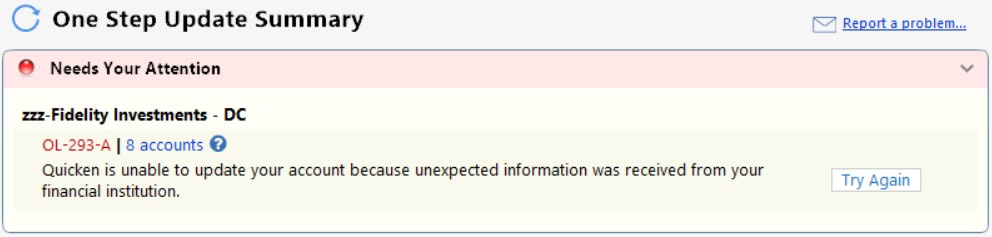
I have numerous bank accounts that usually update after my Fidelity connection when running OSU. In this case, after the Fidelity error OSU shuts down and no additional accounts are updated. Same result when restarting Quicken or restarting my computer.
Anyone else have a similar experience? Is this related to EWC+ transition?
0 -
I just ran OSU and Fidelity DC downloaded well with no issues encountered.
OL-293-A error codes sometimes happen when a financial institution's server sends an unexpected response to Quicken or when there has been some sort of difficulty making an internet connection with the financial institution's server. I do not think this had anything to do with the EWC+ migration.
While this error code does not happen often it is not uncommon. In most cases doing Update Now shortly after getting the error code will resolve the issue. Try doing Update Now or run OSU, again, to see if the issue is resolved for you.
If you are still encountering this error code, if you have not already done so you might want to review this Support Article: .
Quicken Classic Premier (US) Subscription: R66.23 on Windows 11 Home
1 -
There were definitely problems with EWC across all or most institutions earlier this morning. At 6am Pacific Time, I ran one-step update. It took forever to run (around 15 minutes). Lots of error messages on EWC accounts (credit cards, etc) and no transactions on any EWC account download. Fidelity is on EWC+ for me and it returned nothing. Accounts on DC (like Vanguard) worked fine and transactions from yesterday downloaded normally.
At 8:15 I ran again. Still slow, but it worked across all accounts (both EWC and DC). Fidelity (on EWC+) updated yesterday prices on bonds and proprietary funds normally (which it didn't do at 6am). Credit cards on EWC downloaded transactions this time.
So I'm assuming Quicken/Intuit servers had a hiccup earlier this morning. Not the first time, but totally unrelated to the Fidelity transition.
0 -
I will pay you $1 if your Fidelity 09/23/2025 transactions downloaded by now through EWC+ since the OSU reset this morning!
Last time this happened with Schwab, I had to type all of them in manually. If you are lucky, you had no transactions with Fidelity from yesterday to download today. Best of luck and success!
0 -
My Fidelity transactions from yesterday downloaded through EWC+ this morning…. no issues !
0 -
I had 3 transactions download to 3 different Fidelity accounts for 9/23/2025 this morning around 8:11 EST. I don't know when the OSU reset was this morning but I'm not seeing any errors downloading using EWC+.
Deluxe R66.23, Windows 11 Pro
0 -
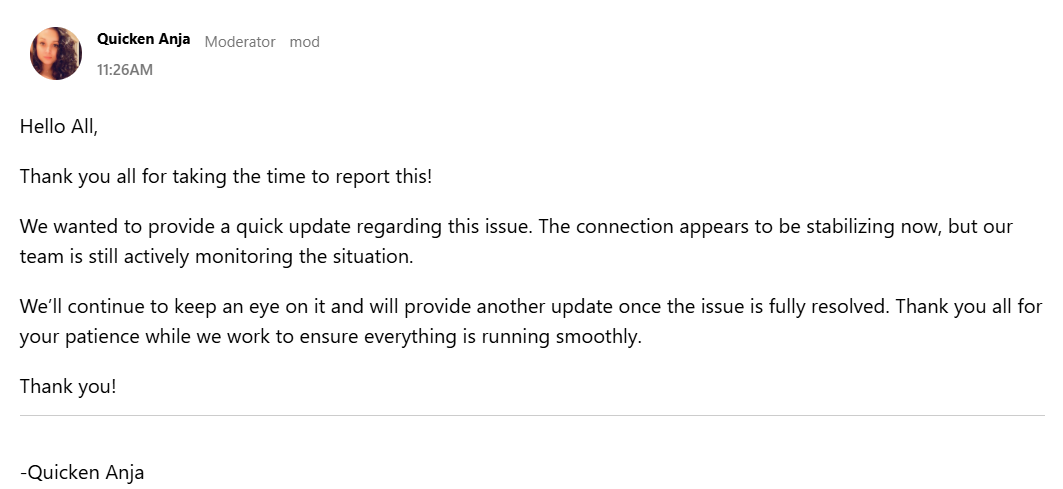
EWC+ OSU restarted around 11:26 am this morning after a complete blackout earlier. No Fidelity transaction downloads from yesterday since then from our end:
https://community.quicken.com/discussion/7966340/windows-quicken-classic-hanging-osu-freezing-cc-501-errors/p4
0 -
My Fidelity rollover account, taken from my 401K, has been a problem. I have had to reset it, or delete it and start over, several times.
This account consists of money market (cash) and two CD ladders.
Currently I see three values in Quicken, only one which matches the total account value that I expect, which is the value I see online at Fidelity.
Quicken shows a "securities value", a cash value, and a total value. The cash value matches the account value online at Fidelity. The Quicken total value adds the mysterious securities value to the cash value, for an incorrect higher value.PTArtist.com0 -
I converted over to EWC last night. I have two data files set up so I can verify over the next few days. One has the EWC set up and the other has the DC set up. Everything appears to have went okay but I have a slight discrepancy in my account values. The "DC" file matches exactly what is reported at Fidelity. The "EWC" file is slightly off on my 401K total value. The only difference I see between the files is the current share price of the individual items. It appears to be 4 digit rounding of the price versus the 6 digit rounding I see with the "DC" file. I will update each file daily for a while to see if things remain constant,
0 -
Attempted conversion on a test file - not happy. My cash management account has always been under banking. It is linked to my Fidelity Credit Card account. With the migration, it is not allowing me to link it and seems to be forcing me to create a new account under Investments. Why?
0 -
Can i still download via the old connection method today and is the forced cutover still tomorrow? I try to read every post via email updates on 2 threads but still wanted to check.
I read that ssomething reset this morning but didn't know if it impacted my use case.
Thanks
0 -
I was able to download updates both ways an hour ago. I have one file using the DC method and another file using the EWC+ method. I don't know if we are going to be forced to cut over tomorrow.
1 -
Thanks
0 -
I just downloaded and was not forced to migrate to EWC+ with the Investment and NetBenefits accounts.
Barry Graham
Quicken H&B Subscription0 -
The cash management account shouldn't need any action taken, it will automatically migrate with the linked account. Did the linked account migrate successfully?
Barry Graham
Quicken H&B Subscription1 -
Conversion was pushed on me. I guess I could have selected "Later", but figured it must be ready for prime-time. Nope. Took too much effort to re-match all existing accounts to online accounts, with cryptic descriptions. Got it going and it mostly works now, but not an easy transition.
0 -
I successfully converted several days ago, however, the One Step Update I have done for the past 2 days (including today) took several minutes to execute (compared to within 1 minute before the Fidelity transition). I also got an error notice today at 6:30am from Fidelity today (CC-501 - unknown error). I ran the OSU twice and got the same message. So I did not make connection with Fidelity this morning. While I am not a technology person, my guess it that someone (either Quicken, Fidelity or both) needs to adjust the capacity of their systems to account for the revised level of traffic associated with the conversion to EWC+. So I'll try again later to see if I can make a connection with Fidelity.
My guess is that it is gonna be a long day for people who are converting today….
PGAVON
Quicken Premier - Windows Subscription
0 -
Thanks again. Last night was able to download with old connection and choose "later" for conversion. A normal download that balanced. Well it did mess up a name change but easy to fix that.
0 -
I have two Fidelity 529 accounts. These appear to have completed the EWC+ conversion successfully, but the share prices for funds in these accounts have NOT updated since since I went through the conversion on 9/19.
The funds in these accounts are special Fidelity funds for the Connecticut CHET program. The CUSIP IDs for these funds are CTX203602 and CTX204220. Prior to the EWC+ conversion, the prices were updated when I download transactions from Fidelity.
In Quicken the funds are still matched to the correct Fidelity funds, and when I do a gear menu > Reconcile Shares or Compare to Portfolio in the Online Center, I still get the message "Your Quicken account and your brokerage holdings are in agreement."
On the Security Detail > Additional Security Information page, "Ignore prices from broker download" is NOT checked.
I have sent logs and screen shots of the Price History via a Report a Problem.
[Update 1:07PM Eastern time] The prices downloaded later today. See update on the next page of this discussion.
QWin Premier subscription0 -
I was forced into EWC+ this AM. I have 2 Net Benefit accounts that fortunately do not contain MMF or other cash accounts. The download had several totally missed transactions that I had to enter manually by copying from the Fidelity website transactions page. Also, a couple downloaded transaction contained the correct numbers but were "unidentified security" and I had to modify the downloaded transaction with the correct security from my list. This was despite a popup that asked me to approve a security name change. Overall, a very buggy / problematic conversion right now for me.
0 -
September 25th update: I am still being given the option to remind me next time re migrating to EWC+, and now I'm not being prompted at all to migrate with my NetBenefits account.
There is a new update being rolled out (64.30) to improve cash and money market handling for our accounts. Perhaps that addresses the issue where the account wasn't being identified?
Barry Graham
Quicken H&B Subscription2 -
I've not gone back and read this entire War & Peace thread…
Quicken notified me this morning to resync with Fidelity. I decided to give it a go. After authentication completed, Quicken then popped up my three accounts to add. However, there was no option to LINK TO EXISTING acccount, only to add new accounts.
Is this the expected behavior or the result of the ongoing issues?
I cancelled out of the process and chose Remind Me Next Time.
Quicken user since 1991
VP, Ops & Tech in the biometric space
0 -
I have 6 Fidelity accounts that as of today when doing an update I receive an "unknown error" with error code CC-501 and they do not update. About a week ago I had to reauthorize my accounts and redownload and delete duplicate transactions and everything was fine again. Not sure what the issue is this time. This happens both when I use the update button on the main screen as well as when I go to a specific account and select "update transactions" from the menu. I just updated to the latest Quicken Windows today but I always update whenever there is an update notice. Hopefully this is on Fidelity's end as the FAQ for this error code suggests, so I will try again later today.
0






