zzz-Fidelity Updates
Comments
-
First glitch since cutting over 2 weeks ago. I bought a position for which I did not have enough cash to cover in SPAXX. It should have pulled from FZDXX to cover the shortfall. This is what I wrote on Friday:
"Because there was not enough cash in SPAXX to cover the buy, I currently show a negative balance there in both Quicken and on the Fidelity Portfolio Positions page (Fidelity should automatically sell enough funds from FZDXX to cover the shortfall in SPAXX). In addition, the entire $ value of the purchase (not just the shortfall) has also been deducted from the Total Cash Balance in some places but not others. The Fidelity site shows different numbers in different places, so it’s a little hard to follow. The Portfolio Positions page displays it right; the Balances page doesn’t. I hope/expect this will all be resolved by tomorrow (Saturday), or next Tuesday at the latest (Fidelity doesn’t send data on Mondays)."
The Fidelity site DID resolve the discrepancies on Saturday, as expected. It WAS NOT resolved in Quicken. There is a "REDEMPTION FROM CORE ACCOUNT FIDELITY MMKT PREMIUM CLASS (FZDXX) (Cash)" in the Activities & Orders" page for the appropriate amount of funds which is not bolded indicating it was eligible for download, but it didn't make it down to Quicken. In the past, these "redemptions" have come through as "Sell" transactions in Quicken. There are 4 possibilities:
1 - Quicken and/or Fidelity are still confused on how to handle multiple money market accts (most likely)
2 - Fidelity didn't send it down bc it changed how it handles Redemption transactions;
3 - Fidelity did send it down, but Quicken didn't know what to do with it, so it ignored it (kinda like #1)
4 - Fidelity didn't send it down and this is the beginning of me having the "not receiving any Fidelity transactions" problem.
I won't know the answer until some new transactions are eligible for download. In the meantime, I manually entered a "Sell" transaction to bring SPAXX and FZDXX into balance.
1 -
Similar problem as @mrzookie . My brokerage account has two money market funds — SPAXX and FSPXX (Fidelity CA Muni Market Fund). Fidelity web site displays SPAXX as CASH, but FSPXX as a mutual fund. But when I go to buy anything or transfer funds, it shows the total of both. On Oct 2, I transferred $10K out of my brokerage. At that time the balance in SPAXX was $0, but there was plenty of money in FSPXX. The transfer happened and Fidelity web site shows two transaction. The first is a REDEMPTION from FSPXX of $10K and the 2nd is a Electronic Funds transfer of $10k.
However Quicken only shows the funds transfer transaction, but not the redemption so my cash balance in quicken shows -$10k. I can easily manually add the transaction, but this does seem to be an issue that should be fixed.
As a point of trivia, I used to only have one money market fund in this account FSPXX. However in 2016, Fidelity no longer allowed it and this forced the situation with two money market funds. I have no idea why, but it is what it is.
1 -
It looks like if you are using DC and reset your account now or try to set it up again using the zzz financial institution, it uses EWC+ even if you were previously using DC. I tried a reset this evening to fix some missing downloaded transaction issues with my son's Youth account that was using DC, and it moved it to EWC+ without asking. I restored a backup and did it again just to make sure it wasn't something I did wrong, and the same thing happened. The good news is that it did actually fix the issues (missing cash transactions) and EWC+ seems to work OK with the account.
Barry Graham
Quicken H&B Subscription2 -
I have something similar. I would wait until tomorrow to see if the sale transaction comes through.
1 -
I have two files with 3 Fidelity accounts still connected with DC and a new test file with only Fidelity using EWC+.
The files with DC continue to update and cash (FDRXX) reconciles correctly each month. The file with EWC+ seems to update correctly but every monthly, cash reconciliation needs a Balance Adjustment. I'm not going to waste more time identifying and correcting the EWC+ mess! I waste enough just following these threads.
This morning, Quicken resumed the popup, "Your financial institution connection(s) need an update" with Reauthorize and Remind me next time buttons. Of course, I chose the latter.
Quicken should immediately suspect this popup. If a user phones support and they can't fix the issue, they should be transferred to an escalation team with more experience on the Fidelity issues. This team should be intimately working with development to prioritize and fix issues including those on these threads. Solutions should be posted on these threads.
Once the issues are resolved and it's safe to change from DC to EWC+, then they can resume the update popup.
8 -
I transitioned my 401K, HSA, and Roth IRA to EWC+ (Deactivated, Removed Authorization, and Reactivated/Reauthorized 3 accounts) without incident on 10/5/2025 and the Simple View balance matches what my web browser shows at Fidelity/Net Benefits. I selected to stay with the simple view because Quicken warned me that I would have to do continuous manual work if I selected the full register view. I don't see any transactions in the simple view, but I hope that doesn't matter too much to me because I only add money during my current working years. Three questions, please:
1) Is it likely that Quicken will have transaction registers re-enabled (automatic - not some semi-manual kludge) within the next 3-6 months?
2) If automatic register/transaction view is re-enabled, will I be able to switch to that from the Simple view easily, or will it be a laborious manual conversion?
3) Were all my years of old transactions lost when I switched to simple view?0 -
It is best to think of Simple and Complete as operating modes, not just views.
1) From what I have heard from the posts by the Moderators, Quicken intends to fully support both Simple and Complete mode for Fidelity accounts. They have not said when the current issues will be resolved.
2) Any time an account is in Simple mode, the detailed transactions are not downloaded. That means that if the account is in Simple mode for an extended period of time and you want to switch back to Complete mode, you will have to enter and/or edit the transactions to make the account include all the detailed data. My recommendation would be that if you plan to switch back to Complete mode in the future, it would best to stay in Complete mode and make the corrections to the transactions as you go.
3) Historical transactions should not be lost when you switch to Simple mode. It is best to keep a backup from before you switched modes, just in case.
QWin Premier subscription4 -
Do we have any idea why some people are getting transaction downloads with EWC+ and others (like myself) are getting nothing?
0 -
Hello @siegelmichael,
Thank you for reaching out! Your transactions should be able to download into your accounts. To clarify, is the account set to Simple investing (no option to view transactions at all), or are you able to see transactions, but nothing new is downloading?
If it is set to Simple investing, you should be able to correct that by navigating to Tools>Account List, clicking the Edit button next to the problem account, and on the General tab, selecting the radio button for Complete.

If you can see transactions, but nothing new is downloading, then please follow these steps from our article on when you have missing transactions or no new transactions are downloading:
Be sure to follow these steps in order:
1. Go to Edit > Preferences > Downloaded Transactions. The option Automatically add to banking registers needs to be unchecked.
2. Refresh your online account information by clicking the Actions Gear Icon on the upper right of the register, and select Update Now. Follow the on-screen instructions to complete the update.
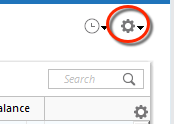
3. Confirm that the Sort Order in your account is by Date; just click the top of the Date column in your account register. It's possible the transactions are in your register, but not where you thought they'd be.

4. Click the Reset button at the top of the register. This will confirm that there's no filtering in your account register.
5. Go to Actions (Gear Icon) > Register Columns > Check Downloaded Payee in the account register. This allows you to search by Payee to confirm the transactions haven't been renamed unexpectedly.
6. Go to Tools > Account List and check Show Hidden Accounts at the bottom left. Confirm the missing transactions haven't been added to a hidden account by clicking on the name of any account that appears with a check mark in the Hidden column.

I hope this helps!
Quicken Kristina
Make sure to sign up for the email digest to see a round up of your top posts.
0 -
I have not gotten any new transactions since I converted from DC to EWC+. Whenever I update it shows a successful download with the current date and time (ie 10/06/25 5:51pm).
When I go to the online center it currently says downloaded transactions as of 09/27/25 12:00am, nine days ago.
All my accounts are set to "Complete".
Here is my info on the steps:
- Download transactions has always been unchecked
- I have been updating multiple times a day. They complete without any errors. All my other investment, bank and credit card accounts have transactions usually, except for Fidelity under EWC+.
- Sort order is always kept ascending. Nothing shows up in downloaded transactions at the bottom for Fidelity. Works fine for all other institutions.
- For my brokerage accounts there is no filtering option.
- Not the issue
- Not the issue
From reading other community comments, there appear to be other people with a similar experience, although others report it is working fine.
0 -
Thank you for your reply @siegelmichael,
For further assistance with this issue, I recommend reaching out to Quicken Support directly. They have access to tools that we can't access on the Community and they're able to escalate as needed. The Quicken Support phone number can be found through this link here. Phone support is available from 5:00 am PT to 5:00 pm PT, Monday through Friday.
If they are unable to assist with the issue, please let me know.
I apologize that I could not be of more assistance!
Quicken Kristina
Make sure to sign up for the email digest to see a round up of your top posts.
0 -
I completely agree with you. I was also prompted to update to EWC+ again today. I can't imagine how confused and frustrated people who don't come to this forum must be. I am really surprised that Quicken hasn't suspended these notifications until all the issues are worked out. That seems irresponsible.
1 -
My NetBenefit non-publicly traded fund prices for 10/6 are not downloading this AM. Previously, on DC, they were downloading the following AM. :(
1 -
They just downloaded for me at 6:20am PDT on EWC+.
1 -
Based on our experience, migrating over from DC to EWC+ on July 29th and thus following iterations closely, we are in hindsight quite glad we took this step earlier rather than later.
The change in Fidelity/Quicken transaction download methods is consequential, so that, irrespective of the specific date, the migration will ultimately come with changes for Quicken users. This is not to say that, once unavoidable manual corrections following migration have been implemented, one connection method is better than the other, yet it is quite clear that EWC+ will continue to require higher levels of active user involvement and manual interventions going forward. This is to say, in our opinion it really doesn't matter much when you migrate over from DC, it will be unrealistic to expect that everything will be 100% automatic and identical with Direct Connect.
The ultimate migration deadline will be determined by Fidelity, when they will discontinue DC access. Bank of America/Merrill Lynch have done so quite abruptly, presumably Fidelity Investments is not far away from doing the same in the foreseeable future. Best of luck and success to everyone going through this transition soon!
1 -
I deleted all downloads from Fidelity and re-attached. After I completed this The next download asked me to reauthorize again. [Removed-Rant]
0 -
@Lasleyma Presumably there are Fidelity accounts in your Quicken data set which Fidelity considers not been authorized, some of which may be hidden. There is a recommendation by @Quicken Alyssa which may be helpful and applicable to your situation:
"Please try these steps:
1.
Save a Backup. Steps can be found inthis articleif needed.2.
Disconnect ALL Fidelity accountsin Quicken.Hereare the steps on how to do that.3. It's also a good idea to
check forhidden accountsand make sure there are none that are still connected.3.
Revoke Quickens Third-Party Accessfrom the Fidelity website.4.
Add accountsback into QuickenOnce back in Quicken, you will want to make sure you choose the "
LINK to existing" option for any of the accounts that were already in Quicken."That's one of the many things I meant by user involvement in the earlier posting above. Best of luck and success!
0 -
Mine downloaded later this AM also.
1 -
Fidelity third party access authorization is viewed after logging into Fidelity here: "
https://digital.fidelity.com/ftgw/digital/dae/fidelityAccess
"
Deluxe R66.23, Windows 11 Pro
0 -
I just got missing transaction for 092425 that I complained initially.
I'm on the EWC+
I don't know what were changed?
Best Regards0 -
When I deactivate an account and then reactive/reauthorize it, Quicken downloads all transactions for just that that account that have not been reconciled (in my case since 09/30/25), but then after that, it never downloads any new transactions.
From reading the message thread, it sound like many others are experiencing this behavior.
@Quicken Kristina is it possible to determine or confirm that this is a problem on Quicken's end, that Quicken (or Fidelity) are trying to troubleshoot and correct?
It would be great if Quicken could acknowledge whether this is a known issue that we need to wait for resolution, rather than spending a lot of time waiting and talking to Customer Support when they are unable to help. Thanks!
0 -
Thank you for your reply @siegelmichael,
Transactions not downloading was a known issue for a while, but it was marked resolved. Since you are seeing that issue, and the troubleshooting steps did not resolve it, contacting Quicken Support directly is typically the fastest way to report the issue so it can get investigated and resolved.
Thank you!
Quicken Kristina
Make sure to sign up for the email digest to see a round up of your top posts.
0 -
Quicken KristinaQuicken Windows Subscription Moderator modOctober 7Thank you for your reply@siegelmichael,Transactions not downloading was a known issue for a while, but it was marked resolved. Since you are seeing that issue, and the troubleshooting steps did not resolve it, contacting Quicken Support directly is typically the fastest way to report the issue so it can get investigated and resolved.It would be very helpful for all of us to have a list of issues and their status (New, Known, & Resolved with date). I'd suggest it be a separate thread with links from this and other threads ("zzz - Fidelity … ", "What's Going On …."). To keep it short and concise, it should be closed so others can't post to it.
3 -
@Ray said,
It would be very helpful for all of us to have a list of issues and their status (New, Known, & Resolved with date). I'd suggest it be a separate thread with links from this and other threads ("zzz - Fidelity … ", "What's Going On …."). To keep it short and concise, it should be closed so others can't post to it.
It would be very helpful for example to have an update for this Alert, with all the known Fidelity issues, current status, and workarounds if any. If the workaround requires a multi-step process, you could include a link to a separate Alert for that issue.
I realize it would take some effort to put together a list like this and keep it up to date. But we users are spending an inordinate amount of time trying to figure these issues out on out own, and when we come up with solutions they often get lost in the flurry of posts in these threads.
QWin Premier subscription2 -
Thanks for the info… I asked the person I contacted to log this as an issue… I guess it fell on deaf ears. I tried again today to link it, with no success.
0 -
Yesterday I downloaded (via EWC+) an exchange from my wife's NetBenefits 401(k). Unfortunately, only half of it was correct. The other half did not include the security and was not a Bought transaction.
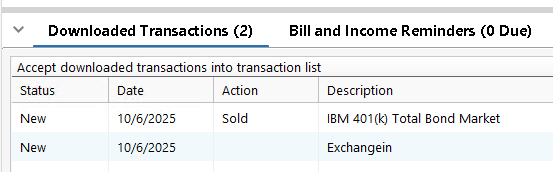
Also it was downloaded to MY 401(k) account. My wife & I worked for the same employer, and the account number for the 401(k) plan is the same. I seem to remember Quicken making this mistake before. As a workaround, do I need to restrict my downloads to one account at a time when I expect transactions for these accounts?
0 -
The more manual intervention required, the less I'm inclined to call it Quicken.
1 -
My wife and I also work for the same employer and all our 401k / 457b account transactions at Fidelity have also always been downloaded to only her accounts (of course!!) when both of our accounts are active for download. The only work around I have found is to deactivate my accounts and download my wife's. Then deactivate hers and activate / download mine. This was a problem even before EWC+ conversion.
2 -
Slight difference in how transactions are processed in EWC+ vs DC:
EWC+
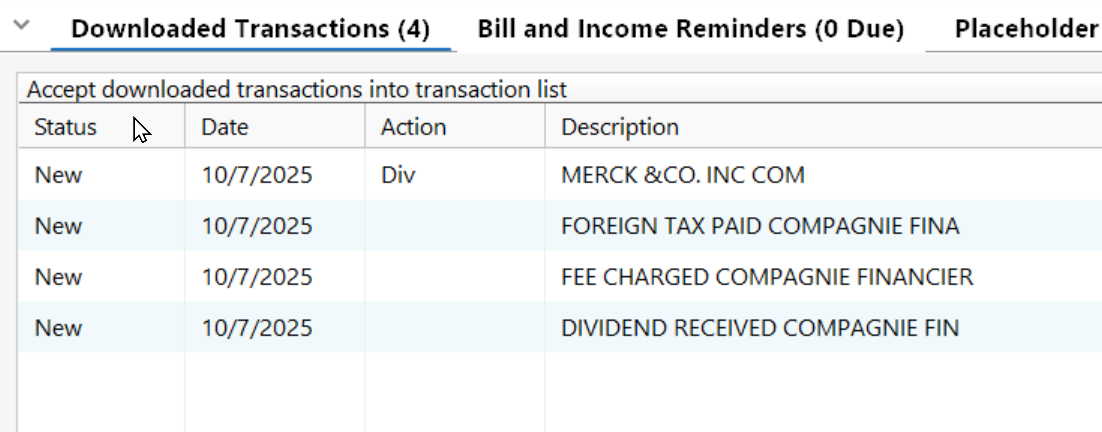
The Dividend received "Compagnine" recorded as deposit with no category.
THIS is WRONG and needs to be fixed ASAP. Not recording as Category _DivInc will cause lots of errors in Tax reports.
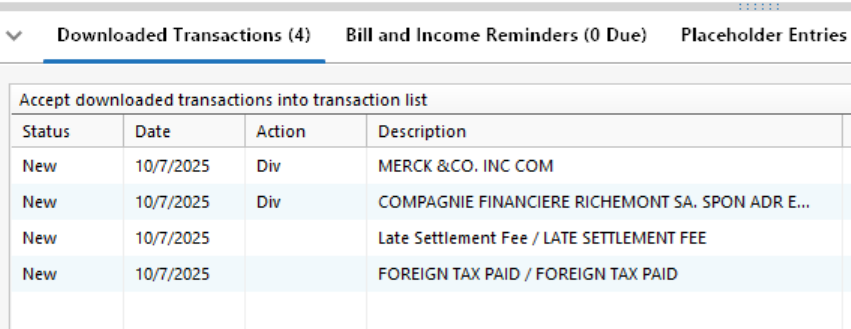
The DC Downloaded transactions showed Div in the action field for these two items and processed correctly.
"No Matter Where You Go, There You Are"Windows 11 Pro, Quicken SubscriptionIntel Core i7-12700, 32GB Ram1 -
I'm seeing a different, but similar problem with cash in my 4 Fidelity IRA accounts; 2 simple IRA's, 1 Roth, 1 SEP (but IRA type shouldn't matter?). In all 4 accounts, cash is held in FDIC INSURED DEPOSIT SWEEPS, according to Fidelity's Positions page. However, it just simply displays as 'cash' on this Positions page. All additions or subtractions; be it dividends, reinvesting dividends, sale or purchase of actual securities, etc., have always downloaded/displayed in Q as simple ebb and flow of cash. Nothing fancy or complicated wherein the cash equivalent 'securities' have to be 'sold' to free up cash for actual securities purchases. and other such nonsense.
Dig deeper and these sweep accounts are located at different FDIC PROGRAM BANKS. These Program Banks assign symbols unlike what I've seen in this thread (SPAXX and FSPXX). Instead, the small remaining cash amounts I have in this particular IRA are split among 4 different banks and then assigned "positions" held, at $1.00 per 'share'. My Fidelity monthly investment report (statement) also shows them as 'securities', but again, the amounts have just acted as simple cash, earning simple interest each month.
Q in DC mode has always handled the ebb and flow of cash perfectly, for years. Now, when trying to convert to EWC+, I get the prompt at the end asking me if these "positions" are new or previously tracked securities. At this juncture, I just cancel out of the conversion to EWC+ and go back to my backup copy and remain in DC mode. I guess I could experiment with different choices and see where I end up, but my main question is - is this similar to the (SPAXX and FSPXX) discussions on this thread, just different 'securities' names and banks, or is it a horse of a different color?
(I have also checked the "edit, preferences, downloaded transactions" settings and other similar items (under DC, I'm operating in 'Complete' mode under Account Details) mentioned in the 37 or so pages of this thread). All good there, so is that the best we can hope for from Quicken or is it still a work in progress? Any suggestions on what I should do from here? I really don't want to have to track additional 'securities' in my bloated 'watch list' and could probably consolidate to one bank per IRA, but still, why is tracking cash so difficult and complicated?
Symbol
Bank
Value*
QPIRQ
WELLS FARGO NA
$15.41
QPCBQ
CITIBANK NA
$15.80
QPIGQ
TRUIST BANK
$0.24
QBYIQ
THE BANK OF NEW YORK MELLON
$0.25
Total $31.70
0





