Fidelity accounts - I do not see the Cash Representation option

I am running 64.30 and per Kathryn's post, there should be an option to change the Cash reporting on my Fidelity IRA account. Under Investing I show "Cash" but when Quicken updates it reports positions in the Fidelity Government Money Market Account. When I login in to Fidelity directly, it shows as Cash.
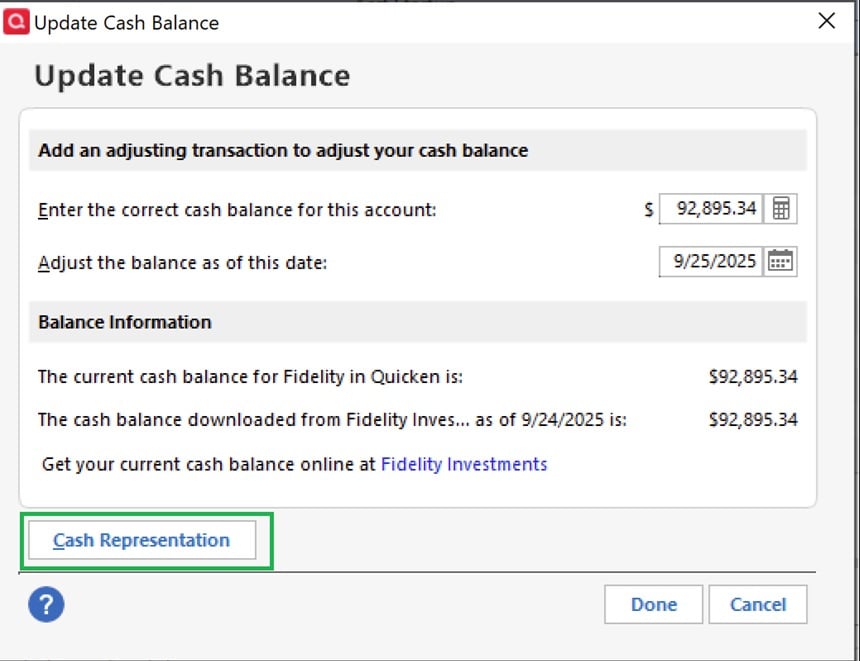
I do not see the "Cash Representation" option as shown. Assume this will fix this issue.
Answers
-
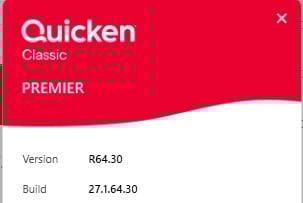
What Q product are you running and what BUILD of that product? This info is at HELP, About Quicken.
Also, please do TOOLS, Account List and tell us what's in the "Transaction Download" column adjacent to your Fidelity account(s).
Lastly, if you're not seeing "Cash Representation", what's that green box in the lower left of your graphic?
Q user since February, 1990. DOS Version 4
Now running Quicken Windows Subscription, Business & Personal
Retired "Certified Information Systems Auditor" & Bank Audit VP0 -
Here are the answers to your first two questions.

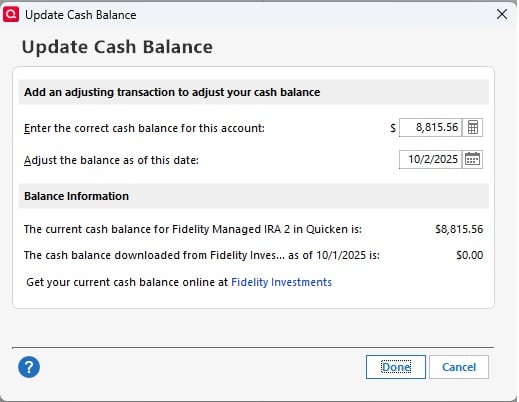
The original graphic was from Quicken Kathryn's post. Here is what my box specifically looks like. No "Cash Representation".
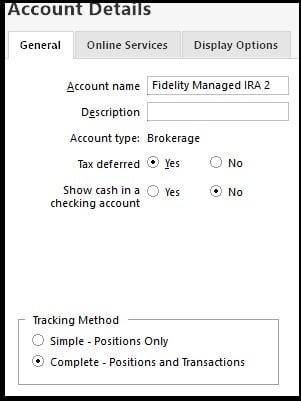
My account details are set as:
 0
0 -
I have the same situation as @Bione … I manage numerous Fidelity accounts, between my wife, myself, and beneficiaries. All are transitioned to EWC+ and are thankfully behaving OK with regard to Transaction Uploads, Share Balances and decimal places, and Cash Representation of Core Position, except for one account, my Traditional IRA. This account continues to incorrectly represent the Core Position Represented as Cash. The most recent monthly dividend showed up as a ReinvDiv rather than a simple Div, so I edited that to contribute to the Cash Balance rather than create further holding mismatch with Fidelity website positions. I continue to get unwarranted Securities Comparison Mismatch error messages whenever I have legitimate security transactions unrelated to the Core Position. Finally, as stated in the first sentence, like @Bione , I see no Cash Representation button when I click in on the Cash Balance number on the lower right of the Register. Interestingly, I do see Cash Representation buttons in all of the accounts that are working correctly. All of the accounts I manage are set up for Complete Position and Transaction Tracking. I also noticed that some, but not all of my accounts have a "Reset Money Market securites/cash options" button in the "Account Details, Online Services Tab", when I click on Edit Account. I'm guessing this is similar, or the same as the "Cash Representation" button noted above ? Note, the one account that I'm having issues with DOES NOT have this option when I Edit Account Details.
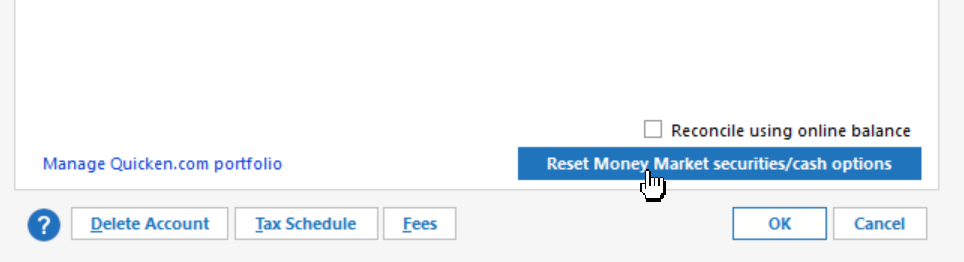
I am on Quicken Classic Premier, Version R64.30, Build 27.1.64.30 on a Windows 11 Home OS
Any ideas on what else to check or do to attain correct Core Cash Representation ?
0 -
I just tried the "Reset Account" on the Online Services Tab of the Account Details feature. It led me through the re-linking process, which I only applied to this one Account. It completed the process, but had no effect on the "missing Cash Representation button" issue. Next I tried the Deactivate process, followed by the "Set Up now" process to re-establish Online Services. Same result, no change.
The "Cash Representation" button remains missing in action in this Account.
0 -
Hello @Bione & @pablomiller,
Thank you for reaching out! Since you're having an issue with cash representation and the option to reset it does not show up in the problem accounts, I recommend that you contact Quicken Support directly for further assistance, since they have access to tools we can't access on the Community and they're able to escalate the issue as needed. The Quicken Support phone number can be found through this link here. Phone support is available from 5:00 am PT to 5:00 pm PT, Monday through Friday.
I apologize that I could not be of more assistance!
Quicken Kristina
Make sure to sign up for the email digest to see a round up of your top posts.
0 -
I called Quicken Support specifically on that option not being there, and it was total bust. They had no idea. I tried to find Kathryn's original post with the top graphic with no luck. Between Fidelity issues and Billers this ship is sinking fast.
0 -
I also called Quicken Support on this same issue a week ago and it was, unfortunately, a waste of time. The Support Agent just said they were having issues with the Fidelity → Quicken integrations and that they were working on it. Made no effort to work with me on any troubleshooting. We need some improved community updates on this issue with more clarity and transparency acknowledging the issue and what actions are being taken to resolve. Not saying it's all Intuit/Quicken's fault but it is now their problem as it's impacting their customers. Why no further updates on the below thread?
1 -
Hello @Bione & @Longhorn90,
I sent both of you DMs. Please click the envelope icon near the upper right to view them.

Thank you!
Quicken Kristina
Make sure to sign up for the email digest to see a round up of your top posts.
0 -
Any guidance for me @Quicken Kristina ? I'd prefer not to burn additional time with fruitless support agent calls. Upon closer examination, it turns out 3 of the 15 Fidelity accounts I manage have no "Cash Representation" buttons. Two of the 3 have nearly zero cash balance in place, so no real impact, but the 3rd one has a significant cash balance with regular cash dividends. I'd prefer to maintain accuracy on that account without needing to use delete & self-enter actions to counteract errant ReinvDiv transactions coming through each month.
0 -
Thank you for your reply @pablomiller,
In the problem account, which fund is it that is not being represented correctly? What is the exact behavior you are observing in that account?
You mention ReinvDiv transactions specifically. What is happening with those transactions?
I look forward to your response!
Quicken Kristina
Make sure to sign up for the email digest to see a round up of your top posts.
0 -
@Quicken Kristina, the fund not representing correctly is the Cash (Core Position, FDRXX). Note that this is not a tradeable position, but is the Core Position in which Cash is held. The specific incorrect behaviors observed: a) The most recent monthly dividend uploaded during OSU showed up as a ReinvDiv transaction creating a fictitious position had I accepted it, rather than a Div transaction contributing to the Cash … I have to delete the ReinvDiv transaction and replace it with my own hand-entered Div transaction to make Cash match Cash in Fidelity … If I don't do this substitution, then I do end up with an errant "position" in FDRXX … and b) I continue to receive Securites Comparison Mismatch errors when I have trades in this account, all reporting a Mismatch between FDRXX shares in Fidelity vs. Quicken. I ignore these errors since they are not based in reality. I really have zero shares of FDRXX in Fidelity because that is the Core Position, but Quicken indicates the Shares Reported equal to the size of my Cash Held in Money Market … I also have a distinct, tradeable position in a Premium money market (FZDXX), but I'm having no issues with the Share Balance with it, or any of the other Positions in this account. Also, this is one of the 3 accounts that have missing Cash Representation buttons.
At this point, I'm managing the issue with the substitution mentioned above, but it is an exercise I'd prefer to not have to do every month. And I wonder what the root cause is of the missing Cash Representation button … seems like an unresolved issue that may still cause other problems.
0 -
Thank you for your reply @pablomiller,
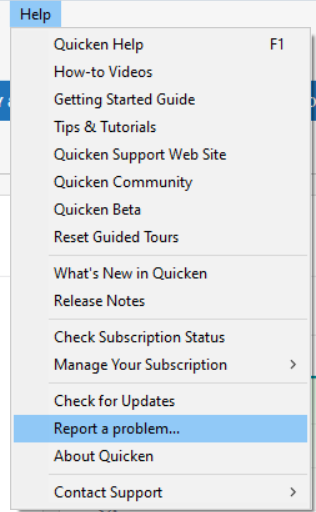
The issue you describe is something that needs to be reported. Typically, it is faster to report by contacting Quicken Support directly, but since you indicated a strong aversion to contacting them, I forwarded this issue to the proper channels for further investigation and resolution. Please navigate to Help>Report a Problem and send a problem report with log files attached.
To investigate the issue, our teams will also need the names of the problem accounts, as they reflect in your Quicken. It would also be helpful if you include screenshots showing how FDRXX is reflecting incorrectly in your accounts. If you don't want to post that information here, please include it with the problem report.
Note - Problem reports allow a maximum of 10 attachments. If you need to send more than 10, please use a 2nd problem report to send the additional information.
Thank you!
(CBT-850/CBT-851)
Quicken Kristina
Make sure to sign up for the email digest to see a round up of your top posts.
0 -
OK, thanks for forwarding the issue. I will proceed with the Problem Report process as you indicated … I will report back here with the results of said process, in case it may be of benefit to others.
2 -
Thank you for the follow-up @pablomiller,
Thank you for sending a problem report with those screenshots. Our teams also do need to see the logs (which are usually pre-selected when you send a problem report). Please send a problem report with the log files attached.
Thank you!
Quicken Kristina
Make sure to sign up for the email digest to see a round up of your top posts.
0 -
Thank you @pablomiller,
I see that you sent another problem report with the logs. I attached them to the ticket so our teams can get started investigating the issue!
Thanks again!
Quicken Kristina
Make sure to sign up for the email digest to see a round up of your top posts.
0 -
It's been a while since I looked at the Manage Dividends view in Fidelity's website. When I examined that, I was surprised to see Dividends and Capital Gains for the Core Cash Fund set for Reinvest rather than Pay to cash. I don't know if this is a new option in their accounts and it defaulted to Reinvest, or if I had inadvertently done this in a global change to Reinvest. Anyway, I've set the Core Funds to Pay to Cash, and leaving everything else to Reinvest. I'll have to wait until the end of October to know for sure, but this may resolve the undesired "ReinvDiv to Core" part of this issue. Note I have some other, non-core Cash Mutual Funds, beside the Core Cash Balance Fund. An example from the main account of concern is shown here (Core is FDRXX, Other is FZDXX):
 0
0 -
Was forced to do the conversion yesterday 10/10/25.
Results? I pretty much have the same scenario as @pablomiller
- Multiple accounts - both standard brokerage and retirement (IRA & Roth IRA)
- My standard brokerage accounts use either SPAXX or FCASH as their core position. Core positions correctly download from Fidelity as Cash, and each of these accounts have the "Reset Money Market securities/cash options" option available on the Account Details >> Online Services tab or when clicking on the Cash Balance number on the lower right of the investment account register .
- My issue seems to be solely related to the retirement (IRA & Roth IRA) type of accounts. My core position in both of these accounts is FDRXX and with both of these accounts Quicken is giving me a "Securities Comparison Mismatch" for FDRXX (which as @pablomiller noted isn't a tradeable position in these accounts and therefore there shouldn't be any shares owned ). Additionally, neither of these retirement type of accounts offer the "Reset Money Market securities/cash options" option on the Account Details >> Online Services tab nor when clicking on the Cash Balance number on the lower right of the investment account register as @pablomiller has also attempted .
My current thoughts are Quicken specifically has an issue in recognizing FDRXX core positions as the Cash balance in retirement type of accounts. As such, it also doesn't offer the "Reset Money Market securities/cash options" option in this circumstance.
- Quicken user since 1992 (back in the good old DOS Version days)
- I don't use Cloud Sync, Mobile & Web, Bill Pay/Mgr, Budgeting, Tax Planner
1 -
I'm seeing the sweep account problems with both FDRXX and FZFXX. No issues with SPAXX.
0 -
I have the same issue as but as mentioned only in one of my three Fidelity accounts (Managed IRA). On Tuesday I have a call with scheduled with supposedly a support specialist on this setup by . I will advise what the result was.
1 -
I also am having similar problems as @pablomiller and the others for Core Positions which hold FDRXX for IRA's and FZFXX for taxable accounts. I also have used Quicken Premier for approaching 3 decades and manage my 10 personal accounts (in 1 Quicken file), 2 Trusts and my son's accounts; each in separate Quicken files. For some reason I set up my son's accounts to hold SPAXX as the Core Position and those are the ONLY accounts which have the Option to "Reset Money Market securities/cash options".
I also have a Schwab taxable account which uses Express Web Connect+ (within the Quicken file that has the Fidelity problems) and have never had a problem since I opened the account in March 2025. It also has the option to reset the Money Market/cash option.
The problems seems to be isolated to FDRXX and FZFXX. Since SPAXX has a 7-day yield of 3.77% vs FZFXX of 3.73%. I am going to switch the core position in my taxable account (which is also having repeated CC-506 errors requiring many "Reset Account" actions). I will report back on Tuesday with the results.
0 -
@allen_car, you make an interesting observation, which fits the pattern of my 3 "problem" accounts. All 3 accounts with the missing Cash Representation button have FDRXX (Fidelity Government Cash Reserves) set as the current core position. All of the other accounts are set on SPAXX. This is one of 3 available choices, and the choices are not the same for all Account Types. Retirement Accounts offer FDRXX, SPAXX, or FDIC while standard Brokerage Accounts offer SPAXX, FZFXX, or FCASH as the user selectable core positions. Regardless of what the investor has chosen for their core position, Core Cash treatment by Quicken should be correct, PERIOD.
0 -
@pablomiller I am going to try making one change at a time and observe the effects. Thursday I made $1K trades in 3 of the problem accounts. On 2 accounts, out of the Premium MM FZDXX and into the Core Cash and I bought FZDXX from the Core Cash in another. I could esily correct the transaction but Quicken did not use the Core Cash correctly.
One interesting thing that I have noted during this messup; is that Fidelity will automatically sell the Premium MM FZDXX to meet a cash transfer or a trade while keeping the Core Cash at Zero. Previously I alway tried to keep a few thousand in the Core Cash; now I don't see the need. Every 1/4% of extra interest adds up.
1 -
I had a scheduled call today with a Support Agent from the Quicken Escalation team. This was in regard to the problem several of us have reported about some of the Fidelity cash sweep accounts not showing the Cash Representation button in Quicken on R64.30. The Support Agent stated that there is a known problem that is affecting 'some' Quicken customers with Fidelity investment accounts. I was told that this was being investigated for a possible future patch to resolve the issue.
@Quicken Kristina @Quicken Alyssa @Quicken Janean @Quicken Jeff Based on the update I received today I would recommend that an official post be made in the Alerts/Known Product Issues section of this site to help track this issue. This would assist any new Quicken customers who run into this problem as well as providing a tracking mechanism for all of us that have reported this problem and are still experiencing the impact of it.
0 -
Hello All,
Thank you all for reaching out!
For users with FDRXX Money Market funds, please note that we’re aware of this issue and are currently working with Fidelity, with the goal of getting this resolved in a future release.
You can also refer to this Community Announcement for more information.
We appreciate your patience! Thank you.
-Quicken Anja
Make sure to sign up for the email digest to see a round up of your top posts.0 -
@Quicken Anja Thanks for the quick response back on this!
Just to clarify, it has been documented by others on this thread, as well as myself, that this problem is also manifesting itself with the Fidelity FZFXX cash sweep account. Both are exhibiting this problem, not just FDRXX. Also, the link you provided does not clearly state that even after changing from DC->EWC+ that the Cash Representation feature/button does not show up for those accounts. Not trying to split hairs but just trying to make sure that we are all on the same page with this problem.
1 -
@Quicken Anja The Community Announcement you referenced above does not reflect what many or all of us are currently seeing with accounts that hold FDRXX as the Core money market fund. These accounts do NOT have access to a "Reset money market securities" link or a Cash Representation button, either via the Online Services tab or by clicking on the Cash link at the bottom of the Transaction List.
I think the announcement should be updated.
QWin Premier subscription2 -
@Jim_Harman Appreciate you letting me know! I will pass this along internally.
Thank you!
-Quicken Anja
Make sure to sign up for the email digest to see a round up of your top posts.0 -
I am having the same issue. Cash positions are showing up as tradeable positions leading to unnecessary reconciliation errors.
0 -
This is a problem now with multiple cash position accounts, not just FDRXX. I have this problem with FZFXX
0 -
Hello everyone,
A member of our escalation team has provided guidance for users experiencing this issue. Please follow the steps below to help resolve the problem. Be sure to back up your Quicken file first to protect your current data.
Steps to Follow:
1. Backup
- Save a backup of your Quicken file.
2. Adjust Preferences
- Go to Edit → Preferences → Downloaded Transactions
- Check “Never interpret downloaded money market funds as cash.”
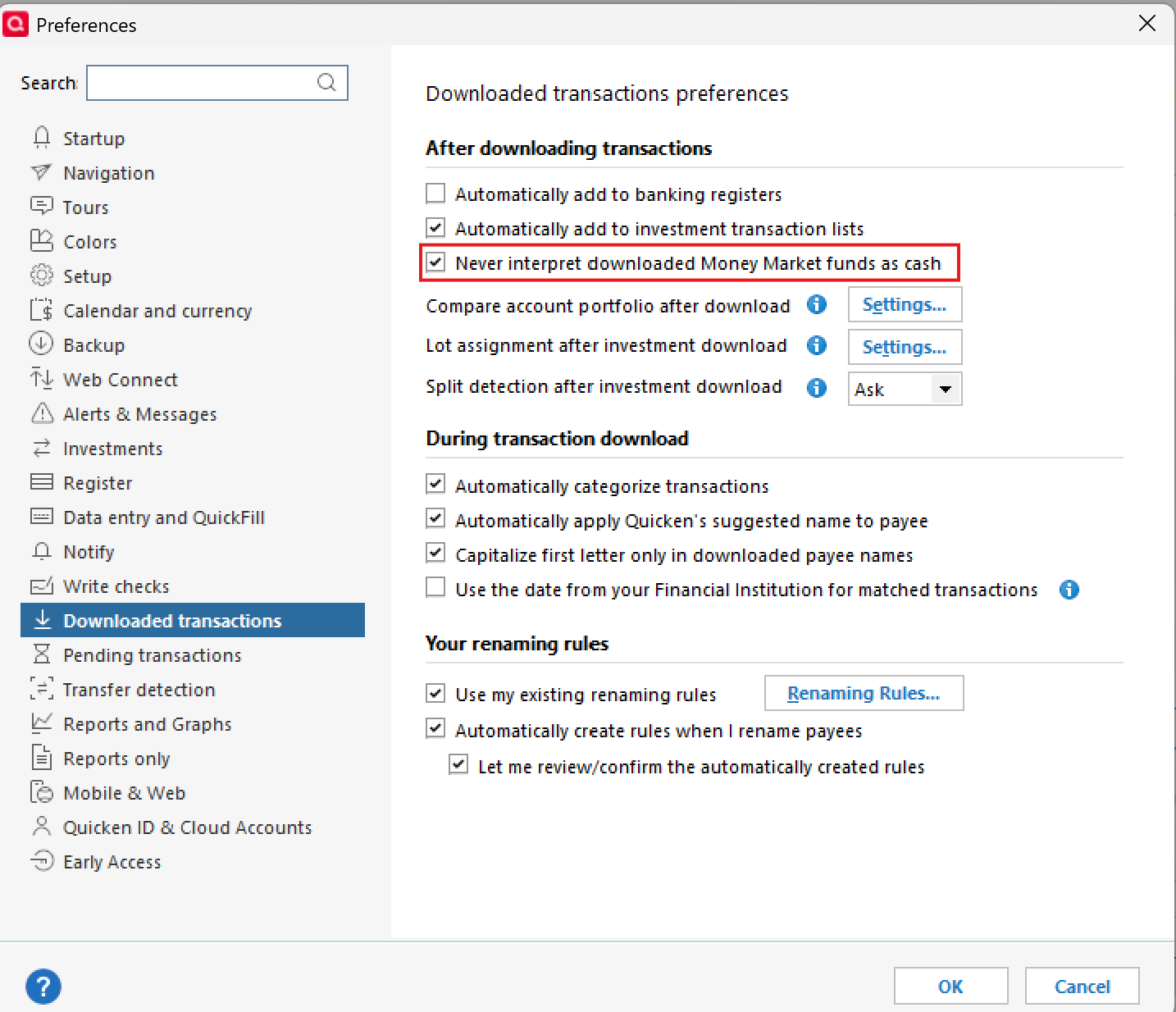
- Click OK
3. Force Transactions
- Run a One Step Update (OSU) on the affected accounts.
- Accept downloaded transactions.
- Review any prompts and make edits as needed.
4. Restore Preferences
- Go back to Edit → Preferences → Downloaded Transactions
- Uncheck “Never interpret downloaded money market funds as cash.”
- Click OK
After completing these steps, you should be able to reset the cash representation for the affected accounts or funds.
Additionally, we are actively working on an official fix for an upcoming update release.
Please let us know if these steps resolve the issue so we can proceed accordingly.
Thank you!
-Quicken Anja
Make sure to sign up for the email digest to see a round up of your top posts.0