PNC bank upgrade affecting Quicken downloads?
Answers
-
I also have lost the ability to pay bills online from my PNC checking account through Quicken. I was able to reactivate all my accounts and download transaction without getting any duplicates or having my balance screwed up. During the reactivation process, I was never presented with the screen shown above to click on Advanced options. How do I get my online bill pay restored without messing around with my other accounts? Do I call PNC or Quicken?
0 -
Is there an alternative? Don't want to start over after 25 years, but it's so screwed up, what do I have to lose?
Windows 11, Home, Quicken Premier R64.35
0 -
Why can't I load a new quicken classic to my new laptop
-1 -
I think you need to start a new post thread for this. This thread is about PNC Bank OSU issues.
Quicken Classic Premier (US) Subscription: R66.23 on Windows 11 Home
-1 -
This type of discussion in not permitted in Quicken Community. There are other non-Quicken websites that this question would be more appropriate for.
Quicken Classic Premier (US) Subscription: R66.23 on Windows 11 Home
0 -
In a test file I just deactivated my DC connected accounts and then did Add Account > PNC Bank - Direct Connect > Advanced Options > Direct Connect > entered my DC login information > Linked the downloaded data to the accounts already in Quicken. Here was the results.:
- The set up process completed properly.
- 9 new/missing transactions were properly downloaded.
- 8 duplicate transactions were downloaded into the checking account. 6 were dupes of the new/missing transactions that were also downloaded. 2 were dupes of late Sep transactions (which I deleted).
- 2 duplicate transactions were downloaded into the HYS savings account (which I deleted).
- 1 duplicate transaction was downloaded into the std savings account (which I deleted0.
- The Online Balances were finally showing up below the registers of all 3 accounts and they were correct!
- Reconciling to the Online Balance functioned properly.
I then rushed to open my primary data file, deactivated my DC connected accounts there and then did Set Up Now. No joy.
- DC setup completed and the data was Linked to the accounts already in Quicken.
- No transactions of any kind were downloaded.
- No Online Balances were listed below the account registers.
- No Reconciling to the Online Balance was possible.
- The date of the last downloaded data is 7/23/2023.
EDIT: I should add that after Set Up Now produced the undesirable results I then did the deactivate/reactivate of those accounts using the Add Account flow. No improvement observed.
Sigh.
Quicken Classic Premier (US) Subscription: R66.23 on Windows 11 Home
0 -
How frustrating. I thought for sure we were finally in a good place with regard to PNC DC downloading, balances and future Bill Pay.
I contacted PNC T3 again at about 4:30PM EST. They did suggest the deactivate-reactivate process as a fix now, but suggested I wait until Monday morning to try. They also indicated that in certain situations additional work might be required to get the mapping correct. The rep was not specific and I got the impression she was just reading what she was given.
I’ll wait for Monday AM and then try the process. If I have no luck with my accounts I’ll reach back out to PNC and see if they have more information to share.0 -
Thank you for letting us know you're seeing this issue. What makes me suspect those accounts are connected via Express Web Connect instead of Direct Connect.
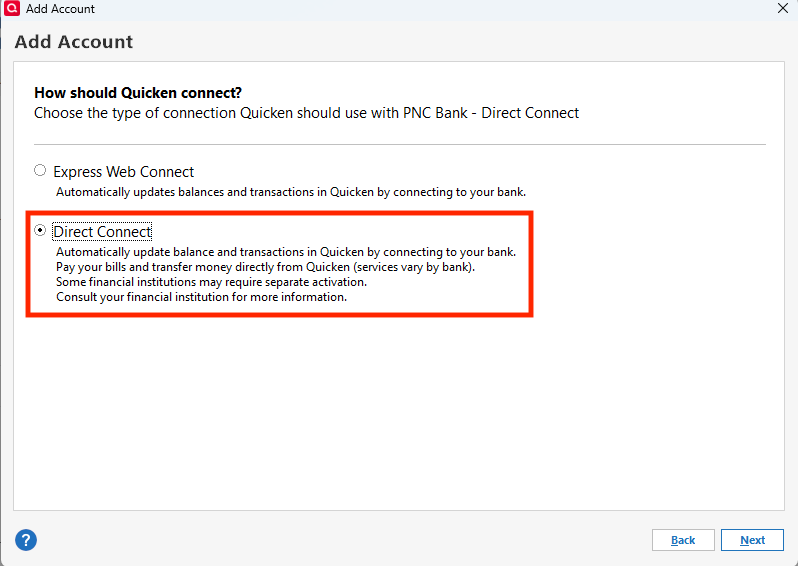
To get back on Direct Connect, backup your file and deactivate the accounts. Navigate to Tools>Add Account, search for the PNC connection you use, and make sure to click Advanced Options.
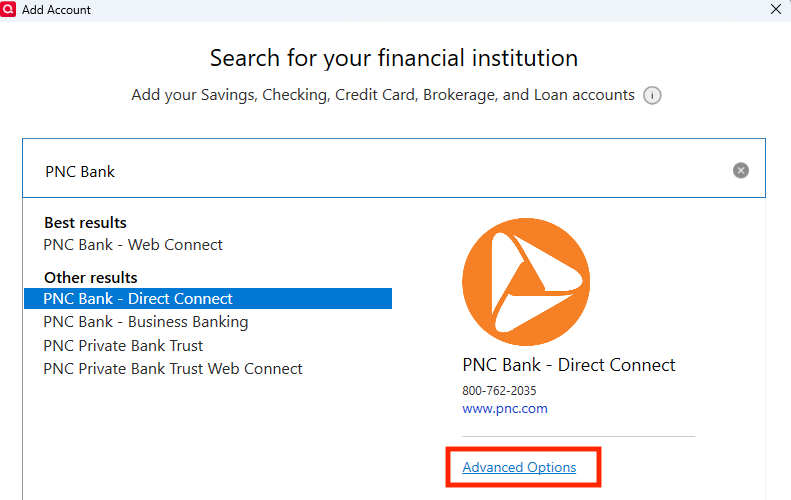
Make sure Direct Connect is selected, click Next, and follow the prompts.
Hello @Boatnmaniac & @charlieo.Hemlock,
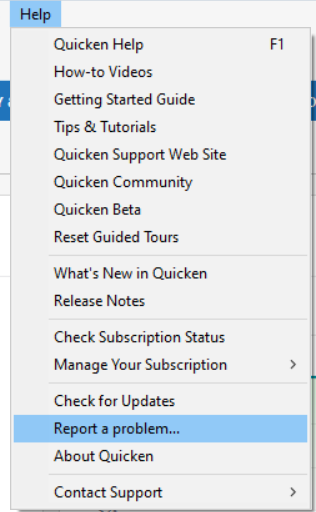
Thank you for letting us know that Direct Connect still isn't working for you, even after deactivating and reactivating the accounts. To help further investigate the issue, please navigate to Help>Report a Problem and send a problem report with log files attached.
Please let me know once the problem report has been sent!
Thank you!
(CBT-918)
Quicken Kristina
Make sure to sign up for the email digest to see a round up of your top posts.
0 -
@Quicken Kristina - Sorry for the delay. I had to step away from my laptop for awhile. I submitted the report and log files you requested.
Quicken Classic Premier (US) Subscription: R66.23 on Windows 11 Home
1 -
Thank you for your reply,
Thank you for sending the problem report with logs so quickly!
Quicken Kristina
Make sure to sign up for the email digest to see a round up of your top posts.
0 -
I have not received Direct Connect downloads since the PNC migration weekend of 10/25. I have tried many times to deactivate/reactivate, also did the deactivate - add new account with direct connect using the advanced options to choose Direct Connect and link to existing Quicken account and it never worked. Today I went back to a 11/05 backup I made that was using Direct Connect before having been forced to use EWC+ in the interim while everyone was working on a fix. I am happy to report that all the past downloads came through. Yes I had some duplicates that I carefully deleted and both my accounts reconcile. As an added benefit for me, the PNC downloads had not been populating the check number column for a while. With whatever additional fix PNC did, all the downloaded transactions did populate the check number column correctly.
0 -
Esteemed Quicken Community Brothers and Sisters, good news!!! I'm delighted to report that PNC DC is working for me again as of 11/14 @8:35pm CST. I returned from a business trip and performed a one step update. During the update all of my accounts including all 11 PNC DC accounts updated and transactions downloaded via PNC DC without issue. I only had to make some adjustments while accepting transactions, as several duplicates downloaded and needed to be reconciled. This morning, 11/15 @7:15am CST, I attempted another connection and successfully downloaded two new transaction into one of my PNC DC accounts. I also initiated two Quicken based transfers which appeared to upload to the bank successfully.
Note that I did not perform any disconnect/reconnect exercise to get things working again. While I had done this at least twice previously during this ordeal, the connections and downloads this time happened automatically.
I am hopeful that this issue has been resolved permanently for all of our sakes. I remain cautiously optimistic based upon my most recent experiences.
One more word of advice, consider Validating or Super Validating your data file. When this issue happed last for me, a Q Community member suggested doing this, and it did fix the problem for me. I've done so again several times during this ordeal. Not sure if that is what helped this go around, but I don't think it could/would hurt.
1 -
I finally got my direct connect to work with PNC by turning off the password vault and entering my pin each time I try to do an download or update. It then did everthing all ok.
0 -
PNC DC in my test file: As with yesterday, DC did update correctly and the online balance date is current.
PNC DC in my primary file: Still no joy. The last data download date was updated to 6/23/2023….seems to change to some other wacky date everytime I run OSU. No transactions downloaded. No Online Balances below the registers.
I deactivated the accounts, again, and then did Add Account for PNC Bank - Direct Connect selecting Add Account and Direct Connect. Same results but the last data download date was updated to 7/27/2023.
Quicken Classic Premier (US) Subscription: R66.23 on Windows 11 Home
0 -
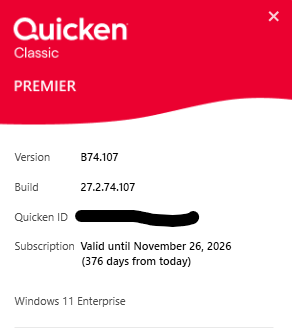
@Boatnmaniac , not sure if this helps. My success today might also be attributed to the version of Quicken I am running. Here is my version and build for all.
0 -
This is ridiculous. Direct Connect has been broken for me for well over a week and there's no sign of it getting fixed soon. I received a Quicken email indicating it was fixed on Nov 11:
We’re writing to let you know that the recent issue affecting PNC Bank Direct Connect connections has been resolved. We understand how frustrating this disruption has been and sincerely apologize for the inconvenience it may have caused.While not all customers were affected, if you experienced problems between October 19 and November 7—such as errors when connecting to PNC, missing transactions, or issues with PNC Bill Pay—please take the following steps to correct the issue:
1.
Disconnect and reconnect your PNC Direct Connect account in Quicken.
This will re-establish your connection and also allow any missing transactions to download.
View step-by-step instructions here ›If you did not encounter any issues during that time, no action is required.
This issue originated from a problem with PNC’s Direct Connect service, and we worked closely with PNC to ensure it is now resolved.
Thank you for your patience and for being a valued Quicken customer.
— The Quicken TeamOf course, this is simply not true.
Nor does deactivating/reactivating solve the issue.
I'm starting to think this is about $$$ - since everything costs a lot more lately and price increases are showing no signs of slowing down, perhaps Quicken and PNC can't agree on the fees for Direct Connect and have suspended the service until they can figure it out.
Also, I can tell you from a technological point of view and personal work experience that if PNC migrated their database for the new system and it caused issues, then they've hired an incompetent company to perform the work and they're struggling to fix it. It could take months. I know how this can go because I worked for a company that did a LOT of database migrations and frequently fixed other companies failures.
I'm not happy about this and I am completely mistrusting of all those involved. PNC's tech backend is horrible, and ever since Quicken/Intuit split, they've also been awful (sold in 2016 and again in 2021)
0 -
Perhaps but you are running a Beta version and that is not available to non-Beta members.
I am running a more recent Beta version and that does not appear to have had an impact on this PNC issue. But read my next post as it says what I did to resolve the issue for me and it might be applicable to others.
Quicken Classic Premier (US) Subscription: R66.23 on Windows 11 Home
0 -
I think you might have hit on something here. At least it definitely appears to have resolved the PNC DC connection issues for me. Sorry for the following wordiness but others might find it to be helpful.
After reading your post I checked the PW Vault in my primary data file (the file which is not working well with PNC's DC) and found an oddity: "Not required" is shown for PNC Bank - Direct Connect. That should not be. It should show "Yes".
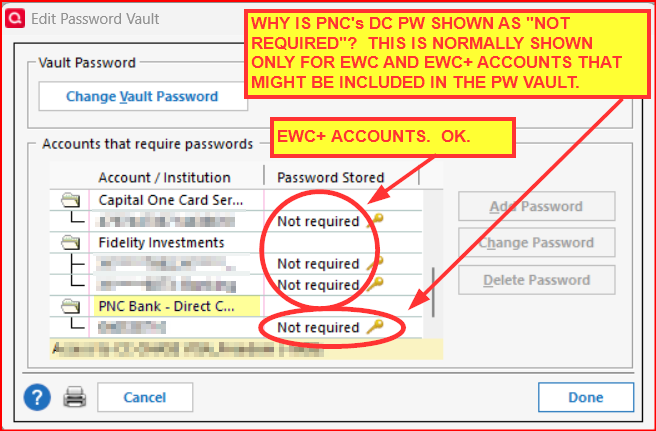
I was not able to change nor delete the PW for PNC Bank - Direct Connect. So I took the following actions:
- RESET VAULT: This did not work and nothing was changed in it.
- DELETE VAULT AND ALL SAVED PWs: The Vault was deleted. But when I then set up a new Vault it automatically populated the entire Vault with the exact same data as shown in the above picture. That should not happen.
I then opened my test file (in which PNC's DC is working correctly) and noticed this PW Vault oddity does not exist there and PNC Bank - Direct Connect shows "Yes" for the PW, as it should.
This leads me to believe there is either a corruption in my primary data file or there is an issue with the Cloud Account for that file.
(I did not run Validate to fix this because Validate always deletes a lot of data for an old (closed) investment account so I avoid doing that. Others might want to first try doing this before proceeding.)
So, I made a Quicken Copy of the data file (File > Copy or Backup File > Create a copy or template > follow the prompts). This process deletes the PW Vault, breaks the connection with the previous Cloud Account and creates a new Cloud Account specific for this copied file. It also break all Online Services connections so all accounts need to be set up for downloading, again.
When I set up PNC Bank - Direct Connect via Advanced Options and selected Direct Connect I got the following results:
- All PNC accounts are now connected with DC.
- There were some duplicate transactions (not many for me) that needed to be manually deleted.
- Accurate Online Balances are now shown below the registers.
- The PW Vault shows "Yes" for PNC Bank - DC as it should.
- I was able to send 2 Bill Payment to PNC and PNC downloaded the check numbers and the Lightning Bolts confirming the Bill Payment commands were accepted.
Maybe you and I just got lucky but to me it appears that ongoing PNC Bank - Direct Connect downloading issues might very possibly be because of some issue with the PW Vault (file corruption or Cloud Account corruption).
Those who are still having PNC DC connection issues:
- Backup your data file.
- Try doing what @MichaelBarry did to see if that works.
- If that doesn't work, check your PW Vault to see if it might be showing this "Not required" oddity for PNC.
- If it does, you might want to try doing Validate & Repair to see if that fixes the PW Vault issue.
- If that doesn't work for you, you might want to try doing what I did and make a Quicken Copy of your data file and try doing Add Account for PNC Bank - Direct Connect in that copied file.
Let us know if any of this resolved the issue for you.
Quicken Classic Premier (US) Subscription: R66.23 on Windows 11 Home
0 -
How did you "turn off" the password vault without deleting it? Is there a simple way to tell Quicken not to use the vault?
I booted up an old PC with an 18 month old copy of my Quicken Classic still running. On the old machine my password shows as stored in the vault. On my current machine the there are no stored passwords in the vault and under password says "not required" (as Boatnmaniac found in his file). The old vault absolutely says the PNC DC password is there while the new Quicken (file) does not have it in the vault.
I validated and then super validated with no change.
0 -
I totally deleted the password vault to get it to work. Sorry I didn't state that in my earlier email solution
0 -
Thank you! I found the “password not required” issue too. I guess I don’t understand what the password PIN does. If the vault is corrupt and there is no password …. why do we still get the green globe and the successful connection popup? I guess that is not where the DC PIN/PASSWORD is used in the process?? I haven’t disconnected-reconnected for two weeks. Did you also disconnect-reconnect recently too?
I assume you can simply recreate the vault when ready… right?
thanks again.0 -
I found the “password not required” issue too. I guess I don’t understand what the password PIN does. If the vault is corrupt and there is no password …. why do we still get the green globe and the successful connection popup?
The "not required" in the PW column is supposed to only apply to EWC and EWC+ connected FIs because the EWC login info and the EWC+ security token are saved on Quicken hosted servers (Intuit?), not on the hard drive. I don't understand why they are now showing up in the Vault because it is my understanding that there is nothing about EWC and EWC+ that needs Vault in order to function (unless something about that has changed).
But DC connected FIs in Vault should have "Yes" in the PW Stored column because the PW/PIN is saved in the Vault to protect it from being compromised. I've never seen "not required" there before. That's what prompted me to think that either there is some sort of corruption at play.
BTW, one can still do OSU without the PW Vault. When doing it this way, since the PW is not in the Vault, Quicken will prompt you to manually enter it each time you do OSU. That's what @MichaelBarry said he is now doing.
I assume you can simply recreate the vault when ready… right?
We should be able to do that but in my case it was not possible to create a clean vault. If it does not work for you, either, then you might want to try following the steps I listed in my earlier post of today (four posts above this one) because that is what fixed the PNC DC connection/download issue for me. Maybe that will fix it for you, too.
If it does not provide you with desired results you can always go back to the original data file and continue using that until the issue gets fixed by PNC/Quicken.
Quicken Classic Premier (US) Subscription: R66.23 on Windows 11 Home
0 -
Thank you for the explanation. The last time I Diconnected-Reconnected I did end up with two EWC+ loan accounts and 8 DC accounts. I have no idea how I did that. I get this when I click on the tiny “key” icons in my vault. I plan on deleting the loan accounts out of Quicken completely … as I never had them in Quicken before 10/24 anyway.
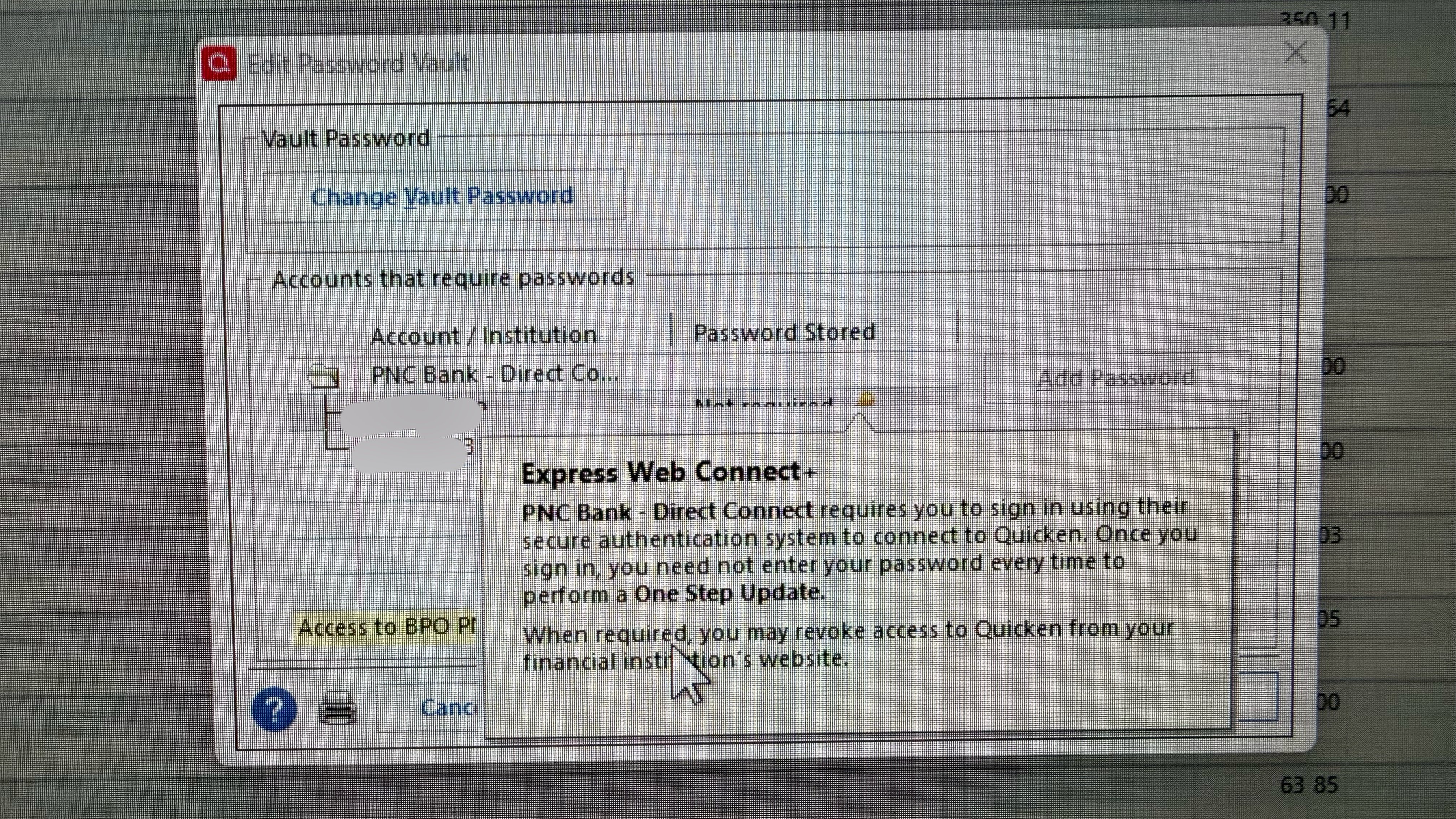
I am gonna wait until Monday and disconnect and reconnect. At that point if it’s still not working (and I’m pretty sure that will be the case), I plan on calling Quicken support and showing them the vault with “not required”. I’ll let them step me through the process of fixing the vault, etc.thanks again.
0 -
Thanks for that picture. Yes, that is the "corruption" that I talked about. It shows that your account is set up with with the DC FI but the PW Saved column also shows that it is, instead, set up with EWC+ and not with DC. So I'm assuming this is causing a conflict during OSU that is allowing some data to download but not all data to download. Since there is a good download there is nothing to flag an error because of the missing or incorrect data.
I'm speculating that this issue might have been caused by another issue that I identified a couple of weeks ago during the Add Account process for PNC Bank - Direct Connect when not clicking on Advanced Options. When you click on Advanced Options you will see that it opens a popup showing Express Web Connect and Direct Connect with EWC being the default. First, I don't think EWC should even be listed there. But most important is that DC should be the default, not EWC. I think that when DC is not selected as the connection option it tries to set up an EWC+ connection with an Add Account Direct Connect FI listing that does not really support EWC+.
Here is the FIDIR listing for PNC Bank - Direct Connect. Note that it includes EWC/EWC+ as a supported connection method. I think that EXP=WEB-CONNECT should be removed from it. Or at the very minimum DC should be made the default for PNC Bank - Direct Connect in Add Account.
045010450104501PNC Bank - Direct Connecthttps://www.pnc.com/800-762-2035https://www.pnc.com/ACTIVEBANKING,ACCOUNTINFO,PAYMENT&DIRECT BANKING,ACCOUNTINFO&EXP-WEB-CONNECTNOT_QBPNA
So, that's why I began posting that during the Add Account process we need to manually change the default to the DC option. I see the Moderators have recently begun to post the same thing.
What has been confounding me is why deactivating the accounts and then carefully setting them back up taking care to select the DC option under Advanced Options does not fix that connection conflict. That's where I think the Cloud Account comes into play. EWC+ security tokens are saved in the Cloud Account. Maybe when Quicken set up the DC connection using the EWC option it causes Quicken to send the DC PW/PIN to the Cloud Account as an EWC PW. And then when setting up a new DC connection the Cloud Account sends that bad PW/PIN information back to Quicken perpetuating the conflict problem.
As for me, this PWV issue could not be fixed without going down the Quicken Copy path. I suppose deleting the Cloud Account should (in theory) resolve that problem but if you're going to go down that path you might as well go down the Quicken Copy path that I did because both will involve about the same amount of effort to get everything set up properly, again, and Quicken Copy can actually fix some other issues that might be present in the data file and/or Cloud Account so it perhaps provides a more comprehensive solution.
Enough of my theoretical rambling. More pertinent to your concerns:
- Resetting or Deleting the PWV does not affect the download connections themselves. All PWV does is safely secure the PWs/PINs for DC connected FIs so that during OSU Quicken can automatically enter them into the OSU Settings so you do not need to manually enter them.
- If you do not have the DC FI PW/PIN saved in PWV you will still be able to run OSU but you will need to manually enter the PW/PIN each time you run OSU.
The last time I Diconnected-Reconnected I did end up with two EWC+ loan accounts and 8 DC accounts. I have no idea how I did that.
I have only seen something like that happen when I've forgotten to first deactivate all of the accounts before doing Add Account to set up the new connection. Maybe that is what happened when you last deactivated/reactivated?
Quicken Classic Premier (US) Subscription: R66.23 on Windows 11 Home
0 -
THANK YOU!!
I am so tempted to try updating from my 2022 copy of Quicken and data on the old PC. The vault looks correct there with the password is "saved". But… I am chicken and won't try that. I am sure you are correct in that my two loan accounts got set up as EWC+ because I wasn't careful and didn't notice them getting set up.
My plan is to:
- Do a disconnect-reconnect making sure that ONLY Direct Connect is being used for all accounts and is primary. I am also going to eliminate the loan accounts for both EWC+ and Direct Connect during the reconnect process. They weren't part of DC or EWC prior to 10/24 and I don't need them now.
- Examine the vault to determine if the anything has changed. If the vault still looks corrupt, I will delete/reset it.
- Now try OSU.
I am going to call Quicken support as soon as they open tomorrow and let them "screen share" me through the process. I imagine they will be very interested in the corrupt vault anyway. I am paranoid about doing more damage than good (I am good at that for sure).
Thanks again. I feel like there is finally room for optomism.
0 -
That sounds like a good plan. And who knows, maybe PNC Tier 3 is correct in that the fix will be put in place by early this week….but I wouldn't bank on that.
One suggestion that might help improve your odds of fixing the the issue yourself: After you deactivate the connections on the Online Services tabs go to the General tabs and delete all the Financial Institution from the fields directly above the Contact Name field. This is something that can help in successfully setting up a new but different connection method when simply deactivating the account does not work.
Quicken Classic Premier (US) Subscription: R66.23 on Windows 11 Home
0 -
I am so tempted to try updating from my 2022 copy of Quicken and data on the old PC.
Do you know if your 2022 data file shares the same Cloud Account as your current primary data file? If so, then you should know that there will likely be some cross-talk that occurs between the 2 data files. Sometimes that is not an issue but sometimes it can cause issues where a change made in one data file will be pushed to the other data file. If this happens and you don't want it to happen then that will be an issue.
You can confirm whether or not they share the same Cloud Account by doing the following:
IN THE PRIMARY DATA FILE:
- Edit > Preferences > Mobile & Web > Sync = ON > OK.
- Edit > Preferences > Quicken ID & Cloud Accounts > Cloud accounts associated with this Quicken ID.
- In the Cloud Account column, look for the one that starts with and asterisk (*).
- Then click on Close.
- If you do not want to use Quicken Mobile or Quicken on the Web: Edit > Preferences > Mobile & Web > Sync = OFF > OK.
IN THE 2022 DATA FILE:
- Repeat the same process.
- If the asterisked Cloud Account is the same as in the primary data file it means that the two data files share the same Cloud Account and that can sometimes be problematic as mentioned above.
If they share the same Cloud Account then I would be very cautious about making any changes in this file, especially regarding anything related to any Online Services (such as account connections, QMobile/QWeb, etc.). In this case it might be better not to make any changes in it at all.
Instead maybe it would be better to make a Quicken Copy of your primary data file which will give that copied file a totally new and unique Cloud Account so there is no risk of cross-talking with the original file. That Quicken Copied file name will, by default, have the same file name as the primary data file but with "CPY" added to the end of it. Or you can manually change the name of that Quicken Copy file to something like "TEST". Either way, it is truly a unique data file so anything you do in it will not impact your primary data file. It is truly a very safe way to proceed.
Quicken Classic Premier (US) Subscription: R66.23 on Windows 11 Home
0 -
Thank you!
I have never used Quicken Mobile & Web. Sync preference has always been turned off. Per your instructions above, I turned it on just to see what was there in my primary file. All I see, now, under Cloud account details is the dataset name, file name and last sync "never". I don't see anything with an asterick. In the 2022 old secondary Quicken/computer, Mobile and Web sync is also turned off. Quicken ID & Cloud Accounts is identical to the primary (with Mobile & Web turned off)…… only my "Quicken Profile" is shown. The profile is identical in both (same Quicken ID, Email and contact info). I turned Mobile & Web off again in the Primary file and i will leave it that way.
It is interesting to note that when I turned sync preference "on" in Mobile & Web in my primary file, I do show an option to "reset your cloud data"…. Is any of the Cloud account stuff relevant if I am not using "Mobile & Web" and I only use a single Quicken Classic computer/file?
I screen shot the Vault on the old computer so I can show it to Quicken support ….. I promise not to open the old Quicken again until the is all fixed :-)
0 -
Let me pose a question: If I open a backed-up data file prior to the latest PNC upgrade, e.g. 08/01/2025, are there any steps I should take before trying to update that data file? FWIW, I have 4 PNC accounts, two (checking and savings) are Direct Connect; and two (wife's checking and savings) are Web Connect. I don't know how, when or why that ever happened, probably some glitch a few years back when the accounts weren't updated properly. I seems to recall dealing with Quicken and/or PNC to try to resolve.
Anyway, if I could properly update the 08/01/2025 backed up database, I would just have aprox 4 months of transactions to review in each account (my checking-direct connect-by far has the most regular transactions.)
But does anyone have any insights in light of recent posts whether that is something I should consider? Do we have any idea whether the fixes discussed by Charleo Hemlock, Boatnmaniac or MichaelBarry would work if we start with a database prior to the latest debacle? Thanks to you folks trying to come up with a solution.
Windows 11, Home, Quicken Premier R64.35
0 -
Those of you who want to use an older backup, do a copy of it, and then use the copy. I found that my issues started on Oct 14th and did just that. Used a database from 2 days before. Reinstalled Quicken using QUI, updated to latest version, and ran the old, copied database. The issue with the PNC Password in the Vault fixed. Everything now works except Fidelity HSA account (another issue).
1


