Issue with Merrill Lynch account since reauthorization - account balance is wrong [Edited]
Comments
-
Today my pending fee transaction downloaded correctly. That leaves just the capital gains transactions, which I expect to get later this month, as the only transactions I am likely to see from ML that were not working the last time I saw them in the transition to EWC+.
Also, another similarity with mrzookie: I, too, was not getting the IRA interest payments downloaded under Direct Connect.
I am curious as to what kind of testing MELCO did that leads him to believe that having multiple data files is not a problem for EWC+. (Or more correctly, leads him to believe that his specific collection of multiple data files and the way he uses them doesn't cause a problem for EWC+.) I know it worked under Direct Connect and it should work under EWC+. But things are not going well for him. I also suspect that MELCO has a lot more activity witth his ML accounts than I do and that maybe a factor as well. I have one IRA account, managed by ML, that has significant buying and selling of stocks and mutual funds plus the monthly fee. (And a recent Netflix stock split that was reported correctly.) The rest of my transactions are dividends, interest, and an occassional withdrawal or purchase/sale of stock. So not really that much going on.
Another thought, with Direct Connect you could look at the OFX Log to see the downloaded data in qfx file format. With EWC+ you can look at the Cloud Sync Log to see the downloaded data in json format. It is easier to look at in Notepad++ with the json extention. Not knowing what the specifics of how Quicken uses/formats the json data makes it a bit hard to understand but you can get some sense of what is being downloaded. It's a little like reading a computer program coded in a language you've never used.
Jim
0 -
You wrote "Today my pending fee transaction downloaded correctly."
Is that your account management fee? If yes, is it for your IRA? All of my mgmt fees, both for taxable and IRA accounts are charged to my core taxable account, and they all downloaded mis-mapped. If its coming through correctly into your IRA, that's a good data point.
0 -
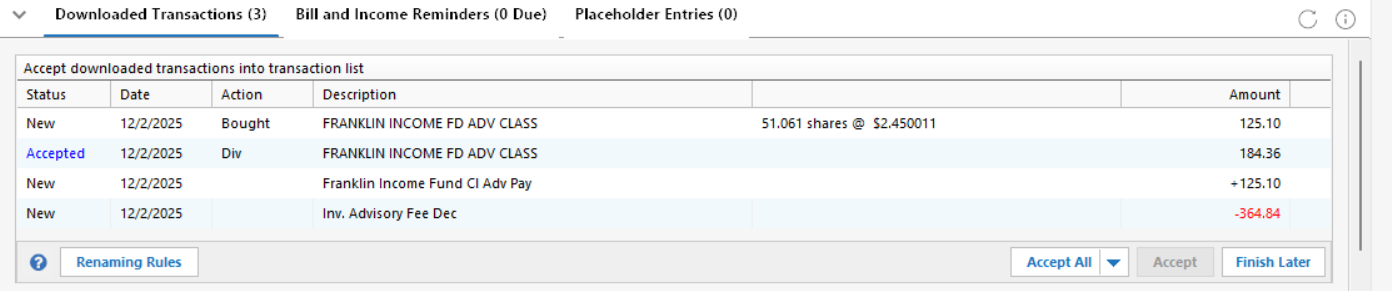
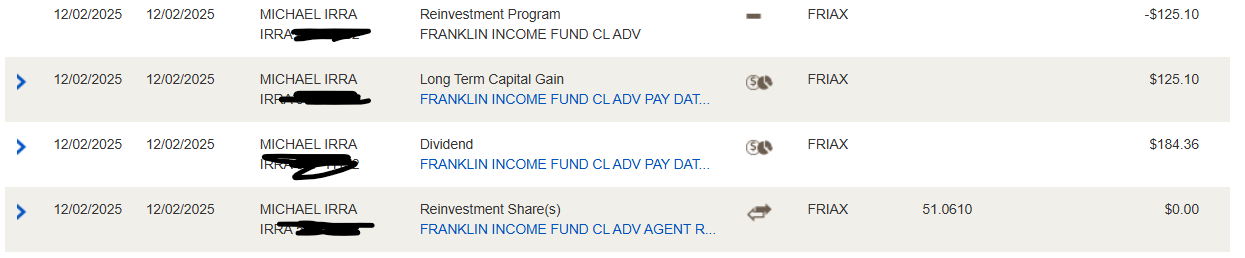
@Quicken Kristina I was beginning to think the download issues were resolved. My transfers, buys, sells, dividends, interest, and fees were all good last month and up to today. However, today there was a security that posted both regular and LT cap gain dividends. The reinvested LT dividend did not map correctly so I had to enter it manually. I submitted a problem report for that. This month there will be more year-end capital gains activity and this was just the first one I have gotten. Please report to support and get this fixed ASAP.
 0
0 -
This is what the fee transaction looks like in the Cloud Sync Log (formatted by Notepad++ json plugin and I have x'ed out the amount)
	{
		"id": "514965458772807424",
		"createdAt": "2025-12-03T14:02:12Z",
		"modifiedAt": "2025-12-03T14:02:12Z",
		"dbVersion": 0,
		"source": "QCS_REFRESH",
		"accountId": "514180192803641600",
		"postedOn": "2025-12-02",
		"payee": "INV. ADVISORY FEE DEC",
		"coa": {
			"type": "UNCATEGORIZED",
			"id": "0"
		},
		"amount": -xx.xx,
		"state": "CLEARED",
		"matchState": "NOT_MATCHED",
		"knownCategoryId": "3000000000",
		"cpData": {
			"id": "20251202AR173553412511682",
			"txnType": "FEE",
			"postedOn": "2025-12-02",
			"txnOn": "2025-12-02",
			"payee": "INV. ADVISORY FEE DEC",
			"amount": -xx.xx,
			"inferredPayee": "INV. ADVISORY FEE DEC",
			"inferredCoa": {
				"type": "UNCATEGORIZED",
				"id": "0"
			},
			"cpCategoryId": "16",
			"investmentTxnType": "FEE",
			"units": 0.0,
			"unitPrice": 0.0
		},
		"mlKnownCategoryId": 3000875000,
		"investmentTxnType": "EXPENSE_MISCELLANEOUS",
		"units": 0.0,
		"type": "INVESTMENT",
		"isExcludedFromF2S": true,
		"isExcludedFromReports": true
	}
In the IRA transaction register it appears with Date = 12/2/2025, Action = Withdraw, Security = "Inv Advisory Fee Dec", Description = "Inv Advisory Fee Dec". Note that payee in the json is all caps and there's a period after Inv. So looks like local Quicken app did some editing of payee before putting it in Security and Description. This is how fees looked under Direct Connect except that Security and Description were a bit more wordy but essentially the same thing.
My investment fee is being taken out of the account for which the fee applies. Maybe that's why it is working.
Would be interesting to look at the OFX Log from last time I was assessed a fee under Direct Connect.
Jim
0 -
My log looks similar. Pre-EWC+, the Payee was listed as "Advisory Program Fee" and the Memo was "Investment Advisory Fee for Dec" (in my case, "Account [acct # inserted]" was appended to each transaction memo where the fee was charged for different account). The Category was set by me as "Investment Expense", but since the Payee has changed, the Category does not carry over.
I no longer see any reference in the log to the "Advisory Program Fee" Payee. So, it looks that the memo data is mapped to the Payee field. If the Payee field just said "Investment Advisory Fee", I might say it was an intentional change, but the fact that it includes the month tells me that's not the case (with the month included, that means the Payee changes every month, which makes no sense). Plus, the wording is exactly the same as what was in the Memo field previously.
2 questions:
1 - You are using the terms "Security" and "Description" for the fields I'm showing as "Payee" and "Memo". Is that intentional or are you just paraphrasing?
2 - Was your Payee pre-EWC+ "Advisory Program Fee" or "Investment Advisory Fee"? If the latter, you may be getting a new payee every month now bc the month is appended. Perhaps its more of a problem for me bc I track the fees by individual account #, even though they're all paid from the same account. I no longer get that info in the Memo field, and thus have to add it manually (and then deal with another old bug when choosing an existing payee and changing the transaction amount).
0 -
@mrzookie to answer your questions:
This is what it looks like now:

This is what it looked like pre-EWC+:

All of my ML accounts have this format in the transaction register. I have two IRA accounts and one brokerage account.
1 - You are using the terms "Security" and "Description" for the fields I'm showing as "Payee" and "Memo". Is that intentional or are you just paraphrasing?
Ans. So, no I am not paraphrasing. I have Payee and Memo in my bank account transaction registers. I do not have a bank account with ML. I do have a Bank of America checking/savings account and have had no problems with them.
2 - Was your Payee pre-EWC+ "Advisory Program Fee" or "Investment Advisory Fee"? If the latter, you may be getting a new payee every month now bc the month is appended. Perhaps its more of a problem for me bc I track the fees by individual account #, even though they're all paid from the same account. I no longer get that info in the Memo field, and thus have to add it manually (and then deal with another old bug when choosing an existing payee and changing the transaction amount).
Ans. As you can see I did have "Advisory Program Fee" but it also had the month then and now.
What is a bit interesting is that I found a qfx file I downloaded before ML stopped supplying them and this is the advisory fee transaction from October:
      <INVBANKTRAN>
        <STMTTRN>
          <TRNTYPE>DEBIT
          <DTPOSTED>20251002110000.000[-5:EST]</DTPOSTED>
          <TRNAMT>-xx.xx
          <FITID>20251002AR173630962487869
          <NAME>Advisory Program Fee
          <MEMO>INV. ADVISORY FEE OCT
        </STMTTRN>
        <SUBACCTFUND>CASH
      </INVBANKTRAN>
So the name and memo were combined into the Security and Description fields. I am guessing now that neither your json (EWC+) nor QFX (Direct Connect) format transactions look anything like mine.
Jim
0 -
Ahhh, I have seen the light! You're looking at the account register where the fields are, as you say, labeled Security and Description. I'm looking at the Withdraw transaction entry/edit dialog, where the same fields are labeled Payee and Memo. So we are, in fact, seeing the same thing.
As it is said, a picture is worth 1000 words!
0 -
I see, said the blind man, as he picked up his hammer and saw. I took a look at the edit entry dialog and now see what you saw.
Jim
0 -
Merrill Edge downloaded Stock Splits as Dividends with $0.
Stock Splits don't happen that often but thought I would share. I am fairly certain that Stock Splits have downloaded as Stock Splits in the past.
0 -
This morning, capital gain transactions were downloaded, but not categorized correctly. They should have been categorized as "Inc - Income (Div, Int, etc.)" with a sub-category of either "Short-term cap gain" or "Long-term cap gain", but were instead set up as "Deposit". I had to research on the ML site, and then manually edit and enter the transactions in Quicken. Where should I send the bill for my time and frustration???
0 -
@WoodCountry same for me. This morning, various capital gain transactions were downloaded, but not categorized correctly. They should have been categorized as "Inc - Income (Div, Int, etc.)" with a sub-category of either "Short-term cap gain" or "Long-term cap gain", but were instead set up as "Deposit". I had to research on the Merrill Lynch web site, and then manually edit and enter the transactions in Quicken. One LTGC came in as just a dividend…along with missing that it was a reinvestment.
Frustrating. I too want to be reimbursed for my time, especially given that I am paying Quicken for this service. I also want to be paid for being a "Beta Tester". I've done my job by testing, calling quicken, sending troubleshooting data and participating on this thread. I travel a good amount, so trying to keep up with all this on the road is challenging.
This entire transition to EWC+ is just not getting any better. The energy I am spending double checking the downloads to the Merril Lynch web site is exhausting. I might as well just enter the manual transactions myself.
This appears to be a mapping issue…possibly along with missing data, however, if Merrill Lynch has the data on their web site, the same data should be pushed down with a Quicken update, and mapped accordingly to the transaction type in Quicken.
MEL0 -
Hello @WoodCountry & @MELCO,
Thank you for letting us know you're seeing this issue. I recommend that you contact Quicken Support directly for assistance, as they have access to tools we can't access on the Community and they're able to escalate the issue as needed. The Quicken Support phone number can be found through this link here. Phone support is available from 5:00 am PT to 5:00 pm PT, Monday through Friday.
I apologize that I could not be of more assistance!
Quicken Kristina
Make sure to sign up for the email digest to see a round up of your top posts.
0 -
@Quicken Kristina Thanks, per your suggestion, I called Support. I reported the Cap Gains issue and the missing Memo issue. The rep fully understood the issues, researched them and found that they are aware of them. Apparently these (and other) issues are happening with several financial institutions which have made the change to EWC+. In this thread, we've seen reports about Merrill, BofA, and Fidelity. It sounds like there are others too. I requested that the rep escalate these issues (again) and he agreed to do so. He understood my (our) extreme frustration and said he would share it.
1 -
@WoodCountry @Quicken Kristina
This has been a known issue going back to September (maybe further) and I'm seeing it with Fidelity too. It's really disappointing that Quicken couldn't get its act together and get it fixed in time for Cap Gains season. I and many others will be doing a lot of manual adjustments over the next 3-4 weeks.
2 -
@mrzookie July 18th for me. The day of cutover from Direct Connect to Express Web Connect+.
2 -
Thank you for your reply @WoodCountry,
I reviewed your interaction with Support and corrected the permissions issue you encountered with the alert that they emailed to you. You should be able to view it now.
Also, I sent you a DM. To view it, please click the envelope icon near the upper right.

Thank you!
Quicken Kristina
Make sure to sign up for the email digest to see a round up of your top posts.
0 -
@Quicken Kristina I travel a good amount. Taking time in front of my PC is often not an option. I do have remote access, but my work is well after hours when I am on the road. I have called support in the past, and it was time consuming.
What do you recommend?
MEL0 -
Received my first ML LT CG txn since cutting over to EWC+. Not great. Received a Deposit and a Buy transaction. Had to change the Buy txn to an Income Reinvest txn and move the $value and #of shares figures from the Dividend line (where they automatically went when I change the txn type) to LT CG. Then had to delete the Deposit txn. The fix is simple enough, but shouldn't need to be done at all. Many funds throw off Divs + ST + LT CGs. A lot of unnecessary work to be done in the next few weeks.
Problem was reported.
2 -
I have the same problems you have. Quicken has always been inconsistent to identify Long-Term, Short-Term, and regular Dividends. I always double check and often have to make adjustments. This is a mapping issue and it's because the investment brokerages don't code the data correctly or they don't receive the info from the actual holding. I've accepted this.
In the past, my Merril Edge Account always downloaded three transactions for each "reinvested dividend". I would go in and edit the "add" transaction and make it a reinvested dividend and then I would delete the other two transactions. When I opened this account with Merrill Edge, I gave their customer service feedback as it is annoying and takes extra time. But I think this is a Merrill problem and not a Quicken problem.
Now, I only have a few transactions in December. The reinvested dividends are showing as a "Deposit" and a "Bought" transaction so it's not downloading as a dividend. I have 34 holdings so it's going to be a pain as most my holdings will give dividends this month.
1 -
For as long as I've used Quicken/ML, there have always been 3 transactions for reinvestments. But they were always accurate. Income (Div/CG short/CG Long), Withdraw, and Add Shares. Never saw an instance where any of the Income transactions was not designated correctly.
I started off doing what you were doing (creating an Income Reinvested transaction and deleting the other 2), but it was too much work, so I just left them the way they were sent. In hindsight, I probably should have kept it up. I've got about 40,000 transactions in my 6 ML accounts and that slows things down quite a bit. One of them alone has 12000, and opening that register takes about 15-20 seconds.
The Dividend Reinvest now coming through as one txn is a nice win for me, but the CG screwup takes the shine off.
2 -
Let me add my voice to the chorus. I just got a long term capital gains transaction downloaded incorrectly: came in as a simple deposit. The transaction is correctly displayed on the Merrill Lynch website. So the correct information is known. Whatever generates the transaction data that is downloaded either is not getting all the data or it does not know how to interpret it. I don't claim to understand what the interface between ML and Quicken is but representatives from both ML and Quicken need to discuss this to figure out what is going on.
I am guessing that calling Quicken support would not be of much help. At this point all they could do is tell me how to edit the transaction to make it correct and I know how to do that.
What is really weird is that the transaction in the Cloud Synclog is labeled a debit ("txnType": "DEBIT"). There was another transaction in that download that was legitimately simply a deposit that also was labeled a debit. However, in both cases the amount was positive. Other transactions (not ML transactions) in other Cloud Synclogs I have saved that are labeled debits have amounts that are negative. So it looks like even transactions that are apparently downloaded "correctly" are not really correct in the download. The Quicken app we have on our computers is "smart" enough to understand that a positive number is a deposit regardless of txnType. But doing that masks the fact that something is wrong with the downloaded transaction. Also, since other FIs using EWC+ have correctly labeled debits, this is something unique (or almost unique) to ML EWC+. Frankly, this boggles my mind.
Jim
1 -
Addendum to last post: In the Clould Synclog of the bad capital gains transaction, the payee field had incorrect security name. It was "<security name> PAY DATE 12/05/2025". This error was in dividend (and other) transactions earlier in the switch to EWC+ and that caused Quicken to popup a message to have user identify the security.
Note: I usually get several captial gains transactions in December and so far I've only gotten one. So if a fix is found quickly enough I can verify that it works. If not, based on recent experience, the next will be in July of 2026.
Jim
0 -
Hello everyone,
We’ve opened a ticket to track the issue where Merrill Lynch capital gains transactions are downloading as “Deposit” instead of Short-Term or Long-Term Capital Gains. At this time, there is no ETA for a resolution.
If you are experiencing this issue, please help us by submitting the following so they can be added to the ticket:
- Log files
- Screenshots of the affected transactions
- Sanitized Quicken file
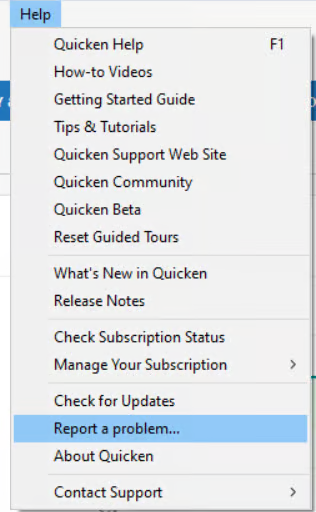
You can submit these via Help > Report a Problem in Quicken.
Thank you for your patience and for providing this information — it helps our teams investigate and work toward a fix.
(CTP-15596)-Quicken Anja
Make sure to sign up for the email digest to see a round up of your top posts.0 -
Thank you @Quicken Anja
It would be really great if you could express to the developers the urgency of this particular issue. I would guess 75% or more of mutual fund cap gains are paid out in December. Right now is the time we need this function working properly.
0 -
Thanks for sharing that, @mrzookie. I’ve added your note about the urgency to the ticket so the team is aware that this issue is especially impactful during the December payout period.
We appreciate your patience as the investigation continues.
-Quicken Anja
Make sure to sign up for the email digest to see a round up of your top posts.0 -
@Quicken Anja I did send a report with the data that I had.
One problem with reporting is that if you "Send to Quicken" with too many files attached, the entire report is lost. That's a problem. I can understand having a limit but just refuse the send don't wipe out everything. That would allow us to amend the report to reduce the number of files. The file I didn't send was OFXOLD.txt. That one shouldn't be needed.
One thing I hope is clear, I manually updated the bad transaction in the Quicken data file prior to sending the report.
To be frank, I think that the only thing they will need from us is the synclog.txt file because that has the transaction as it was downloaded to Quicken. It is indistinguishable from other transactions that are simply deposits. If there is any other data they need it will likely be log files on the server.
And, by the way, the deposits are wrong because they have "txnType": "DEBIT" which can't be right. Probably should be "txnType": "CREDIT". (Other Financial Institutions have "txnType": "DEBIT" only when the amount is negative.) It "works" for things that really are deposits probably because the amount is positive.
Thanks
Jim
0 -
@jdparker225 @mrzookie My Dividend reinvestments, short-term capital gains and long-term capital gains required manual review, comparison to the Merrill Lynch web site and ultimately manual entry with corrected data and memo fields into Quicken. Nothing downloaded could be accepted without manual adjustment and correction as downloaded.
My experience with the Quicken and Merrill Lynch EWC+ is that the data downloads are going backward in viability, and it continues to be a time-consuming process. This has to get corrected and it appears to all be mapping issues if indeed what is available on the Merrill Lynch web site is what Quicken uses to download to my local Quicken for Windows.
MEL0 -
I downloaded 16 transactions including stock splits, short term and long term reinvestments.
All had to be reentered manually.
1



