More Graphs and Graph types for Q Mac
Comments
-
Did this ever get considered by the Quicken dev team. This feature is something I have seen on competing products, and honestly it such a good visual, it would certainly tempt me to use them. Maybe it could even just be done on Quicken on the Web, but native would be better.
1 -
Hello @Zoolook,
Thank you for sharing your feedback. This hasn't been considered yet because it hasn't gotten enough votes. Once it has enough votes, it will be forwarded for consideration.
Thank you!
Quicken Kristina
Make sure to sign up for the email digest to see a round up of your top posts.
0 -
Hello Quicken Mac users!
Help us improve: Try the new Account Chart in Quicken Mac
We are working on a new visual graph in Quicken Mac that lets you see your account activity over time — including both, past transactions and upcoming scheduled transactions.
We’d love your feedback! Your input will help us refine the graph and make it even more useful.
If you’re interested in taking a quick look and sharing your thoughts or ideas for improvement, please reply to this post or send me a direct message.
Thanks for being part of the Quicken family — we appreciate your support!
Victoria
Product Manager for Quicken Mac
1 -
Sure, I'll check it out.
1 -
Hi, Victoria. I’m interested in trying the account chart feature you’re developing.
1 -
Count me in too, I would love to take a look…..although I'm a Window user in case that matters.
0 -
I think if users saw a Sankey chart of their income streams in and expense streams out, they would be impressed by how quickly it summarizes their financial situation in visually powerful way. It's a perfect commercial of why someone would want to use Quicken.
0 -
I manage a Monarch Money account for my niece, and its Sankey charts are fantastic. Would love to see that functionality built into Quicken for my own finances.
0 -
Hello Victoria, I would be interested in the chart account feature, too.
Also would like to add the following:
I like Sanket Charts also. Would be nice if there was a way to view Sankeys by Income to Accounts and/or Tags, Tags to Categories. For budgets, can we have an error bar that shows the targeted budget, heat map (of a calendar) for scheduled bills and scheduled income, waterfall charts for income/expenses over a period of time
1 -
I had a nice discussion with with @Quicken Victoria and she put me in contact with @Quicken Siddhi and @Quicken Jayashree two of their Windows developers. I showed them a few ideas I had for system improvements and showed them an example of a Sand Key chart that I think would be very powerful if added to Quicken, they seemed to agree. I am impressed with Quicken Dev team. So let's see what happens.
 0
0 -
@Jeff76 Just to clarify, this thread is about chart features for Quicken Mac. You’re apparently a Quicken Windows user, and I’m glad you were able to deliver input to the Quicken Windows developers. But for anyone reading this thread, it’s worth noting that the development teams for Quicken Windows and Quicken Mac are completely separate (although there’s obviously senior product and engineering management for the overall company to keep the individual products on track).
For Quicken Mac users, @Quicken Victoria is the product manager, and the right person to reach out to if you want to get a preview of the new account activity graph they are working on or to give your input on other areas of Quicken Mac. (I’ll post about this separately, but I know she is truly interested in interacting with and listening to Quicken Mac users beyond the small group of us who do beta testing or spend a lot of time posting in this forum.)
Quicken Mac Subscription • Quicken user since 19931 -
I see these on social media often these days. What a beautiful way to show income and expenses and easily target areas for improvement.
1 -
While the income and expense report is really nice for a very detailed view of where money is going, it’d be nice to have a more visual representation.
Sankey diagrams seem to be good at showing total income and how it breaks down across expense categories.
Can you add a report or dashboard that shows a sankey?0 -
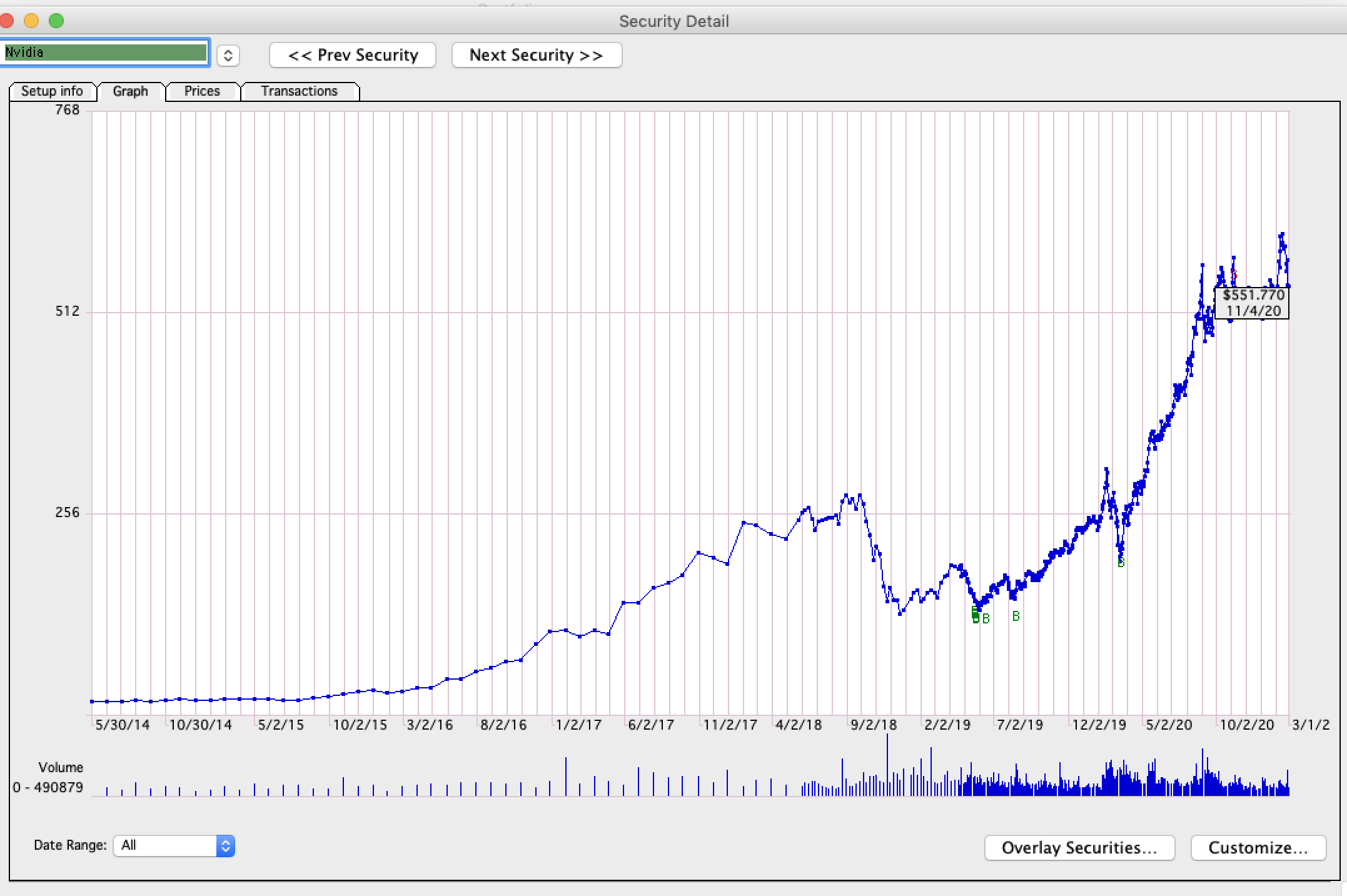
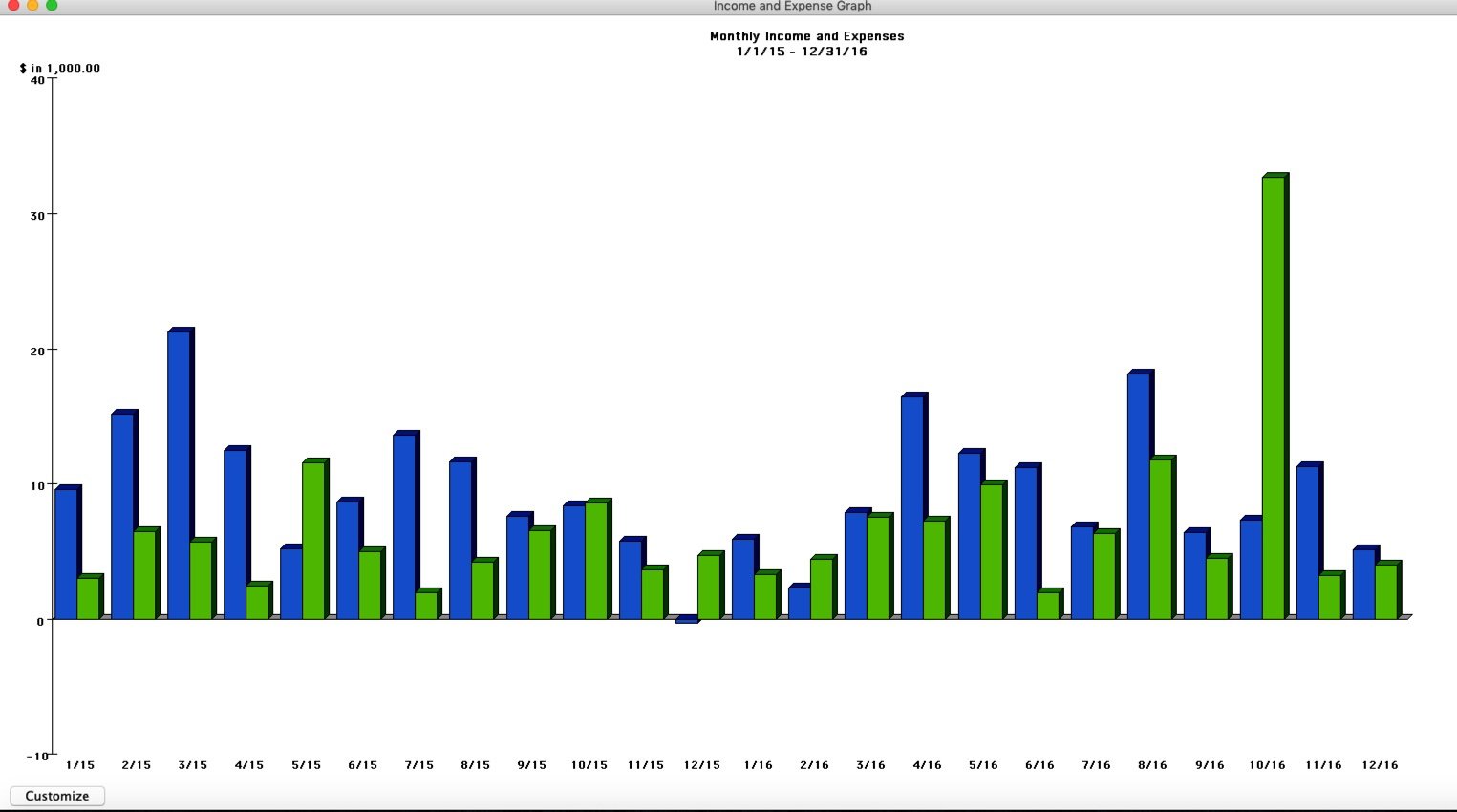
@Quicken Victoria, thank you for your efforts. I'd love to see all the graph features of QFM Lion to be available in Quicken Mac Classic Deluxe: 1. "Net worth" (not just on the small Dashboard, but full screen and mouse reactive. Same for "Income and expense." I'd like to double click on these small Dashboard items to break out to a full-screen window. On the investment side, Quicken 2007 Lion had a tab where "buys and sells" were for a particular equity/fund along with transaction tabs. Simple and useful.
Thank you, Matt
 1
1 -
I agree a Stanley would be helpful
0 -
Please add sankey diagram - it would be good for the spending plan as well
0 -
+1 for sankey diagram
0 -
+1 for sankey
0 -
Another vote for Sankey! Considering switching to monarch just for this
0 -
Sankey charts are the perfect way to show income and expense streams at a glance. I'm still hoping the Quicken dev team explores this option.
0 -
To vote on an existing Idea, go to the first post in the discussion and click on the little up arrow below the vote count in the big yellow box at the bottom of the post. If the discussion extends to more than one page, go to page 1 to find the original post. When you have voted, the arrow will turn gray and the vote count will increase by one. If the count decreases, it means you have already voted. Click once more to re-register your vote.
It takes about 50 votes for an Idea to be considered for implementation. Adding a comment will move the Idea to the top of the list, where it will get more visibility. As Ideas move through the review process, their Status next to the vote count changes.
QWin Premier subscription0 -
It takes about 50 votes for an Idea to be considered for implementation.
For Quicken Mac, because it's a smaller user base than Quicken Windows, the number of votes needed to forward an Idea to the developers is actually 30 — which this thread has just reached! The moderators will change the status on this thread to "Under Consideration" and forward the topic to the development team.
From there, well, we never know how long it will take for the developer to do an assessment to see if they feel the idea fits with other Quicken products, how long it would take to design and code, and when they could slot this on their schedule midst all the other things they already have planned. I'd note that there are about 3 dozen existing Ideas marked as "Planned" which have not yet been implemented. And more than 40 which are in "Under Consideration" status already. Some of the "Planned" Ideas seem pretty straightforward, while others seem like time-consuming big projects to implement. Unless this happens to be something they are already planning, I'd say it's typical for Ideas to remain in "Under Consideration" status for a year or more; late summer/early fall is when they seem to do their major planning for the following calendar year, so that's often when statuses change.
Bottom line: this feature request has just taken the next step forward, but because of the volume of features eating for implementation and the small size of the development team, don't expect to see it implemented any time soon. 😉
Quicken Mac Subscription • Quicken user since 19931 -
Hello All,
The status of this Idea has been changed to Under Consideration as it has reached enough votes and has been submitted to our Product and Development team for further review.
Thank you!
-Quicken Anja
Make sure to sign up for the email digest to see a round up of your top posts.1








Categories
- All Categories
- 6 Product Ideas
- 34 Announcements
- 248 Alerts, Online Banking & Known Product Issues
- 19 Product Alerts
- 265 Welcome to the Community!
- 301 Before you Buy
- 1.5K Product Ideas
- 55.8K Quicken Classic for Windows
- 16.9K Quicken Classic for Mac
- 1K Quicken Mobile
- 834 Quicken on the Web
- 129 Quicken LifeHub