SoldX from IRA not showing as 1099-R taxable distribution

In years past, I entered WithdrawalX transactions from my IRA to my checking account and Q entered this as a Tax Item 1099-R Total IRA taxable distribution, as expected. Last year I entered the same RMD as a SoldX: sold shares of MMF and Record Proceeds to: Checking Account. I expected this to also be same Tax Item. But the transfers out of the IRA are not listed as Transfers in the Tax Summary Report.
In the Category List I see the item:
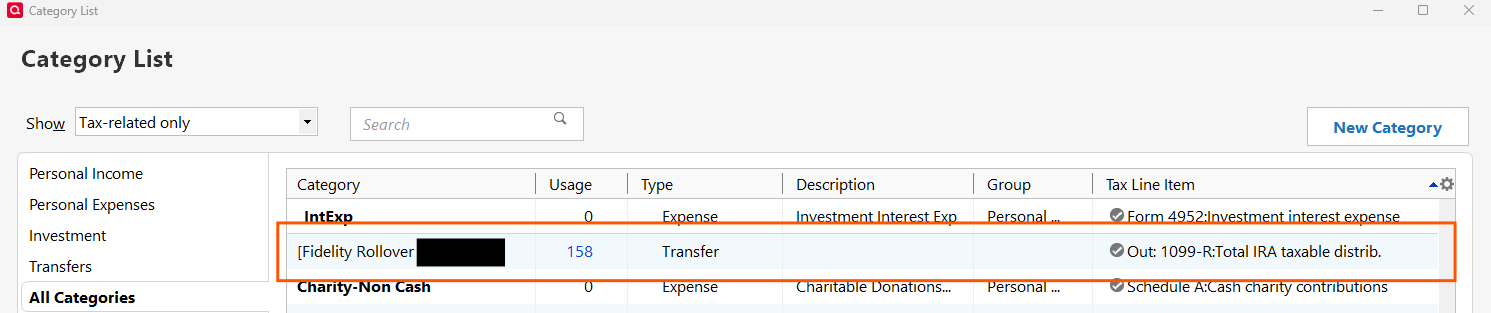
Why aren't the SoldX transactions also categorized as a 1099-R Tax Item. Is there a way to make it so?
Answers
-
This is odd. It appears to me that this might be a bug as I was able to duplicate it.
I set up a test SoldX transaction in an IRA account for 12/31/2025 with the proceeds transferred to a checking account. That transaction does not show up in the Tax Schedule report (as 1099-R income) nor in the Tax Summary report (as a transfer) nor in Tax Planner (as a retirement account distribution).I double checked the Tax Schedule for the account and it was properly set as 1099-R:Total IRA taxable distrib. and not as 1099-R:Total IRA gross distrib.. I also double checked to make sure the account is properly set as Traditional IRA and tax-deferred is selected.
I think you might have identified a program bug. (Just a guess, but this bug might also be at least a contributing factor to why you were not able to set up the Memorized Investment Transaction for SoldX per your other thread.)
I recommend that you go to Help > Report a Problem and submit a report about this. You can also copy and paste the URL to this thread and your other thread regarding the SoldX Memorized Investment Transaction issue. This is the surest way of getting this issue in front of the Quicken Dev Team for their review and potential action.
Quicken Classic Premier (US) Subscription: R66.23 on Windows 11 Home
1 -
Here is Q S response to this question:
Me: A WithdrawalX transaction enters a 1099-R Tax Item which shows as Income, as expected. But a SoldX does not. Is there a way to set SoldX as a 1099-R Tax Item?
Gabriel from Quicken Classic: Unfortunately, no — Quicken does not allow assigning a tax line item to SoldX transactions because:
The tax reporting for sales is handled through capital gains reports, not income categories.
1099-R is specifically for distributions from retirement accounts, not for sales of securities.Me: But in an IRA the effect is the same. Money transferred out of an IRA is always income, I think.
Gabriel from Quicken Classic: The reason SoldX doesn’t behave the same way is because Quicken assumes the sale is just an internal investment action, not a distribution. In other words:
SoldX = Sell + Transfer, but Quicken treats the transfer as “moving cash,” not “taxable distribution.”
The tax logic is tied to the transaction type, and SoldX is coded as an investment sale, not a withdrawal.In other words, BS. Yup, time for: Help > Report a Problem
1 -
This sounds similar to this recently introduced issue with BoughtX transactions
QWin Premier subscription0 -
Gabriel from Quicken Classic: The reason SoldX doesn’t behave the same way is because Quicken assumes the sale is just an internal investment action, not a distribution. In other words:
SoldX = Sell + Transfer, but Quicken treats the transfer as “moving cash,” not “taxable distribution.”
The tax logic is tied to the transaction type, and SoldX is coded as an investment sale, not a withdrawal.Yes, this just shows a lack of understanding about the difference between the actual Selling of the security and the distribution of the proceeds.
And it shows a lack of understanding about how Quicken properly handles Sell (and Buy) transactions differently based upon the type of the account.
It just reinforces for me that this is a bug and needs to be fixed.
Quicken Classic Premier (US) Subscription: R66.23 on Windows 11 Home
0 -
Hello All,
Thank you for taking the time to visit the Community to report this issue, though we apologize that you are experiencing this.
We have forwarded this issue to the proper channels to have this further investigated. In the meantime, we request that you please navigate to Help > Report a problem and submit a problem report with log files attached and (if you are willing) a sanitized copy of your data file in order to contribute to the investigation.
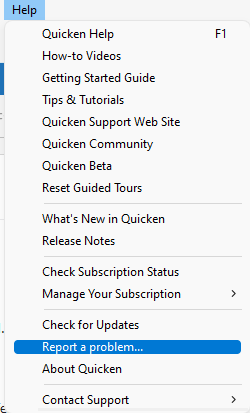
While you will not receive a response through this submission, these reports will help our teams in further investigating the issue. The more problem reports we receive, the better.
We apologize for any inconvenience!
Thank you.
(CTP-15883)
Quicken Kristina
Make sure to sign up for the email digest to see a round up of your top posts.
0 -
A report has been sent.
BTW, while completing the report I detected a problem. If you just check the Sanitized data file box, the number of items sent exceeds the number allowed. Which file should one omit?🤔
1 -
Thank you for your reply @DoctorBrown,
Sending the sanitized file is optional. If you need to send a problem report and have more than 10 attachments, you can omit any log file with OLD in the file name. If needed, you can also omit the screenshot (if one is included), since I was able to replicate the issue in my Quicken and get the necessary screenshots.
I hope this helps!
Quicken Kristina
Make sure to sign up for the email digest to see a round up of your top posts.
0 -
In my R61.21 release, I am not able to enter a SoldX transaction in an IRA account - nor a DivX or any other ___X type except the WithdrwX. If there is a recent bug, I suspect it is in allowing those other transactions to be created in the IRA account to begin with.
(The exception is IRA accounts which get created as Single Mutual Fund accounts and thus carry no cash balance and must use ___X transactions. To my way of thinking SMF IRA accounts would be a poor choice.)
As I see the normal case, those tax reports and the tax planner is working with the taxable accounts, not the retirement accounts. When the report engine finds a transfer into the applicable taxable account, it looks for the source of the transfer in. When it sees the source as an IRA account, it must double check that it is a WithdrwX from the IRA and only then applies the 1099-R line to the transaction.
I can't imagine any competent financial person taking dividends and interest and other income streams out directly as part of ones IRA withdrawals. My $0.05 worth.
1 -
@q_lurker, I don't know if SMF IRA are the norm or the exception, but in many cases, an IRA isn't a SMF and Quicken should still handle it appropriately.
It seems to me all the __X Out transactions should all operate the same. Funds are leaving the Tax Deferred account so should be recorded as 1099-R distributions. Now, there may be a case where the funds are rolling over into another Tax Deferred account, but that could be handled as a special case because both the source and target accounts will be Tax Deferred. I've only done that once,18 years ago, so I'll have to review how it it was handled.
As far as withdrawing dividends and interest, some people might because that is their income, but that could still be done by adding up all the D&I funds left as Cash in the account and using a WithdrawalX transaction.
0 -
I agree with @DoctorBrown that regardless of the method for how cash is transferred out of a tax deferred account to another account (whether taxable distribution or a non-taxable rollover distribution) it still is cash being transferred out and Quicken should capture that distribution correctly in the Tax Reports and Tax Planner. If a SoldX option is available that permits the residual cash to be transferred to a taxable account then it should be captured as a taxable event but that is not happening with the current versions. (I can't speak to what the situation was like with earlier versions.)
I agree that it is unlikely dividends/interest would be transferred directly to the taxable account because I believe most financial institutions only permit dividends/interest to be reinvested or paid into the account's cash balance and not distributed. However, the OP is about distributing the proceeds from a Sell transaction, not about dividends/interest transactions.
Perhaps the fix for the issue might be suited to be included in the Planned Idea regarding improving how retirement account distributions are handled by Quicken (Improve handling of IRA distributions, including QCDs and Roth conversions)? This, I think, would be a good fit in that effort if fixing this SoldX issue turns out to be something complex.
Quicken Classic Premier (US) Subscription: R66.23 on Windows 11 Home
0 -
I am sure the planned idea that @Boatnmaniac cited is exactly where this should be resolved. Mostly I commented here to bring to light the additional ___X transfer possibilities. It should be all or none (IMO); I just bias toward the none side as simpler and more definitive - my viewpoint, not necessarily right.
Those in charge also need to keep in mind other ways to move money out or spend money from an IRA need to be maintained. For me, these might be expenses like administrative fees, foreign taxes, ADR dividend charges, and QCD ‘checks’. Those can currently be transacted as MiscExp or WriteChk. So then what’s suppose to happen if the category on the ‘check’ is a taxable account? Just asking and hoping somebody else is considering all the permutations.
1 -
Yes, to all you said. I would add that Income Tax withheld from an IRA distribution should be included in the total taxable distribution amount. Currently it is excluded and is treated as a non-taxable event. It is primarily because of this that we need to resort to the workaround of entering the IRA distribution as a deposit into the checking (or other) account with the category being split between a transfer from the IRA for the full taxable amount of the distribution along with deductions for the withheld income tax(es). This withheld income tax handling is the only example I can think of where it is not simply a misc expense because there are tax and income implications so it should not be treated as other retirement account misc expenses are.
Quicken Classic Premier (US) Subscription: R66.23 on Windows 11 Home
2 -
I would add that Income Tax withheld from an IRA distribution should be included in the total taxable distribution amount. Currently it is excluded and is treated as a non-taxable event. It is primarily because of this that we need to resort to the workaround of entering the IRA distribution as a deposit into the checking (or other) account with the category being split between a transfer from the IRA for the full taxable amount of the distribution along with deductions for the withheld income tax(es). This withheld income tax handling is the only example I can think of where it is not simply a misc expense because there are tax and income implications so it should not be treated as other retirement account misc expenses are.
So, I think, you are saying you want the state and fed tax withholdings recorded in the IRA account and picked up from there by Tax Planner and reports. I understand that desire. It is the IRA administrator that pays out those amounts commonly (I believe) as separate transactions.
The challenge, as I see it, is that it requires the program, tax planner and tax reports, to review and evaluate transactions in those accounts while those accounts are otherwise excluded from the planner and reports. Not that I know, but that strikes me as a major change to the Quicken programming.
What is the programming logic:
- Review of taxable account shows a transfer from an investment account
- That investment account is a retirement account
- That retirement account has a tax line assignment for withdrawals (Does it matter which tax line?)
- Program then reviews transactions in that retirement account to look for Fed and State tax withholdings (Does the category matter, i.e. if a user has created their own categories. Or is it based on tax line assigned to the category. Does the timing matter? So many days before or after the transfer transaction?)
Like I said, I understand the rationale. But I also see the current workaround (recording tax withholding as a split on the receiving transaction) as quite effective and not creating exceptions to how the tax planner and reports operate. Too often when we ask programming development for what appears to be simple, we get something more complex and less than fully desirable.
2 -
The challenge, as I see it, is that it requires the program, tax planner and tax reports, to review and evaluate transactions in those accounts while those accounts are otherwise excluded from the planner and reports. Not that I know, but that strikes me as a major change to the Quicken programming.
The challenge for Quicken is to follow transactions as they occur at the banking institutions. In this case, the tax withholding are clearly occurring at the Investment bank, NOT the receiving checking account. Regardless if that is 'effective' from a Quicken transaction handling. Second, the amount recorded as transferred to my Quicken checking account is WRONG. Third, the tax transaction are downloaded from the Investment bank, and I have to delete them to make it all work out. Forth, except in circumstances where there is a transmission or user error, I should NEVER need to delete valid accurate downloaded transactions, period.
It's not Quicken's fault that the tax laws make things complicated and banking transaction difficult. But it is their duty to follow them, as closely as reasonable. In My Humble Opinion, this is a case where they should have, long ago, followed the established banking and tax practices.
0 -
Write up your suggestion, make it an idea, and see if it gets any traction.
The challenge though, as many long-time users can attest, is that major changes in the Quicken programming almost invariably screws up a half dozen other aspects of Quicken that were working perfectly before. Frequently the KISS principal is actually the better way of going.
2 -
[Removed - Disruptive]
Q user since February, 1990. DOS Version 4
Now running Quicken Windows Subscription, Business & Personal
Retired "Certified Information Systems Auditor" & Bank Audit VP2 -
I "third" that.
- Q Win Deluxe user since 2010, US Subscription
- I don't use Cloud Sync, Mobile & Web, Bill Pay1 -
Whether or not fixing this would be a major code change is really unknown. It might be or it might not be. Only those who work with the code can answer that question so it is not wise, IMO, to make judgement regarding that.
I for one would really like to see this issue resolved because I do agree that this appears to be a bug as it appears to be an inconsistency in the program with how cash proceeds from transactions can be managed. Will I go bonkers if it is not? No because we do have a reasonable workaround option that works really well, even if it is a bit awkward and is not a perfect process.
I think the only reasonable thing at this point is to acknowledge that if the Quicken Dev Team agrees to take this on it is not likely something that is going to happen very quickly, especially if they tie it in with that IRA Handling Improvement idea that I referenced earlier. It's been reported as an issue, use that best practice workaround and hope it will eventually be fixed.
Time for me to move on.
Quicken Classic Premier (US) Subscription: R66.23 on Windows 11 Home
2




