Where are oddball Dow prices coming from?


Quicken user since version 2 for DOS, as of 2025 using QWin Premier (US) on Win10 Pro & Win11 Pro on 2 PCs.
Best Answer
-
It looks like you are sometimes seeing the prices for Compass Inc Class A, which also has the ticker COMP.
We have had trouble before when the ticker for an index collides with a company ticker. Try using INDEX:DJA instead, which appears to be Quicken's preferred symbol for that index.QWin Premier subscription1

Answers
-
Not sure where you got today’s price since mine looks okay (have you updated since then?) As for 5/31/21 I got the same and that was a holiday. I see something similar for 4/2/21 which I believe was Good Friday, another day the stock market was closed. Not sure why they put in those odd prices on holidays.I’d be curious to see what you end up with when the market closes today.
Quicken Windows user since 1993.
1 -
I just updated again and COMP now has a correct-looking price.
Quicken user since version 2 for DOS, as of 2025 using QWin Premier (US) on Win10 Pro & Win11 Pro on 2 PCs.
0 -
Lowest cost bidder for providing quotes.
2 -
Have you tried adding a circle of salt around your computer, followed up by a sprinkling of holy water?
Quicken user since Q1999. Currently using QW2017.
Questions? Check out the Quicken Windows FAQ list0 -
It looks like you are sometimes seeing the prices for Compass Inc Class A, which also has the ticker COMP.
We have had trouble before when the ticker for an index collides with a company ticker. Try using INDEX:DJA instead, which appears to be Quicken's preferred symbol for that index.QWin Premier subscription1 -
Jim_Harman said:It looks like you are sometimes seeing the prices for Compass Inc Class A, which also has the ticker COMP.
We have had trouble before when the ticker for an index collides with a company ticker. Try using INDEX:DJA instead, which appears to be Quicken's preferred symbol for that index.That's interesting. When I open a new file, Quicken provides COMP as the symbol for the Dow Composite as shown below. But changing it to INDEX:DJA seems to work also. Thanks for the tip.
Quicken user since version 2 for DOS, as of 2025 using QWin Premier (US) on Win10 Pro & Win11 Pro on 2 PCs.
0 -
I would call that a bug, the built-in symbol for new files should be INDEX:DJAQWin Premier subscription1
-
Disregard, I was looking at the wrong thing.Jim_Harman said:I would call that a bug, the built-in symbol for new files should be INDEX:DJA0 -
Reviving this old post in search of a solution.
As noted previously above, "Compass Inc CL A" and "Dow Jones Composite" both have the same symbol assigned.
Is there any way to prevent the security from displaying as an Index as noted in screenshot compilation below?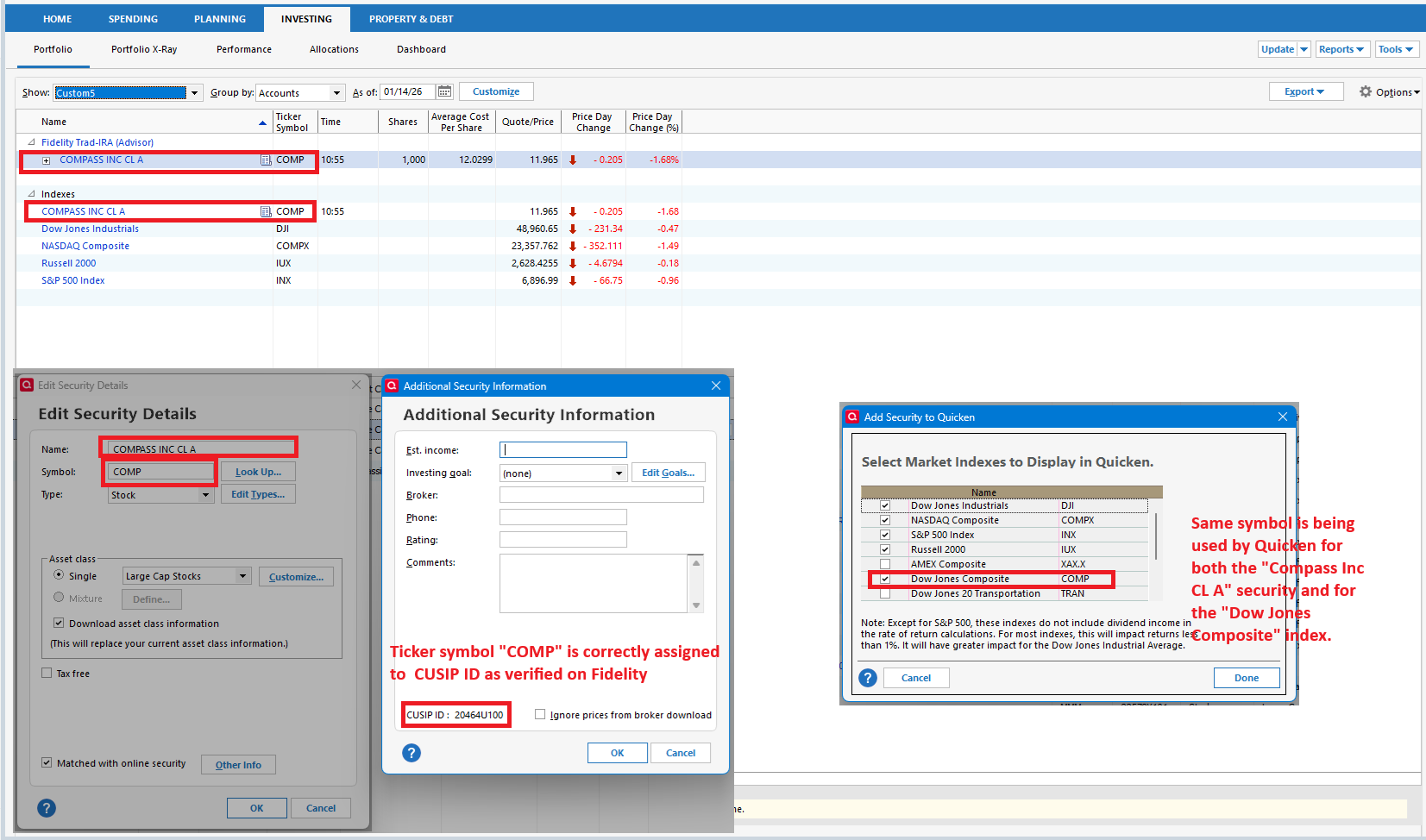
- Quicken user since 1992 (back in the good old DOS Version days)
- I don't use Cloud Sync, Mobile & Web, Bill Pay/Mgr, Budgeting, Tax Planner
0 -
Ticker for Compass, Inc = COMP
Ticker for DJ Composite Average = INDEX:DJA; Security Type should be Market Index.
Ticker for NASDAQ Composite Index = COMPX
0 -
I tried adding the index using the INDEX:DJA ticker as suggested, but that only led to both it AND Compass showing up under the Index section.
Additionally, I can't untick the box in the "Select Market Indexes to Display in Quicken". I mean I can untick it, but it doesn't save that I've done so.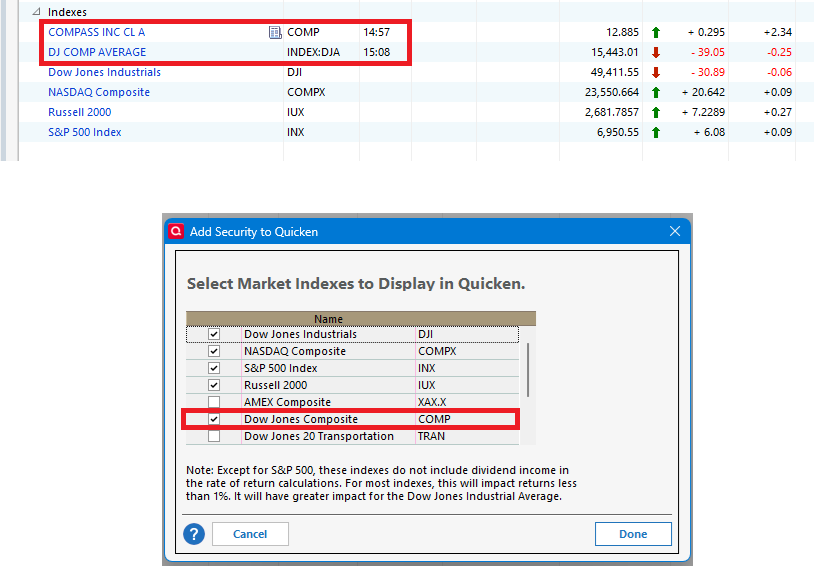
- Quicken user since 1992 (back in the good old DOS Version days)
- I don't use Cloud Sync, Mobile & Web, Bill Pay/Mgr, Budgeting, Tax Planner
0 -
This is confusing. There is a flaw in Quicken's logic and handling here. Below is my screen shot exemplifying the issue:
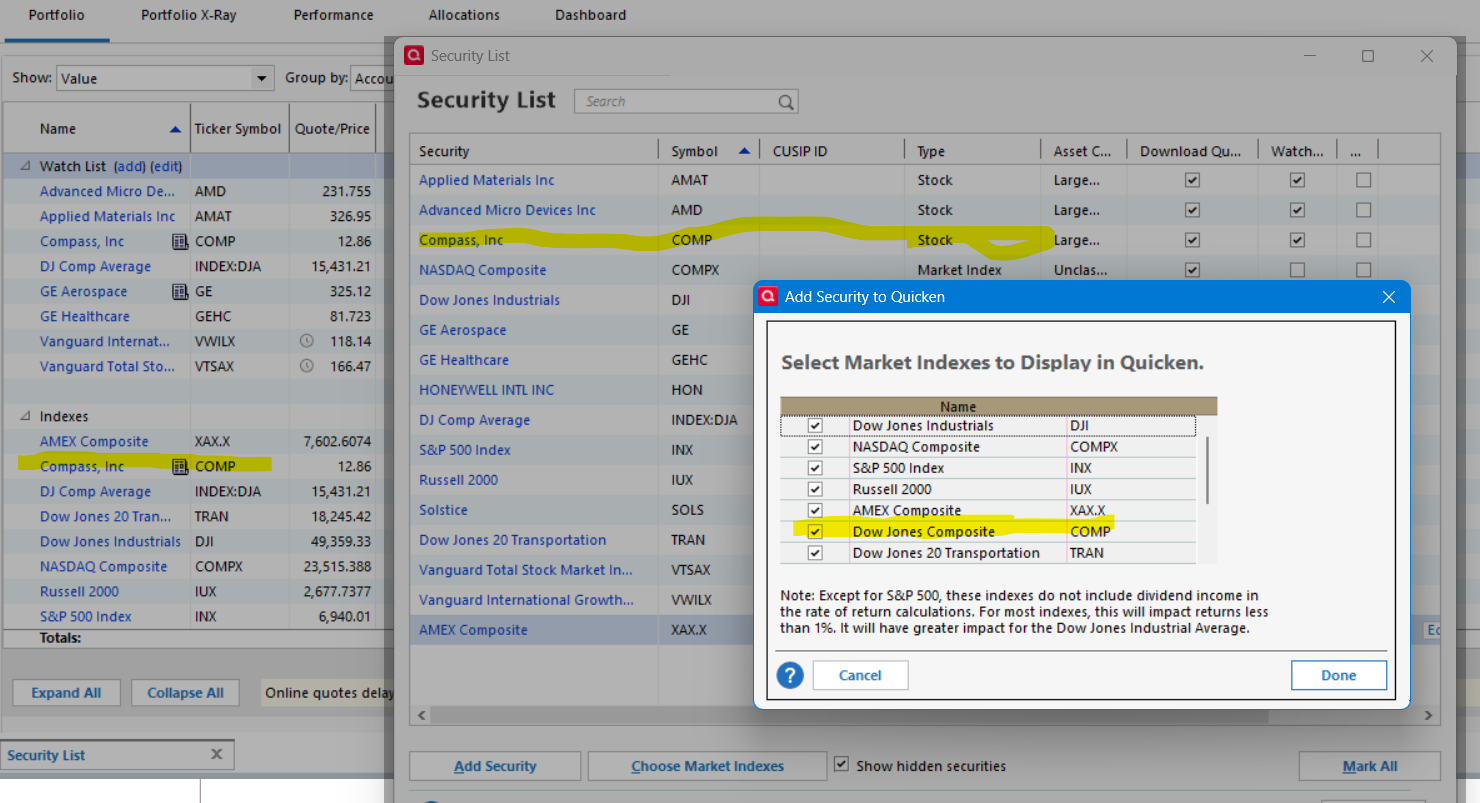
With the Compass, Inc security correctly in place as a Stock with the ticker COMP, portfolio views (and others?) treat the security as an index. This is apparently because the Choose Market Indexes button brings up a selection of indices that has COMP associated with the the Dow Jones Composite. That is the wrong association. That index should be associated with the symbol Index:DJA (which I had independently set up as a Market Index security.
Quicken needs to fix this. I don't see any way a user can get around this.
I've clicked the Report an Issue for this within Quicken citing this discussion.
2 -
Hello @emhamiltn & @q_lurker,
Thank you for bringing this to our attention! I see the same thing in my own Quicken. I forwarded this to the proper channels for further investigation and resolution. If you haven't already done so, please navigate to Help>Report a Problem and send a problem report with log files attached to contribute to the investigation.
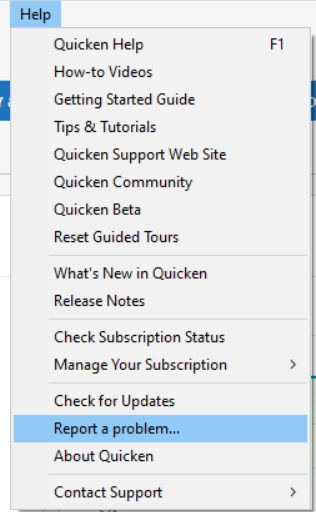
While you will not receive a response through this submission, these reports will help our teams in further investigating the issue. The more problem reports we receive, the better.
We apologize for any inconvenience! Thank you.
(CTP-16154)
Quicken Kristina
Make sure to sign up for the email digest to see a round up of your top posts.
2 -
Would be nice to get this fixed. It's been super annoying since I moved some investments at Fidelity at the start of the year. A fund I moved to has COMP (the company, not the index) in it, and every day I update, I seem to have to correct the history for this security.
Downloading the stock history for this security was so bad that I had to delete everything prior to 2021.
Unfortunately, for today I already fixed it, but the next time it happens I'll send a problem report.
0 -
Updating the index does seem to have fixed the immediate problem. Though as @emhamiltn noted now Compass also shows up as an index in addition to being a stock. So clearly something hardcoded in the investing view to show COMP as an index.
1