Portfolio X-Ray not recognizing ETF stock funds
Answers
-
Thank you for your reply,
I forwarded that information to our teams.
Thank you!
Quicken Kristina
Make sure to sign up for the email digest to see a round up of your top posts.
0 -
Hello @Jim_Harman,
Our teams recommended updating your quotes for the whole portfolio first, then retrying.
If the issue persists, please log out of Quicken and then log back in. To do that:
- Click on the Edit Menu and select Preferences.
- In the left panel, select Quicken ID & Cloud Accounts.
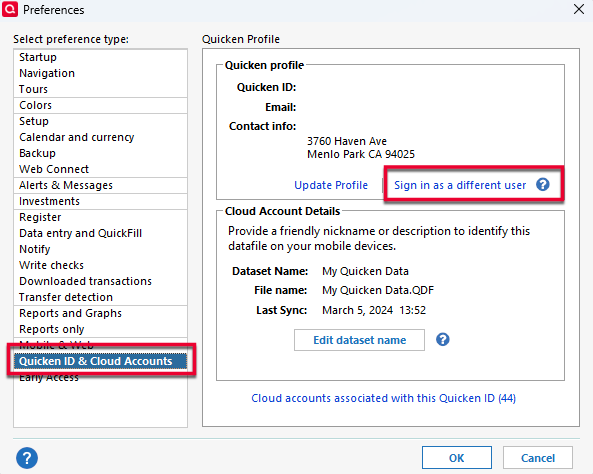
- Click Sign in as a different user.
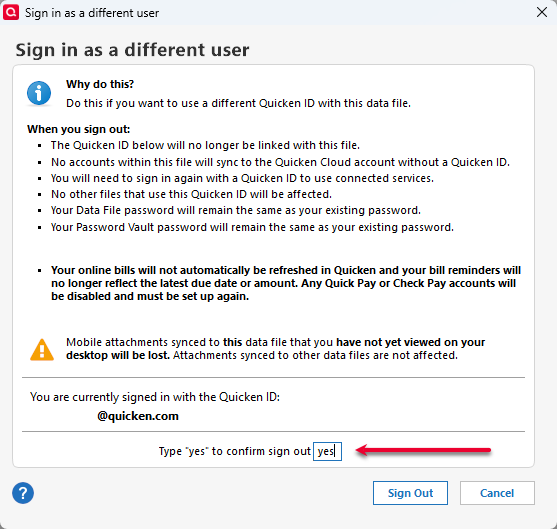
- Type "yes" as prompted and click Sign Out.
- Close Quicken and reopen it.
- Sign back in with your Quicken ID.
Please let me know how it goes!
Quicken Kristina
Make sure to sign up for the email digest to see a round up of your top posts.
0 -
Your suggestion worked for me: Selected All Accounts and All Securities and then Refresh, and all ETF's are correctly classified. Confirmed that it also works now when selecting a single account.
Thanks for your help.
1 -
Thank you for the follow-up,
I'm glad to hear it's now working.
If you need further assistance, please feel free to reach out!
Quicken Kristina
Make sure to sign up for the email digest to see a round up of your top posts.
1 -
Thanks for those recommendations. I am working with a test file and the quotes were out of date.
I updated the quotes then selected one account then all accounts and now there is no longer a Not Classified slice.
The AI analysis is still wrong however.
QWin Premier subscription1 -
Thank you for your reply,
I'm glad to hear that resolved the issue in the test file.
The issue with the AI analysis has been reported in a new ticket, CTP-16331.
Thank you!
Quicken Kristina
Make sure to sign up for the email digest to see a round up of your top posts.
1 -
X-ray hasn't been picking up my ETF's for months. I have sent in problem reports and have heard nothing from Quicken I installed the latest patch and that did not work. They must be severely understaffed or lack expertise in basic software testing before they release new versions.
Has anyone found a solution or workaround?
[Merged Post]
0 -
Well known issue.
[Merged Post]
Q user since February, 1990. DOS Version 4
Now running Quicken Windows Subscription, Business & Personal
Retired "Certified Information Systems Auditor" & Bank Audit VP0 -
Perhaps they need to credit all of us for the months our subscription has not been working?
0 -
@JFS8020 What got the ETFs working for me was:
- Install R66.11 or newer
- At the top right of the X-Ray page, click on the arrow next to Update and select Quotes
- Select one account
- Select All accounts
- Click on Refresh X-Ray
On a test file, this worked right away. On my working file, I had to repeat steps 2-5 a few times before the Not Classified wedge of the pie chart disappeared and the allocations were correct.
Note that the AI analysis is still incorrect.
QWin Premier subscription4 -
I got Version R66.12 and I am still having issues with the X-Ray.
0 -
I updated to R66.12 today. Following the ALL of the steps mentioned in @Jim_Harman's last post fixed X-Ray for me. (I first skipped updating the quotes and X-Ray remained broken so I think updating the quotes is a critical step to take.)
As mentioned by others, AI is not working correctly, yet. I have a moderately aggressive portfolio but AI says that I have a conservative portfolio.
Quicken Classic Premier (US) Subscription: R66.23 on Windows 11 Home
3 -
Thanks Boatnmaniac and Jim_Harman; I now got a working X-Ray!
2 -
Hello @Boatnmaniac,
Thank you for letting us know you're also seeing the issue with the AI Analysis tool not working correctly. The issue has already been reported to the proper channels for further investigation and resolution.
There is a separate discussion for that issue. You can find it here:
Thank you!
(CTP-16331)
Quicken Kristina
Make sure to sign up for the email digest to see a round up of your top posts.
1 -
-
Not fixed.
0 -
Hello @rheineman,
Thank you for letting us know you're still seeing this issue. If you haven't done so already, please try following the steps @Jim_Harman shared earlier:
Please let me know how it goes!
Quicken Kristina
Make sure to sign up for the email digest to see a round up of your top posts.
0 -
Updating this post after a helpful comment from @Jim_Harman … I found that x-ray is working fine! Jim made me dig into my data and I found two transactions from nearly 10 years ago that had left (literally) .00008 shares of VFIAX in my holdings … and that is why it was coming up with "0.00" … I don't hold that security any longer! Thank you Jim!
0 -
@mitch cohen I am still running R66.12 on my main system and I do not see this problem. In the X-Ray security setup I selected Custom and then just VFIAX and in the Stock Intersection I see the expected securities - NVDA 7.74%, AAPL 6.86%, etc.
For me the Stock Intersection also appears to be working correctly with R66.23.
Make sure you have selected All Accounts or at least an account where you hold VFIAX. Then try making the security selection as above and hitting Refresh X-Ray a couple of times and see if that fixes it.
When the latest set of X-Ray fixes went in, for some reason I also had to go to the top right of the X-Ray page, click on the arrow next to Update and select Quotes.
QWin Premier subscription1 -
I'm seeing the same problem. "Drill down" doesn't seem to work either. If I click on the pie chart to see what's "Not Classified", nothing happens. How are people seeing which securities are included in Not Classified? Is there another way to drill down?
0 -
The only way I know to drill down in the X-Ray is to narrow down the selection by accounts and securities and then hitting Refresh X-Ray to see when the Not Classified goes away. You can confirm that you have found the culprits by selecting All Accounts and just those securities.
QWin Premier subscription0





Categories
- All Categories
- 20 Product Ideas
- 34 Announcements
- 247 Alerts, Online Banking & Known Product Issues
- 19 Product Alerts
- 518 Welcome to the Community!
- 682 Before you Buy
- 1.5K Product Ideas
- 55.7K Quicken Classic for Windows
- 16.8K Quicken Classic for Mac
- 1K Quicken Mobile
- 834 Quicken on the Web
- 128 Quicken LifeHub