PNC bank upgrade affecting Quicken downloads?
Answers
-
The issue is that for some reason Quicken cannot establish an Internet connection with PNC's server(s).
If this were a connection issue affecting most or all other financial institutions then it would indicate that it might be a Quicken issue but more likely is a personal computer issue.
But if it is an issue with just one financial institution it almost always is a financial institution caused issue.
Because of this, I do not think that Reset Account is the best path to take.
Also, deactivating and then reactivating can introduce the risk that after deactivating the account it will not be able to be set up (reactivated), again (at least, not right away). So I do not recommend doing this for this issue.
What has usually worked for me with this latest connection issue of the last few days:
- Account Register > upper right Gear Icon > Update Now: Often this will work with the 1st attempt but sometimes it can take several attempts to get a good download connection.
- When this doesn't resolve the issue: Try to do OSU and/or Update Now later in the day or the next day.
Quicken Classic Premier (US) Subscription: R67.7 on Windows 11 Home
0 -
UPDATE: I decided to try to connect from a backup. First backup was from 3/21 and it connected, but when I went into the online center it was empty. I then tried a backup from 3/17, and it connected and I was able to download and pay bills. Hope this works for the group. I am hoping this doesn't happen again.
0 -
Thought I posted this update, but I guess I didn't. Got it working from a backup from 3/17. You guys might want to try that. First backup from 3/21 connected but online center was blank. Hope these issues are behind me…
0 -
I am getting the same unable to connect to the internet for OSU's for my PNC accounts. I use Direct Connect with another bank and I just did that OSU and it worked fine. So it apparently is an issue with PNC. There is another thread that everyone should be posting on probably it is "PNC Bank not downloading since February 23, 2026. My last successful OSU with PNC was 3/27, I didn't do anything over the weekend as I had other plans and when I did an OSU this morning I was like WHAT NOW? I just closed the ticket for the one account on Friday cause the only issue was the missing transactions. So here we go again with another issue.
0 -
Hi everyone,
The issue affecting PNC accounts, where transactions are not downloading, and no error message is displayed, remains ongoing. Additionally, a new alert has been created regarding OL-297 and -1202 errors.
For the latest updates, please refer to the Community Alerts, where any new information will be shared.
- PNC Bank - Direct Connect - Accounts not updating, no connection errors
- Direct Connect - OL-297/ -1202
We appreciate your patience as we work toward a resolution. If you’re experiencing any issues unrelated to these alerts, please don’t hesitate to let us know; we’re here to help.
Quicken Laura
Make sure to sign up for the email digest to see a round up of your top posts.
1 -
Today (3/30/26) at 5:00AM EDT PNC DC connected without issue and did an OSU….. repeated as a test. No issues.
Today (3/30/26) at 10:50AM EDT opened Quicken tried to PNC DC connect only to get the OL-297-A error 11 times. Red ball extremely quickly … as if it can't hit a server its looking for. On the 12th try (about 5-7 minutes) Quicken DC connected and completed without issue.
I am hard pressed at this point to believe the connection issue is a local configuration or application problem. Just an opinion based on the random nature of the connections.
0 -
I recently got off the phone with a PNC rep who stated there is an active ongoing issue with Quicken and Quickbooks and them today. She called me about something else. She also stated possibly intermittant for some people.
0 -
Intermittent indeed. I, too, have been having update issues. I will note, however, that it is much more likely to happen in the AM. After 1pm, I noticed that the first update would immediately fail. I would restart Quicken, then try an update, and that would usually succeed. Just did it now.
Flaky is the word of the day.
0 -
Well went this morning to see if it was fixed yet. Well sort of….I was able to do OSU's for all my accounts. Guess what I got all my missing transaction from when this all began for all of my accounts. So my decision not to send screen shots to PNC and waste all that time paid off. I knew that once they fixed that issue they would come thru and they did. So try it now and see what you all get. However, 3 of my 7 accounts are showing an online balance of "zero" but I know that is incorrect as I just was logged into my accounts. The accounts with a balance are not correct. So I will wait till later today and run OSU's again and see what I get.
1 -
Got online yesterday on the first try and received all transactions that had not previously downloaded. Some matched the transactions I had entered and some did not, but this was not unexpected. (I am old school and enter all transactions in Q as they occur and then use OSU to clear/reconcile; some entries have memorized payee names that are slightly different than those that download so that likely explains the match failures.) The online balance of each of my accounts, however, was incorrect, so I could not reconcile
This morning (about 8:45am EST), I updated again and received several debit transactions I made yesterday(!). The online balances were also correct this time; hopefully others who have been having problems with PNC will see good results today as well.
Greg
Quicken Classic Deluxe - Windows
Quicken User Since 2004
1 -
What is going on with the Direct Connect from Quicken to PNC Bank..this is rediculous !
0 -
Direct Connect has been working fine for a checking account, HOWEVER I lost Express Web Connect about a week ago for a credit card account. Trying to reconnect I get to PNC website, choose account, and upon "Return to Quicken" I get:
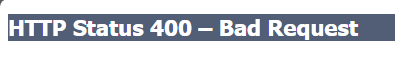
I haven't put up a fuss thinking PNC will fix the bad URL, but nothing yet.
0 -
I discovered two DC transactions had check numbers assigned missing lightning bolts and no “sent” status. I eventually reached a tier 3 in PNC who verified the two in question were processed on their end.
0 -
Hello everyone,
The issues affecting PNC Bank – Direct Connect are still open and actively being worked on by our team. In the meantime, you may be able to connect your accounts using PNC Bank – Web Connect (Express Web Connect+).
@jcsanders Please try clearing your browser's cache and cookies, then attempt to reconnect using PNC Bank - Web Connect.
Steps to clear cache and cookies in Google Chrome:
- Click the three-dot menu in the upper-right corner of the browser.
- Select Delete browsing data.
- Check Cookies and other site data, Cached images and files.
- Set the time range to Last 24 hours.
- Click Delete data.
Once completed, please follow the reactivation steps and try connecting again.
Let me know how it goes!
Quicken Laura
Make sure to sign up for the email digest to see a round up of your top posts.
0 -
@jcsanders - Google's AI says that
The 400 Bad Request error is primarily a client-side issue caused by malformed requests or local caching problems. By addressing these issues systematically, you can resolve the error and ensure smooth communication with the server.
You can also search the websites of the various browsers and they say essentially the same thing and that the likely fix is to delete your browser's browsing history, cookies and cache as mentioned in steps 2-3 of @Quicken Laura's prior reply.
From my perspective it is still generally caused by the financial institution because they likely made some change on their server/software that no longer recognizes the previously working browsing history, cookies and/or cache. But it is not realistic to expect that the financial institution will revert to what they had before the change so it is up to the user to remove the offending outdated browser data from their browser history.
Quicken Classic Premier (US) Subscription: R67.7 on Windows 11 Home
0 -
To @Boatnmaniac and @Quicken Laura: you guys are geniuses! Your suggestions worked!! I lost saved logins and passwords but that is just a temporary inconvenience worth the Fix!! Thanks!
2 -
@jcsanders - I'm glad that it resolved the issue for you.
I should have mentioned that losing saved logins/PWs could end up being a downside of this process. Taking this step to reset parts of the browser or to sometimes do a complete reinstall is sometimes needed to fix browser issues that can occur, such as this 400 error code. But when it fixes the issue like it did for you this time that is, like you said, a temporary inconvenience.
Quicken Classic Premier (US) Subscription: R67.7 on Windows 11 Home
0