Quicken One Step Update and/or when Reconcile = Duplicate Transactions or Recurring Dates Changing

I have two issues seemingly caused between Desktop and Mobile?????
- When I do a one step update on my (only one) home computer, sometimes transactions that have already been reconciled are then duplicated in the checking register. The most recent is a Speedway gas station record for $18.23. Over and over… it duplicated the transaction nine additional times yesterday. My balance is constantly off because transactions are duplicating. The $18.23 is only an example. It has been happening a lot!
- Recurring income and/or payment dates randomly push out / change on their own. I'll look at my Bills and Income Projected Balances and my balance will project negative until I realize my scheduled paycheck has pushed out 2 weeks or more. I'll Edit All to restart on the next paydate and it is fine until I do another One Step Update and it will change the date again. It has also changed the due date of a payment which made me late and cost me a late fee.
I have reset cloud data, etc., already.
Windows 11 Home
Quicken Version: R66.23
Build: 27.1.66.23
Answers
-
Q Mobile is known to sometimes cause the issues you're seeing. Turn if off, for a few days or a week, and see if the issues resolve.
Q user since February, 1990. DOS Version 4
Now running Quicken Windows Subscription, Business & Personal
Retired "Certified Information Systems Auditor" & Bank Audit VP0 -
I too am having issues when updating, duplicate transactions come into my register. Items in there will "clear" and the same transaction comes in as "uncleared". I have been manually deleting the duplicates. I have turned off mobile and the issue still happens. This only started with a recent update from Quicken, I believe it was two updates ago. I'm running R66.28.
It is frustrating and I'm to the point of canceling Quicken and going back to paper register. There seems to be enough of us complaining about this issue; and I don't feel Quicken is interested in resolving the issues.
1 -
This happens to me constantly. It drives me insane!!!! There is no rhyme or reason. Some times it will do it and others not. Some times it will bring up transactions for 4 years ago. And there really isn't an easy way to find these transactions - they won't show up as unreconciled. I've wasted hours upon hours trying to find them. Most times I give up and import my most recent saved file. Is my only option to turn off the one step update?
1 -
Hello @westolivelisa,
Thank you for letting us know you're also seeing this issue. To help troubleshoot, please provide more information:
- When did you first notice this issue?
- Is this happening only in accounts that sync with the Quicken Cloud?
- Is your Quicken file set to sync with the cloud when you run One Step Update?
- If it is, you'll see the option selected in the One Step Update Settings window.
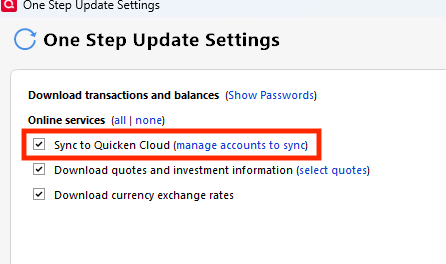
- If it is, you'll see the option selected in the One Step Update Settings window.
I look forward to your response!
Quicken Kristina
Make sure to sign up for the email digest to see a round up of your top posts.
0 -
@westolivelisa
I'm sorry this is an issue for you also. I've used Quicken as long as I can remember and while there have been a few minor frustrations, the duplicates and also the dates changing on me for recurring income and bills are going to lead up to an end me using this product. They need to fix this. I've already had late fees from missed bills that exceed what I pay for Quicken annually. I'll go back to a custom spreadsheet soon.
I did do something recently that is helping me search the duplicates. It isn't bullet proof but it certainly helps. If you add the Downloaded ID column to your account (in my case, Checking) it can help you search duplicates. In my example, I have two transactions to Lowe's for $21.40. One is reconciled with a number in the Downloaded ID column while the other does not have anything in that field. I happen to believe the second one is real and just hasn't cleared yet because of a recent home project. So, you still have to do some investigation but seeing a blank in the Downloaded ID column can help point your eyes to what might be duplicates to investigate first. Hope it helps you!
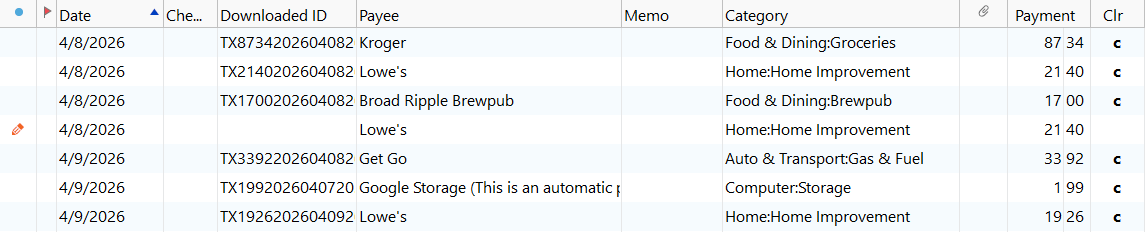 0
0 -
Hello @BobS54,
Thank you for sharing your experience. Did NotACPA's recommendation earlier in the discussion help at all?
Do you have automatic entry turned on (transactions go into your register with a blue dot to indicate they're not yet reviewed), or do you have it turned off (transactions go to a section below the register for you to review/accept, and a red flag displays next to the account so that you know there's something new to review)?
I look forward to your reply!
Quicken Kristina
Make sure to sign up for the email digest to see a round up of your top posts.
0 -
Hello @BobS54,
We haven't heard back from you in a while. Do you still need assistance?
Check back and let us know! Thank you.
Quicken Kristina
Make sure to sign up for the email digest to see a round up of your top posts.
0

