Checking account register has a Check# field. I like to put INT, POS, ACH, etc there (Q Mac)

QUICKEN CLASSIC, using QMac since 1992.
In Q2007, I could get/make a drop-down of various entries besides a check number. I currently can type in what I want, but there is no drop-down. In Q2007, I could type the 1st character and tab, and the system would fill it in. It's tedious to type each one.
Does anyone else do this, and what is a quick fix?
Paulette
Answers
-
Hello @polly5931,
Thank you for reaching out with this question. While the Check # column doesn't currently have a dropdown to let you select INT, POS, ACH, etc., there is an Idea post requesting that functionality be added:
I recommend adding your vote and a comment. Ideas that get enough votes may be implemented in the future!
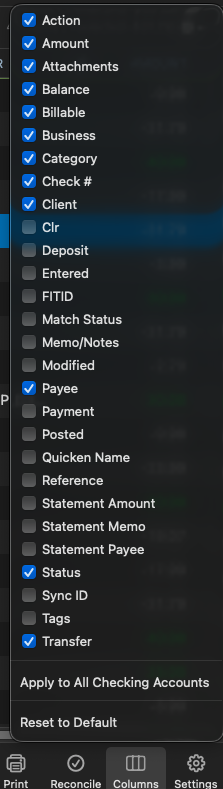
In the meantime, in that idea discussion, @jacobs recommended using the Action column. That column isn't visible in your register by default, but you can turn it on by clicking the columns icon near the lower right and selecting it.
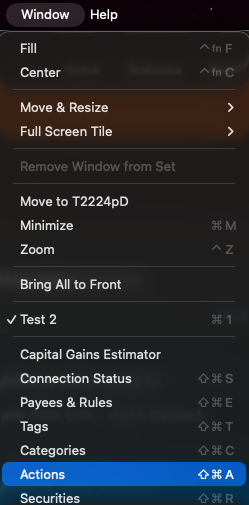
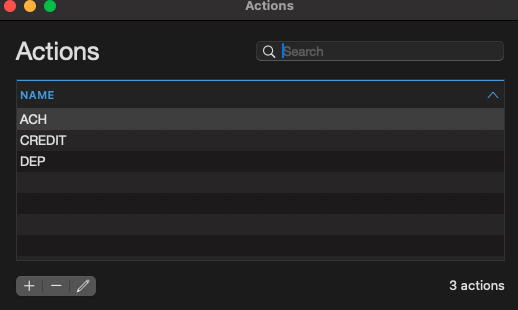
You can customize the Actions you want to use by going to Window>Actions and adding/removing actions as appropriate.
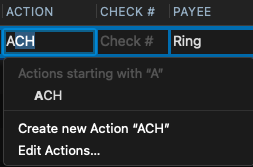
Once you have the column added to your register and the actions you want to use set up, you can type the first letter of the action, and you should see a dropdown of actions you can select that start with that letter.
I hope this helps!
Quicken Kristina
Make sure to sign up for the email digest to see a round up of your top posts.
0 -
Kristina - that was my post, but when I try to follow the link to go to it to see what was posted about 2-line registers, I get a page telling me I don't have permission to do that.
Has my post of 7/25/24 been deleted?0 -
@jeyges That suggestion post was archived, so you won't be able to see it anymore. I can't see how many votes it received but the last post in the thread was from a Quicken moderator stating there was a "lack of interest" with no further replies after that, so it sounds like it didn't get very many votes.
0 -
Hello @jeyges,
Thanks for checking on that! The Idea post hasn’t been deleted, but it has been archived and is no longer publicly accessible.
This happens to older Idea posts that haven’t received enough community engagement or votes over time, as part of routine maintenance of the Ideas forum. That’s why you’re seeing a permissions message when trying to access it.
If this is still something you’d like to see added, you’re welcome to create a new Idea post so it can get fresh visibility and community voting.
Thank you!
-Quicken Anja
Make sure to sign up for the email digest to see a round up of your top posts.0 -
Has my post of 7/25/24 been deleted?
@jeyges Not deleted, but "Archived" — which is pretty much functionally the same. 😉 Archived posts can be seen by the moderators and SuperUSers for history, but are not visible to most users.
Your post was submitted as an Idea, or feature request. The moderators periodically review those Ideas which haven't received any or more than a few additional votes after a year, and remove (archive) them. It appears to me that's what happened to your 7/25/24 Idea post. There was a post by a moderator in that thread last month to say "This Idea seems to have stalled, and we would like to gauge the current interest in this request", and there were no replies after that. So they probably proceeded recently to archive it. [Edit: I was typing this reply while moderator Anja posted her reply above.]
As noted above, the Action field already has the capabilities you were seeking to have added to the Check Number field, os it's likely that most users like you who want to add transaction types to their entries are using that existing optional field.
– – – – –
You also referenced in that post the desire to see the Quicken Mac developers build a 2-line registers display, like the designs for Quicken Mac and Windows from decades ago. That Idea thread still exists:
It has a status of "Under Consideration", which means the developers have not committed to adding it in the future, but also have not ruled it out entirely and marked it as "Not Planned". Considering the large number of feature requests users have on the table for capabilities which are entirely missing from Quicken Mac, I would guess that adding the alternative register UI — which is apparently complex to implement — does not rank high on the priority list of the development team. (That's just my speculation.)
I'd additionally note that that Idea request has received only about 15 new votes over the past two years, and I don't know if they look at the "heat" an Idea is generating in deciding which of the many feature requests to pursue. The two-line register is something that many people who switch from Quicken Windows or the old legacy Quicken Mac program ask for initially, but over time settle into satisfied use of the current Quicken Mac UI. Again, this is just my guess, but I suspect that many people who voted for the 2-line register years ago when they first started using Quicken Mac wouldn't now put it at the top of their wishlist for new Quicken features.
Hope that helps!
Quicken Mac Subscription • Quicken user since 19930


