Problem managing cash in Fidelity account after switch to EWC+

Rocket J Squirrel
Rocket J Squirrel Quicken Windows Subscription SuperUser ✭✭✭✭✭
edited November 9 in Investing (Windows)

I like to track my cash as cash in my Fidelity brokerage account, even though it's really in a money market fund. This worked fine until the recent switch from DC to EWC+. Now QWin complains that there's a mismatch. And its messaging is very strange, e.g., "-15 transactions were deleted".

Any idea how I can fix this and force QWin to track my cash as cash?
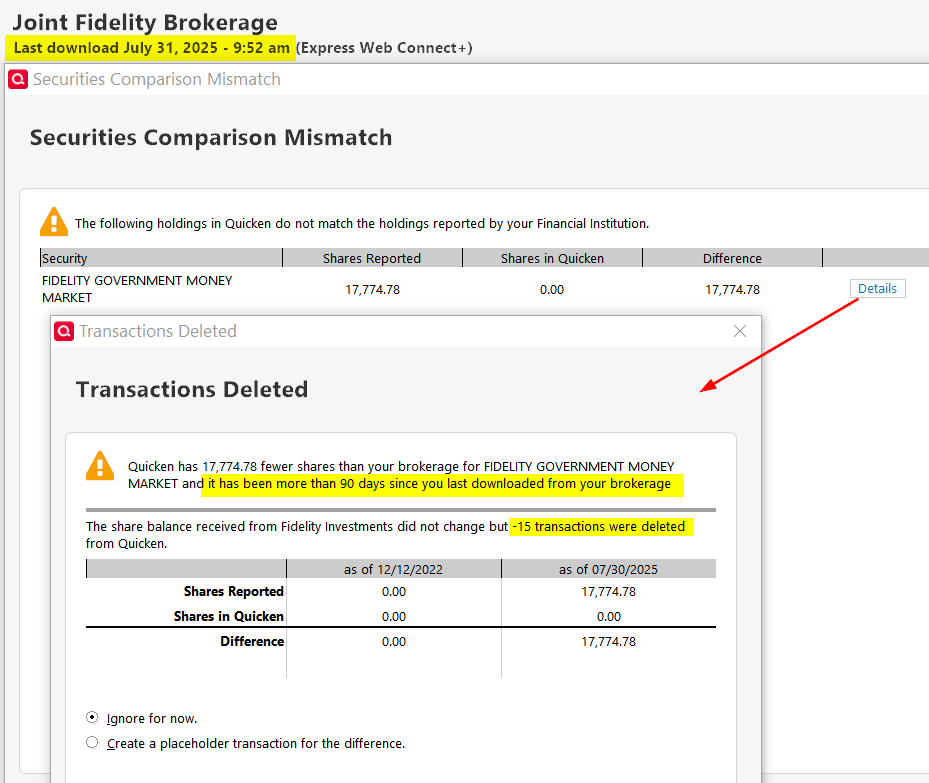
image.png

Quicken user since version 2 for DOS, as of 2025 using QWin Premier (US) on Win10 Pro & Win11 Pro on 2 PCs.

«1

Comments

  • NotACPA
    NotACPA Quicken Windows Subscription SuperUser ✭✭✭✭✭

    @Rocket J Squirrel is this in a Tax-deferred account, where you can't use "Show cash as a checking account"?

    Q user since February, 1990. DOS Version 4
    Now running Quicken Windows Subscription, Business & Personal
    Retired "Certified Information Systems Auditor" & Bank Audit VP

  • Rocket J Squirrel
    Rocket J Squirrel Quicken Windows Subscription SuperUser ✭✭✭✭✭
    edited July 31

    @NotACPA
    Nope, just an ordinary taxable brokerage account.

    Quicken user since version 2 for DOS, as of 2025 using QWin Premier (US) on Win10 Pro & Win11 Pro on 2 PCs.

  • NotACPA
    NotACPA Quicken Windows Subscription SuperUser ✭✭✭✭✭

    Q user since February, 1990. DOS Version 4
    Now running Quicken Windows Subscription, Business & Personal
    Retired "Certified Information Systems Auditor" & Bank Audit VP

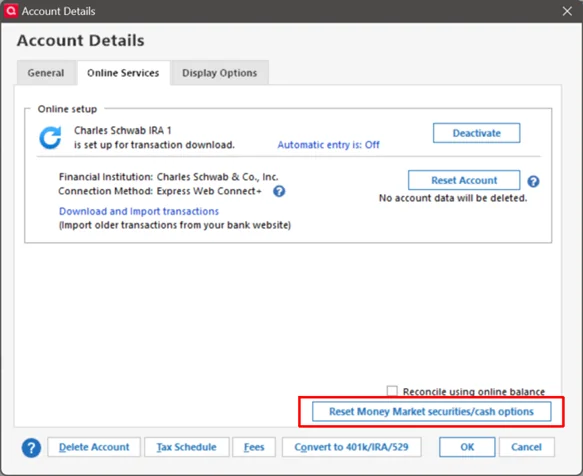
  • @Rocket J Squirrel if you look on your Online Services tab in Account Details, does it show options on how to show cash and/or money market funds?

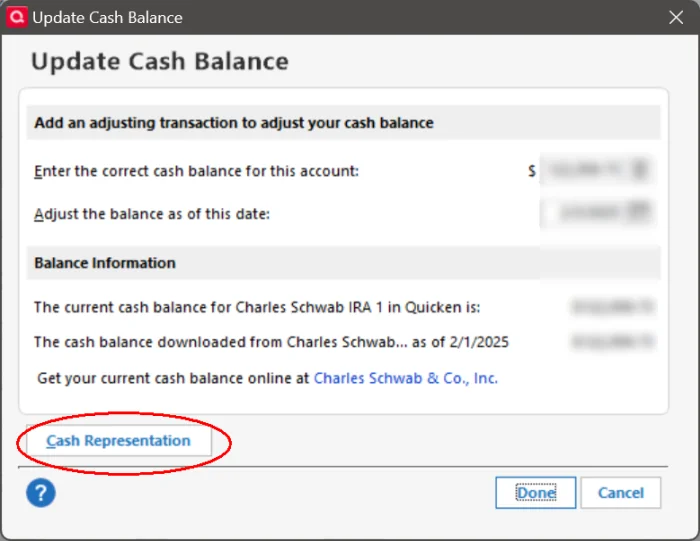
    Also, if you click on the cash amount link at the bottom of the account register, does it give you option to change the way cash is represented?

    Just grasping at straws here.

  • Rocket J Squirrel
    Rocket J Squirrel Quicken Windows Subscription SuperUser ✭✭✭✭✭

    @CaliQkn

    if you look on your Online Services tab in Account Details, does it show options on how to show cash and/or money market funds?

    It does not. Have you seen this option in that location?

    Also, if you click on the cash amount link at the bottom of the account register, does it give you option to change the way cash is represented?

    Nope. The displayed cash balance is correct. If I were to track this as a money market fund, cash balance would be zero and incorrect.

    Quicken user since version 2 for DOS, as of 2025 using QWin Premier (US) on Win10 Pro & Win11 Pro on 2 PCs.

  • Rocket J Squirrel
    Rocket J Squirrel Quicken Windows Subscription SuperUser ✭✭✭✭✭

    I don't see an option for "Show cash …". Where do you see that?

    Quicken user since version 2 for DOS, as of 2025 using QWin Premier (US) on Win10 Pro & Win11 Pro on 2 PCs.

  • Rocket J Squirrel
    Rocket J Squirrel Quicken Windows Subscription SuperUser ✭✭✭✭✭

    Oh, you mean "Show cash in a checking account". I don't want to do that. I want to show cash as cash in the main investment register. Since the EWC+ changeover occurred, QWin wants to show it as the MMF which really holds the cash.

    Quicken user since version 2 for DOS, as of 2025 using QWin Premier (US) on Win10 Pro & Win11 Pro on 2 PCs.

  • @Rocket J Squirrel these are the two options I was referring to -

    image.png image.png

    Some FIs offer these options, but most do not. I wasn't sure if Fidelity would offer these options for their new EWC+ connection.

  • NotACPA
    NotACPA Quicken Windows Subscription SuperUser ✭✭✭✭✭

    Entirely your choice.

    But since my wife and I both have taxable accounts at Fido, and they're our primary checking accounts, that option is how we depict all cash transactions … and i don't understand your choice.

    Q user since February, 1990. DOS Version 4
    Now running Quicken Windows Subscription, Business & Personal
    Retired "Certified Information Systems Auditor" & Bank Audit VP

  • Rocket J Squirrel
    Rocket J Squirrel Quicken Windows Subscription SuperUser ✭✭✭✭✭

    @CaliQkn Interesting. I can't see those options for any of my brokerage accounts in R63.21. As you say, it must be broker-specific.

    Quicken user since version 2 for DOS, as of 2025 using QWin Premier (US) on Win10 Pro & Win11 Pro on 2 PCs.

  • Rocket J Squirrel
    Rocket J Squirrel Quicken Windows Subscription SuperUser ✭✭✭✭✭

    @NotACPA

    i don't understand your choice

    Our primary checking is at Bank of America. We rarely write checks from our brokerage accounts.

    In the Account Bar, I want brokerage cash to be included in the real accounts in the Investing area, not in pseudo-accounts in the Banking area.

    Quicken user since version 2 for DOS, as of 2025 using QWin Premier (US) on Win10 Pro & Win11 Pro on 2 PCs.

  • Chris_QPW
    Chris_QPW Quicken Windows Subscription Member ✭✭✭✭
    edited July 31

    The ability to choose to treat a security as cash is determined by a "magical" part of the download information.

    I say magical because I have never figured out even with Direct Connect let alone Express Web Connect + what it is that tells Quicken that it can treat a given security as cash. But one thing I know for sure, it isn't up to the user.

    This is why I keep pushing this feature request whenever this subject comes up:

    It doesn't surprise me that when Fidelity switched to Express Web Connect + that this feature "didn't make it".

    Note that it isn't an Express Web Connect + restriction, it can allow this too, but it is up to what is in the data sent by the financial institution.

    How do I know? Chase which uses Express Web Connect + allows this. Not only that Chase has the quirk that they use different Securities to represent how they are moving cash around. And as it moves around Quicken will tell me that security that it is treating as cash has changed.

    BTW if you want to get what exactly this feature is, it is this. The financial institution is still sending the buys and sells for that security but Quicken ignores the buys and sells which in turn leaves the cash in the register balance.

    Signature:
    This is my website (ImportQIF is free to use):

    http://www.quicknperlwiz.com/

  • Tom Young
    Tom Young Quicken Windows Subscription SuperUser ✭✭✭✭✭
    edited August 1

    In our 8 Schwab Accounts in Quicken our two brokerage Accounts do not show that

    image.png

    option, but most though not all of our tax-deferred Accounts do have that option. Go figure.

    I have had to re-authorize the Schwab Accounts for downloading a couple of times since the change from DC to EWC+ and, lately, that question of "cash or security?" does come as part of the process flow, at least for some of the Accounts. You might give that process a shot.

    This "cash or security?" process seems to have changed over time, though Quicken has been remarkably poor explaining exactly how this all works. This issue originated with the Schwab changeover from DC to EWC+ with Quicken initially announcing that ALL MMFs would be included in "cash" because "that's the way Schwab does it", thought they had to back off from that position.

  • @Tom Young are the accounts that do not show that option older accounts? I am wondering if it's just new accounts that show this option?

  • Chris_QPW
    Chris_QPW Quicken Windows Subscription Member ✭✭✭✭

    I have had to re-authorize the Schwab Accounts for downloading a couple of times since the change from DC to EWC+ and, lately, that question of "cash or security?" does come as part of the process flow, at least for some of the Accounts. You might give that process a shot.

    It has been my experience that re-authorize resets this setting, and as such sets it up for asking the question, but from what I remember it doesn't ask until the next transaction I download. Note that my accounts have very few transactions and as such me being forced to re-authorize (which BTW rarely happens now but happened much more when everyone was having problems with Chase) and getting transactions can be pretty far separated.

    Signature:
    This is my website (ImportQIF is free to use):

    http://www.quicknperlwiz.com/

  • Rocket J Squirrel
    Rocket J Squirrel Quicken Windows Subscription SuperUser ✭✭✭✭✭

    I had to re-authorize my Fidelity accounts. Now every account is offering the cash/MMF toggle - except the one account which needs it.

    Quicken user since version 2 for DOS, as of 2025 using QWin Premier (US) on Win10 Pro & Win11 Pro on 2 PCs.

  • NotACPA
    NotACPA Quicken Windows Subscription SuperUser ✭✭✭✭✭

    @Rocket J Squirrel And my wife and I do exactly the opposite. Our MMFs at Fidelity are our primary checking accounts … and the "real" bank accounts are infrequently used.

    But, we don't pay any service fees on those bank accounts either, since the bank also holds our mortgage which is auto-paid out of Fidelity.

    It's the oddball transactions of a few dollars that go thru the bank.

    Q user since February, 1990. DOS Version 4
    Now running Quicken Windows Subscription, Business & Personal
    Retired "Certified Information Systems Auditor" & Bank Audit VP

  • BJB
    BJB Member ✭✭✭

    Two questions.

    Do you get prompted at the next download whether to re-authorize or does it force you? If given an option and you do not do it, does it continue to treat cash the old way and download the old day? I thought I saw a screen snip somewhere that had a late August deadline.

    Currently sweep cash is treated as cash. When you have to re-authorize, what option do you choose to keep it this way? Assuming you do get the prompt....

    Thanks

  • Tom Young
    Tom Young Quicken Windows Subscription SuperUser ✭✭✭✭✭
    edited August 2

    They are all "old" in the sense that until the switch to EWC+ all these Accounts were established in Schwab using DC downloading method.

    The "newest" two Accounts came into Schwab as a result of the acquisition of Ameritrade on 9/5/23.

  • Chris_QPW
    Chris_QPW Quicken Windows Subscription Member ✭✭✭✭

    For the first question I will refer to others that have gone through it with Fidelity. I have seen it both ways, like at first it is optional, and then eventually it is forced, and you have to switch.

    For the second question, as explained above, currently there isn't any option that the user can set to force Quicken to ask whether you want to treat it as cash or not. It is up to what is in the information that the financial institution sends. And as shown above that is "flaky", it can vary even between accounts.

    So, basically it will depend on your luck. If you get the option, Quicken will prompt you on whether you want to treat it as cash or not.

    This is the reason why everyone should vote for this idea:

    Signature:
    This is my website (ImportQIF is free to use):

    http://www.quicknperlwiz.com/

  • Geobrick
    Geobrick Member ✭✭✭✭

    Thanks for continuing to promote the feature request I posted.

  • garspss
    garspss Member ✭✭✭

    When I switched Fidelity DC to EWC+, I had three Fidelity accounts that offered to treat the money market as cash and three that did not. I want the core position treated as cash. The accounts that worked had FDRXX as the core position. The accounts that failed had SPAXX as the core. At Fidelity I switched the core position at two accounts from SPAXX to FDRXX and now Quicken can treat them as cash. The other account didn't offer FDRXX, so I chose FZFXX. It also can be treated as cash by Quicken. I am happy with the changes and my problem is solved.

  • BJB
    BJB Member ✭✭✭

    Thank you for that great info. It may explain the inconsistency based on sweep fund selection,

  • smess
    smess Quicken Windows Subscription Member ✭✭✭

    I wonder what Quicken would do if you swapped the core position out of SPAXX to FDRXX at Fidelity, then enabled the account option in Quicken to treat as cash and then changed the core position back to SPAXX at Fidelity.

  • Movie Nut
    Movie Nut Quicken Windows Subscription Member, Windows Beta Beta
    edited August 6

    I have similar issues and new ones, i am not sure has been mentioned. In manually reconciling my Fidelity June statement, I found Dividends from 8 individual stocks were not recorded in quicken, one Core FDIC Bank Deposit Sweep transaction that bought FDRXX was also missing. These all caused my Cash balance to be highly misstated in Quicken.

    (Update) After manually reconciling against printed Fidelity statements (thats why I still get them) I found the missing Div and Int transactions happened on two Days 6/23 & 6/30 for the same 8 stocks in both wife's and My Roth IRAs. They are managed funds with the same portfolio of Stocks. So, my guess is either Fidelity or Quicken sync had a problem on those two days. I am sure I was still on Direct Connect then. The one transaction that was a Buy from the Core Sweep account to the FDRXX happened on 6/17 which was missed in the sync too. My Brokage account was missing a Div transactions for the Core Sweep position on 6/30 also.

    "No Matter Where You Go, There You Are"
    Windows 11 Pro, Quicken Subscription
    Intel Core i7-12700, 32GB Ram
  • Movie Nut
    Movie Nut Quicken Windows Subscription Member, Windows Beta Beta

    So is there an approved solution for how we should configure our Fidelity Accounts so the Cash is handled properly?

    I don't want to reset accounts and then have to do something different.

    "No Matter Where You Go, There You Are"
    Windows 11 Pro, Quicken Subscription
    Intel Core i7-12700, 32GB Ram
  • Chris_QPW
    Chris_QPW Quicken Windows Subscription Member ✭✭✭✭

    Not at this time. Maybe later when they get things straightened out there might be some clear way that is better, but for now things are still too much in flux.

    Signature:
    This is my website (ImportQIF is free to use):

    http://www.quicknperlwiz.com/

  • Movie Nut
    Movie Nut Quicken Windows Subscription Member, Windows Beta Beta

    Thanks

    "No Matter Where You Go, There You Are"
    Windows 11 Pro, Quicken Subscription
    Intel Core i7-12700, 32GB Ram
  • Movie Nut
    Movie Nut Quicken Windows Subscription Member, Windows Beta Beta

    Just reconciled my Quicken Fidelity ROTH account(s) against July paper statements and I am missing 4 div/Int transactions on one account and 2 Div/Int transactions from 7/31.

    My Brokerage and IRA account balanced, but these are mostly Mutual Funds, not as much activity.

    Conclusion, either Fidelity is not sending some transactions on last day of the Month, or the Sync process is not functioning correctly.

    "No Matter Where You Go, There You Are"
    Windows 11 Pro, Quicken Subscription
    Intel Core i7-12700, 32GB Ram
  • Quicken Kristina
    Quicken Kristina Quicken Windows Subscription Moderator mod

    Hello All,

    Over the past few years, several large investment firms have moved their connections to EWC+, which, once fully implemented, functions the same as Direct Connect.

    Each firm’s transition may include unique challenges, and occasional issues can occur during the process. To ensure a smooth implementation, Fidelity began their migration in phases, starting with an optional migration period in late July.

    At this time, Fidelity has paused the migration for additional users while both their team and ours work to resolve the issues that have been identified. Throughout this process, Fidelity has been a strong partner to Quicken and continues to work diligently to address customer concerns as they arise.

    Quicken Kristina

    Make sure to sign up for the email digest to see a round up of your top posts.

This discussion has been closed.