zzz-Fidelity Updates
Comments
-
YES….. assuming the balance in your CMA checking is correct.
1 -
Yes you should be able to delete them. You may want to check that the total amount is the same as the error. I have a CMA account (my HSA) and I don't have the issue you described. It works fine.
Make a backup first please.Barry Graham
Quicken H&B Subscription1 -
Thanks, BarryGraham. Deleted the placeholder entries, and all is well. The process was a little tricky having to deal with netbenefits and rollovers for me and my husband, but ultimately a successful conversion, and all the zzz- names are history.
0 -
No. On Mac transactions go straight into the register, marked with a blue dot so you can review them.
0 -
I see the theory? promise? threat? that the leading "zzz-" for Fidelity accounts indicates an upcoming change. It is now mid-September and I still see this peculiar renaming. In addition, I have seen the message that I need to update to a new connection method several times recently, requiring that I re-authorize my account access each time. Each time Quicken wants to create new account, and when I link to my existing accounts the balances and transactions don't seem to match up. It is a mess and I have to abandon Quicken for my Fidelity CD's and rollover IRA.
I am also encountering new problematic behavior with my credit union accounts: transactions dated the day of download do NOT download at all, OR sometimes DO download several days later AFTER I have entered them manually and reconciled my account using the online balance. At that point the balance is incorrect, and I have to spend an hour or two figuring out where things went wrong.
I am sad.
PTArtist.com0 -
Hello @SandraStowell,
Thank you for sharing your experience. If you are looking for assistance with the issue you mentioned with your credit union accounts, please start a new discussion so that we can better assist.
For the issue with your Fidelity accounts, please provide more information. How are the balances and transactions not matching up? For example, are you having an issue with duplicate transactions, missing transactions, or is something else happening? What is throwing the balances off? Are money market funds showing as cash (or cash showing as money market funds), or is something else impacting the balance?
Thank you!
Quicken Kristina
Make sure to sign up for the email digest to see a round up of your top posts.
0 -
- I have completed the transition to EWC+ for my main brokerage account. In completing that, I selected the option to classify the FDLXX Money Market as "cash" (which was recommended). Using this methodology, my total cash balance should be 11,235.22 in Quicken. Instead, my Quicken balance is cash of $10,648.58 and $586.64 showing up under the security FDLXX. The $586.64 represents the dividends paid by FDLXX over time. So I can't figure out how to get these "dividends" which were recorded under FDLXX security back to being presented as "cash". I tried a "sell" transaction to liquidate the FDLXX shares, but Quicken comes up and says I have 0 FDLXX shares to sell, when there are clearly 586.64 shares in my investment report.
Also, when I look at the current balances in Fidelity, it shows the $11,235.22 under the FDLXX security and not "cash".
It seems to me that Quicken and Fidelity are out of synch. Any thoughts on how to get them back in synch?
PGAVON
Quicken Premier - Windows Subscription
0 -
On starting Quicken, after being updated to Quicken 64.29 I got the message that zzz-Fidelity required a re-authorization due to a new connection method. The reauth seemed to go fine…
Then it popped up another dialog stating that it had downloaded 6175 days of transactions! I held my breath and selected the account to view the register, hoping it would be a zillion duplicates in the download…
Then it popped up a securities matching dialog which had me manually match 2 securities (both CITs), VANG IS EXT MKT IDX TR and VANG INST 500 IDX TR. Okay, this account has 5 securities on a regular investment schedule, so why only 2…
When the register displayed, the downloaded transaction list showed two prior pay periods of duplicate transactions to ones in the register, however, only 2 of the 5 securities were named correctly (the ones I had to manually match). The other 3 were unmatched and named "Unidentified Security."
I deleted all the new ones, which are all duplicates. Now await my next online update and what fresh hell it will bring.
Quicken keeps getting more expensive, and worse performing. I'm getting closer to bailing out.1 -
On Sept 14, I guess they temporarily rolled back the conversion because I was able to download Fidelity without problems (no reauthorization required). But today, Sept 20, reauthorization was required and the same problems - it downloaded past transactions again. I don't bother downloading the transactions, since I know the situation isn't OK. I restored from a previous backup. I agree with @Mark Wagner that the conversion should be postponed. Perhaps even until they fix the problem??
[Deleted Duplicate Posts]
-1 -
@kmagnush Please only post your issues once. If you want to edit a post, you can click on the 3 dots at the top right of the post.
You mention that duplicate transactions were downloaded. Were they from a long time ago, or just back to late August? Because the connection method to Fidelity is changing, it may not be possible to prevent the downloading of duplicates from before the change.
When I went through this process, I only had a couple of duplicates to delete. I deleted them from the Downloaded Transactions area before accepting them. This took 3 clicks per dupe.
If you have a large number of duplicates, @bmbass has posted the following method for identifying and bulk deleting the duplicates.
I too have often been disappointed that there was not some way to delete multiple transactions before accepting them without all the effort (3 actions each) when there are a LOT of duplicate downloads. What I have been doing recently is the following:
- First, RECONCILE the account so that all recorded transactions are shown with the "R" label on the CLR column.
- Next, ACCEPT ALL the downloaded transactions (I understand this will put the duplicates in your register, but we will get rid of them soon)
- Then under the Gear Icon on the top right, select EDIT MULTIPLE TRANACTIONS
- This will bring up a list of all your transactions in your register and you can SORT this list by CLR
- All the newly accepted transactions will have a CLR value of "c" so they can easily be identified
- This list supports the CTRL-click or SHIFT-click method of selecting multiple entries
- Select all the duplicates and then select DELETE (bottom right) and all the selected entries will be removedOf course, make a backup before you try this in case you make some mistake and also be careful that you only select the duplicates. This allowed me to get rid of all my duplicates in a few keystrokes when I converted to EWC+ a few weeks back.
QWin Premier subscription1 -
As far as I can tell the issues have been resolved. I converted to the new connection method yesterday. See my post above as their are a few things you should be aware of and do before you convert. At this point all my transactions are correct and OSU, which I do every morning, is working fine.
Quicken Classic Premier (US): R66.28 on Windows 11 Pro
0 -
Today I hit the Reauthorization wall. Before updating I had to reauthorize the Fidelity accounts, which I did. When I tried to update the accounts Quicken said I had to reauthorize two of them. I went through the process which led me to Fidelity to verify the accounts, which I did. I went back to Quicken and tried to update the accounts and got the same two that had to be reauthorized. I went through the process again and at the end got a panel that listed "Don't Add To Quicken" in the right-hand column with no option to choose another option. I've read that you get that message if they're already added to Quicken but if they're already add then why won't they update? It's and endless loop that doesn't make any sense. From the posts this problem has been going on for a long time and Q keeps saying they're working on them but it doesn't seem like they're making any progress. If anyone has solved this problem please tell me how
0 -
What exactly are the "Placeholders", do they need to be there? and is it Ok to delete them.
I only had Fidelity d/l one in one account. It is for the Government Money Market. If I click edit, it shows the previous (also d/l) amount of $41.44 and the placeholder says 0 shares.
0 -
I'm trying add my six Fidelity accounts to a blank file in simple format. When the accounts are added, they all show up with ZERO balance.
- Initiating a OSU does not update the balances.
- I deactivated all the accounts and reauthorized them. Account balances are still ZERO.
- After deactivating and reauthorizing, I ran a OSU and the balances finally showed up.
- However, I have an account with both FMPXX and FDRXX. It considers FMPXX as cash and FDRXX is not listed in the security list. (In other accounts FDRXX is treated as cash).
- FMPXX is listed as both a security and as cash, so it is adding those values twice to the total. FDRXX is not listed and it's value is not reflected in the total.
Any help is appreciated.
0 -
I updated to EWC+ but the current transactions will not download. I have all my transactions from prior to 9/15 when i did the reauthorization. But since then, i see activity but none of it shows up in downloaded transactions when i run one-time update.
0 -
I converted my 2 brokerage and 2 IRA accounts this morning and, after a couple of false starts, it's done and looks good. Here's some info, tips and pitfalls to avoid that might help:
1 - Make a list/spreadsheet of the account(s) you're converting. Include the account name, number, total balance, securities balance, cash balance and symbol of the fund you want to designate as the "sweep".
2 - If you have MM(s) other than the most common cash funds like SPAXX, FDRXX, FCASH, decide how you want to handle them beforehand - cash or security position, so you can select when the dialog(s) come up.
3 – If you have “automatically add to investment transactions list” checked in Preferences/Downloaded Transactions – turn it off.
4 - BACKUP before starting!
5 - First try: I experienced some oddities:
- Quicken didn’t match one of my IRAs, No idea why. I was able to link it, but it was labeled as a Brokerage account. If that happens, you can fix it later in Edit Account Details.
- It started running through all the cash representation options, one account after the other. I didn’t know which accounts I was selecting for, but was able to figure it out (handy spreadsheet)
- I got a few dialogs (by account) with security quantity mismatches. Didn’t realize it at the time, but they were probably due to the duplicate transactions downloaded.
- Got a couple of dialogs asking about Placeholder Transactions. I had no idea what to do so I just skipped. That was probably an error, not sure.
- All account numbers were off. 2AM – too late. Went to back up. Try again in the morning.
6 – Second try:
- Cash Representation dialogs came up only when as I clicked on each account. Don’t know what changed, but it was much better.
- Got the security mismatch dialogs, but no placeholder dialogs. Good!
- Checked all account, securities and cash balances. On the money! Now for the dups in the Downloaded Txns dialog at the bottom of each account. There were about 50 between the 4 accounts
- Someone suggested accepting all the transactions and then deleting the dups. That didn’t work for me. Everything was marked “C” so I couldn’t tell which were dups and which weren’t. Went to backup.
7 – Third try:
- Everything worked as it did in try #2. Because there weren’t an outrageous number of dups, I checked to make sure that there was an existing txn before manually deleting each dup from the Dowloaded Txns list. Made sure there were no changes to the account balances as I did it.
- After de-duping was done, went into Edit Account Details for each account. Checked to make sure all important settings were correct – Account Type (Brokerage/IRA etc), Tax deferred or not, Tracking Method (simple/complete). Confirmed all accounts say EWC+.
- Ran OSU. All accounts marked updated (No txns received, none available for download)
- Bonus - Cash Representation button now appears in all Fidelity Update Cash Balance dialogs.
So it looks like, for me, the 3rd time was the charm. Will know more next week when transactions start coming through. Now, on to Merrill Lynch (where the problems look even worse - ugh!).
2 -
@mrzookie For others who are following,
Step 6 last bullet - You must Reconcile the account back at Step 1 for this method to work. Then all the old transactions will be marked with R and after accepting the duplicates, the dupes will have c's. Then go to the gear menu and select Edit multiple transactions. In the Edit window, sort on the Clr column and all the dupes will be grouped together. At that point you can verify that they are all dupes, then click and Shft-click to select then all and delete them.
QWin Premier subscription0 -
You're right. I didn't realize I skipped the reconcile step until I backed out of Try#2. But I also haven't reconciled any of my brokerage/IRA accounts in almost 20 yrs of using Quicken. I didn't know how long it would take and didn't want to toss another unknown into the mix so I opted to delete the dupes one by one. It my case it wasn't much time. But I agree - if you have a large number of dupes and/or you've been reconciling your accounts all along then, yes, that's probably the better way to go.
0 -
Today I took a different tact on testing Fidelity's EWC+ by setting up only the account that has been the most troublesome and most concerned for me (instead of setting up a 9 accounts at one time): A file that is one that I manage for another person and that includes brokered CDs.
Attempt #1: Did Add Account in a new test file. The issues observed were much the same as reported earlier.
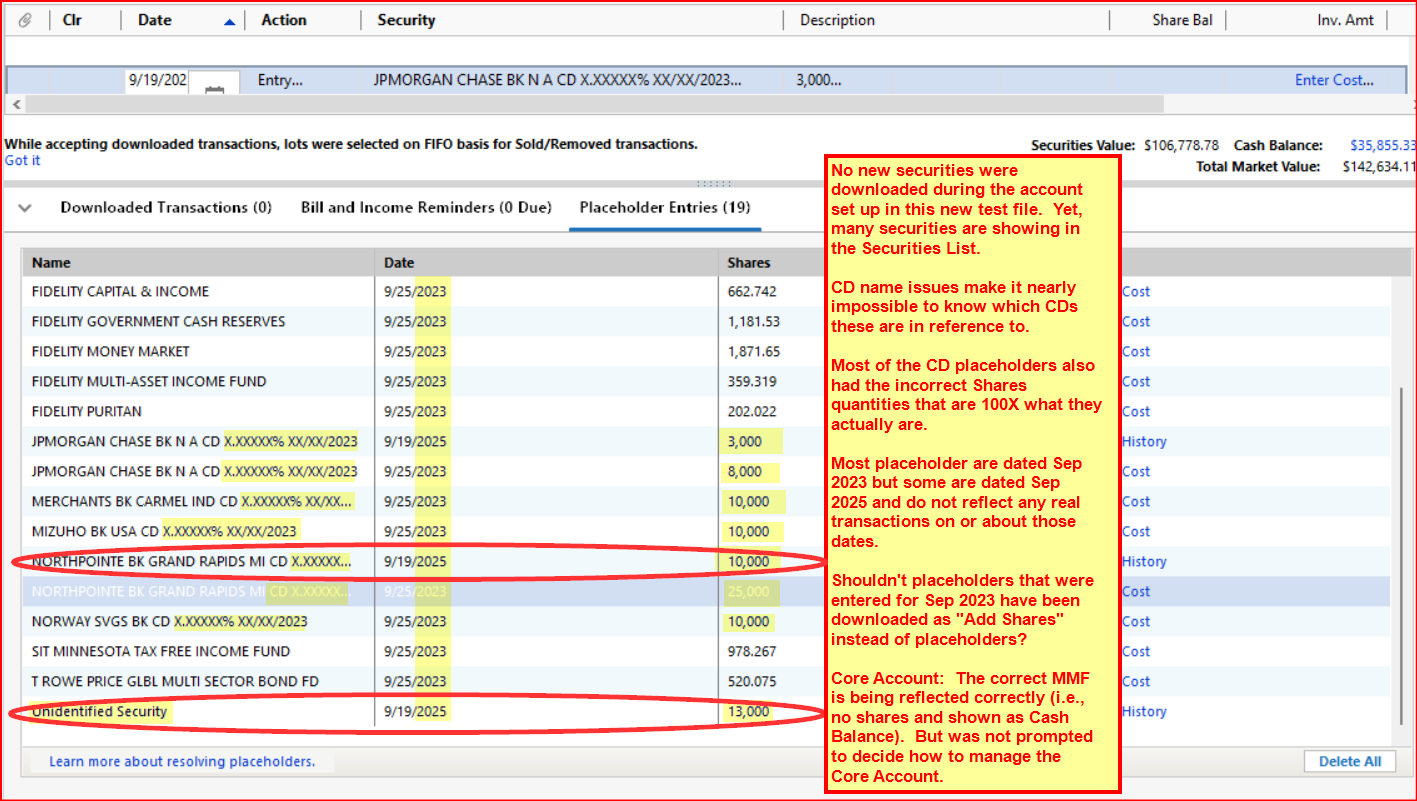
- I never got prompted to accept any new securities but should have because it was a new account in a new file. However, after the account was set up there were many securities listed in Security List, many of which I did not even recognize.
- I was never prompted to review and accept any of the downloaded transactions. They simply appeared in the register.
- There were many placeholders created for Sep 2023. There was no data in the register dated prior to before Sep 2023 so these placeholders appear to represent the holdings in the account as of Sep 2023. IMO, it would have been better if Quicken would have generated Add Shares transactions for these instead of placeholders.
- Most of the placeholders were for brokered CDs. But the names of those CDs were pretty meaningless since they were not valid CD names. This is VERY similar to the issues I'd seen in previous tests and which I was never able to resolve.
- Many of the CD placeholders had the shares and pricing issues that plagued previous download attempts.
- There were also 3 Placeholders dated from yesterday. I have no idea what these are for.
One was for an "Unidentified Security" that I have absolutely no idea of what that might be for. - A positive: I was never prompted to tell Quicken how I wanted the Core Account (SPAXX) to be accounted for…as shares or as cash. But Quicken did not show shares being held of the Core Account (SPAXX) and the Cash Balance matched the online value of SPAXX holdings. So it did get that right all on its own.
- Despite all of these issues, The total value of the accounts, the securities value and the Cash Balance value were accurate.
Here is a picture of some of the placeholders that were generated along with some comments about them.
I did almost no troubleshooting. What I observed was enough to convince me that for someone adding a new account there is still a high risk of getting some really troublesome results, especially if there are CDs involved.
Attempt #2: This was done in a different test file with a Quicken created copy of the primary data file including the exact same account as in Attempt #1. I was VERY pleasantly surprised by the results:
- Set Up Now (the account gets deactivated during the copy process) properly set it up with EWC+ with no odd CD securities, no Placeholders and the Total Value of the account and the individual securities values being 100% correct. And there were no dupes downloaded.
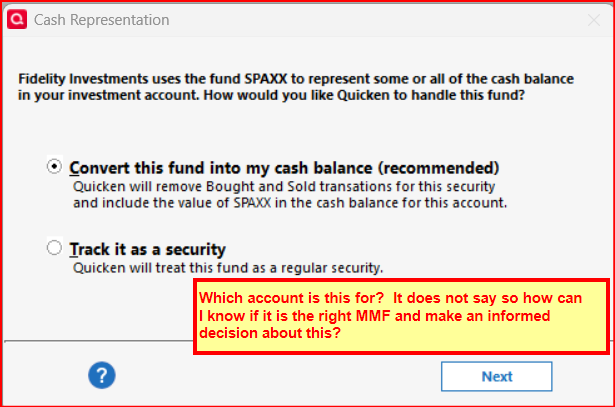
- I was prompted to decide on how I wanted the the Core Account (SPAXX) to be managed and it appears to be managing it correctly as Cash Balance and not as shares.
- The only issue is that there is still that problem where the Core Account reporting prompt still does not identify which account that prompt applies to. It was OK in this file because there is only one Fidelity account in it but this is what I've seen with regard to test files where there are multiple Fidelity accounts.
Tomorrow I'll try migrating a more complex file with 8 accounts including taxable brokerage, IRAs and Roth IRAs. That should be interesting but today's results along are encouraging.
Quicken Classic Premier (US) Subscription: R66.23 on Windows 11 Home
1 -
I finally bit the bullet and updated my personal fidelity accounts (which also includes my wife accounts). 7 Brokerage accounts, 4 cash management accounts, and 1 Netbenefits Deferred Comp account. First, I did a regular one-step update (hitting "remind me later" for the connection update) and reconciled all downloaded transactions (including a fair number of quarterly dividends). Then I made a complete backup and then proceeded to update the connection. It said I had two connections to update — Fidelity Investments and Fidelity Netbenefits. I started with the standard Fidelity Investments and when I logged into account to specify what accounts to connect, it included my Netbenefit accounts which I checked to connect. It also had a pension account which I closed last February when I rolled it into an IRA so I didn't check this one. It then asked me to check if the accounts were linked to proper account in quicken, most were correct automatically. There were two that it thought were new accounts, but it was easy to link it to the correct existing account.
After it was done with the new connection, I went through every account to check it. In all cases, the last 30 days of transactions were downloaded. As these were duplicates, I deleted all of them. Core accounts (with one exception which I talk about later) were converted to cash (which is nice). For the cash management accounts, they were also converted to cash instead of the banks the funds were deposited in, but it also created placeholders for the balances at time of conversion with the banks specified. I deleted these as it was causing the funds to be double counted.
The one strange thing (which fortunately was the first account I went to reconcile) was that in one brokerage I have two mutual funds — one is SPAXX which is my core fund and the other is Fidelity California Muni Money Market (FSPXX). I wish I could have the tax-free one as my core fund, but Fidelity doesn't allow it. It asked me on setup whether I wanted FSPXX treated as cash, and I said yes by mistake. I want this separate. So I restored to my backup and started over again. Not a big deal as I caught it before I spent a lot of time on all the other accounts.
Overall, it seems to be fine. I see what happens over the next couple of days to see if there are any issues. If so, I'll let you know. I'm particularly concerned whether the Calif Municipal Bonds will be priced correctly as well as the proprietary mutual funds in my Deferred Compensation account. These don't have stock tickers and are priced when I "update transactions" during one-step update. The mutual funds in Deferred Compensation account (Netbenefits) are priced after around 8:30pm California time and the Muni Bonds have yesterday prices early in the morning (before 6am PDT).
PS. All the accounts are primarily holding standard publically traded mutual funds, ETFs and a couple of stocks. No CDs. The only other holdings as mentioned above are Calif Bonds and Fidelity retirement proprietary mutual funds (which reinvest distributions into existing shares and thus have very few transactions).
2 -
I created a test file this week upon learning all of the core money market funds were converting ok. I have a CMA and a taxable Brokerage account that had core and non-core money market funds. Quicken was unable to differentiate my core from the non-core money market funds. I sold the non-core money market funds and Quicken converted both accounts on the following day. My live Quicken file conversion was flawless after deleting all of the duplicate transactions.
0 -
I was finally able to spend some time sorting this out this Sunday. I have six accounts with FIldeity and I knew there was another issue as this once account is very active trading stocks. I had to go back through the re-authorization process again (third time, once in July, once in August and again today) one by one for each account via Reset Account option. Very time consuming.
My transactions appear to have stopped loading On Sept 8th—not sure if that means anything.
Now my next issue is it wants to keep putting in Placeholder transactions even though I do not have the "reconcile using online balance" selected on any accounts and I have the compare portfolio off also in Preferences. This too has been a problem with Merrill Lynch accounts although interestingly has never been an issue with Schwab accounts.
0 -
I have 6 accounts with Fidelity: brokerage, GO and 4 IRAs. One of the IRA accounts is very active in stock trading hence why I knew I had an issue not downloading transactions.
Spent some time today (Sunday) looking at all the accounts. None are downloading starting with Sept 8th. I had to go through account by account resetting them (this is now the third time I have done this, since July and again in August.) Was able to get all transactions to pull through now.
Hoever, I now have that damn Placeholder for cash transaction coming through even though I have it set not to compare cash. This has been a constant issue too with Merrill Lynch but not with Schwab.
0 -
Starting today I'm getting this for my Fidelity (not NetBenefits) accounts I've not migrated to EWC+ yet:
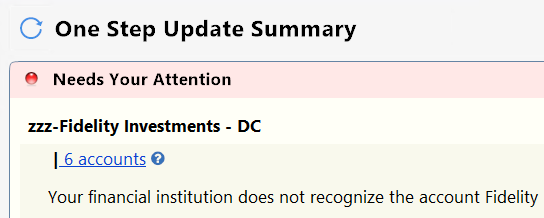
How do I fix it without going to EWC+?
0 -
I converted 6 Fidelity brokerage/retirement accounts yesterday, plus one Fidelity Visa. I don't have any CDs.
Using the reconcile approach I was able to delete all of the duplicate transactions. I did discover that I was missing a transaction from two months ago. Whether I unintentionally deleted it in the transition, or if it's been missing for awhile, I don't know, but it took awhile and comparison to reports from old backups to figure out what was missing.
I have FZDXX in several accounts, in addition to SPAXX as the core holding. The conversion properly recognized SPAXX as my core holding and prompted me accordingly. That worked.
I wish I could have more than one core holding because that's how I treat FZDXX. I just delete buys and sells and convert REINV transactions to DIV or DIVX (in my CMA). Because you can't have FZDXX as a core MMF, I just buy some occasionally if the balance between SPAXX and FZDXX drifts down too far.
0 -
If you restore from a recent good backup after backing up the current datafile and retry the download, does that make a difference?
If not, then maybe re-login under preferences by "Sign in as different user" and logging back in with your same user credentials.
Suggestion
As a test, I tried to update my Fidelity accounts now using the DC connection and they all (6) downloaded transactions without problems.
I again tried on my datafile that is using EWC+ connection, and they downloaded fine.
Deluxe R66.23, Windows 11 Pro
1 -
To add to what others seem to be saying, I had to restore and migrate to EWC+ a couple of times for Quicken to get this right. I had attempted this upgrade last week and, after finding all my cash representations were wrong and couldn't be corrected (since the "Cash Representation" button didn't appear for me), I restored a backup and decided to wait.
So yesterday I decided to try again. After backing up, I went thru the conversion process and, to my disappointment, appeared to be in the same state as last week: I wasn't prompted for which MMF to use as cash and all my cash balances were off. Again, there was no "Cash Representation" button (or "Reset Money Market…" button). So, I restored from backup and was back to Direct Connect.
Seeing the posts here, I decided to repeat the process one more time, doing the exact same thing. I restored from backup again, went thru the EWC+ conversion again and, much to my surprise, I was prompted for the Cash Representation choice as I reconciled the downloaded (duplicate) transactions for each account. Now, the cash balances look correct and I have hope this is working correctly.
The fact that this migration seems to behave differently with each attempt is a bit disturbing, but it looks like I'm not the only one who's experienced this. Now, fingers crossed that, when new transactions start occurring next week, things will go as expected.
0 -
Hi, that seems very strange. It would seem you did the correct thing to classify FDLXX as cash, so it's odd that there is $586.64 not correctly showing as cash. However the fact that Quicken thinks you don't have an FDLXX would suggest that those dividends didn't convert to FDLXX when they were downloaded, in other words Quicken isn't actually seeing them as FDLXX. It could be that they were incorrectly recorded as dividends rather than interest, but I'm not expert enough to say that is true (others feel free to chime in).
Before doing this, please make a backup so that you can roll back if it messes things up:
Can you manually add 586.64 or FDLXX shares and see if that fixes the issue while still keeping all the balances for everything else correct?Barry Graham
Quicken H&B Subscription0 -
FDLXX is not one of the published Fidelity Core Account funds. Quicken should not have identified that as a Core Fund option at all.
In your online account do you have shares of FDLXX? If so, that is the only way that Quicken should be representing it. You should have been presented the option of having it represented as Cash.
This sounds like an issue I have encountered. FZDXX is not a Fidelity Core Account fund but during the EWC+ setup process Quicken identifies it as such. And in the 3 accounts that have this issue my FZDXX holdings are shown as both shares and Cash. I cannot correct the Core Account to what it should be, nor can I correct the Cash Balance so that it agrees with what Fidelity has downloaded.
Quicken Classic Premier (US) Subscription: R66.23 on Windows 11 Home
0 -
As follow up to my post of yesterday (referenced here for easy access)….
Today I did a Quicken Copy of my primary data file
My latest EWC+ test with 8 Fidelity accounts (taxable brokerage, IRAs, Roth IRAs) was an EWC+ migration done with a Quicken copy of my main data file. It shows continued improvement with just 3 areas of concern remaining:
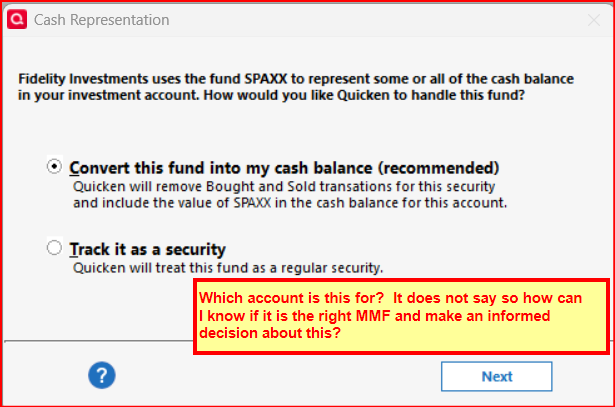
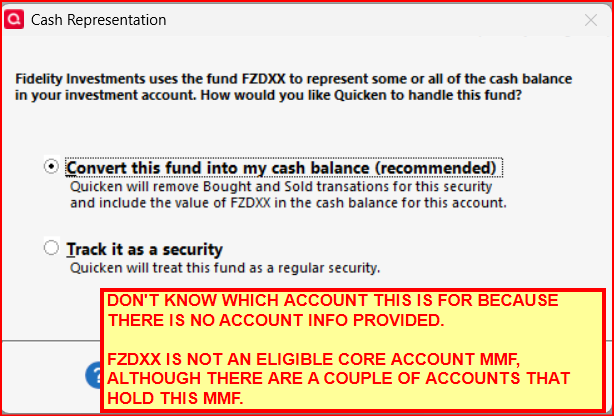
- Core Account MMF Prompts Do Not Identify the Account They Apply To: This makes it very difficult to know which account the prompt applies to. This issue is present with every prompt popup. Since there a multiple MMFs used as Core Accounts in my portfolio this means there is a high risk for making the wrong decision regarding the popups. This has been an ongoing issue since the choice prompts first came out. Here is an example of this issue:
- Core Account MMF Prompt Indentifies an Invalid MMF as an Option: FZDXX is not a valid Fidelity Core Account MMF option (at least not for most types of Fidelity accounts) but it was listed in two of the prompts I got. I do hold this MMF in 3 accounts but not as the Core Account. In each of the 3 accounts the FZDXX values were entered as both shares and Cash Balance. Three big concerns with this: 1) There is no way to change the MMF option from FZDXX to the correct one, 2) Opting to show the FZDXX value as shares instead of cash does not prevent the value from also being shown in the Cash Balance duplicating value and 3) Resetting the MMF security shares/cash option does not fix this FZDXX issue.
- Core Account Can Also Be A Sweep But Sweep Shares Do Not Get The Prompt: In the account a Sweep is used for the Core Account the Sweeps are shown as held shares and are not included in Quicken’s Cash Balance. But per Fidelity.com’s Quicken downloading FAQs Sweeps are downloaded by them as Cash and not as shares. So, this is inconsistent with Fidelity’s website.
Two noted improvements:
- The EWC+ setup process did enter many duplicate transactions in the account registers going back to early June. Fortunately, it is pretty easy and fast to delete the dupes in bulk completely resolving this issue.
- There were absolutely no placeholders or Reconcile Shares discrepancies once the duplicate transactions were deleted.
In summary of the tests I did yesterday and today:
- Adding new EWC+ accounts that have more than 2 yrs of history at Fidelity: Very problematic with CD naming issues, Placeholders being generated for opening balances of prior holdings that would be better suited as Add Shares transactions and strange “Unidentified security” transactions. In some cases I was able to resolve the issues after much time was spent on them but in other cases I simply gave up trying to get the issues resolved so the accounts could be reconciled and balanced.
- Setting up the EWC+ connection for accounts with prior history in Quicken (via the Quicken Copy process): Worked pretty well except for the Core Account MMF and Sweeps issues mentioned above. Once these issues are resolved, it appears to me that EWC+ may be quite ready for prime time.
I have not yet migrated my primary data files to EWC+ but if the process and results are similar to what was experienced when setting up the Quicken Copies with EWC+ I will be much relieved.
Quicken Classic Premier (US) Subscription: R66.23 on Windows 11 Home
2 - Core Account MMF Prompts Do Not Identify the Account They Apply To: This makes it very difficult to know which account the prompt applies to. This issue is present with every prompt popup. Since there a multiple MMFs used as Core Accounts in my portfolio this means there is a high risk for making the wrong decision regarding the popups. This has been an ongoing issue since the choice prompts first came out. Here is an example of this issue: