PNC bank upgrade affecting Quicken downloads?
Answers
-
Hello All,
I am happy to hear that some of you are seeing success.
Since deactivating/reactivating did not resolve the issue, please contact Quicken Support directly so they can investigate further and gather information from you.
Thank you.
Quicken Alyssa
Make sure to sign up for the email digest to see a round up of your top posts.
0 -
Same here. Not fixed at 4:15EST 11/11 Tuesday. Disconnected and reconnected 8 accounts. No downloads, zero balances and unable to send payment.
Still waiting to hear/see posts that this November 11 "fix" has worked.
2 -
Alyssa,
Maybe I am missing something, but I have yet to see anyone post that as of this afternoon their downloads started working and their balances are correct. What I have seen posted are from folks that either had working PNC Direct Connect prior to today, got EWC+ instead of Direct Connect today after Disco-Reco or have had intermittant success for the last week. I hope I am wrong.
My accounts are not working for downloads, balances (still zero) or sending new payments. I'll try reconnecting again later today.
1 -
Not working for me either. followed all the directions and contacted quicken support. No positive results.
0 -
Make sure you are doing Add Account and not Set Up Now. Then select PNC Bank - Direct Connect and make sure to click on Advanced Options. I have found that this FI link is defaulting to EWC+ when it should be defaulting to DC. Clicking on Advanced Options will provide you the opportunity to select DC so it will not set up with EWC+.
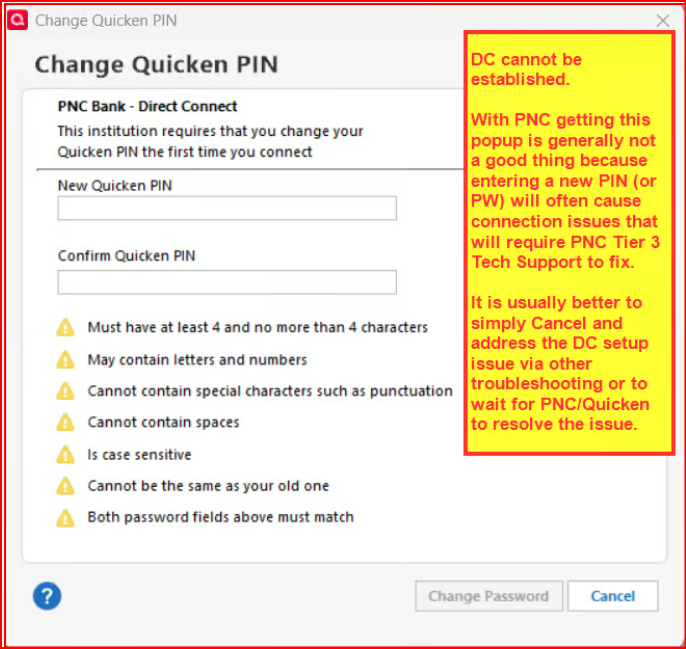
FYI: For me, after selecting DC the set up process has been failing and I am prompted to enter my SSN and a new PW. If you get this prompt DO NOT DO IT. Instead, cancel the process. If you don't it might take PNC Tier 3 to reset your account at PNC in their system so that you will be able to at some point in time download with DC, again.
Quicken Classic Premier (US) Subscription: R66.23 on Windows 11 Home
4 -
PNC Bank-Direct Connect Fix-Deactivate/Reactivate Does Not Work! 😡
Continues to work on my Checking Acct., but not my Savings or Joint Checking Acct.
Sent Data to Quicken for the 10th time. Do they even look at this?
Quicken Premier - latest version, all patches.
Windows 11 25H2, all patches.
1 -
November 11 - Quicken Direct Connect still not working for me. I get the following message: "Did you mistype your sign-in info? Please re-enter your credentials for PNC Bank - Direct Connect."
It asks for my SSN and PIN - I enter that information. It then says that PNC requires that I change my PIN. I then change my PIN and get the message about mistyping my sign-in info. I don't get it!!!
0 -
Why is Quicken not testing these changes before they are rolled out? Between this issue, and the Fidelity issue, I have lost days of productivity. Beyond frustrating.
1 -
New set up of PNC Bank - Direct Connect in Add Account in a test file continues to fail and produce the following prompt which I will decline to complete because of the significant issues it causes with PNCs system requiring a Tier 3 PNC person to reset something in their system. (This is a different issue that has existed with PNC Bank - Direct Connect for years.)
Deactivating the PNC Bank - Web Connect EWC+ connection and then trying to set up again with PNC Bank - Direct Connect with all 3 accounts in another test file also failed with the same failure mode.
Quicken Classic Premier (US) Subscription: R66.23 on Windows 11 Home
0 -
Short version: After an attempt to fix PNC Direct Connect by deactivating DC in all my PNC accounts, One Step Update is broken. When I run an update of any account, One Step Update just hangs with "Waiting…" and Quicken freezes. I have to use task manager to manually close Quicken.
Long version:
My PNC accounts were not downloading new transactions after approximately 10/31
1) Per instructions at https://community.quicken.com/discussion/7967888/updated-11-11-25-pnc-bank-direct-connect-and-pnc-web-connect-missing-transactions?utm_source=community-search&utm_medium=organic-search&utm_term=pnc I deactivated PNC Direct Connect. My intention was to reactivate PNC Direct Connect as instructed.
Note that when I deactivated an account, Quicken would freeze and I had to use Windows task manager to close Quicken.
I had to repeat this (deactivate, let Quicken hang, end task) for all (>3) PNC accounts in Quicken.
2) After deactivating PNC Direct Connect, “One Step Update” stopped working for my other accounts at multiple banks. When it is running the accounts show “Waiting” and Quicken freezes. I have to use task manager to close Quicken.
The same “waiting” is shown if I request a single-account update.
0 -
First post to this discussion. Have not been able to download data from PNC since mid- October 2025 and I cannot send payments to PNC. Beyond frustrating. Not only that but at this point I have very little trust in anything Quicken says. I would be certain you have your data backed up. Very disappointed with this product and not the first time I posted this comment. I'm doing everything manually with my PNC accounts. For bill pay I now have to set up all of my payees in PNC. Complete waste of my time given I already have them all set up in Quicken.
1 -
As a suggestion to those who are trying to deactivate and reactivate Quicken/PNC Direct connect and are only able to connect via Express Web Connect+, please make sure to use your PNC ATM PIN as the password and not your PNC online account password. I had a similar experience and using my ATM PIN fixed the direct connect issue.
0 -
Deactivate/Reactivate says it's successful for my two accounts but no new transactions are downloaded after a One Step Update (verified I'm using Direct Connect). One weird thing I'm experiencing is that after the accounts are added I get an error screen when trying to add them on the Accounts for Mobile and Web screen (get a CC-501 error). I've opened a ticket with support and uploaded some files/screenshots but was told to reach out after 8:30 AM PST (11:30 AM EST) since the escalation department wasn't available yet.
0 -
I deactivated and reactivated again this morning, but mine continues to connect to EWC+ with no ability to schedule payments through Quicken. In fact, I now seem to have lost the ability to download transactions — so I'm going backwards.
Two weeks in and no real resolution, despite lengthy tech support calls and despite several incorrect announcements of a "fix" by Quicken and/or PNC. I've used Quicken for 25 years and muddled through when Quicken (a) stopped supporting older versions of its software to force users to buy newer versions, and then later (b) switched to a subscription approach requiring users to pay every year. But I'm fast approaching my breaking point with this ongoing fiasco. Time to start researching the competitors' products.
1 -
Same here, followed the instructions on deactivating and reactivating and still not downloading transactions.
0 -
Hello again,
Thanks for keeping us updated!
When deactivating and reactivating your PNC Bank – Direct Connect accounts, please be sure to select Advanced Options > Direct Connect during reactivation.
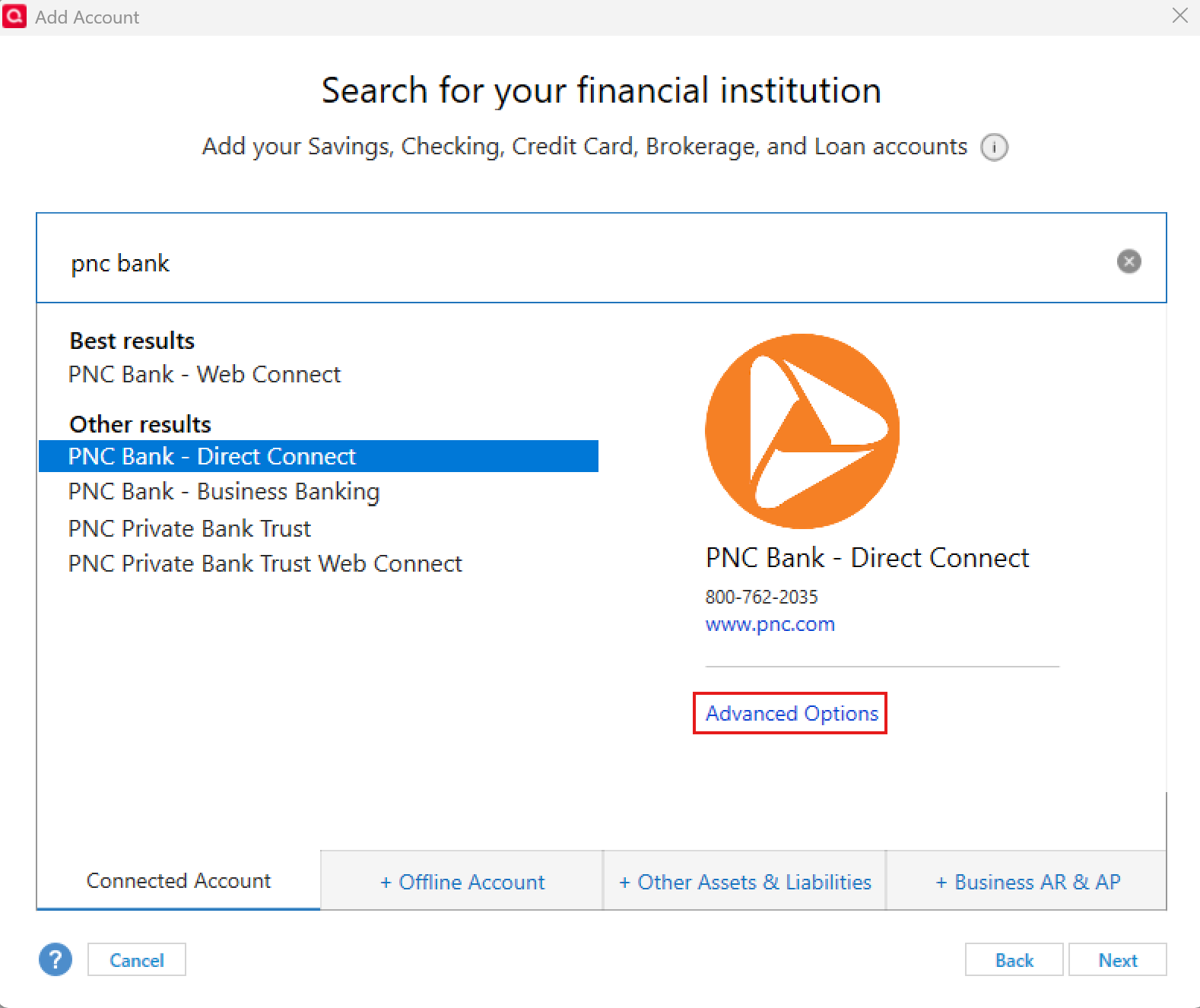
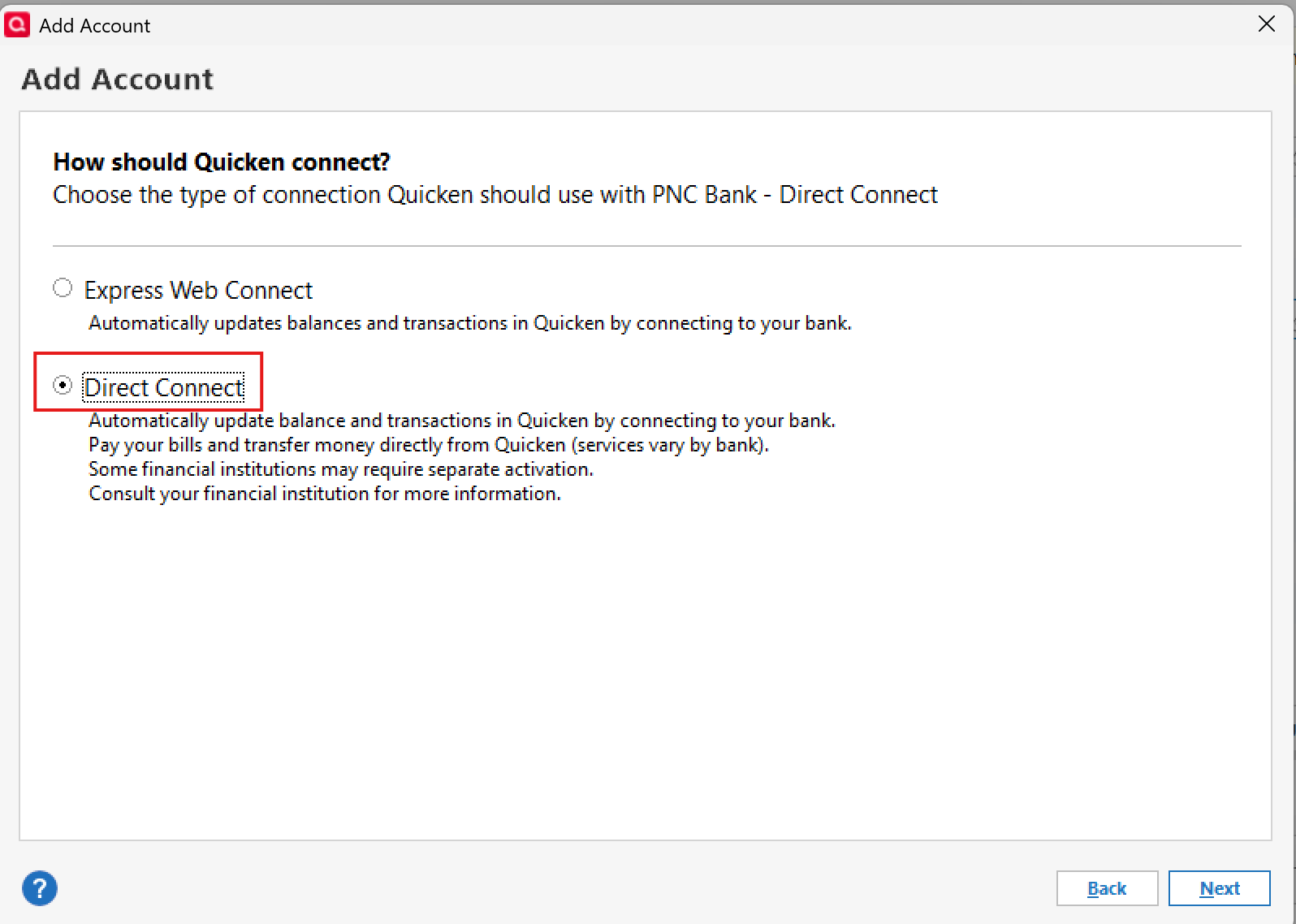
If the accounts still fail to reconnect after doing so, we recommend contacting Quicken Support directly so our team can gather the necessary details for escalation.
Thank you!
-Quicken Anja
Make sure to sign up for the email digest to see a round up of your top posts.0 -
Anja,
Thanks for all the help. Unfortunately I have yet to see anyone post here that their PNC Direct Connect is working after 11/11 "fix". I have seen some people post that what was working prior to yesterday is still working or not working, or with EWC+, etc., but nobody is seeming to have that "Eureka" moment… "it works now" (after the "fix").
I just spent an hour getting to PNC Tier 3 support to discuss the case I opened early last week. The representative I spoke with doesn't believe the problem/issue has been resolved as of this morning. She again reiterated a "mid November" resolution. She was very surprised when I read her the Quicken email from yesterday.
I don't understand why there seems to be a disconnect between Quicken and PNC support (no pun intended). Can you shed any light on this? What is the status of the fix to the fix that was mentioned yesterday?
As far as contacting Quicken support directly goes, I am happy to do that, but what else needs to "gathered"? This problem hasn't really changed since October 24th when PNC initiated their migration (which everyone seems to believe is at the root of the problem). I opened a case early last week with Quicken.
Thanks again.
1 -
Few more days of this and I'm heading to a different Financial Instution that actually supports DC.
1 -
PNC Bank-Direct Connect Fix-Deactivate/Reactivate STILL Does Not Work!
As far as contacting Quicken support, I will continue to update online but will not wait on the phone to fix your problem anymore. It is now costing me money to send the checks I have to. Between this and Fidelity Investments not downloading either, Quicken has totally screwed up my financial life.
0 -
Quicken just told me Direct Connect is going away with all banks. It's not secure. Guess I'll find a new way to pay bills. Hope I don't have to go back to snail mail!
0 -
Reached out via chat since that's what I was told via my last support interaction. Got this reply:
11:23 AM | Me: I opened ticket <ticket_number> this morning as was told to reach back out after 8:30 AM PST (11:30 AM EST) because the escalation team wasn't available.11:26 AM | Jorge from Quicken Classic: Upon reviewing the ticket, I have identified issues related to PNC Bank's use of the Direct Connect method. Please be informed that this is a known issue, and PNC is actively working to resolve it. The matter has already been escalated to their team for further attention.
11:28 AM | Jorge from Quicken Classic: Is there anything else I can assist you with today?
Guess I'd better plan on paying bills the old-fashioned way next month.0 -
In a test file I got excited because I was finally able to set up a DC connection and a lot of new transactions were downloaded.
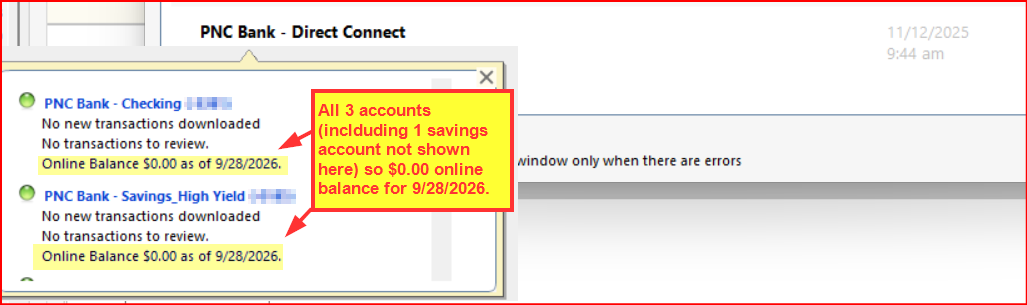
So, I then deactivated my EWC+ connections for my PNC accounts in my main data file and did Add Account>Advanced Options>Direct Connect>Linked the downloaded data to the correct accounts already in Quicken. The accounts are now shown in Quicken as being connected with DC! But that's where the joy ended:
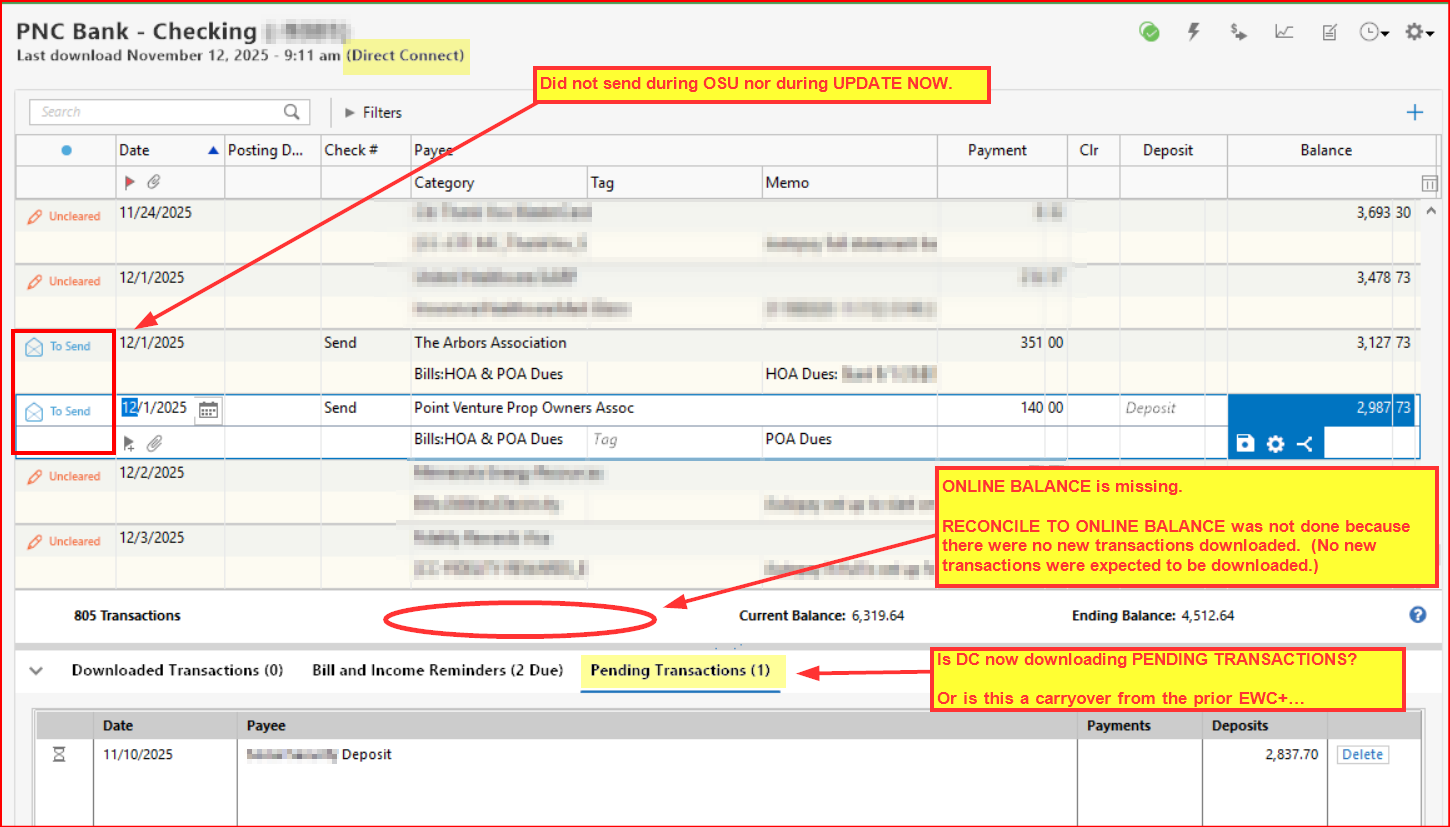
- ONLINE BALANCE (on the left side of the OSU Summary below "PNC Bank - Direct Connect): Shows $0.00 as of 9/23/2026!
- ONLINE BALANCE (below the Account Registers): Still not present. Note: I did not try to do Reconcile to Online Balance because there were no new transactions downloaded. I will try doing this either tonight or tomorrow after a new posted transaction is supposed to be downloaded.
- DC BANK BILL PAY: I set up two payments and ran Update Now (this is after DC had already been connected). The payments did not send and still shows in the register as "To Send". (I confirmed that Bank Bill Pay is enabled on the Online Services tab of Account Details.)
- PENDING TRANSACTIONS (below the Account Register): Shows a pending transaction that will likely post later today and be ready for downloading tonight or tomorrow morning. Note: I believe this was downloaded with EWC+ before I had changed the connection to DC. So, maybe it just did not get removed by the DC connection set up?
- ROUTING NUMBERS: I noticed an oddity. When the accounts were set up with EWC+ the Routing number on the General tab of Account Details was 7138 which I could find no reference to in my online PNC account. But with DC it is 071921891 which is the routing number referenced in my online PNC account. Why two different routing numbers, one of which (for EWC+) does not show up on the PNC Bank website? I don't know but what I do know is that PNC has a different routing number for each state. Maybe EWC+ is routed through a different state than my accounts are actually set up with?
At any rate, DC is not fixed (at least not for me) regardless of what Quicken and PNC have communicated.
(EDIT: I did submit a report referencing this post via Report a Problem.)
Quicken Classic Premier (US) Subscription: R66.23 on Windows 11 Home
0 - ONLINE BALANCE (on the left side of the OSU Summary below "PNC Bank - Direct Connect): Shows $0.00 as of 9/23/2026!
-
This AM (Wednesday) PNC Tier 3 support told me Direct Connect is not yet fixed and stiuck to their "mid November" time line. I have no idea who to believe at this point…. but my Direct Connect isn't working either. It appears that nothing has changed for my accounts since 10/24.
2 -
Does this have anything to do with the Direct Connect Issue. This was posted yesteday
https://www.banktivity.com/support/articles/ibank-for-ipad/list-of-banks-experiencing-direct-access-connection-issues/
1 -
I went back to that test file where DC did download transactions and found that all of the checking account and std savings account transactions which were downloaded were prior to 10/24. After that there were no transactions downloaded.
The HYS savings account downloaded 2 transactions after 10/24 that should have been downloaded.
There is an Online Balance shown beneath each of the registers but only the HYS savings account Online Balance is correct.
I haven't the vaguest idea of why DC appears to be working with the HYS savings account (in the test file but not in the primary file) and when DC does not appear to be working at all with the checking and std savings accounts.
Quicken Classic Premier (US) Subscription: R66.23 on Windows 11 Home
1 -
Why is it costing you money? Are you writing out and mailing checks? You don't need to do that. You can log into your online account and do free bill pay there. It's not ideal but it sure beats writing out and mailing checks.
Quicken Classic Premier (US) Subscription: R66.23 on Windows 11 Home
0 -
Interesting. Thanks for posting this.
I wonder who these banks use for managing their DC downloads process?
I wonder it that might be the same DC company that both Quicken and PNC have said is behind the current DC downloads issue with PNC accounts?
Quicken Classic Premier (US) Subscription: R66.23 on Windows 11 Home
1 -
At best that is simply speculation/conjecture. I have not heard that from anyone at Quicken although I have heard that most if not all banks will eventually migrate EWC connections to EWC+.
I have heard that least some banks with DC connections now will also migrate to EWC+ and that is evidenced by some having already eliminated DC support when they did cut in EWC+. But there have also been several banks that retained DC after cutting in EWC+….US Bank, Wells Fargo, PNC (regardless of the current DC issues), Truist, and others.
I have also not heard anything about DC not being secure. In fact, it's usually been communicated that DC is perhaps the most secure of the download methods (outside of WC which is manual downloading/importing of data into Quicken) because none of the data is saved anywhere outside of your computer…unless you also use Quicken Mobile and/or Quicken on the Web.
It does not surprise me that financial institutions are moving away from DC because DC costs them money (annual fee) to use. EWC, EWC+ and WC do not cost them any annual fees.
Even if DC does go away you will not need to go back to snail mail unless you want to. Your other options include setting up bill payments on the billers' websites and logging into your online account at PNC and using their bill pay system to pay bills. With both of these options, there usually is no cost to use them and it avoids having to write out checks and having to use snail mail.
Quicken Classic Premier (US) Subscription: R66.23 on Windows 11 Home
0 -
Something I have not seen mentioned that may help explain why all users did not start having problems at the same time: The "Online Experience" migration was not performed for all customers on the same weekend. Mine occurred on the weekend that started Friday evening of 10/24, but two others in my extended family had theirs occur a few weeks earlier (though neither use Quicken).
I have deactivated/reactivated DC for my two PNC accounts but made no other changes (such as to EWC+ and back). Right now OSU appears to succeed but reports 10/24 as the balance date for my checking account, and reports zero new transactions (though 14 have cleared since 10/24 per the web site).
My other account is savings, and I did receive an Interest transaction dated 11/03 and OSU reported this date as the balance date. I cannot confirm if that means this account is working correctly, however, as no other transactions exist to download.
One other interesting thing I noticed is that when I reactivated (via Add Account and Advanced), Quicken reported it loaded only 1 day of transactions for the Checking account, but 2665 days of transactions for the Savings account!
Like everyone else, I sure hope PNC gets this straightened out soon!
Greg
Quicken Classic Deluxe - Windows
Quicken User Since 2004
0 -
PNC Direct connect still not fixed. Absolutely no new downloads or balances after deactivating and reactivating. Today s November 12th at 4pm EST
1



