missing budget items on HOME page

Best Answers
-
Hello All,
Thank you all for taking the time to report this issue and for sharing screenshots, confirmations, and temporary workarounds. We understand how disruptive it is to lose the budget progress bars on the Home tab, especially when this functionality is something many of you rely on daily.
This behavior has been confirmed as a bug introduced in the recent update, and it is currently being actively worked on by our development team. The issue is being tracked internally, and a fix is in progress. At this time, however, we don’t have an ETA for when the fix will be released.
We appreciate those of you who shared temporary workarounds—while they may help in some cases, we understand they are not a permanent solution. Once a fix is available, it will be included in a future update.
Thank you for your patience and for helping us investigate by submitting reports and detailed feedback!
(CTP-15435)-Quicken Anja
Make sure to sign up for the email digest to see a round up of your top posts.1 -
Very sad. This issue has been around for months, and it's still not fixed! Sure, I can take several steps to make the bars appear, but I shouldn't have to do a "workaround" every time I start up Quicken. Honestly, Quicken is clunky. It's really sad that I pay for a product and encounter an error, which has been reported by many users and the company knows about, and it hasn't been a priority to fix.
0

Answers
-
Sometimes a picture is worth a thousand words …
Can you please capture one or more images of the parts of your Quicken window showing the issue, sensitive information blacked out or removed as necessary to protect your privacy and attach the image(s) here?
How do I post a screenshot in the community from a macHow do I post a screenshot in the community from windows
Please save images to files of file type PNG or JPG only. They're easier to work with than PDF files.
0 -
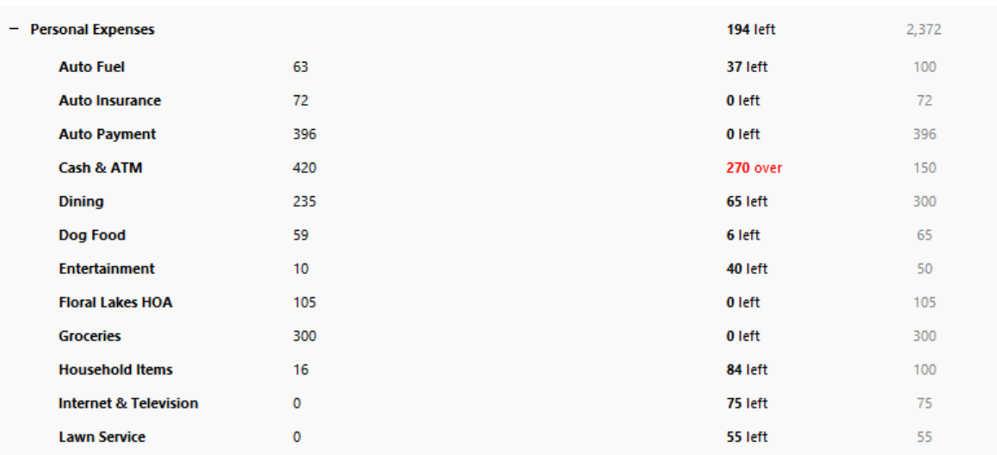
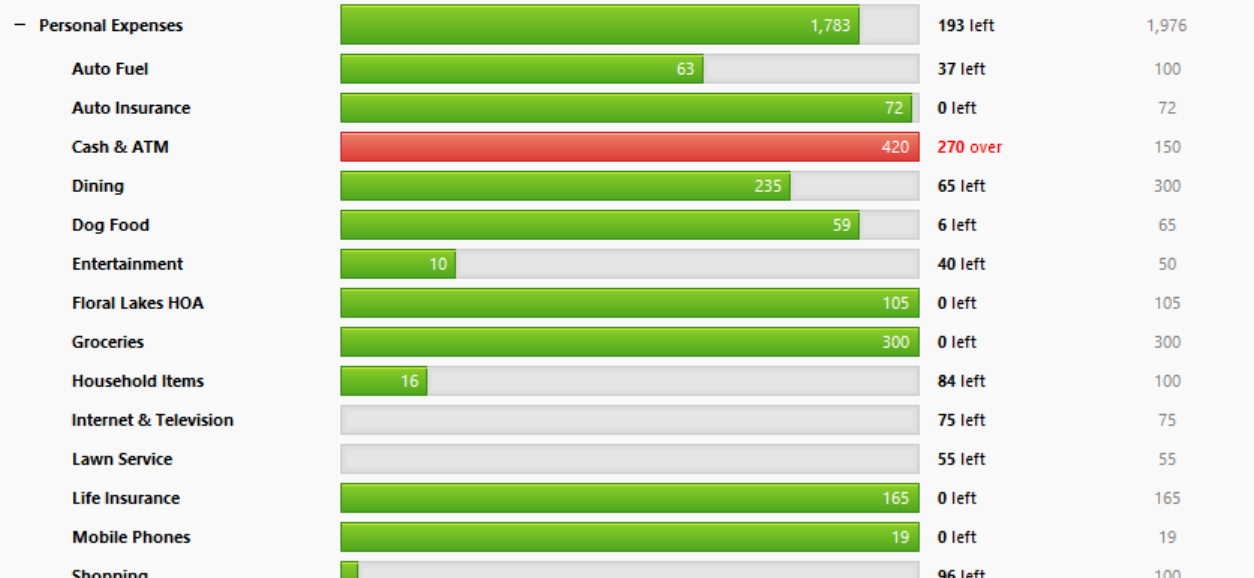
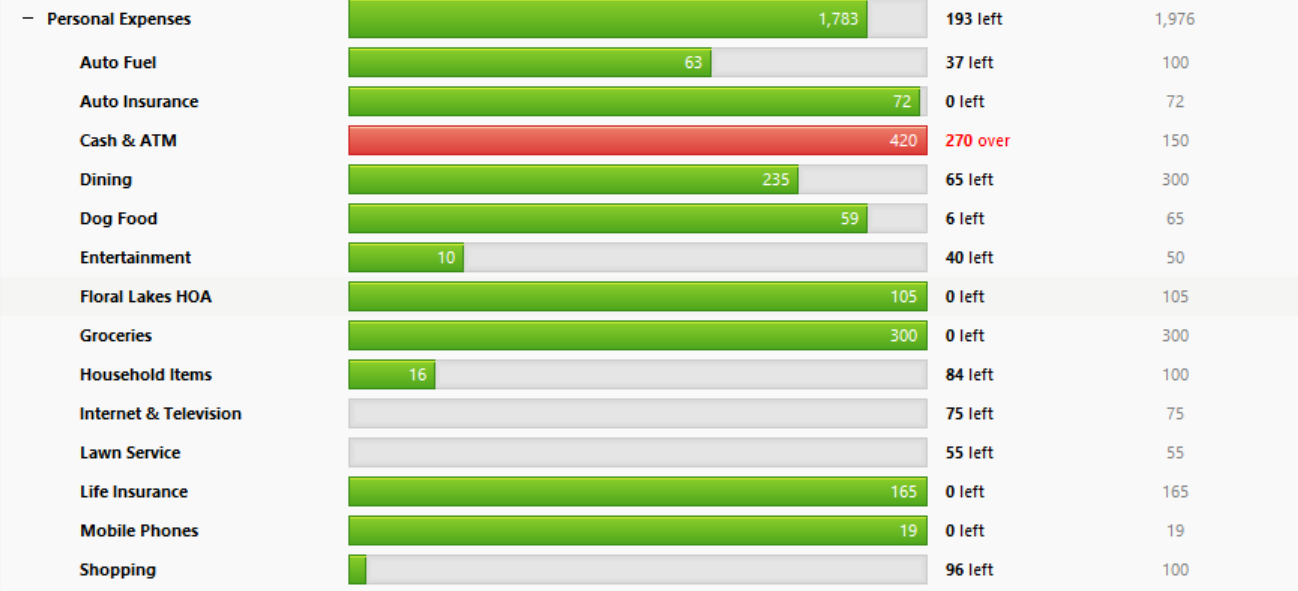
There were green or red bars for each item tracking that showed the progress of budget spent items. Thank you in advance for investigating this problem.
 0
0 -
Attached is pre-R65.17 update.
 0
0 -
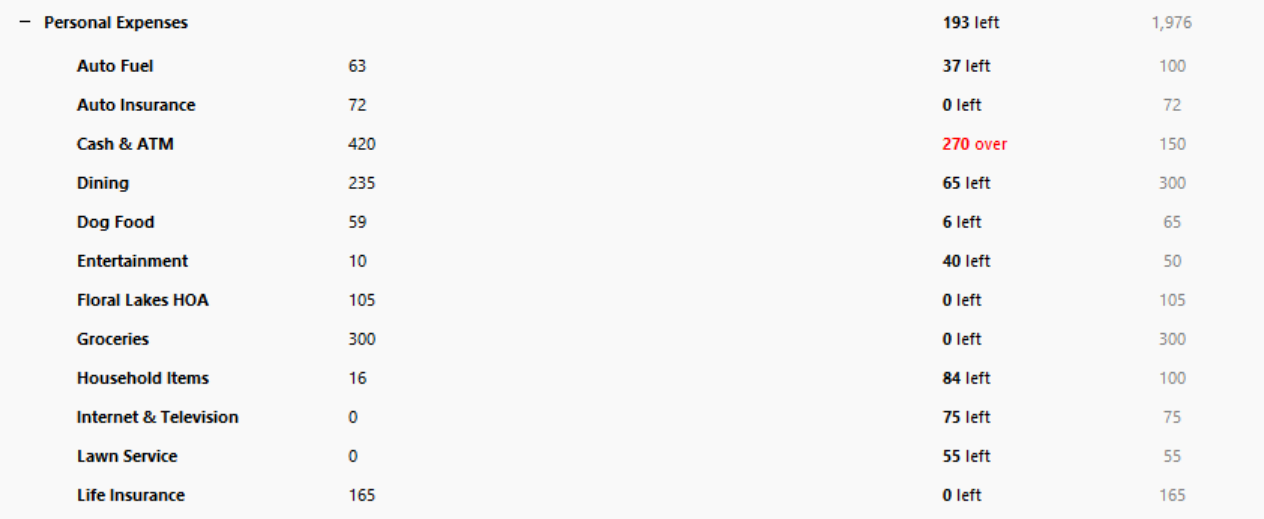
Before the recent 11/25/2025 update a green or red bar would indicate the amount spent on each budget item. How do I correct this setting or ii it a problem with the update? The picture is from BEFORE the update. Picture below is AFER the update.
 0
0 -
Discovered a quick fix….Go to Planning Tab and then go back home and the bars are back!!!
1 -
Thank you for your suggestion but that was the first thing I attempted and it did not correct the problem. The bars do appear in the Planning section but returning to Home they are gone.
0 -
Actually, I'm experiencing the same result in the Home tab, and this does appear to be an issue with 65.17. Navigating to the Planning tab then back to Home doesn't resolve the issue for me.
0 -
Thank you for the thoughtful reply. Nothing is working in the HOME tab and now I have lost UPDATE NOW on all of my accounts. Since we both are sharing problems - it is NOT us that did something wrong. Now ho do we inform Quicken to FIX the problem ?
0 -
Going to planning and back worked for a while but even that doesn't seem to work today.
0 -
I'm having the same problem. I found that selecting the categories to watch option in the Main display on my Home screen, and then checking or unchecking a category and clicking OK seemed to bring the bars back, at least once. However, they disappeared when I navigated away from the Home tab and then back. Now I can't them back using the workaround above.
This is clearly a bug introduced in the latest upgrade (~11/25/2025).
0 -
Hello All,
Thank you for taking the time to visit the Community to report this issue, though we apologize that you are experiencing this.
We have forwarded this issue to the proper channels to have this further investigated. In the meantime, if you haven't already done so, we request that you please navigate to Help > Report a problem and submit a problem report with log files attached and (if you are willing) a sanitized copy of your data file in order to contribute to the investigation.
While you will not receive a response through this submission, these reports will help our teams in further investigating the issue. The more problem reports we receive, the better.
We apologize for any inconvenience!
Thank you.
(CTP-15435)
Quicken Kristina
Make sure to sign up for the email digest to see a round up of your top posts.
1 -
I am having the same problem, this is a bug. I was hoping it would have been fixed by now. My quick fix is going to the planning tab like RichardSchreyer suggested, back to the dashboard, then switching to another budget and then back to your current one under the settings gear → show budget. Make sure the budget that you switch to has budget categories to show. I hope this helps until the bug is fixed.
1 -
I can confirm the workaround. I can restore the bar graph contents by pulling down the graph settings menu (gear icon) > Click on Go to full budget > Go back to the Home tab > Click on the graph settings gear icon > Click Select budget categories to watch… > Select OK.
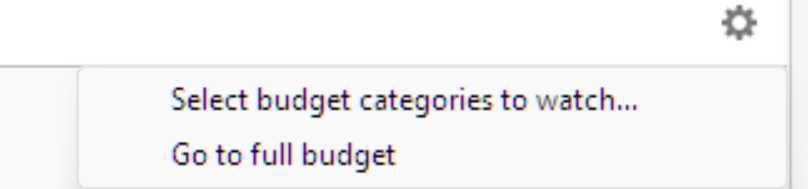
At this point, the bars are restored on my system. However, after exiting the current session and starting a new session, I have to perform these steps again.
0 -
I'm having the same issue.
0 -
Glad to discover that Quicken believes all of us that they have a problem - now we wait for them to fix it. Hopefully it is SOON !! Not to be mean since I have used Quicken for approx 15 years BUT why do they create problems when they update ? I would think they would TEST the update on a computer in their office before sending it out to paying customers.
0 -
Any idea when Quicken will fix the problem ?
0 -
Hello All,
Thank you all for taking the time to report this issue and for sharing screenshots, confirmations, and temporary workarounds. We understand how disruptive it is to lose the budget progress bars on the Home tab, especially when this functionality is something many of you rely on daily.
This behavior has been confirmed as a bug introduced in the recent update, and it is currently being actively worked on by our development team. The issue is being tracked internally, and a fix is in progress. At this time, however, we don’t have an ETA for when the fix will be released.
We appreciate those of you who shared temporary workarounds—while they may help in some cases, we understand they are not a permanent solution. Once a fix is available, it will be included in a future update.
Thank you for your patience and for helping us investigate by submitting reports and detailed feedback!
(CTP-15435)-Quicken Anja
Make sure to sign up for the email digest to see a round up of your top posts.1 -
@Quicken Anja here are two more reports of the same issue. Can we get your info about the bug being reported added to those discussions as well?
Quicken user since Q1999. Currently using QW2017.
Questions? Check out the Quicken Windows FAQ list0 -
@mshiggins Absolutely, thanks for pointing these out to me! I will post in both of these as well.
-Quicken Anja
Make sure to sign up for the email digest to see a round up of your top posts.1 -
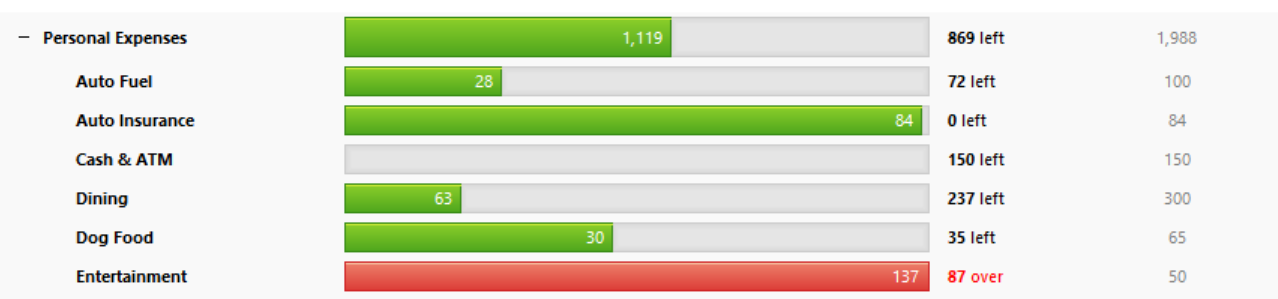
Update R65.29 did NOT fix the problem with the GREEN budget status progress created by update R65.17 from several weeks ago. Will you EVER fix the error you created? The suggested "work around" is not what we are paying for and is getting to be a pain after a month.
 1
1 -
I am running R65.29 and the budget graphing is working for me.
It might be a long shot but perhaps you might want to try downloading the R65.29 Manual Patch Update File ( ) and then allow it to install right over your current R65.29 installation. Sometimes when a version update is done it does not update completely/correctly so reinstalling it can often resolve that kind of issue.
If that doesn't fix the issue you could try uninstalling Quicken and then downloading and installing a fresh copy of Quicken from the online Quicken.com account or from .
I can't say that this will fix the issue you are seeing but doing these things can sometimes resolve an issue that one person is still seeing when others are no longer posting that it still is an issue.
Quicken Classic Premier (US) Subscription: R66.23 on Windows 11 Home
0 -
Boatnmaniac, unfortunately this did not resolve the issue for me.
0 -
Thank you all for your advice and comments - I will wait for Quicken to fix the problem.
0 -
Very sad. This issue has been around for months, and it's still not fixed! Sure, I can take several steps to make the bars appear, but I shouldn't have to do a "workaround" every time I start up Quicken. Honestly, Quicken is clunky. It's really sad that I pay for a product and encounter an error, which has been reported by many users and the company knows about, and it hasn't been a priority to fix.
0 -
Hello everyone,
I understand how frustrating this has been, especially given how long the issue has persisted and the fact that it affects a feature many of you rely on regularly.
This issue is still being tracked internally under CTP-15435. Although some workarounds may temporarily restore the budget bars, there is not yet a permanent fix, and we recognize that the behavior continues to occur after restarting Quicken or navigating away from the Home tab.
At this time, I don’t have an ETA to share, but please know this issue is still actively being worked on by our development team.
We appreciate everyone’s patience and the detailed feedback you’ve provided here.
Thank you!
-Quicken Anja
Make sure to sign up for the email digest to see a round up of your top posts.0 -
Updated to R66.18 today, but unfortunately this issue still has not been fixed.
0 -
Another software update today and still no fix after 4 months.
-1 -
Hello everyone,
Thank you for continuing to provide updates and for confirming that the issue is still occurring in the latest releases.
I’ve checked again internally, and this issue remains open and actively tracked under CTP-15435. The development team is still working toward a permanent resolution. We understand how frustrating it is that this has persisted through multiple updates, especially for those of you who rely on the budget progress bars on the Home tab daily.
At this time, there is still no ETA available for when the fix will be released. As soon as we have any new information to share, including confirmation that a fix has been implemented, we will update this thread.
We truly appreciate your continued patience and the detailed feedback you’ve provided throughout this process.
Thank you!
-Quicken Anja
Make sure to sign up for the email digest to see a round up of your top posts.1 -
Another "FIX" update and STILL no fix - REALLY ??
-1 -
@galahad I completely understand the frustration here. Especially seeing multiple updates come through without this being resolved.
I do want to clarify one point, just to set expectations correctly: while this issue is actively being worked on, that doesn’t necessarily mean it will be included in the very next release. Fixes are deployed as they’re completed, tested, and cleared for release, so they can appear in any future update rather than a specific one.
This issue is still open and tracked under CTP-15435, and the fact that it’s persisting across releases does not mean it’s been ignored, it just means a fix has not yet been finalized and released.
I know that’s not the answer you’re hoping for, and I agree it’s not ideal given how long this has been impacting you and others. We are continuing to monitor this internally, and as soon as a fix is available, it will be included in a future update and noted accordingly.
Thank you!
-Quicken Anja
Make sure to sign up for the email digest to see a round up of your top posts.1




