PNC bank upgrade affecting Quicken downloads?
Answers
-
I’m printing this out for later.
thanks.0 -
Hello everyone,
Thanks for your continued reports. We wanted to share an update from our development team.
For those experiencing duplicate transactions with the “PNC Bank – Direct Connect” connection, a fix has already been deployed with the latest release. If you’re still seeing duplicates from before the fix took effect, you can safely delete those duplicate transactions as a cleanup step.
If you are still encountering duplicate transactions and are not using “PNC Bank – Direct Connect”, we need a bit more information to continue the investigation. Please let us know the exact name of the PNC connection you’re using, which you can see via Tools > Account List > Edit > Online Services in Quicken (example below).
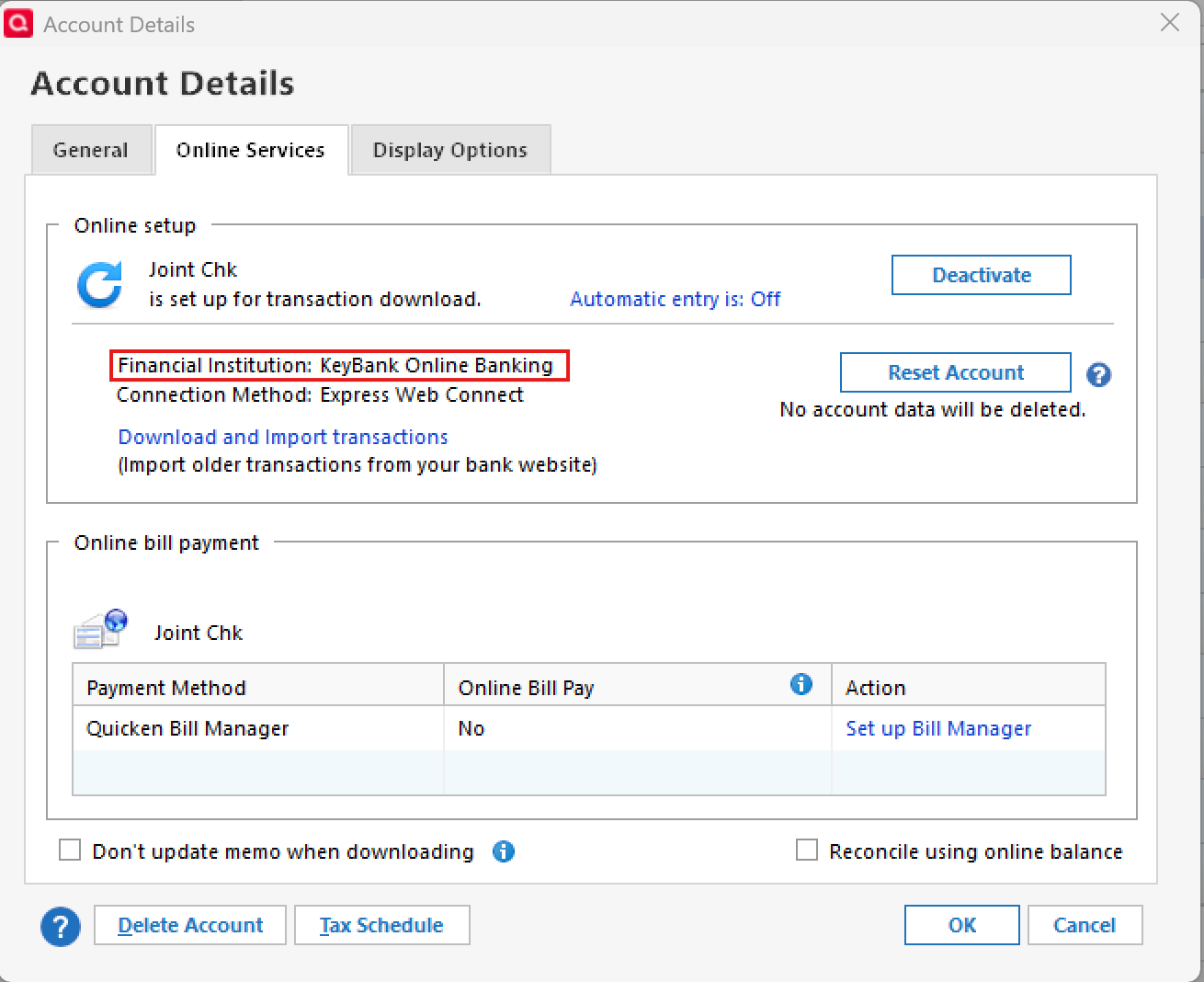
Thank you!
-Quicken Anja
Make sure to sign up for the email digest to see a round up of your top posts.0 -
I was going to post that it looks like Quicken and PNC had solved the issue. Alas, DC only worked for a few days. As of today, I am back to manually tracking my bank balance. Not the service I am paying for.
1 -
Which issue? There have been several encountered ever since PNC's 10/24/2025 system upgrade.
Which connection method are you using? And if you are using DC, go to Tools > Password Vault > Add or Edit Passwords. Does the Password Stored column for PNC show Saved or Not Required?
Are you seeing an error code? If so, which one?
Also, which version of Quicken are you running? (Help > About Quicken)
Quicken Classic Premier (US) Subscription: R66.23 on Windows 11 Home
0 -
I am using Direct Connect. The password now indicates that it is saved. This is a change that occurred 7-10 days ago. No error codes. I am on version R65.29. Again, it was working for a few days but today I updated, received no errors, but cleared transactions were not downloaded.
0 -
Do you think that maybe since yesterday was Christmas Eve that could have contributed to no new transactions being downloaded today?
I had transactions download from PNC today but they had posted on 12/23, not on 12/24.
I have transactions pending at PNC that I think normally would have posted on 12/24 but they did not so nothing from 12/24 downloaded today.
Since it has been only 1 day and it is a holiday maybe that is why you didn't get the downloads today. Try downloading, again, tomorrow and post back here if the expected posted transactions downloaded then.
Quicken Classic Premier (US) Subscription: R66.23 on Windows 11 Home
0 -
You were correct. The transactions downloaded today. Thx.
0 -
Good to hear that PNC downloading is working for you. Thanks for the update.
Quicken Classic Premier (US) Subscription: R66.23 on Windows 11 Home
0 -
@charlieo.Hemlock , here's my latest update on the PNC problem we are both experiencing (along with many others, I was told by PNC). To summarize the issue (in order to save anyone else interested from having to scroll through several pages), it began when Direct Connect stopped working over three weeks ago, failing with OL-293-A and stating "Quicken is unable to update your account because unexpected information was received from your financial institution." We ultimately found that we each had one checking account (out of several PNC accounts) that could not be deactivated/reactivated successfully, or even added to a new Quicken test file, as in each case the process would fail near the end with a message stating "We encountered an error while connecting to your financial institution".
After two calls to PNC early this week, I was given a ticket number and the name and phone number of the escalation team member assigned to my case, after which I called and left him a message. He called me back yesterday (Friday 2/26) and apologized for the delay. He then had me attempt reconnecting in my "real" Quicken file, then adding my account to a newly created test file. I then emailed him screen shots of both errors, as well as copies of my CONNLOG and OFXLOG to be forwarded to the software team. He then told me that:
this and other DC transaction download problems that have recently surfaced are all tied to the web site update they made last month (no surprise there);
two software patches had been implemented in the past week or so, which had solved some of the problems for a number of Quicken users, but;
a significant number of users were still reporting the same OL-293-A / reconnect issue that we have.
He said they hope that by examining the logs of all who report this problem to them, they can identify the source so it can be corrected. He also indicated that I should be contacted when they had a potential fix implemented -- which will hopefully be in days, not weeks. Fingers crossed!
Greg
Quicken Classic Deluxe - Windows
Quicken User Since 2004
0 -
Thanks for the update. It’s almost exactly what I was told 10 days ago. I am not sure if this ultimately needs to be a Direct Connect (the company) fix or a PNC fix. It’s odd that all but one account can DC connect. That kind of tells us all the authentication is correct at PNC for DC (and I assume with Quicken as well). I’m not expecting much movement until after the 1st. Fingers crossed.
0 -
For such a serious problem, I am surprised there has been so little recent communication from the support folks.
2 -
Is anyone still encountering this OL-293 error code issue or any of the other issues previously mentioned in this thread? It's been nearly 2 weeks since the last person posted of any issue which is usually a good indication that the issue(s) have been resolved. If no one is posting about it then that would be a pretty reasonable explanation as to why there haven't been any recent communications from the Quicken team in this thread.
Also, a quick review of the Alerts that had been posted about PNC issues since their Oct system upgrade shows they have all been resolved. Which does parallel the relative silence about PNC issues in this and other threads.
So, if there still are outstanding issues I suggest that instead of adding on to this thread start a new post thread. At 18 pages long this one has become unwieldy and difficult to sort through and who is going to read through 18 pages of a variety of issues resulting from PNC's system Oct upgrade-related issues?
Quicken Classic Premier (US) Subscription: R66.23 on Windows 11 Home
0 -
@Boatnmaniac I am absolutely still experiencing the OL-293 error on my primary checking account. The OL-293 stems from the fact that the account can not be added with Direct Connect. The connection process always ends with "we encountered an error while connecting to your bank". It appears to be set up completely, but it's not. 7 of my 8 accounts work perfectly with DC (if I disconnect the checking account) … but the one account I need for BillPay is the one that fails. This all started with the PNC migration at the end of October.
Quicken support just says this is a PNC issue. I created a ticket with PNC Tier 3 three weeks ago and have heard nothing. I do not think this is a Quicken issue, I think the problem lies with PNC. I will be calling again tomorrow and then meeting with my local branch manager in the next few days (just to see if he can add some urgency).
2 -
Have you tried adding your PNC accounts to a test file?
Or maybe adding just the one checking account that you've not been able to?
Quicken Classic Premier (US) Subscription: R66.23 on Windows 11 Home
0 -
@Boatnmaniac I have tried adding the account to a test file and to my existing file as a new account. I know of at least one other person on this thread with the same issue….. only a single account throws the error. Unfortunately trying to add the account prevents all the other accounts from updating in DC with the OL error.
Any other ideas?? 7 accounts work and 1 doesn’t. I am thinking it’s something within the PNC account structure that got changed. Just guessing.
I am going to call Tier 3 tomorrow and see why I have heard nothing from them.Charlie
0 -
Maybe you could try setting up your one checking account with DC and then set up the other accounts with EWC+. I've done something similar in the past with another FI when I was having issues getting all the accounts set up with DC so I split it so some accounts were set up with DC while other accounts were set up with EWC. It worked well because, I think, the DC login and the EWC logins were different. And that would be the same situation with PNC, right? Anyway, it might be worthwhile until the whole DC issue ends up getting resolved.
Quicken Classic Premier (US) Subscription: R66.23 on Windows 11 Home
0 -
@Boatnmaniac Good idea. I thought about using EWC+ too, but it won’t work for me on this account. I absolutely need BillPay from within Quicken. Besides, PNC should be able to compare my accounts and figure out the issue. This account worked with DC without an issue for probably 15 years. I’m going to try and get some answers tomorrow and will keep you posted. All 7 accounts that are connected with DC are working flawlessly. I honestly don’t think it will be a difficult fix for PNC …. I just need them to take the time to do it….. that’s why I am going to try and leverage my local branch manager. At least they don’t want lose my business.
0 -
OK. But to clarify: My suggestion was to set up only the checking account with DC and change all the other accounts to EWC+.
I suggested this because I thought you'd said that you could set up the checking account with DC but when you do that it prevents all the other accounts from updating with DC. Or did I misunderstand?
Quicken Classic Premier (US) Subscription: R66.23 on Windows 11 Home
0 -
@Boatnmaniac My Bad for not being clear. If I try to connect the checking account to DC it throws an error right before the process completes. However, the account is still “partially” connected to DC. Quicken shows it as connected. Hence, if I do an OSU or account update, all I ever get is an OL-293 error. This one account prevents everything from updating. I even went so far as to disconnect all 7 other accounts and just try to connect the checking account. Same problem…. error just before the DC connection process completes and I get an OL-293 error with every attempted update.
I am clueless what else to try.0 -
charlieo.Hemlock
"I thought about using EWC+ too, but it won’t work for me on this account. I absolutely need BillPay from within Quicken."
I switched to PNC Bill Pay which works pretty well. I thought I needed DC to work but once I stopped cursing PNC and Quicken, I was ready to try workarounds.
0 -
@Swift and @Boatnmaniac I just got off the telephone with PNC Tier 3 and my "resolution specialist".
PNC Tier 3 was surprised nobody had reached out to me. She found the resolution specialist assigned to my case and connected me. Unfortuantely my case wasn't assigned until yesterday (3 weeks with holidays).
The resolution person could NOT have been nicer. She gave me her direct contact number. Obviously my case has yet to be worked for a fix :-(
My expectation is that my case gets worked within the week. What exactly that means and will my account get fixed?…… I have not a clue. What I am pretty sure of is that the resolution person has access to the people who actually do the work and find the problem and create the fix, if one exists.
Stay tuned.
Charlie
1 -
Thank you for that. For me, ultimately, if PNC cannot fix this issue I will need to decide if I want to leave PNC for a more reliable bank experience or just start using a secondary PNC checking account that is currently working with DC. I honestly don't want to leave the bank after so many years and using another PNC checking account would be a PIA to make work (so much to change).
1 -
I don't know if this is related. I finally re-setup all my PNC accounts last week after PNC gave me a new pin and everything seem to be working ok including OSU. I did a OSU yesterday and I would get an error with PNC DC without showing what the error and then it said it was complete without showing the error. All the other accounts in other banks worked ok. I figure I would wait until today to try it again and I am still getting an error on PNC DC when doing a OSU but again it does not show what the error. How can I find out what the error is ?
0 -
If it’s not showing you an error code, why do you think there is an “error”?
0 -
Because as I watch all my accounts being updated, it will show completed on all of the other accounts and it will say an error for the PNC Direct Connection.
0 -
I gave up and switched them all to EWC+. I setup my bills in PNC. This is too undependable and takes too much time to troubleshoot. I've been a Quicken user for decades but sure wish I could find something to replace it.
0 -
After most recent Quicken Update a few weeks ago (Release R65.29) I successfully achieved Direct Connect with my PNC checking account and have successfully utilized Quicken Bill Pay as I did before PNC update. Yea! HOWEVER, I'm not going to poke the bear and try my other PNC account. I download transactions for that account directly from the PNC website.
One curious annoyance, however, is that when my transactions download via DC they go right to "R" (Reconciled) rather than "c" (cleared).
0 -
So when you open up the OSU summary ….. you have a red ball instead of a green ball by your PNC accounts?
0 -
Glad to hear you got your checking account set up with DC and DC Bank Bill Pay. Although I am curious how you got only your one checking account to set up correctly and did not also set up the other account during the same setup process. Usually when doing Add Account it will download data for all of the accounts at that financial institution and allow you to LINK each of them to the correct accounts in Quicken. Or did you do Set Up Now? That is usually not the best method for setting up accounts because it will often do just like you mentioned….sets up just that one account but not the other.
Regardless, since you don't want to "poke the bear", have you considered setting up the other account with EWC+ using the PNC Bank - Web Connect or PNC - Virtual Wallet? You can do this by going to Tools > Add Account, typing in one of these two PNC Bank financial institutions in the search field and then following the prompts to complete the reauthorization process for EWC+. When you get the downloaded data make sure to select "Do Not Add" for your DC-connect checking account (if Quicken does not already default that way) and to LINK the other account data to the correct account in Quicken. Following these steps will not impact your checking account DC connection at all. Once the EWC+ connection is set up you will no long need to manually download transaction files from your online account.
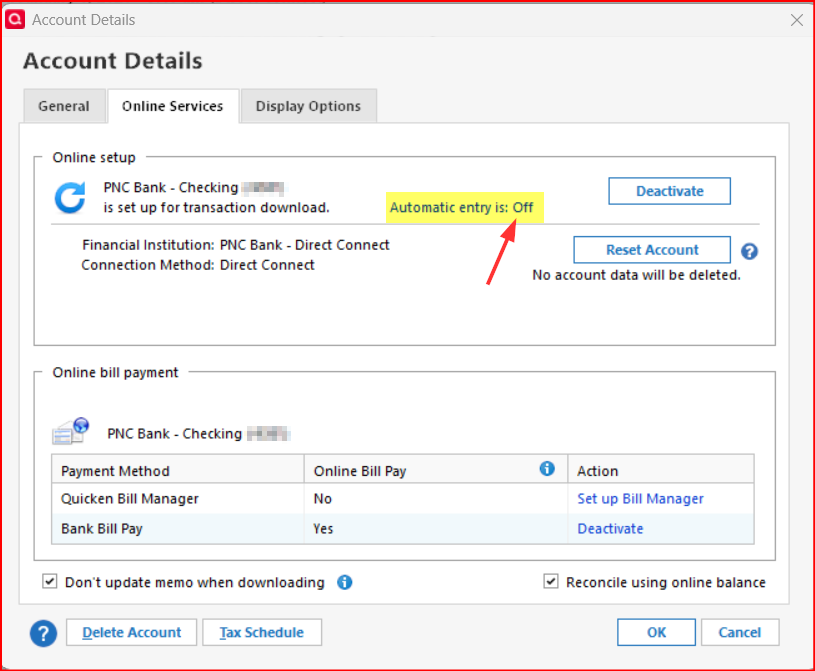
Regarding your checking account transactions being automatically reconciled (marked as "R"): This is likely because the account is set up to have downloaded transactions automatically entered into the account register. Disable this and then this auto "R" should stop. There are two ways to disable this:
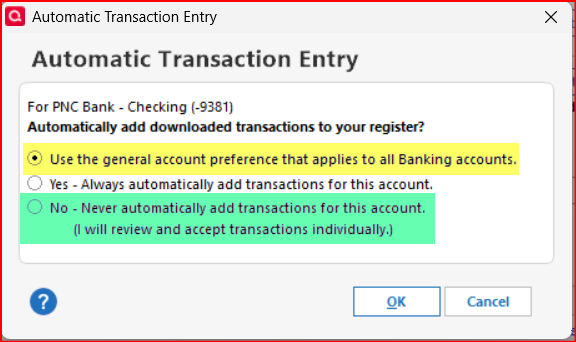
- Account Details > Online Services tab: Make sure that Automatic entry = Off. If it does not show this, click on it and you will get a popup where you can select 1 of 2 options to turn it off. Clicking on the GREEN highlighted options will affect only this account. Clicking on the YELLOW highlighted option will apply the global preference which will apply to all Banking accounts…see the next step to set the global preference.
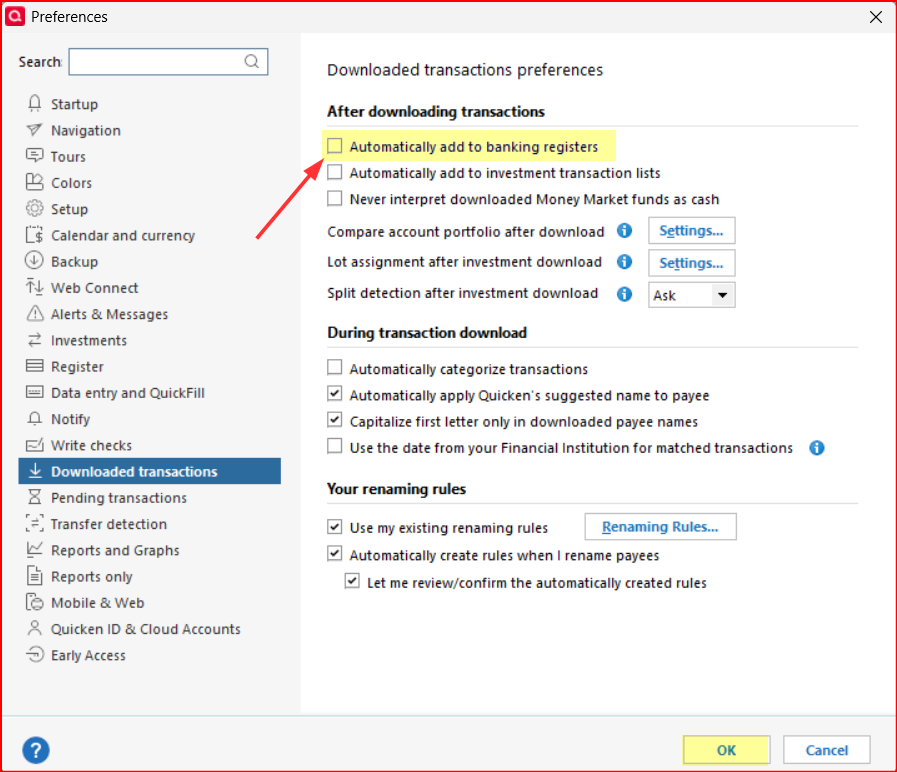
- Edit > Preferences > Downloaded transactions > make sure the box is unchecked for Automatically add to banking registers: This will apply to all Banking accounts provided there are no individual account exceptions taken.
Quicken Classic Premier (US) Subscription: R66.23 on Windows 11 Home
0 - Account Details > Online Services tab: Make sure that Automatic entry = Off. If it does not show this, click on it and you will get a popup where you can select 1 of 2 options to turn it off. Clicking on the GREEN highlighted options will affect only this account. Clicking on the YELLOW highlighted option will apply the global preference which will apply to all Banking accounts…see the next step to set the global preference.
-
@charlieo.Hemlock when I go to One Step Update - it does not show any errors. But when when I do an OSU update it says PNC Bank - Direct Connect: Error Recovery. It now does that every time I do OSU for PNC instead of saying complete. All my other accounts outside of PNC shows Complete.
0


