Dark Mode for Quicken for Windows (6 Merged Votes)
Comments
-
When will Dark Mode be available? It's been several years, and it's a simple UI update. It's a common feature in most applications. This is essential for individuals with sensitive eyes. It should be a priority update.
1 -
When will Dark Mode be available?
No one here can answer that. Quicken never comments on when a particular feature will be released; all we know is that they have stated that this is coming at some point.
it's a simple UI update
It's most definitely not a "simple UI update". Quicken has hundreds of screens, panes, panels, menus, dialog boxes, etc. Some of them were developed with programming tools which are no longer used, and which existed long before the concept of switching between light and dark mode existed. That means either trying to resurrect old tools which don't run on current computers in order to update and re-compile old code, or re-writing code in a current development environment. This is why this project is taking such a long time to bring to fruition.
Quicken Mac Subscription • Quicken user since 19930 -
To emulate Dark Mode for Quicken Windows there are a couple of workarounds you can try:
Use Windows High Contrast Mode: Go to Settings > Accessibility > Color filters, toggle on color filters, and select Inverted Mode. This will make Quicken appear darker, but it will also affect all other apps.
Use Magnifier's Invert Colors Feature: Press Windows key + = to open Magnifier, then press Ctrl + Alt + I to invert colors. This will make Quicken appear in a dark theme.0 -
Jobs copied Xerox PARC to make the Mac, then Microsoft followed, when it was a hit. Popular doesn't always equal good for you - if it did, we'd all still be smoking cigarettes in cars without seat belts. It isn't the bright light that hurts your eyes, it's the strain of picking up the dark pixels in a sea of white ones that's the problem. There are usually sunspots on the Sun, but you'll never see them directly with your eyes, because the bright light washes them out for you. The bright light forces your pupils to contract, restricting the amount of light your eyes get. Now that the total amount of light is reduced, you now have to find the few dark pixels in the image. People end up squinting to open their pupils enough to see the dark pixels, and doing this for hours on end, results in eyestrain and constant pressure on the eyes that can alter normal sight. Ergonomics is about what's best for your body, determined by science, and they spent huge sums to get the answers. Now that computers are everywhere, it's time to put that good science to work and keep everyone healthy.
1 -
There's a simpler way to switch to Inverted Colors with Windows. Open Settings → Ease of Access. Click on Color Filters. Turn ON the Color Filters. Select Inverted (screen colors will invert). Click on Allow the shortcut key to toggle on or off. Turn OFF the Color Filters (screen colors will revert to normal). To invert (or toggle) the colors for any program, hold down Win logo key + Ctrl, then, while still holding, press C. No need to go through the Magnifier each time you need inverted (dark) colors. I saw this somewhere else and I'm passing it along…
0 -
It's 2025 and Quicken doesn't have Dark Mode . . . SERIOUSLY ? ! Yes, I'm familiar with Inverting the Windows colors. We just shouldn't have to.
-1 -
Hello @MacroBlue,
Thank you for coming to the Community to share your feedback. Since there is already an active request for the feature you're asking for, I merged your request with the active request.
This idea is currently in Planned status, which means that it is on the roadmap for future implementation. We do not have an ETA for when this feature will be implemented. To track the status of this request, I recommend bookmarking it, since any updates, once available, will be posted here.
Thank you!
Quicken Kristina
Make sure to sign up for the email digest to see a round up of your top posts.
0 -
I would like to see dark mode implemented ASAP
1 -
Hey… Hey… Quicken… Let me show you something. See in that image below? ?
First thing of note is that prior to the turn of the century it was perfectly reasonable for two people to go out to dinner on New Years Eve, have a pleasant time, and it only cost $126 with tip.
The second thing I want to point out is that… »» IT IS FROM 1996 ««
Yes, I have been using your software for over thirty years (I had a HDD failure in 1996, I started using it around 1994).
Do you see my user name?? Is it Grumpy Young Man? No?
That's right, because I am not young anymore. I'm older, wiser, and sadly… blinder.PLEASE FOR THE LOVE OF GOD ADD IN A DARK MODE
Gen-X (remember us, the folks who gave you the Internet and hair metal) are getting older, and not all of our body parts work right anymore.
It is annoying AF having to get my face three-inches from the screen (and yes, I increased font size already) to do my bills and finances.
Doesn't the ADA now have accessibility requirements?
Because your software is no longer accessible for the aging population of X'ers who are smart enough not to trust "the cloud" and want all of their private financial information stored locally (and fully backed-up in a safe encrypted manner due to lessons learned in 1996).
Please, please PLEASE add a high-contrast dark mode.
Thank you.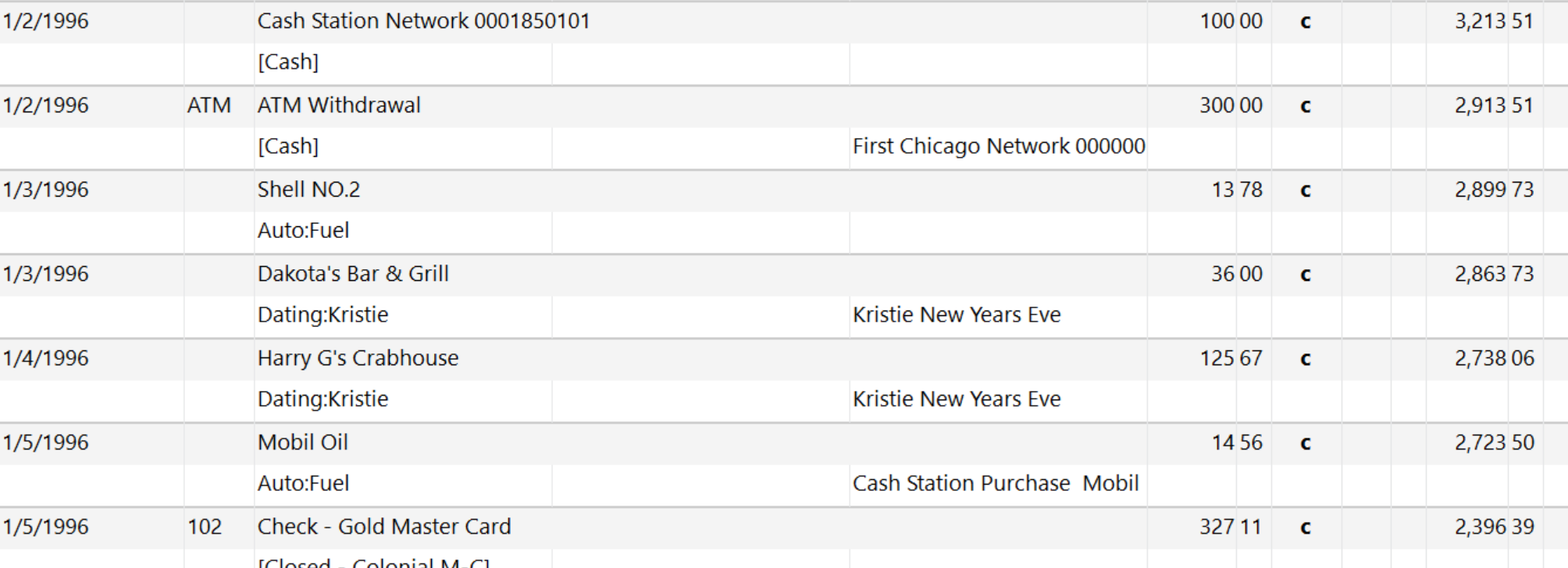 0
0 -
Try this as a workaround. You can always back it out if you prefer your choices. Upper right gear icon, Under Global Preferences, Register Preferences, Register, at the bottom:
Fonts: Seqoe UI Semibold Size 8 Put a Checkmark in the Bold box.
Colors: Choose the dark green in the dropdown for Spending, Savings and Credit.
1 -
If you look earlier on this page of the discussion, you will see several Windows settings you can change to set different variations on Dark mode.
Does that help, or are you still grumpy?
QWin Premier subscription0 -
While many of the dark theme workarounds are helpful, they fail to address the difficulty that people with COMMON eye conditions have with the amount of WHITE SPACE, particularly—but not exclusively—those conditions that are age-related. I don't know what the Quicken user demographics are, but I suspect that every year the average user age has been increasing. If web pages and browsers can easily handle "dark modes" in 2025, Quicken Classic for Windows should up the priority for making user-friendly dark themes or dark mode—before some of us who have been using Quicken since the days of MS-DOS are forced to go elsewhere.
0 -
For those who can't wait for Quicken Dark Mode here is another solution. I get Aura migraines from white screens and/or Quicken screens. These glasses prevent it. Search on Amazon for: Wise eyewear Cover-Ups. But look for the ones that are NOT polarized because some computer monitors will go black when viewed with polarized glasses. These cover ups will fit over regular eyeglasses.
1 -
I use the desktop version of Classic Quicken for Windows. I am visually impaired and now struggle greatly to use it. Old, too, and not computer savvy except for specific programs I have used for over 30 years as I have with Quicken. "Read aloud" is not working properly for me to even access the information here in the community. I just need to really bold the items in Quicken as everything is light gray on a white background to me. Impossible to see with my very limited vision. I have tried everything I could find in Quicken or Windows 10 and nothing has worked for me. I don't want to change to any other program. I love Classic Quicken. I have even closed credit card accounts if they did not participate in Quicken downloads. I really depend on this version of Quicken but really need help.
0 -
Have you tried getting a larger monitor such as a 24 inch Ultrasharp? I hate to say it but the longer you stay on Windows 10 (instead of moving to Windows 11) you may experience frustrations with your computer running slower. Unfortunately, there are things about Windows 11 you might not like.
Barb, I found this to be the best I could do to improve Quicken visibility.
Originally posted by me on Aug. 29 but I am reposting specifically for you since you say you are having trouble accessing (and maybe navigating?) information in this community.Try this as a workaround. You can always back it out if you prefer your choices. In Quicken, Upper right gear icon, Under Global Preferences, Register Preferences, Register, at the bottom:
Fonts: Seqoe UI Semibold Size 8 Put a Checkmark in the Bold box.
Colors: Choose the dark green in the dropdown for Spending, Savings and Credit.
I use these Quicken settings on my 24 inch Dell ultrasharp portrait monitor with 1200 x 1920 resolution.1 -
Hi, I see this began almost 3 years ago. Has any progress been made. It is a bit behind the times to not offer a dark mode application option in 2025. Where does this stand? I certainly would vote for a dark mode as well so how about it Quicken?
1 -
Paid subscribers are begging for these and after years it is still not done. This isn't an over reach of an ask it's standard with any program nowadays.
1 -
Thanks, these FONT & Color settings made a world of difference.
I also upgraded to a DELL 32 inch monitor (S3225QS)
You Don't Have to Have a Point, To Have A Point
0 -
Still no dark mode for windows desktop? Seriously? Well I guess I will not be renewing my subscription in 2026.
0 -
When will dark mode be available?
0 -
As an 82 year old Quicken subscriber, I'm having increasing difficulty reading the bright white Quicken screen backgrounds. Please, please - move the Dark Mode option UP in your priority list of "fixes" as it truly is a fix that's sorely needed by MANY of your aging subscribers. Thank you.
1 -
Hello All,
Thank you all for participating in this idea thread.
We have received word from the Product Development team. They have done extensive investigation and testing of this, and due to the technical complexity, have decided that, unfortunately, this is not something they will be implementing at this time.
We do value your ideas and apologize for any frustration or disappointment this may cause.
Thank you.
Quicken Alyssa
Make sure to sign up for the email digest to see a round up of your top posts.
9 -
😧
What a pity.
Seems like the only alternative until the product is rewritten from scratch will be to use this method (also see page 7 of this discussion):Not just Quicken … a kind of "Windows Dark Mode" for the entire system
How to turn on Invert Colors mode in Windows:
• Start in normal (not dark) mode.
• Press the Windows logo key and the = key to open Magnifier.
• Press Ctrl+Alt+I to invert colors.
• Press the Windows logo key and the - key once or several times as needed to reduce the magnification to normal size.
• If it's not already open, start Quicken using its now color-inverted icon.
• Press Ctrl+Alt+I again to restore colors to "normal" mode or close the Magnifier icon / window2 -
[Removed-Off Topic/Rant]
0 -
We told you so. We told you so. We told you so.
Several of us developer-types have been telling you that dark mode was going to be time-consuming and difficult, if even possible, because of the age of the Quicken Windows code base. The old controls on the many, many windows and dialog boxes were never architected to enable wholescale display changes like switching from light to dark mode. Each window and dialog box would have to be rewritten.
But, but, but, you say. Dark mode is available on <app x>. Well, that app was written using modern UI frameworks the made mode switching easy to do for every control in a app. The apps I sell on the Microsoft Store is living proof of that.Quicken abandoning dark mode is a shame. But not surprising. Given how long the ask was in "planned" stage, it sounds like the developers gave it a shot, and decided it just wasn't practial or too expensive to implement.
1 -
What I find ironic is that I see tons of complaints here that Quicken Windows doesn't have dark mode, but almost nothing for the fact that this forum has no dark mode!
Now this forum is out of Quicken Inc's control (like a lot of the things that Quicken users complain about), but the difference in complexity between having a dark mode for a website and having Quicken Windows do it is like the difference between taking a walk around the block and taking a trip to Proxima Centauri.
I suppose that maybe people aren't complaining as much because they might be using a setting in the browser to reverse video this forum, but if that is the case, well that is what has also been suggested for Quicken Windows.
0 -
I commented on dark mode for Quicken earlier and stated, if someone was willing to install AutoHotKey, I have a AutoHotkey script that works very well in placing Quicken in a dark mode (not the website). I have been using it now for several years and it just plain works. Send me a message and I would be happy to provide that script to you at no charge of course :-)
A side note, if I can do this in AutoHotkey, Quicken programmers can do it on their side. It's just a matter of how skilled the programmers are at Quicken.
0 -
What does the AutoHotkey script actually invoke? Does it just set reverse video?
Note that I don't think this has anything to do with the skill of the programmers. There are things one might do as a user that aren't acceptable for the programmer. For instance, I can select to reverse video this forum, but in doing so things like the profile icons are also reversed and don't look right. That might fine for me, but if the programmer's did that then they would get complaints about it.
The complication of doing something like this for the programmers is "doing it the right way".
0 -
Dark reader does a fantastic job of rendering this forum in Dark Mode - as do many other plugins I presume.
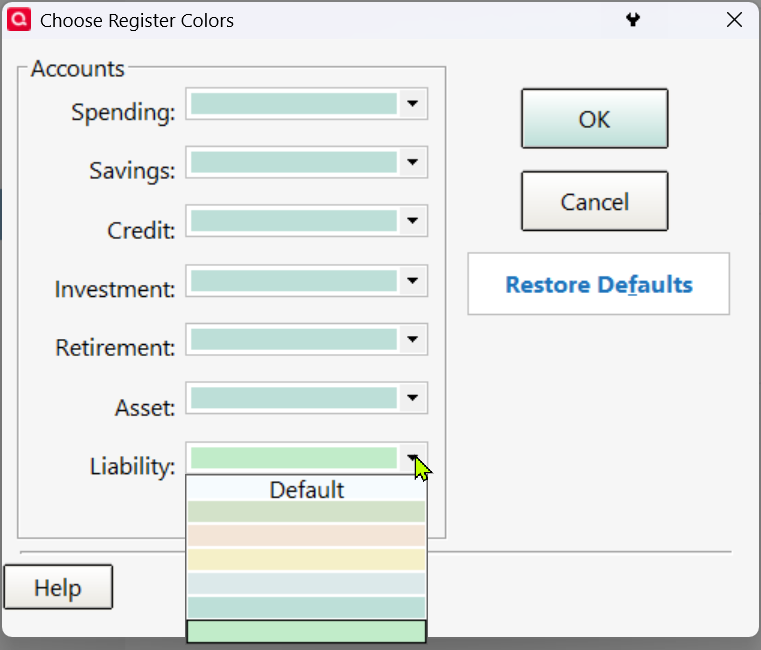
I totally get the seemingly insurmountable scope of updating the entire app to support dark mode. That's why I said earlier I'd be willing to live with the dialogs as is since they are (for me) the least used components of the interface. Most of my time is spent in Registers. Code already exists to 'color' the register but the only colors are bright ones. Of course they'd have to do a little more than just add dark colors here. They'd have to allow setting the font color as well.
 1
1 -
The AutoHotKey script I have been using can color various things of the Quicken interface whatever color you want. It does not necessarily 'invert' colors, although it can if you want; just need to know what the inverted color is to get what you are looking for.
I'm a seasoned programmer/software developer with 40+ years in the biz. If a programmer really wants to do something, they will find a way - and it will be the 'right way of doing it'.
1