Bank connection issues: Citibank
Comments
-
Kristina - I've been having Citibank connection issues errors daily since 7/24 on all 3 of my data files. The accounts are updated and are up to date.
You want us to include logs with the report. I've added cloud backup, so I have to uncheck 2 logs or the attachments exceed the limit of 10. This deletes the post so I have to start it over. See "Report a Problem fails - too many attachments" that I reported 4/28. It was closed. Does this mean it'll be ignored by development?
Which logs do you need? I unchecked OnLineBackup Log and Report so I can report the 3 data files.
I'm using Windows Classic Business & Personal R63.21 Build 27.1.63.21 on Windows 10 Pro.
0 -
"Citibank has been reporting connection issues"
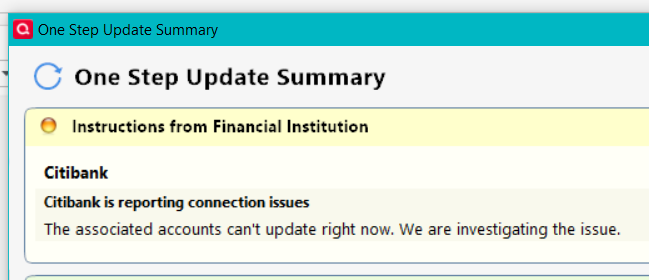
What's up with that?
0 -
Thank you for your reply @Ray,
Typically, our teams prefer if you send all of the pre-selected logs, unless they have OLD in the filename.
Hello @Brian Marko,
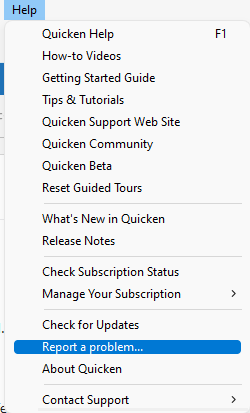
If you have been seeing that message for longer than 24 hours, then please navigate to Help>Report a Problem and send a problem report with log files attached. Please include ATTN CBT-734 in the subject line.
Thank you!
(CBT-734)
Quicken Kristina
Make sure to sign up for the email digest to see a round up of your top posts.
0 -
I've added Online Backup, which adds 2 more attachments by default. Attachments 1 of 2 shows 9 of them including the screenshot and 2 new backups. Attachment 2 of 2 shows the remaining 3.
Now, if I create a problem, clicking Send will pop up an error that I've exceeded the limit of 10 attachments. Closing the error will close the problem so I lose all my typing. Quicken needs to do the following:
1) Warn with the limit on the number of attachments.
2) Increase the default to 12 attachments or more.
3) If I deselect an attachment, remember it for future submissions.
4) Don't close the submission if the error pops up and I cancel it.
I reported this as an issue Report a Problem fails - too many attachments — Quicken but it's been closed.
0 -
Thank you for your reply @Ray,
Thank you for the feedback on how you'd like to see the Report a Problem function changed. I recommend submitting an Idea Post with those recommendations. If it gets enough votes, it may be implemented in the future! For information on creating an Idea post, please see this post:
The issue with Report a Problem allowing only 10 attachments (but not telling you until you try to submit it) has already been reported, ticket CTP-7831. In the meantime, if one needs to send more than 10 attachments, the only way to do it is by sending the extra attachments in a 2nd problem report.
Thank you!
(CTP-7831)
Quicken Kristina
Make sure to sign up for the email digest to see a round up of your top posts.
0 -
I still get the Citibank error daily on all 3 data files. I'm tired of reporting it. The Citibank accounts are updating. I wouldn't necessarily conclude it's a false error. Quicken need to investigate it and fix the issue.
Do they set deadlines for solutions or are these issues open-ended? Typically, I see these treads closed by the moderator without any solution other than something like "being investigated."
0 -
RE: I still get the Citibank error daily on all 3 data files. I'm tired of reporting it.
Ditto. I am also tired of and done with reporting it.
- Q Win Deluxe user since 2010, US Subscription
- I don't use Cloud Sync, Mobile & Web, Bill Pay0 -
This issue stopped for a couple of weeks and is back again using Citi EWC+ connection.
Deluxe R66.23, Windows 11 Pro
0 -
I have been having this issue with my Citi Costco card. I just submitted a Problem Report. Hopefully will help solve the issue.
0 -
Getting the same for Citi Cards. Citi's own mastercard.
0 -
For the last month, I've had daily Citibank connection failures on all 3 datafiles. Today, only 1 datafiles had a connection error. I submitted a problem report. During this period, the accounts are updating but something in their process is detecting a communication errors.
0 -
Thank you for your reply @Ray,
Unfortunately, our teams do not provide ETAs.
Please be aware that posting about an issue on the Community is not the same as contacting Quicken Support via phone or chat. A post on the Community is not the same as a ticket and does get closed after roughly a month of inactivity, even if the issue isn't resolved.
Closing a thread on the Community does not mean that an issue is no longer being investigated; any tickets created to investigate the issue are not closed just because the discussion on the Community was closed. The ticket for this issue is still open.
I hope this helps!
(CBT-734)
Quicken Kristina
Make sure to sign up for the email digest to see a round up of your top posts.
0 -
I've used Quicken since 1992. Has anyone wondered why these errors began back at least as far as the beginning of 2021 (for me), and they are getting worse instead of better? I can't even create a new account because all my banks plus Fidelity are fouled up… Quicken is not providing the service for which we are paying, and they want us to pay more. This is not a rant; it's a legitimate question I hope the moderators will get someone at Quicken to answer. Calling them for tech support is an exercise in futility. The support techs know nothing, at least that's the answer I've gotten when I've called.
3 -
Today I updated my Citibank and 2 Citi Card institutions in 2 data files and a Citibank in the 3rd data file. There were no Citibank connection failures.
Usually, I update in the mornings and the accounts are updated as of the day before. Today, at 6:30 pm PST. They and all other institutions using Express Web Connect and Express Web Connect+ are updated as of today except for Fidelity that uses Direct Connect. It is updated as of Friday, 8/8.
0 -
The "Citibank is reporting connection issues" is back. All 3 data files had this error. I reported them with Quicken. Quicken needs more competent resources to fix the continual One Step Update issues. I want reliability over new features.
0 -
Thank you for sharing. I am happy to hear that you were able to update your accounts across multiple files with no errors!
-Quicken Jasmine
Make sure to sign up for the email digest to see a round-up of your top posts.
0 -
Citi Cards is reporting connection issues AGAIN
1 -
Citi Cards is reporting connection issues AGAIN
0 -
It only worked August 10. Yesterday and today all 3 accounts are failing again. I've reported them with " Help > Report a problem" both days.
I'm so tired on Quicken One Step Update issues. This Citibank one is annoying. My issues with Fidelity, also persisting for weeks, are catastrophic as they corrupt the data requiring hours to correct. Quicken needs to focus on fixing reliability.
I can only find the Community and Report a problem to complain. How can I write to upper management to voice my frustrations?
3 -
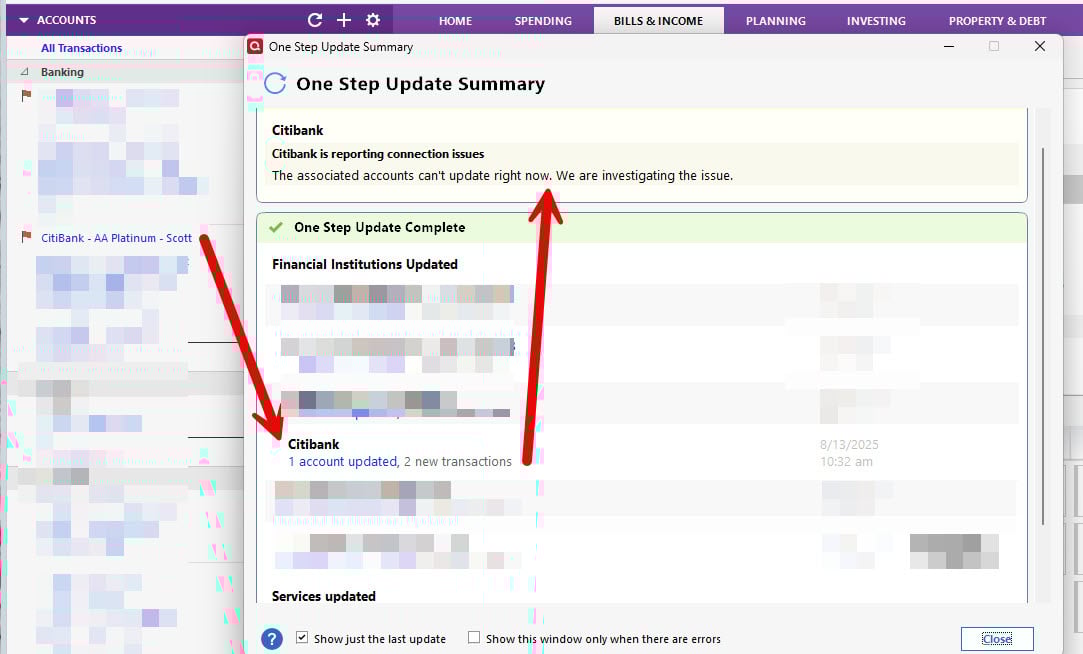
Citibank still reporting a problem daily since 3-4 weeks. Sent a "report a problem" See image.
 0
0 -
All 3 data files updated this morning without the Citibank reporting connection issue error. This afternoon, I updated them again. All 3 failed.
The individual accounts show yesterday's date. This is not the date of the last transaction but the date of Quickens data. I have seen OneStepUpdates, done late in the afternoon, show today's date.
0 -
All 3 data files had Citibank Connection Issues. I reported them again.
This issue was first reported June 28, over 6 weeks ago. The One Step Update development is probably overloaded trying to fix the disastrous Fidelity update that corrupted my data and took hours to repair. This Citibank error is only annoying.
0 -
I have this issue, and when I try to report a problem, I get an error that it was not possible at this time.
PLEASE FIX THE CITIBANK ISSUE!
0 -
I still get the error message intermittently but for me it appears it is the error message itself that is the error since it does not impair OSU updates (online balance, new transactions being downloaded) at all.
Quicken Classic Premier (US) Subscription: R66.23 on Windows 11 Home
0 -
Same thing exactly.
I just deactivated the account. Will wait a week and then reconnect and see what happens.
- Q Win Deluxe user since 2010, US Subscription
- I don't use Cloud Sync, Mobile & Web, Bill Pay0 -
BK
no need to deactivate the account as it seems the account downloads correctly in spite of the annoying error message.
So far I've had this issue multiple times, intermittently over more than a month but the download data is correct just the "cosmetic" error message.
1 -
I agree. At least for me, this error is "cosmetic" and not functional because there is no real error occurring with the downloads and the data.
Quicken Classic Premier (US) Subscription: R66.23 on Windows 11 Home
1 -
Is anyone who is getting this connection error message also set up to download pending transactions from Citi? And are those pending transactions being removed when the posted transactions are downloaded?
I just noticed that for me the pending transactions listed on the Pending Transactions tab have not been gettng deleted when the posted transactions download, like they should have, for the last several weeks. This is only an issue with the Citi cards that I intermittently get this error message with. I don't know if this might be an issue related to the error message or if it is something different.
Quicken Classic Premier (US) Subscription: R66.23 on Windows 11 Home
0 -
Still happening here…. I have to log into the Citi site and "push" my transactions into Quicken from there…
0 -
don't know about the pending transactions question. Logged in just now and the error message is there again/still but I have no transactions in either the download or pending section - probably correct since it was updated yesterday.
kayak, how do you "push" transactions?
0








